# AMPopTip
**Repository Path**: wiwigame/AMPopTip
## Basic Information
- **Project Name**: AMPopTip
- **Description**: AMPopTip
- **Primary Language**: Swift
- **License**: MIT
- **Default Branch**: main
- **Homepage**: None
- **GVP Project**: No
## Statistics
- **Stars**: 0
- **Forks**: 0
- **Created**: 2023-05-11
- **Last Updated**: 2023-05-11
## Categories & Tags
**Categories**: Uncategorized
**Tags**: None
## README


[](http://cocoapods.org/?q=ampoptip)
[](http://cocoadocs.org/docsets/AMPopTip)
[](https://github.com/Carthage/Carthage)

[](https://gitter.im/andreamazz/AMPopTip?utm_source=badge&utm_medium=badge&utm_campaign=pr-badge&utm_content=badge)
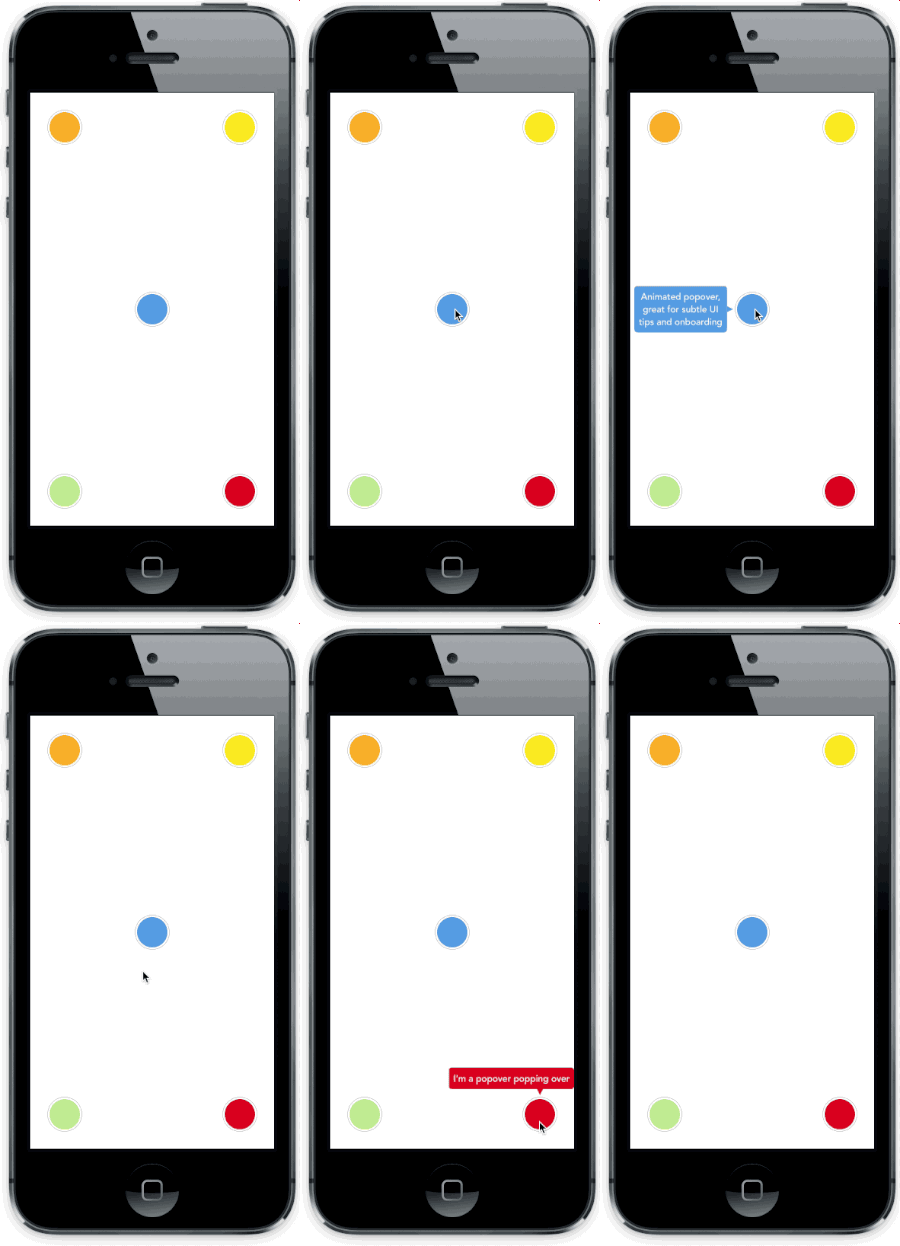
Animated popover that pops out of a frame. You can specify the direction of the popover and the arrow that points to its origin. Color, border radius and font can be easily customized.
This popover can be used to leave subtle hints about your UI and provide fun looking onboarding popups.

# Screenshot
### Versioning notes
With version `2.0.0` the library was re-written in Swift, and the API was slightly updated. Checkout version `1.5.x` for the previous Objective-C implementation.
Version `3.0.0` introduces Swift 4 support, `3.5.0` Swift 4.2.
# Setup with CocoaPods
* Add ```pod 'AMPopTip'``` to your ```Podfile```
* Run ```pod install```
* Run ```open App.xcworkspace```
# Setup with Carthage
* Add ```github "andreamazz/AMPopTip"```
* Run ```carthage update```
* Add ```AMPopTip.framework``` in your project
You can then import the framework in your project
```swift
import AMPopTip
```
# Usage
The API is fairly straight forward, you can show and hide the popover at any time.
## Showing the popover
You must specify the text that you want to display alongside the popover direction, its max width, the view that will contain it and the frame of the view that the popover's arrow will point to.
```swift
let popTip = PopTip()
popTip.show(text: "Hey! Listen!", direction: .up, maxWidth: 200, in: view, from: someView.frame)
```
You can also display the popover in the center, with no arrow, in this case the `from` can be the whole view:
```swift
popTip.show(text: "Hey! Listen!", direction: .none, maxWidth: 200, in: view, from: view.frame)
```
## Coordinate system
Please note that the frame you are intended to provide needs to refer to the absolute coordinate system of the view you are presenting the popover in. This means that if you are presenting the popover in a view, pointing to a nested subview, you'll need to convert its frame using UIKit's `convertRect(_:toView:)`. Read the reference [here](https://developer.apple.com/library/ios/documentation/UIKit/Reference/UIView_Class/#//apple_ref/occ/instm/UIView/convertRect:toView:).
## Direction
You can specify the direction that the tip will occupy, or you can let the library decide by using `auto` (all axis), `autoHorizontal` (only `left` or `right`) or `autoVertical` (only `up` or `down`). Once the popup is visible, the `direction` property will hold the direction that was decided.
## Showing a custom view
You can provide a custom view that will be wrapped in the PopTip and presented.
```swift
let customView = UIView(frame: CGRect(x: 0, y: 0, width: 100, height: 100))
// Configure your view
popTip.show(customView: customView, direction: .down, in: view, from: someView.frame)
```
## Showing a custom SwiftUI view
You can provide a custom SwiftUI view that will be embed in a `UIHostingController`, added to a parent controller and then wrapped in the PopTip and presented.
```swift
let customSwiftUIView = MySwiftUIView()
// Configure your view
popTip.show(rootView: customSwiftUIView, direction: .down, in: view, from: someView.frame, parent: someParentViewController)
```
## Dismissing the popover
You can hide the popover by calling:
```swift
popTip.hide()
```
Or you can specify the duration of the popover:
```swift
popTip.show(text: "Hey! Listen!", direction: .up, maxWidth: 200, in: view, from: someView.frame, duration: 3)
```
You can also let the user dismiss the popover by tapping on it (default `true`):
```swift
popTip.shouldDismissOnTap = true
```
You can also let the user tap outside the popover dismiss the PopTip (default `true`):
```swift
popTip.shouldDismissOnTapOutside = true
```
You can also consider the origin frame as part of the popTip, i.e. treat the origin frame the same as tapping the popover (default `false`):
```swift
popTip.shouldConsiderOriginatingFrameAsPopTip = true
```
You can also consider the cutout as a separate tap area that will call a different callback (default `false`):
```swift
popTip.shouldConsiderCutoutTapSeparately = true
```
You can also allow the user to dismiss via swiping outside the PopTip (default `false`) (direction is controlled via `popTip.swipeRemoveGestureDirection` with `UISwipeGestureRecognizer.Direction`):
```swift
popTip.shouldDismissOnSwipeOutside = false
```
You can add a block that will be fired when the user taps the PopTip...
```swift
popTip.tapHandler = { popTip in
print("\(popTip) tapped")
}
```
... when the cutout is tapped...
```swift
popTip.tapCutoutHandler = { popTip in
print("\(popTip) cutout tapped")
}
```
... when the popover is shown...
```swift
popTip.appearHandler = { popTip in
print("\(popTip) appeared")
};
```
... or when the popover is dismissed:
```swift
popTip.dismissHandler = { popTip in
print("\(popTip) dismissed")
}
popTip.tapOutsideHandler = { _ in
print("tap outside")
}
popTip.swipeOutsideHandler = { _ in
print("swipe outside")
}
```
# Forwarding tap gesture on dismiss
By default the "tap to dismiss" gesture recognizer cancels the taps in the view, you can enable this behaviour manually if needed:
```swift
popTip.tapToRemoveGestureRecognizer?.cancelsTouchesInView = false
```
# Updating the PopTip
You can update the text, attributed text, or custom view to a PopTip already visible:
```swift
popTip.update(text: "New string")
popTip.update(attributedText: someAttributedString)
popTip.update(customView: someView)
```
The position can also be changed by updating the `from` property:
```swift
let here = CGRect(x: 100, 100, 10, 10)
let there = CGRect(x: 400, 400, 10, 10)
popTip.show(text: "Hey! Listen!", direction: .up, maxWidth: 200, in: view, from: here)
DispatchQueue.main.asyncAfter(deadline: .now() + 2) {
popTip.from = there
}
```
# Custom entrance animation
You can choose which animation should be performed when the popTip is displayed:
```swift
popTip.entranceAnimation = .scale;
```
Available animations:
```swift
PopTipEntranceAnimation.scale,
PopTipEntranceAnimation.transition,
PopTipEntranceAnimation.none,
PopTipEntranceAnimation.custom
```
## PopTipEntranceAnimation.custom
You can provide your own animation block when using `PopTipEntranceAnimation.custom`:
```swift
popTip.entranceAnimationHandler = { [weak self] completion in
guard let `self` = self else { return }
self.popTip.transform = CGAffineTransform(rotationAngle: 0.3)
UIView.animate(withDuration: 0.5, animations: {
self.popTip.transform = .identity
}, completion: { (_) in
completion()
})
}
```
This sample makes the PopTip rotate on entrance. Make sure to call the completion block when the animation is done. Also note that the animation is fired as soon as the PopTip is added as subview.
# Action animations
Action animations are subtle animations that can be performed to get the user's attention.
Set your preferred animation:
```swift
popTip.actionAnimation = .bounce()
```
Available animations:
```swift
PopTipActionAnimation.bounce,
PopTipActionAnimation.float,
PopTipActionAnimation.pulse,
PopTipActionAnimation.none
```
The animation is fired as soon as the popover enters the scene and completes its entrance animation, if `startActionAnimationOnShow` is set to true.
## Customize the animations
You can pass a custom value as an associated value to customize the action animation:
```swift
popTip.actionAnimation = .bounce(16) // This will bounce for 16px instead of the default value
```

# Customizing the arrow position
The arrow is centered by default, and moves to avoid the edge of the screen. You can manually change the offset from the center using the `bubbleOffset` property.
# A note about subviews
The popover is presented inside the view provided in the `in` parameter. If this view is smaller than the resulting popover, to prevent clipping set `clipsToBounds = false` on the presenting view, and set `constrainInContainerView = false` to the pop tip instance. See #175 for more context.
# Customization
Use the appearance proxy to customize the popover before creating the instance, or just use its public properties:
```swift
textColor = <#UIColor#>;
textAlignment = <#NSTextAlignment#>
bubbleColor = <#UIColor#>
bubbleLayerGenerator = <#(PopTip)->Void#>
borderColor = <#UIColor#>
borderWidth = <#CGFloat#>
cornerRadius = <#CGFloat#> // Popover's border radius
isRounded = <#Bool#> // If set to YES the radius will equal frame.height / 2
offset = <#CGFloat#> // Offset between the popover and the origin
font = <#UIFont#>
padding = <#CGFloat#>
edgeInsets = <#UIEdgeInsets#>
arrowSize = <#CGSize#>
animationIn = <#TimeInterval#>
animationOut = <#TimeInterval#>
delayIn = <#TimeInterval#>
delayOut = <#TimeInterval#>
entranceAnimation = <#PopTipEntranceAnimation#>
exitAnimation = <#PopTipExitAnimation#>
actionAnimation = <#PopTipActionAnimation#>
actionAnimationIn = <#TimeInterval#>
actionAnimationOut = <#TimeInterval#>
actionDelayIn = <#TimeInterval#>
actionDelayOut = <#TimeInterval#>
edgeMargin = <#CGFloat#>
bubbleOffset = <#CGFloat#> // Offset between the bubble and the origin
arrowOffset = <#CGFloat#> // Offset between the bubble center and the arrow
arrowRadius = <#CGFloat#>
shadowOpacity = <#Float#>
shadowRadius = <#Float#>
shadowOffset = <#CGSize#>
shadowColor = <#UIColor#>
maskColor = <#UIColor#>
shouldShowMask = <#Bool#>
shouldCutoutMask = <#Bool#>
cutoutPathGenerator = <#(CGRect)->UIBezierPath#>
constrainInContainerView = <#Bool#>
```
## Background mask
A background mask can be applied to dim the background when the PopTip is active, this can be enabeld by setting the public property to `true`:
```swift
popTip.shouldShowMask = true
```
The color is set by the `maskColor` property (default is `UIColor(red: 0, green: 0, blue: 0, alpha: 0.6)`):
```swift
popTip.maskColor = UIColor(red: 1, green: 0, blue: 0, alpha: 0.6)
```
### Adding a cutout
A cutout can be applied to the background mask to allow the `from` view to be visible through the dimmed background. `shouldShowMask` must be `true` as well as `shouldCutoutMask` for this to work. The cutout path is supplied via a closure with a signature of `(_ from: CGRect) -> UIBezierPath` stored against public property `cutoutPathGenerator`. The closure will provide an argument which is the `CGRect` frame supplied to `popTip.show(...)`.
The default generator add an `8` rounded rectangle around the `from` frame area which has `8` padding in the `x` and `y` directions, it is as follows but can be changed to whatever is desired:
```swift
popTip.cutoutPathGenerator = { from in
UIBezierPath(roundedRect: from.insetBy(dx: -8, dy: -8), byRoundingCorners: .allCorners, cornerRadii: CGSize(width: 8, height: 8))
}
```
A seperate callback closure can be called on tapping the area defined by the `cutoutPathGenerator` provided both `shouldShowMask` and `shouldCutoutMask` are `true`, the closure is as follows:
```swift
popTip.tapCutoutHandler = { popTip in
print("\(popTip) cutout tapped")
}
```
## Custom bubble background
A custom `CALayer` can be used as the background for the PopTip bubble, this is supplied via a closure with a signauture of `((_ path: UIBezierPath) -> CALayer?)?` stored against public property `bubbleLayerGenerator`. The closure will provide an argument which is the `UIBezierPath` that represents the draw path for the PopTip bubble and arrow.
If `bubbleLayerGenerator` is `nil`, then the `bubbleColor` will be used instead for a solid background fill. If `bubbleLayerGenerator` is not `nil`, then it will be used, providing it provides a valid `CALayer`, otherwise `bubbleColor` will be used as a solid color fallback. Example below:
```swift
popTip.bubbleLayerGenerator = { path in
let gradient = CAGradientLayer()
gradient.frame = path.bounds
gradient.colors = [UIColor.black.withAlphaComponent(0.4).cgColor, UIColor.black.withAlphaComponent(0.3)]
gradient.locations = [0, 1]
gradient.startPoint = CGPoint(x: 0.5, y: 0.0)
gradient.endPoint = CGPoint(x: 0.5, y: 1.0)
let shapeMask = CAShapeLayer()
shapeMask.path = path.cgPath
gradient.mask = shapeMask
return gradient
}
```
# Author
[Andrea Mazzini](https://twitter.com/theandreamazz). I'm available for freelance work, feel free to contact me.
Want to support the development of [these free libraries](https://cocoapods.org/owners/734)? Buy me a coffee ☕️ via [Paypal](https://www.paypal.me/andreamazzini).
# Contributors
Thanks to [everyone](https://github.com/andreamazz/AMPopTip/graphs/contributors) kind enough to submit a pull request.
# MIT License
Copyright (c) 2017 Andrea Mazzini. All rights reserved.
Permission is hereby granted, free of charge, to any person obtaining a
copy of this software and associated documentation files (the "Software"),
to deal in the Software without restriction, including
without limitation the rights to use, copy, modify, merge, publish,
distribute, sublicense, and/or sell copies of the Software, and to
permit persons to whom the Software is furnished to do so, subject to
the following conditions:
The above copyright notice and this permission notice shall be included
in all copies or substantial portions of the Software.
THE SOFTWARE IS PROVIDED "AS IS", WITHOUT WARRANTY OF ANY KIND, EXPRESS
OR IMPLIED, INCLUDING BUT NOT LIMITED TO THE WARRANTIES OF
MERCHANTABILITY, FITNESS FOR A PARTICULAR PURPOSE AND NONINFRINGEMENT.
IN NO EVENT SHALL THE AUTHORS OR COPYRIGHT HOLDERS BE LIABLE FOR ANY
CLAIM, DAMAGES OR OTHER LIABILITY, WHETHER IN AN ACTION OF CONTRACT,
TORT OR OTHERWISE, ARISING FROM, OUT OF OR IN CONNECTION WITH THE
SOFTWARE OR THE USE OR OTHER DEALINGS IN THE SOFTWARE.