# Caire
**Repository Path**: wk2016/Caire
## Basic Information
- **Project Name**: Caire
- **Description**: Caire 是一个基于论文《Seam Carving for Content-Aware Image Resizing》(图像伸缩变换算法)实现的内容感知图像 (尺寸) 压缩/扩展
- **Primary Language**: Unknown
- **License**: MIT
- **Default Branch**: master
- **Homepage**: None
- **GVP Project**: No
## Statistics
- **Stars**: 0
- **Forks**: 11
- **Created**: 2018-02-02
- **Last Updated**: 2021-01-05
## Categories & Tags
**Categories**: Uncategorized
**Tags**: None
## README

[](https://travis-ci.org/esimov/caire)
[](https://godoc.org/github.com/esimov/caire)
[](./LICENSE)
[](https://github.com/esimov/caire/releases/tag/v1.2.6)
[](https://github.com/esimov/homebrew-caire)
[](https://snapcraft.io/caire)
**Caire** is a content aware image resize library based on *[Seam Carving for Content-Aware Image Resizing](https://inst.eecs.berkeley.edu/~cs194-26/fa16/hw/proj4-seamcarving/imret.pdf)* paper.
### How does it work
* An energy map (edge detection) is generated from the provided image.
* The algorithm tries to find the least important parts of the image taking into account the lowest energy values.
* Using a dynamic programming approach the algorithm will generate individual seams across the image from top to down, or from left to right (depending on the horizontal or vertical resizing) and will allocate for each seam a custom value, the least important pixels having the lowest energy cost and the most important ones having the highest cost.
* Traverse the image from the second row to the last row and compute the cumulative minimum energy for all possible connected seams for each entry.
* The minimum energy level is calculated by summing up the current pixel with the lowest value of the neighboring pixels from the previous row.
* Traverse the image from top to bottom and compute the minimum energy level. For each pixel in a row we compute the energy of the current pixel plus the energy of one of the three possible pixels above it.
* Find the lowest cost seam from the energy matrix starting from the last row and remove it.
* Repeat the process.
#### The process illustrated:
| Original image | Energy map | Seams applied
|:--:|:--:|:--:|
| 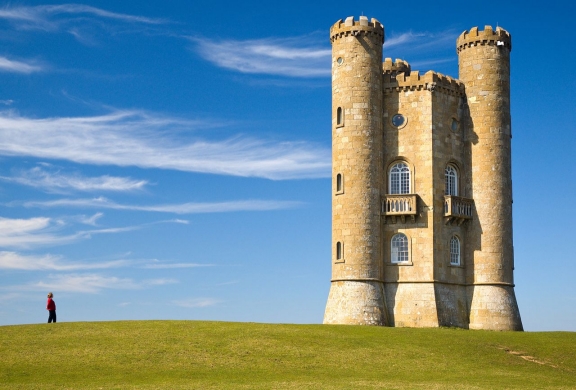 | 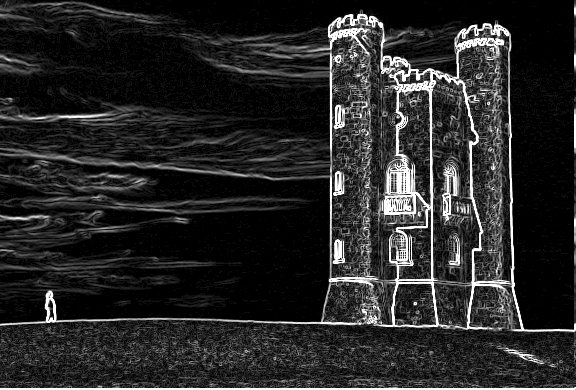 |  |  |
## Features
Key features which differentiates this library from the other existing open source solutions:
- [x] Customizable command line support
- [x] Support for both shrinking or enlarging the image
- [x] Resize image both vertically and horizontally
- [x] Can resize all the images from a directory
- [x] Does not require any third party library
- [x] Use of sobel threshold for fine tuning
- [x] Use of blur filter for increased edge detection
- [x] Square the image with a single command
- [x] Support for proportional scaling
- [x] Face detection to avoid face deformation
- [x] Support for multiple output image type (jpg, jpeg, png, bmp, gif)
## Face detection
The library is capable of detecting human faces prior resizing the images by using the Pigo (https://github.com/esimov/pigo) face detection library, which does not require to have OpenCV installed.
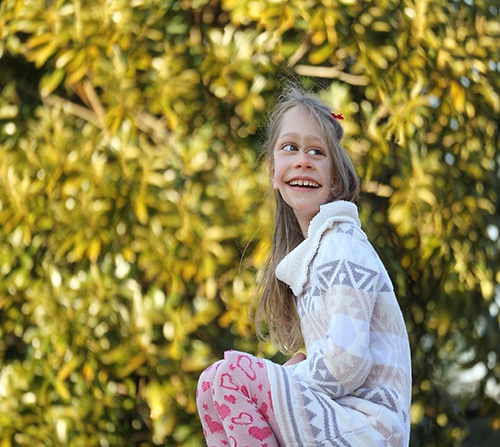
The image below illustrates the application capabilities for human face detection prior resizing. It's clearly visible from the image that with face detection activated the algorithm will avoid cropping pixels inside the detected faces, retaining the face zone unaltered.
| Original image | With face detection | Without face detection
|:--:|:--:|:--:|
| 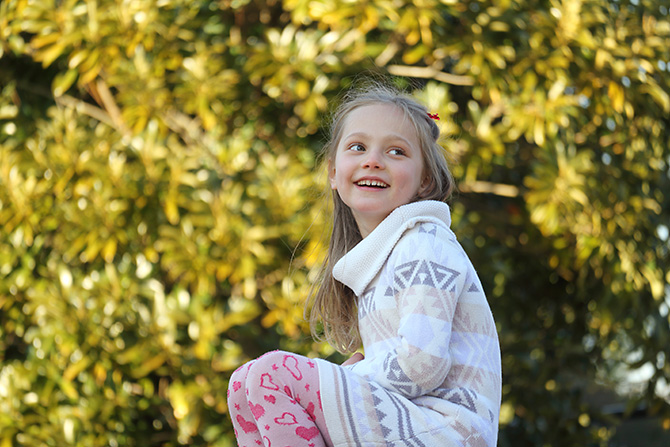 | 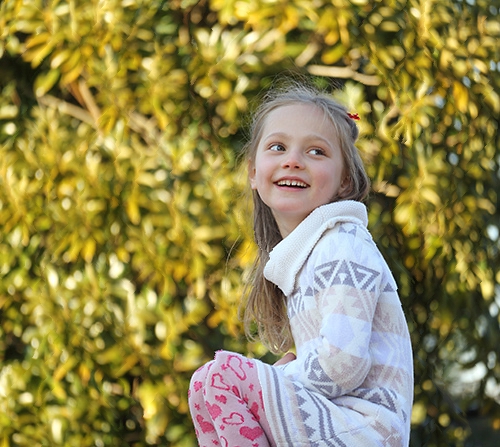 |  |
[Sample image source](http://www.lens-rumors.com/wp-content/uploads/2014/12/EF-M-55-200mm-f4.5-6.3-IS-STM-sample.jpg)
## Install
First, install Go, set your `GOPATH`, and make sure `$GOPATH/bin` is on your `PATH`.
```bash
$ export GOPATH="$HOME/go"
$ export PATH="$PATH:$GOPATH/bin"
```
Next download the project and build the binary file.
```bash
$ go get -u -f github.com/esimov/caire/cmd/caire
$ go install
```
## MacOS (Brew) install
The library can also be installed via Homebrew.
```bash
$ brew tap esimov/caire
$ brew install caire
```
## Usage
```bash
$ caire -in input.jpg -out output.jpg
```
### Supported commands:
```bash
$ caire --help
```
The following flags are supported:
| Flag | Default | Description |
| --- | --- | --- |
| `in` | - | Input file |
| `out` | - | Output file |
| `width` | n/a | New width |
| `height` | n/a | New height |
| `perc` | false | Reduce image by percentage |
| `square` | false | Reduce image to square dimensions |
| `scale` | false | Proportional scaling |
| `blur` | 1 | Blur radius |
| `sobel` | 10 | Sobel filter threshold |
| `debug` | false | Use debugger |
| `face` | false | Use face detection |
| `angle` | float | Plane rotated faces angle |
| `cc` | string | Cascade classifier |
#### Use the face detection option to avoid face deformation
To detect faces prior rescaling use the `-face` flag and provide the face classification binary file included into the `data` folder. The sample code below will rescale the provided image with 20% but will search for human faces prior rescaling.
For the face detection related arguments check the Pigo [documentation](https://github.com/esimov/pigo/blob/master/README.md).
```bash
$ caire -in input.jpg -out output.jpg -face=1 -cc="data/facefinder" -perc=1 -width=20
```
#### Other options
In case you wish to scale down the image by a specific percentage, it can be used the **`-perc`** boolean flag. In this case the values provided for the `width` and `height` options are expressed in percentage and not pixel values. For example to reduce the image dimension by 20% both horizontally and vertically you can use the following command:
```bash
$ caire -in input/source.jpg -out ./out.jpg -perc=1 -width=20 -height=20 -debug=false
```
Also the library supports the **`-square`** option. When this option is used the image will be resized to a square, based on the shortest edge.
The **`-scale`** option will resize the image proportionally. First the image is scaled down preserving the image aspect ratio, then the seam carving algorithm is applied only to the remaining points. Ex. : given an image of dimensions 2048x1536 if we want to resize to the 1024x500, the tool first rescale the image to 1024x768 and will remove only the remaining 268px.
**Notice: Using the `-scale` option will reduce drastically the processing time. Use this option whenever is possible!**
The CLI command can process all the images from a specific directory:
```bash
$ caire -in ./input-directory -out ./output-directory
```
You can also use `stdin` and `stdout` with `-`:
```bash
$ cat input/source.jpg | caire -in - -out - >out.jpg
```
`in` and `out` default to `-` so you can also use:
```bash
$ cat input/source.jpg | caire >out.jpg
$ caire -out out.jpg < input/source.jpg
```
### Caire integrations
- [x] Caire can be used as a serverless function via OpenFaaS: https://github.com/esimov/caire-openfaas
- [x] Caire can also be used as a `snap` function (https://snapcraft.io/caire): `$ snap run caire --h`
 ## Results
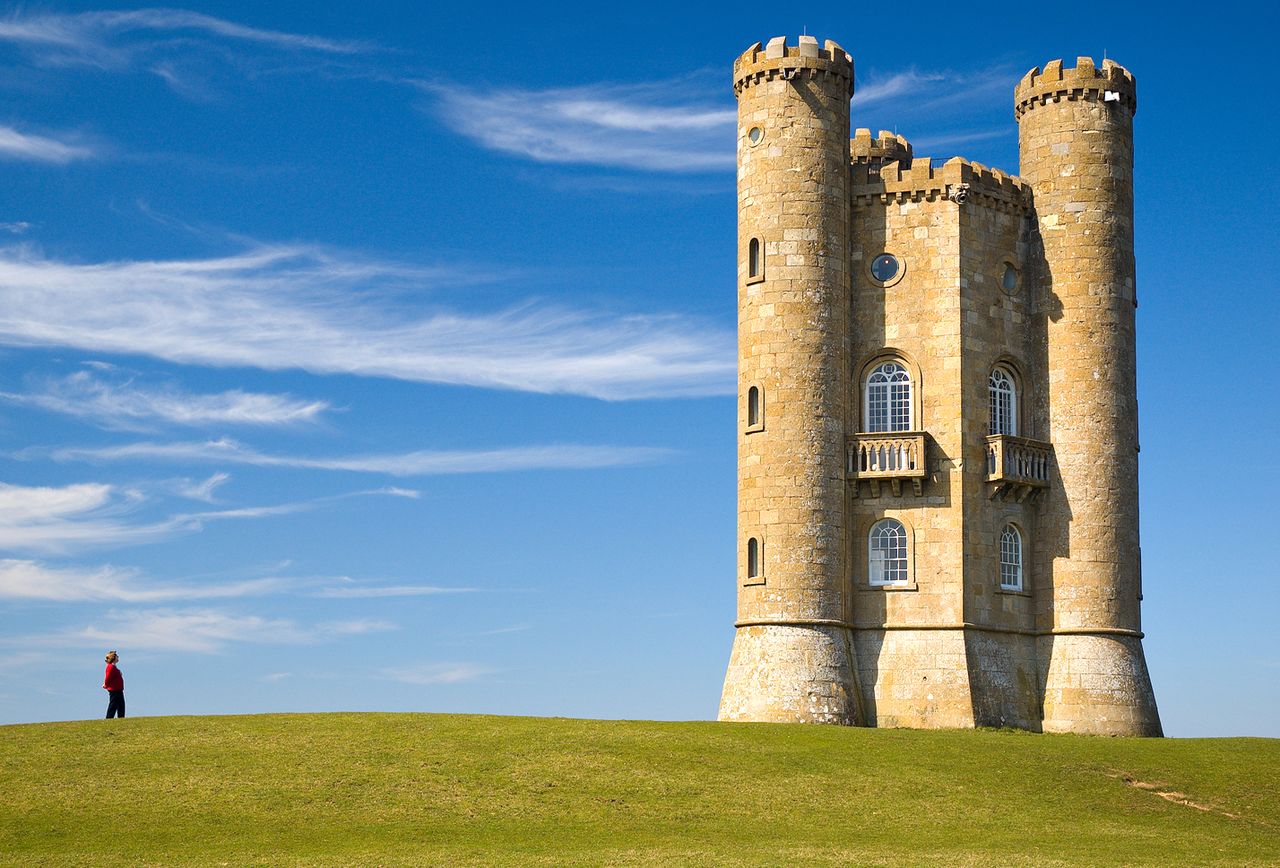
#### Shrunk images
| Original | Shrunk |
| --- | --- |
|  |  |
|  |  |
|  |  |
|  |  |
#### Enlarged images
| Original | Extended |
| --- | --- |
|  |  |
|  |  |
### Useful resources
* https://en.wikipedia.org/wiki/Seam_carving
* https://inst.eecs.berkeley.edu/~cs194-26/fa16/hw/proj4-seamcarving/imret.pdf
* http://pages.cs.wisc.edu/~moayad/cs766/download_files/alnammi_cs_766_final_report.pdf
* https://stacks.stanford.edu/file/druid:my512gb2187/Zargham_Nassirpour_Content_aware_image_resizing.pdf
## Author
* Endre Simo ([@simo_endre](https://twitter.com/simo_endre))
## License
Copyright © 2018 Endre Simo
This project is under the MIT License. See the LICENSE file for the full license text.
## Results
#### Shrunk images
| Original | Shrunk |
| --- | --- |
|  |  |
|  |  |
|  |  |
|  |  |
#### Enlarged images
| Original | Extended |
| --- | --- |
|  |  |
|  |  |
### Useful resources
* https://en.wikipedia.org/wiki/Seam_carving
* https://inst.eecs.berkeley.edu/~cs194-26/fa16/hw/proj4-seamcarving/imret.pdf
* http://pages.cs.wisc.edu/~moayad/cs766/download_files/alnammi_cs_766_final_report.pdf
* https://stacks.stanford.edu/file/druid:my512gb2187/Zargham_Nassirpour_Content_aware_image_resizing.pdf
## Author
* Endre Simo ([@simo_endre](https://twitter.com/simo_endre))
## License
Copyright © 2018 Endre Simo
This project is under the MIT License. See the LICENSE file for the full license text.