# FileCodeBox
**Repository Path**: wu3374/FileCodeBox
## Basic Information
- **Project Name**: FileCodeBox
- **Description**: No description available
- **Primary Language**: Unknown
- **License**: LGPL-3.0
- **Default Branch**: master
- **Homepage**: None
- **GVP Project**: No
## Statistics
- **Stars**: 0
- **Forks**: 0
- **Created**: 2026-05-03
- **Last Updated**: 2026-05-03
## Categories & Tags
**Categories**: Uncategorized
**Tags**: None
## README
# FileCodeBox
### Anonymous File & Text Sharing with Passcode

Share files like picking up a package — no registration required, just enter the passcode
[](https://github.com/vastsa/FileCodeBox/stargazers)
[](https://github.com/vastsa/FileCodeBox/network)
[](https://github.com/vastsa/FileCodeBox/issues)
[](https://github.com/vastsa/FileCodeBox/blob/master/LICENSE)
[](https://hub.docker.com/r/lanol/filecodebox)
[](https://www.python.org)
[](https://fastapi.tiangolo.com)
[](https://vuejs.org)
[简体中文](./README.md) | [Live Demo](https://share.lanol.cn) | [Documentation](https://github.com/vastsa/FileCodeBox/wiki/Deployment-Guide) | [FAQ](https://github.com/vastsa/FileCodeBox/wiki/FAQ)
```bash
# 🚀 Quick Deploy
docker run -d -p 12345:12345 -v /opt/FileCodeBox:/app/data --name filecodebox lanol/filecodebox:latest
# China Mirror (if slow): docker.cnb.cool/aixk/filecodebox
```
|
### 🚀 Lightweight & Fast
- FastAPI + SQLite3 backend
- Vue3 + Element Plus frontend
- One-click Docker deployment
- Minimal resource usage
|
### 🔒 Secure & Reliable
- IP upload rate limiting
- Passcode attempt limiting
- Auto file expiration cleanup
- Admin authentication support
|
### 📤 Easy Upload
- Drag & drop upload
- Copy & paste upload
- Command line curl upload
- Batch file upload
|
|
### 🎫 Flexible Sharing
- Random / custom passcodes
- Set expiration (time/count)
- Permanent validity support
- Unified text & file management
|
### 💾 Multiple Storage
- Local file system
- S3-compatible storage
- [OneDrive](./docs/guide/storage-onedrive.md)
- [OpenDAL](./docs/guide/storage-opendal.md)
|
### 🌍 Internationalization
- Simplified Chinese
- Traditional Chinese
- English
- Responsive design / Dark mode
|
---
## 🖼️ Screenshots
> Frontend repositories: [2024 Theme](https://github.com/vastsa/FileCodeBoxFronted) | [2023 Theme](https://github.com/vastsa/FileCodeBoxFronted2023)
🎨 New Interface (2024)
📦 Classic Interface (2023)
---
## 🚀 Quick Start
### Docker Deployment (Recommended)
**Option 1: Docker CLI**
```bash
# Docker Hub (Recommended)
docker run -d --restart always -p 12345:12345 -v /opt/FileCodeBox:/app/data --name filecodebox lanol/filecodebox:latest
# China Mirror (if Docker Hub is slow)
docker run -d --restart always -p 12345:12345 -v /opt/FileCodeBox:/app/data --name filecodebox docker.cnb.cool/aixk/filecodebox
```
**Option 2: Docker Compose**
```yaml
services:
filecodebox:
image: lanol/filecodebox:latest
container_name: filecodebox
restart: unless-stopped
ports:
- "12345:12345"
volumes:
- ./data:/app/data
environment:
- WORKERS=4
- LOG_LEVEL=info
```
```bash
docker compose up -d
```
**Environment Variables**
| Variable | Default | Description |
|----------|---------|-------------|
| `HOST` | `::` | Listen address (supports IPv4/IPv6 dual-stack) |
| `PORT` | `12345` | Service port |
| `WORKERS` | `4` | Worker processes (recommended: CPU cores) |
| `LOG_LEVEL` | `info` | Log level: `debug` / `info` / `warning` / `error` |
### Reverse Proxy Configuration
When using Nginx, add the following configuration to properly obtain client IP:
```nginx
location / {
proxy_pass http://127.0.0.1:12345;
proxy_set_header Host $host;
proxy_set_header X-Real-IP $remote_addr;
proxy_set_header X-Forwarded-For $proxy_add_x_forwarded_for;
proxy_set_header X-Forwarded-Proto $scheme;
client_max_body_size 100m; # Adjust upload size limit as needed
}
```
### Manual Deployment
```bash
# 1. Clone the repository
git clone https://github.com/vastsa/FileCodeBox.git
cd FileCodeBox
# 2. Install dependencies
pip install -r requirements.txt
# 3. Start the service
python main.py
```
---
## 📖 Usage Guide
### Basic Operations
| Operation | Steps |
|-----------|-------|
| **Share File** | Open website → Select/drag files → Set expiration → Get passcode |
| **Retrieve File** | Open website → Enter passcode → Download file or view text |
| **Admin Panel** | Visit `/#/admin` → Enter password `FileCodeBox2023` |
### Command Line Usage (curl)
Click to expand curl examples
**Upload File**
```bash
# Basic upload (default 1 day expiration)
curl -X POST "http://localhost:12345/share/file/" \
-F "file=@/path/to/file.txt"
# Set 1 hour expiration
curl -X POST "http://localhost:12345/share/file/" \
-F "file=@/path/to/file.txt" \
-F "expire_value=1" \
-F "expire_style=hour"
# Set expiration after 10 downloads
curl -X POST "http://localhost:12345/share/file/" \
-F "file=@/path/to/file.txt" \
-F "expire_value=10" \
-F "expire_style=count"
```
**Share Text**
```bash
curl -X POST "http://localhost:12345/share/text/" \
-F "text=Text content to share"
```
**Download File**
```bash
curl -L "http://localhost:12345/share/select/?code=PASSCODE" -o filename
```
**Expiration Parameters**
| `expire_style` | Description |
|----------------|-------------|
| `day` | Days |
| `hour` | Hours |
| `minute` | Minutes |
| `count` | Download count |
| `forever` | Never expire |
**Response Example**
```json
{
"code": 200,
"msg": "success",
"detail": {
"code": "abcd1234",
"name": "file.txt"
}
}
```
**When Authentication Required** (after admin disables guest upload)
```bash
# 1. Get token
curl -X POST "http://localhost:12345/admin/login" \
-H "Content-Type: application/json" \
-d '{"password": "FileCodeBox2023"}'
# 2. Upload with token
curl -X POST "http://localhost:12345/share/file/" \
-H "Authorization: Bearer " \
-F "file=@/path/to/file.txt"
```
---
## 🛠 Development
### Project Structure
```
FileCodeBox/
├── apps/ # Application modules
│ ├── admin/ # Admin backend
│ └── base/ # Base functionality
├── core/ # Core modules
├── data/ # Data directory (generated at runtime)
├── docs/ # Documentation
└── main.py # Entry point
```
### Local Development
**Backend**
```bash
pip install -r requirements.txt
python main.py
```
**Frontend**
```bash
# Frontend repo: https://github.com/vastsa/FileCodeBoxFronted
cd fcb-fronted
npm install
npm run dev
```
### Tech Stack
| Category | Technology |
|----------|------------|
| **Backend Framework** | FastAPI 0.128+ / Uvicorn |
| **Database** | SQLite + Tortoise ORM |
| **Data Validation** | Pydantic 2.x |
| **Async Support** | aiofiles / aiohttp / aioboto3 |
| **Object Storage** | S3 Protocol / OneDrive / OpenDAL |
| **Frontend Framework** | Vue 3 + Element Plus + Vite |
| **Runtime** | Python 3.8+ / Node.js 18+ |
| **Containerization** | Docker / Docker Compose |
---
## ❓ FAQ
How to modify upload size limit?
Modify the `uploadSize` configuration in the admin panel. If using Nginx reverse proxy, also modify `client_max_body_size`.
How to configure storage engine?
Select the storage engine type and configure parameters in the admin panel. Supports local storage, S3, OneDrive, OpenDAL, etc.
How to backup data?
Backup the `data` directory, which contains the database and uploaded files.
How to change admin password?
After logging into the admin panel, modify the `adminPassword` configuration in system settings.
For more questions, visit [Wiki](https://github.com/vastsa/FileCodeBox/wiki/FAQ)
---
## 🤝 Contributing
Issues and Pull Requests are welcome!
```bash
# 1. Fork and clone
git clone https://github.com/your-username/FileCodeBox.git
# 2. Create branch
git checkout -b feature/your-feature
# 3. Commit changes
git commit -m "feat: add your feature"
# 4. Push and create PR
git push origin feature/your-feature
```
---
## 📊 Statistics

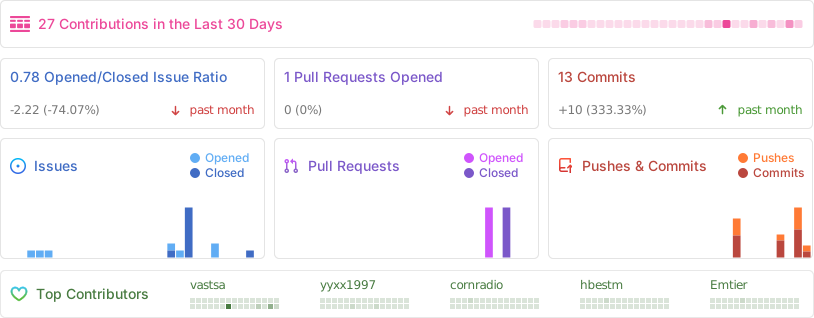
[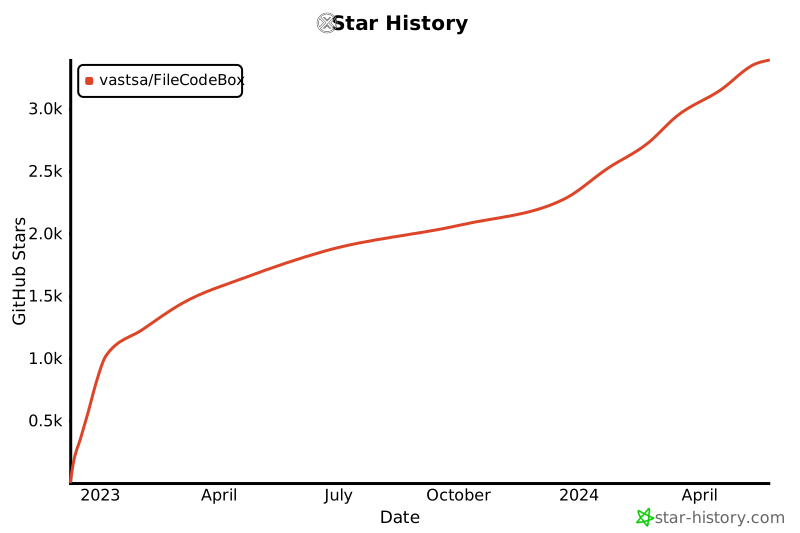](https://star-history.com/#vastsa/FileCodeBox&Date)
---
## 🗓 Roadmap
- [ ] 2025 New Theme
- [ ] File Collection Feature
---
## 📜 Disclaimer
This project is open-source for learning and communication purposes only. It should not be used for any illegal purposes. The author is not responsible for any consequences. Please retain the project address and copyright information when using it.
---
**If you find this project helpful, please give it a ⭐ Star!**
Made with ❤️ by [vastsa](https://github.com/vastsa)


