# musicdl
**Repository Path**: wydev/musicdl
## Basic Information
- **Project Name**: musicdl
- **Description**: No description available
- **Primary Language**: Unknown
- **License**: Not specified
- **Default Branch**: master
- **Homepage**: None
- **GVP Project**: No
## Statistics
- **Stars**: 0
- **Forks**: 0
- **Created**: 2026-02-02
- **Last Updated**: 2026-02-02
## Categories & Tags
**Categories**: Uncategorized
**Tags**: None
## README
📚 Documents: musicdl.readthedocs.io
🎧 Live Demo · MusicSquare (音乐广场)

🛠 Source Code (MusicSquare)
MusicSquare is a browser-based music playground — search, play, and download tracks directly in your browser.
⚠️ For learning and testing only: please respect copyright and the terms of each music platform.
学习收获更多有趣的内容, 欢迎关注微信公众号:Charles的皮卡丘
# 🎉 What's New
- 2026-01-31: Released musicdl v2.8.12 — refactored the terminal table rendering algorithm to better accommodate support for giant table; fixed kugou lossless api; added a new YouTube parsing endpoint.
- 2026-01-30: Released musicdl v2.8.11 — added or enhanced search and download support for Ximalaya, Lizhi FM, and Qingting FM; fixed several known bugs.
- 2026-01-29: Released musicdl v2.8.10 — Support batch downloading audiobooks from the same album on the Ximalaya platform; update the API interfaces for Ximalaya, Kuwo, and TuneHub; and fix some minor bugs.
# 🎵 Introduction
A lightweight music downloader written in pure Python. Like it? ⭐ Star the repository to stay up to date. Thanks!
# ⚠️ Disclaimer
This repository is provided solely for educational and research purposes. Commercial use is prohibited.
The software only interacts with publicly accessible web endpoints and does not host, store, mirror, or distribute any copyrighted or proprietary content.
No executables are distributed with this repository. Redistribution, resale, or bundling of this software (or any derivative packaged distribution) without explicit permission is strictly prohibited.
Access to paid, subscription, or otherwise restricted content must be obtained through authorized channels (*e.g.*, purchase or subscription via the relevant service). Use of this software to circumvent paywalls, DRM, licensing restrictions, or other access controls is strictly prohibited.
If you are a copyright or rights holder and believe that this repository infringes your rights, please contact me with sufficient detail (*e.g.*, relevant URLs and proof of ownership), and I will promptly investigate and take appropriate action, which may include removal of the referenced material.
# 🎧 Supported Music Client
| Category | MusicClient (EN) | MusicClient (CN) | 🔎 Search | ⬇️ Download | Code Snippet |
| :-- | :-- | :-- | :--: | :--: | :-- |
| **Mainland Platforms** | [BilibiliMusicClient](https://www.bilibili.com/audio/home/?type=9) | [Bilibili音乐](https://www.bilibili.com/audio/home/?type=9) | ✅ | ✅ | [bilibili.py](https://github.com/CharlesPikachu/musicdl/blob/master/musicdl/modules/sources/bilibili.py) |
| | [FiveSingMusicClient](https://5sing.kugou.com/index.html) | [5SING音乐](https://5sing.kugou.com/index.html) | ✅ | ✅ | [fivesing.py](https://github.com/CharlesPikachu/musicdl/blob/master/musicdl/modules/sources/fivesing.py) |
| | [KugouMusicClient](http://www.kugou.com/) | [酷狗音乐](http://www.kugou.com/) | ✅ | ✅ | [kugou.py](https://github.com/CharlesPikachu/musicdl/blob/master/musicdl/modules/sources/kugou.py) |
| | [KuwoMusicClient](http://www.kuwo.cn/) | [酷我音乐](http://www.kuwo.cn/) | ✅ | ✅ | [kuwo.py](https://github.com/CharlesPikachu/musicdl/blob/master/musicdl/modules/sources/kuwo.py) |
| | [MiguMusicClient](https://music.migu.cn/v5/#/musicLibrary) | [咪咕音乐](https://music.migu.cn/v5/#/musicLibrary) | ✅ | ✅ | [migu.py](https://github.com/CharlesPikachu/musicdl/blob/master/musicdl/modules/sources/migu.py) |
| | [NeteaseMusicClient](https://music.163.com/) | [网易云音乐](https://music.163.com/) | ✅ | ✅ | [netease.py](https://github.com/CharlesPikachu/musicdl/blob/master/musicdl/modules/sources/netease.py) |
| | [QianqianMusicClient](http://music.taihe.com/) | [千千音乐](http://music.taihe.com/) | ✅ | ✅ | [qianqian.py](https://github.com/CharlesPikachu/musicdl/blob/master/musicdl/modules/sources/qianqian.py) |
| | [QQMusicClient](https://y.qq.com/) | [QQ音乐](https://y.qq.com/) | ✅ | ✅ | [qq.py](https://github.com/CharlesPikachu/musicdl/blob/master/musicdl/modules/sources/qq.py) |
| | [SodaMusicClient](https://www.douyin.com/qishui/) | [汽水音乐](https://www.douyin.com/qishui/) | ✅ | ✅ | [soda.py](https://github.com/CharlesPikachu/musicdl/blob/master/musicdl/modules/sources/soda.py) |
| **Global Streaming / Indie** | [AppleMusicClient](https://music.apple.com/) | [苹果音乐](https://music.apple.com/) | ✅ | ✅ | [apple.py](https://github.com/CharlesPikachu/musicdl/blob/master/musicdl/modules/sources/apple.py) |
| | [JamendoMusicClient](https://www.jamendo.com/) | [简音乐 (欧美流行音乐)](https://www.jamendo.com/) | ✅ | ✅ | [jamendo.py](https://github.com/CharlesPikachu/musicdl/blob/master/musicdl/modules/sources/jamendo.py) |
| | [SoundCloudMusicClient](https://soundcloud.com/discover) | [SoundCloud (声云)](https://soundcloud.com/discover) | ✅ | ✅ | [soundclound.py](https://github.com/CharlesPikachu/musicdl/blob/master/musicdl/modules/sources/soundclound.py) |
| | [JooxMusicClient](https://www.joox.com/intl) | [JOOX (QQ音乐海外版)](https://www.joox.com/intl) | ✅ | ✅ | [joox.py](https://github.com/CharlesPikachu/musicdl/blob/master/musicdl/modules/sources/joox.py) |
| | [TIDALMusicClient](https://tidal.com/) | [TIDAL (提供HiFi音质的流媒体平台)](https://tidal.com/) | ✅ | ✅ | [tidal.py](https://github.com/CharlesPikachu/musicdl/blob/master/musicdl/modules/sources/tidal.py) |
| | [YouTubeMusicClient](https://music.youtube.com/) | [油管音乐](https://music.youtube.com/) | ✅ | ✅ | [youtube.py](https://github.com/CharlesPikachu/musicdl/blob/master/musicdl/modules/sources/youtube.py) |
| **Audio / Radio** | [LizhiMusicClient](https://www.lizhi.fm/) | [荔枝FM](https://www.lizhi.fm/) | ✅ | ✅ | [lizhi.py](https://github.com/CharlesPikachu/musicdl/blob/master/musicdl/modules/audiobooks/lizhi.py) |
| | [QingtingMusicClient](https://www.qtfm.cn/) | [蜻蜓FM](https://www.qtfm.cn/) | ✅ | ✅ | [qingting.py](https://github.com/CharlesPikachu/musicdl/blob/master/musicdl/modules/audiobooks/qingting.py) |
| | [XimalayaMusicClient](https://www.ximalaya.com/) | [喜马拉雅](https://www.ximalaya.com/) | ✅ | ✅ | [ximalaya.py](https://github.com/CharlesPikachu/musicdl/blob/master/musicdl/modules/audiobooks/ximalaya.py) |
| **Aggregators / Multi-Source Gateways** | [GDStudioMusicClient](https://music.gdstudio.xyz/) | [GD音乐台 (Spotify, Qobuz等10个音乐源)](https://music.gdstudio.xyz/) | ✅ | ✅ | [gdstudio.py](https://github.com/CharlesPikachu/musicdl/blob/master/musicdl/modules/common/gdstudio.py) |
| | [JBSouMusicClient](https://www.jbsou.cn/) | [煎饼搜 (QQ网易云酷我酷狗音乐源)](https://www.jbsou.cn/) | ✅ | ✅ | [jbsou.py](https://github.com/CharlesPikachu/musicdl/blob/master/musicdl/modules/common/jbsou.py) |
| | [MP3JuiceMusicClient](https://mp3juice.co/) | [MP3 Juice (SoundCloud+YouTube音乐源)](https://mp3juice.co/) | ✅ | ✅ | [mp3juice.py](https://github.com/CharlesPikachu/musicdl/blob/master/musicdl/modules/common/mp3juice.py) |
| | [MyFreeMP3MusicClient](https://www.myfreemp3.com.cn/) | [MyFreeMP3 (网易云+夸克音乐源)](https://www.myfreemp3.com.cn/) | ✅ | ✅ | [myfreemp3.py](https://github.com/CharlesPikachu/musicdl/blob/master/musicdl/modules/common/myfreemp3.py) |
| | [TuneHubMusicClient](https://tunehub.sayqz.com/docs) | [TuneHub音乐 (QQ网易云酷我音乐源)](https://tunehub.sayqz.com/docs) | ✅ | ✅ | [tunehub.py](https://github.com/CharlesPikachu/musicdl/blob/master/musicdl/modules/common/tunehub.py) |
| **Unofficial Download Sites / Scrapers** | [BuguyyMusicClient](https://buguyy.top/) | [布谷音乐](https://buguyy.top/) | ✅ | ✅ | [buguyy.py](https://github.com/CharlesPikachu/musicdl/blob/master/musicdl/modules/sources/buguyy.py) |
| | [FangpiMusicClient](https://www.fangpi.net/) | [放屁音乐](https://www.fangpi.net/) | ✅ | ✅ | [fangpi.py](https://github.com/CharlesPikachu/musicdl/blob/master/musicdl/modules/sources/fangpi.py) |
| | [FiveSongMusicClient](https://www.5song.xyz/index.html) | [5Song无损音乐](https://www.5song.xyz/index.html) | ✅ | ✅ | [fivesong.py](https://github.com/CharlesPikachu/musicdl/blob/master/musicdl/modules/sources/fivesong.py) |
| | [FLMP3MusicClient](https://www.flmp3.pro/index.html) | [凤梨音乐](https://www.flmp3.pro/index.html) | ✅ | ✅ | [flmp3.py](https://github.com/CharlesPikachu/musicdl/blob/master/musicdl/modules/sources/flmp3.py) |
| | [GequbaoMusicClient](https://www.gequbao.com/) | [歌曲宝](https://www.gequbao.com/) | ✅ | ✅ | [gequbao.py](https://github.com/CharlesPikachu/musicdl/blob/master/musicdl/modules/sources/gequbao.py) |
| | [GequhaiMusicClient](https://www.gequhai.com/) | [歌曲海](https://www.gequhai.com/) | ✅ | ✅ | [gequhai.py](https://github.com/CharlesPikachu/musicdl/blob/master/musicdl/modules/sources/gequhai.py) |
| | [HTQYYMusicClient](http://www.htqyy.com/) | [好听轻音乐网](http://www.htqyy.com/) | ✅ | ✅ | [htqyy.py](https://github.com/CharlesPikachu/musicdl/blob/master/musicdl/modules/sources/htqyy.py) |
| | [JCPOOMusicClient](https://www.jcpoo.cn/) | [九册音乐网](https://www.jcpoo.cn/) | ✅ | ✅ | [jcpoo.py](https://github.com/CharlesPikachu/musicdl/blob/master/musicdl/modules/sources/jcpoo.py) |
| | [KKWSMusicClient](https://www.kkws.cc/) | [开开无损音乐](https://www.kkws.cc/) | ✅ | ✅ | [kkws.py](https://github.com/CharlesPikachu/musicdl/blob/master/musicdl/modules/sources/kkws.py) |
| | [LivePOOMusicClient](https://www.livepoo.cn/) | [力音](https://www.livepoo.cn/) | ✅ | ✅ | [livepoo.py](https://github.com/CharlesPikachu/musicdl/blob/master/musicdl/modules/sources/livepoo.py) |
| | [MituMusicClient](https://www.qqmp3.vip/) | [米兔音乐](https://www.qqmp3.vip/) | ✅ | ✅ | [mitu.py](https://github.com/CharlesPikachu/musicdl/blob/master/musicdl/modules/sources/mitu.py) |
| | [TwoT58MusicClient](https://www.2t58.com/) | [爱听音乐网](https://www.2t58.com/) | ✅ | ✅ | [twot58.py](https://github.com/CharlesPikachu/musicdl/blob/master/musicdl/modules/sources/twot58.py) |
| | [YinyuedaoMusicClient](https://1mp3.top/) | [音乐岛](https://1mp3.top/) | ✅ | ✅ | [yinyuedao.py](https://github.com/CharlesPikachu/musicdl/blob/master/musicdl/modules/sources/yinyuedao.py) |
| | [ZhuolinMusicClient](https://music.zhuolin.wang/) | [音乐解析下载网](https://music.zhuolin.wang/) | ✅ | ✅ | [zhuolin.py](https://github.com/CharlesPikachu/musicdl/blob/master/musicdl/modules/sources/zhuolin.py) |
# 🧪 Playground
Here are some projects built on top of musicdl,
| Project (EN) | Project (CN) | WeChat Article | Project Location |
| :----: | :----: | :----: | :----: |
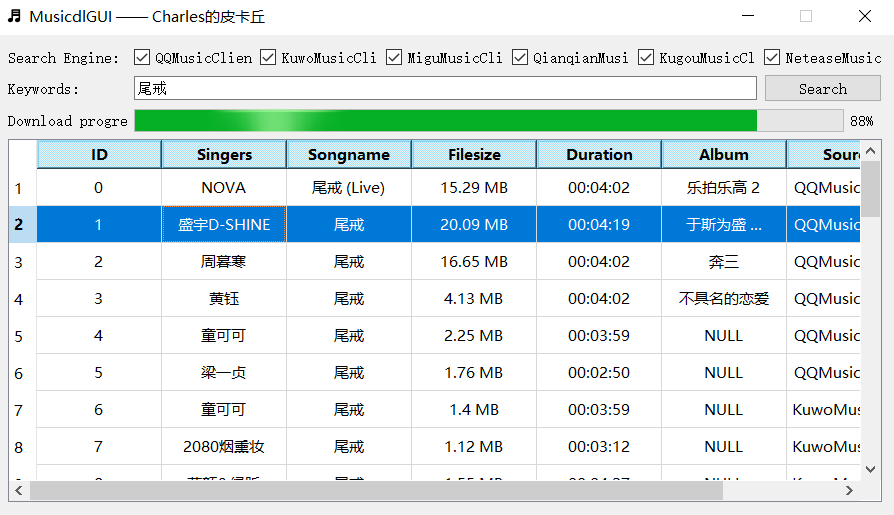
| Music downloader GUI | 音乐下载器GUI界面 | [click](https://mp.weixin.qq.com/s/fN1ORyI6lzQFqxf6Zk1oIg) | [musicdlgui](https://github.com/CharlesPikachu/musicdl/tree/master/examples/musicdlgui) |
| Singer lyrics analysis | 歌手歌词分析 | [click](https://mp.weixin.qq.com/s/I8Dy7CoM2ThnSpjoUaPtig) | [singerlyricsanalysis](https://github.com/CharlesPikachu/musicdl/tree/master/examples/singerlyricsanalysis) |
| Lyric-based song snippet retrieval | 歌词获取歌曲片段 | [click](https://mp.weixin.qq.com/s/Vmc1IhuhMJ6C5vBwBe43Pg) | [searchlyrics](https://github.com/CharlesPikachu/musicdl/tree/master/examples/searchlyrics) |
For example, the Music Downloader GUI looks/works like this,
# 📦 Install
You have three installation methods to choose from,
```sh
# from pip
pip install musicdl
# from github repo method-1
pip install git+https://github.com/CharlesPikachu/musicdl.git@master
# from github repo method-2
git clone https://github.com/CharlesPikachu/musicdl.git
cd musicdl
python setup.py install
```
Some of the music downloaders supported by musicdl require additional CLI tools to function properly, mainly for decrypting encrypted search/download requests and audio files.
These CLI tools include,
- [FFmpeg](https://www.ffmpeg.org/): At the moment, only `TIDALMusicClient` and `AppleMusicClient` depends on FFmpeg for audio file decoding.
If you don’t need to use `TIDALMusicClient` and `AppleMusicClient` when working with musicdl, you don’t need to install FFmpeg.
After installing it, you should run the following command in a terminal (Command Prompt / PowerShell on Windows, Terminal on macOS/Linux) to check whether FFmpeg is on your system `PATH`:
```bash
ffmpeg -version
```
If FFmpeg is installed correctly and on your `PATH`, this command will print the FFmpeg version information (*e.g.*, a few lines starting with `ffmpeg version ...`).
If you see an error like `command not found` or `'ffmpeg' is not recognized as an internal or external command`, then FFmpeg is either not installed or not added to your `PATH`.
- [Node.js](https://nodejs.org/en): Currently, only `YouTubeMusicClient` in musicdl depends on Node.js, so if you don’t need `YouTubeMusicClient`, you don’t have to install Node.js.
Similar to FFmpeg, after installing Node.js, you should run the following command to check whether Node.js is on your system `PATH`:
```bash
node -v (npm -v)
```
If Node.js is installed correctly, `node -v` will print the Node.js version (*e.g.*, `v22.11.0`), and `npm -v` will print the npm version.
If you see a similar `command not found` / `not recognized` error, Node.js is not installed correctly or not available on your `PATH`.
- [GPAC](https://gpac.io/downloads/gpac-nightly-builds/): GPAC is an open-source multimedia framework for packaging, processing, and streaming formats like MP4, DASH, and HLS.
In musicdl, this library is mainly used for handling `AppleMusicClient` audio streams, so if you don’t need `AppleMusicClient` support, you don’t need to install it.
After installing GPAC, you need to make sure all of its executables are available in your system `PATH`.
A quick way to verify this is that you should be able to run
```bash
python -c "import shutil; print(shutil.which('MP4Box'))"
```
in Command Prompt and get the full path without an error.
- [Bento4](https://www.bento4.com/downloads/): Bento4 is an open-source C++ toolkit for reading, writing, inspecting, and packaging MP4 files and related multimedia formats.
In musicdl, this library is mainly used for handling `AppleMusicClient` audio streams, so if you don’t need `AppleMusicClient` support, you don’t need to install it.
After installing Bento4, you need to make sure all of its executables are available in your system `PATH`.
A quick way to verify this is that you should be able to run
```bash
python -c "import shutil; print(shutil.which('mp4decrypt'))"
```
in Command Prompt and get the full path without an error.
- [N_m3u8DL-RE](https://github.com/nilaoda/N_m3u8DL-RE): N_m3u8DL-RE is a powerful open-source command-line tool for downloading, decrypting, and muxing HLS/DASH (m3u8/mpd) streaming media into local video files.
In musicdl, this library is mainly used for handling `AppleMusicClient` audio streams, so if you don’t need `AppleMusicClient` support, you don’t need to install it.
After installing N_m3u8DL-RE, you need to make sure all of its executables are available in your system `PATH`.
A quick way to verify this is that you should be able to run
```bash
python -c "import shutil; print(shutil.which('N_m3u8DL-RE'))"
```
in Command Prompt and get the full path without an error.
# 🚀 Quick Start
#### Typical Examples
Here, we provide some common musicdl use cases to help you quickly get started with the tool.
If you want the quickest way to run musicdl to verify that your environment meets its basic requirements and that musicdl has been installed successfully, you can write and run the following code,
```python
from musicdl import musicdl
music_client = musicdl.MusicClient(music_sources=['MiguMusicClient', 'NeteaseMusicClient', 'QQMusicClient', 'KuwoMusicClient', 'QianqianMusicClient'])
music_client.startcmdui()
```
The above code runs musicdl using `MiguMusicClient`, `NeteaseMusicClient`, `QQMusicClient`, `KuwoMusicClient` and `QianqianMusicClient` as both the search sources and download sources.
Of course, you can also run musicdl by entering the following equivalent command directly in the command line,
```bash
musicdl -m NeteaseMusicClient,MiguMusicClient,QQMusicClient,KuwoMusicClient,QianqianMusicClient
```
Please note that musicdl uses five Mainland China music sources by default for searching.
If you need to use overseas music sources, you must manually specify the music platform each time you run the program.
For example:
```bash
musicdl -m GDStudioMusicClient,JamendoMusicClient
```
In addition, searching and downloading from many music sources simultaneously may be relatively slow.
Each run may take about 10–30 seconds.
If you are confident that your song can be found on a specific platform or a few platforms, for example, `NeteaseMusicClient`, `QQMusicClient` or `KuwoMusicClient`,
it is recommended to directly specify those platforms:
```bash
musicdl -m NeteaseMusicClient,QQMusicClient,KuwoMusicClient
```
The demonstration is as follows,
You can also use `musicdl --help` to see the detailed usage of the musicdl command-line tool, as follows:
```bash
Usage: musicdl [OPTIONS]
Options:
--version Show the version and exit.
-k, --keyword TEXT The keywords for the music search. If left
empty, an interactive terminal will open
automatically.
-m, --music-sources, --music_sources TEXT
The music search and download sources.
[default: MiguMusicClient,NeteaseMusicClient
,QQMusicClient,KuwoMusicClient,QianqianMusicClient]
-i, --init-music-clients-cfg, --init_music_clients_cfg TEXT
Config such as `work_dir` for each music
client as a JSON string.
-r, --requests-overrides, --requests_overrides TEXT
Requests.get / Requests.post kwargs such as
`headers` and `proxies` for each music
client as a JSON string.
-c, --clients-threadings, --clients_threadings TEXT
Number of threads used for each music client
as a JSON string.
-s, --search-rules, --search_rules TEXT
Search rules for each music client as a JSON
string.
--help Show this message and exit.
```
If you want to change the download path for the music files, you can write the following code:
```python
from musicdl import musicdl
init_music_clients_cfg = dict()
init_music_clients_cfg['MiguMusicClient'] = {'work_dir': 'migu'}
init_music_clients_cfg['NeteaseMusicClient'] = {'work_dir': 'netease'}
init_music_clients_cfg['QQMusicClient'] = {'work_dir': 'qq'}
music_client = musicdl.MusicClient(music_sources=['MiguMusicClient', 'NeteaseMusicClient', 'QQMusicClient'])
music_client.startcmdui()
```
Alternatively, you can equivalently run the following command directly in the command line:
```bash
musicdl -m NeteaseMusicClient,MiguMusicClient,QQMusicClient -i "{'MiguMusicClient': {'work_dir': 'migu'}, {'NeteaseMusicClient': {'work_dir': 'netease'}, {'QQMusicClient': {'work_dir': 'qq'}}"
```
If you are a VIP user on a particular music platform, you can pass the cookies from your logged-in web session on that platform to musicdl to improve the quality of song search and downloads.
Specifically, for example, if you have a membership on `QQMusicClient`, your code can be written as follows:
```python
from musicdl import musicdl
your_vip_cookies_with_str_or_dict_format = ""
init_music_clients_cfg = dict()
init_music_clients_cfg['QQMusicClient'] = {'default_search_cookies': your_vip_cookies_with_str_or_dict_format, 'default_download_cookies': your_vip_cookies_with_str_or_dict_format}
music_client = musicdl.MusicClient(music_sources=['NeteaseMusicClient', 'QQMusicClient'], init_music_clients_cfg=init_music_clients_cfg)
music_client.startcmdui()
```
Of course, you can also achieve the same effect by running the following command directly in the command line:
```bash
musicdl -m NeteaseMusicClient,QQMusicClient -i "{'QQMusicClient': {'default_search_cookies': your_vip_cookies_with_str_or_dict_format, 'default_download_cookies': your_vip_cookies_with_str_or_dict_format}}"
```
If you want to search for more songs on a specific music platform (*e.g.*, `QQMusicClient`), you can do the following:
```python
from musicdl import musicdl
init_music_clients_cfg = dict()
init_music_clients_cfg['QQMusicClient'] = {'search_size_per_source': 20}
music_client = musicdl.MusicClient(music_sources=['NeteaseMusicClient', 'QQMusicClient'], init_music_clients_cfg=init_music_clients_cfg)
music_client.startcmdui()
```
Or enter the following in the command line:
```bash
musicdl -m NeteaseMusicClient,QQMusicClient -i "{'QQMusicClient': {'search_size_per_source': 20}}"
```
In this way, you can see up to 20 search results from `QQMusicClient`.
If you want to use the [pyfreeproxy](https://github.com/CharlesPikachu/freeproxy) library to automatically leverage free online proxies for music search and download, you can do it as follows:
```python
from musicdl import musicdl
init_music_clients_cfg = dict()
init_music_clients_cfg['NeteaseMusicClient'] = {
'search_size_per_source': 1000, 'auto_set_proxies': True,
'freeproxy_settings': dict(
proxy_sources=["ProxyScrapeProxiedSession", "ProxylistProxiedSession"],
init_proxied_session_cfg={"max_pages": 2, "filter_rule": {"country_code": ["CN"], "anonymity": ["elite"], "protocol": ["http", "https"]}},
disable_print=True,
max_tries=20
)
}
music_client = musicdl.MusicClient(music_sources=['NeteaseMusicClient'], init_music_clients_cfg=init_music_clients_cfg)
music_client.startcmdui()
```
The command-line usage is similar:
```bash
musicdl -m NeteaseMusicClient -i "{'NeteaseMusicClient': {'search_size_per_source': 1000, 'auto_set_proxies': True, 'freeproxy_settings': {'proxy_sources':['ProxyScrapeProxiedSession','ProxylistProxiedSession'],'init_proxied_session_cfg':{'max_pages':2,'filter_rule':{'country_code':['CN'],'anonymity':['elite'],'protocol':['http','https']}},'disable_print':True,'max_tries':20}}}"
```
#### Separating Search and Download Results
You can also call the `.search` and `.download` interfaces of musicdl separately to inspect its intermediate results or perform secondary development,
```python
from musicdl import musicdl
# instance
music_client = musicdl.MusicClient(music_sources=['NeteaseMusicClient'])
# search
search_results = music_client.search(keyword='尾戒')
print(search_results)
song_infos = []
for song_infos_per_source in list(search_results.values()):
song_infos.extend(song_infos_per_source)
# download
music_client.download(song_infos=song_infos)
```
You can also choose not to use the unified `MusicClient` interface and instead directly import the definition class for a specific music platform for secondary development.
For example, to import the definition class for `NeteaseMusicClient`:
```python
from musicdl.modules.sources import NeteaseMusicClient
netease_music_client = NeteaseMusicClient()
# search
search_results = netease_music_client.search(keyword='那些年')
print(search_results)
# download
netease_music_client.download(song_infos=search_results)
```
All supported classes can be obtained by printing `MusicClientBuilder.REGISTERED_MODULES`, *e.g*,
```python
from musicdl.modules import MusicClientBuilder
print(MusicClientBuilder.REGISTERED_MODULES)
```
#### WhisperLRC
On some music platforms, it’s not possible to obtain the lyric files corresponding to the audio, *e.g*, `XimalayaMusicClient` and `MituMusicClient`.
To handle this, we provide a faster-whisper interface that can automatically generate lyrics for tracks whose lyrics are unavailable for download.
For audio files that have already been downloaded, you can use the following invocation to automatically generate lyrics for the local file,
```python
from musicdl.modules import WhisperLRC
your_local_music_file_path = 'xxx.flac'
WhisperLRC(model_size_or_path='base').fromfilepath(your_local_music_file_path)
```
The available `model_size_or_path`, ordered from smallest to largest, are:
```python
tiny, tiny.en, base, base.en, small, small.en, distil-small.en, medium, medium.en, distil-medium.en, large-v1, large-v2, large-v3, large, distil-large-v2, distil-large-v3, large-v3-turbo, turbo
```
In general, the larger the model, the better the generated lyrics (transcription/translation) will be, but this also means it will take longer to run.
If you want to automatically generate lyric files during the download process,
you can set the environment variable `ENABLE_WHISPERLRC=True` (for example, by running `export ENABLE_WHISPERLRC=True`).
However, this is generally not recommended, as it may cause a single run of the program to take a very long time,
unless you set `search_size_per_source` to `1` and `model_size_or_path` to `tiny`.
Of course, you can also directly call `.fromurl` to generate a lyrics file for a song given by a direct URL:
```python
from musicdl.modules import WhisperLRC
music_file_link = ''
WhisperLRC(model_size_or_path='base').fromurl(music_link)
```
#### Scenarios Where Quark Netdisk Login Cookies Are Required
Some websites share high-quality or lossless music files via [Quark Netdisk](https://pan.quark.cn/) links, for example, `MituMusicClient`, `GequbaoMusicClient`, `YinyuedaoMusicClient`, and `BuguyyMusicClient`.
If you want to download high-quality or lossless audio files from these music platforms, you need to provide the cookies from your logged-in Quark Netdisk web session when calling musicdl.
For example, you can do the following:
```python
from musicdl import musicdl
init_music_clients_cfg = dict()
init_music_clients_cfg['YinyuedaoMusicClient'] = {'quark_parser_config': {'cookies': your_cookies_with_str_or_dict_format}}
init_music_clients_cfg['GequbaoMusicClient'] = {'quark_parser_config': {'cookies': your_cookies_with_str_or_dict_format}}
init_music_clients_cfg['MituMusicClient'] = {'quark_parser_config': {'cookies': your_cookies_with_str_or_dict_format}}
init_music_clients_cfg['BuguyyMusicClient'] = {'quark_parser_config': {'cookies': your_cookies_with_str_or_dict_format}}
music_client = musicdl.MusicClient(music_sources=['MituMusicClient', 'YinyuedaoMusicClient', 'GequbaoMusicClient', 'BuguyyMusicClient'], init_music_clients_cfg=init_music_clients_cfg)
music_client.startcmdui()
```
Please note that musicdl does not provide any speed-limit bypass for Quark Netdisk.
If the cookies you supply belong to a non-VIP Quark account, the download speed may be limited to only a few hundred KB/s.
Also note that Quark Drive will first save the music file to your own Quark account (usually in the "From: Shares (来自: 分享)" folder) and then start the download.
Therefore, if your Quark storage is insufficient, the download may fail.
#### XimalayaFM and LizhiFM Audio/Radio Download
Musicdl currently also supports searching for and downloading individual audio tracks, as well as entire albums, from long-form audio platforms (*e.g.*, Ximalaya and Lizhi FM) that host podcasts and audiobooks.
By default, both modes start simultaneously, and the top few search results for each mode are shown based on the input keyword.
A simple usage example is shown below,
```python
from musicdl import musicdl
init_music_clients_cfg = {'XimalayaMusicClient': {'search_size_per_source': 2}}
music_client = musicdl.MusicClient(music_sources=['XimalayaMusicClient'], init_music_clients_cfg=init_music_clients_cfg)
music_client.startcmdui()
```
The result of running the code above looks like this,
You can also choose the search type yourself by setting `allowed_search_types`, for example:
```python
from musicdl import musicdl
# only search by track
init_music_clients_cfg = {'XimalayaMusicClient': {'search_size_per_source': 2, 'allowed_search_types': ['track']}}
# only search by album
init_music_clients_cfg = {'XimalayaMusicClient': {'search_size_per_source': 2, 'allowed_search_types': ['album']}}
# instance music_client
music_client = musicdl.MusicClient(music_sources=['XimalayaMusicClient'], init_music_clients_cfg=init_music_clients_cfg)
# start
music_client.startcmdui()
```
Please note that the code above only supports downloading free albums and audio.
If you need to download paid audio, please configure cookies in `init_music_clients_cfg`, just as you would with other music clients.
#### QingtingFM Audio/Radio Download
The usage for searching and downloading on the QingTing FM website is similar to Ximalaya and Lizhi FM.
The only thing to watch out for is how cookies are set, it differs from typical music client objects.
Specifically, without logging in (*i.e.*, when you don’t need to download paid audio), you can invoke it by running `musicdl -m QingtingMusicClient` in the command line, or by calling it via the following code:
```python
from musicdl import musicdl
# only search by track
init_music_clients_cfg = {'QingtingMusicClient': {'search_size_per_source': 2, 'allowed_search_types': ['track']}}
# only search by album
init_music_clients_cfg = {'QingtingMusicClient': {'search_size_per_source': 2, 'allowed_search_types': ['album']}}
# search by album and track
init_music_clients_cfg = {'QingtingMusicClient': {'search_size_per_source': 2, 'allowed_search_types': ['album', 'track']}}
# instance music_client
music_client = musicdl.MusicClient(music_sources=['QingtingMusicClient'], init_music_clients_cfg=init_music_clients_cfg)
# start
music_client.startcmdui()
```
When you need to download paid audio, you’ll have to capture the network traffic yourself on the [QingTing FM web client](https://www.qtfm.cn/).
Look for an AJAX request with the keyword `auth`, its response data will look like:
```python
{
"errorno": 0,
"errormsg": "",
"data": {
"qingting_id": "xxxx",
"access_token": "xxx",
"refresh_token": "xxx",
"expires_in": 7200
}
}
```
Or, use the script [build_cookies_for_qingtingfm.py](https://github.com/CharlesPikachu/musicdl/tree/master/scripts/build_cookies_for_qingtingfm) in this repository to retrieve it.
Once you’ve obtained this data, you can configure cookies for `QingtingMusicClient` as follows:
```python
from musicdl import musicdl
cookies = {"qingting_id": "xxxx", "access_token": "xxx", "refresh_token": "xxx"}
init_music_clients_cfg = {'QingtingMusicClient': {'default_search_cookies': cookies, 'default_download_cookies': cookies, 'search_size_per_source': 3}}
music_client = musicdl.MusicClient(music_sources=['QingtingMusicClient'], init_music_clients_cfg=init_music_clients_cfg)
music_client.startcmdui()
```
Of course, it’s worth noting that another prerequisite for downloading paid audio is that your account must already have permission to access (listen to) that audio.
#### TIDAL High-Quality Music Download
If you want to download lossless-quality music from [TIDAL](https://tidal.com/), you need to make sure that [PyAV](https://github.com/PyAV-Org/PyAV) is available or that [FFmpeg](https://www.ffmpeg.org/) is in your environment variables,
and then use musicdl as follows:
```python
from musicdl import musicdl
music_client = musicdl.MusicClient(music_sources=['TIDALMusicClient'])
music_client.startcmdui()
```
Running the above code will automatically open your default browser and prompt you to log in to TIDAL. Once you have successfully logged in, musicdl will automatically capture the tokens from your session to support subsequent music search and download.
If you are running on a remote server where the browser cannot be opened automatically, you can instead copy the URL printed in the terminal and open it in your local browser to complete the login process.
Note that if the account you log in with is not a paid TIDAL subscription, you will still be unable to download the full lossless audio files.
#### YouTube Music Download
If you want to use musicdl to search for and download music from `YouTubeMusicClient`, you must have [Node.js](https://nodejs.org/en) installed, *e.g.*, on Linux, you can install Node.js using the following script:
```bash
#!/usr/bin/env bash
set -e
# Install nvm (Node Version Manager)
curl -fsSL https://raw.githubusercontent.com/nvm-sh/nvm/v0.40.0/install.sh | bash
# Load nvm for this script
export NVM_DIR="$HOME/.nvm"
[ -s "$NVM_DIR/nvm.sh" ] && . "$NVM_DIR/nvm.sh"
# Install and use latest LTS Node.js
nvm install --lts
nvm use --lts
# Print versions
node -v
npm -v
```
On macOS, you can install Node.js using the following script:
```bash
#!/usr/bin/env bash
set -e
# Install nvm (Node Version Manager)
curl -fsSL https://raw.githubusercontent.com/nvm-sh/nvm/v0.40.0/install.sh | bash
# Load nvm for this script
export NVM_DIR="$HOME/.nvm"
[ -s "$NVM_DIR/nvm.sh" ] && . "$NVM_DIR/nvm.sh"
# Install and use latest LTS Node.js
nvm install --lts
nvm use --lts
# Print versions
node -v
npm -v
```
On Windows (PowerShell), you can install Node.js using the following script:
```bash
# Install Node.js LTS via winget
winget install --id OpenJS.NodeJS.LTS -e --source winget
# Print hint for version check
Write-Output ""
Write-Output "Please reopen PowerShell and run:"
Write-Output " node -v"
Write-Output " npm -v"
```
A simple example of searching for and downloading music from `YouTubeMusicClient` is as follows,
```python
from musicdl import musicdl
music_client = musicdl.MusicClient(music_sources=['YouTubeMusicClient'])
music_client.startcmdui()
```
#### Apple Music Download
`AppleMusicClient` works similarly to `TIDALMusicClient`:
if you are not an Apple Music subscriber or you have not manually set in musicdl the cookies (*i.e.*, the `media-user-token`) from your logged-in Apple Music session in the browser,
you will only be able to download a partial segment of each track (usually 30–90 seconds).
If you need to download the full audio and lyrics for each song, you can configure musicdl as follows:
```python
from musicdl import musicdl
cookies = {'media-user-token': xxx}
init_music_clients_cfg = {'AppleMusicClient': {'default_search_cookies': cookies, 'default_download_cookies': cookies, 'search_size_per_source': 10}}
music_client = musicdl.MusicClient(music_sources=['AppleMusicClient'], init_music_clients_cfg=init_music_clients_cfg)
music_client.startcmdui()
```
It is important to note that to download Apple Music audio files (including decryption) using musicdl, you must properly install [GPAC](https://gpac.io/downloads/gpac-nightly-builds/),
[Bento4](https://www.bento4.com/downloads/) and [N_m3u8DL-RE](https://github.com/nilaoda/N_m3u8DL-RE).
#### GD Studio Music Download
We’ve added `GDStudioMusicClient` to musicdl as a practical solution for users who are on a tight budget or who find it difficult to configure extra command-line tools/arguments for musicdl.
With only the basic installation of musicdl, you can search for and download high-quality music files from the following music platforms:
| Source (EN) | Source (CN) | Official Websites | `allowed_music_sources` |
| ----------------- | ------------------- | ----------------------------------- | ------------------- |
| Spotify | Spotify | https://www.spotify.com | `spotify` |
| Tencent (QQ Music) | QQ音乐 | https://y.qq.com | `tencent` |
| NetEase Cloud Music | 网易云音乐 | https://music.163.com | `netease` |
| Kuwo | 酷我音乐 | https://www.kuwo.cn | `kuwo` |
| TIDAL | TIDAL | https://tidal.com | `tidal` |
| Qobuz | Qobuz | https://www.qobuz.com | `qobuz` |
| JOOX | JOOX | https://www.joox.com | `joox` |
| Bilibili | 哔哩哔哩 | https://www.bilibili.com | `bilibili` |
| Apple Music | 苹果音乐 | https://www.apple.com/apple-music/ | `apple` |
| YouTube Music | 油管音乐 | https://music.youtube.com | `ytmusic` |
Specifically, you just need to write and run a few lines of code like this
(song retrieval from YouTube and Tencent is unstable, so musicdl disables these two sources by default.
You can manually enable them by setting `allowed_music_sources`.):
```python
from musicdl import musicdl
music_client = musicdl.MusicClient(music_sources=['GDStudioMusicClient'])
music_client.startcmdui()
```
Or, equivalently, run the following command in the command line:
```bash
musicdl -m GDStudioMusicClient
```
By default, the above code will search for and download music from eight music platforms, excluding YouTube and Tencent Music (as using `GDStudioMusicClient` for search and download on both platforms seems to be unstable).
The screenshot of the running result is as follows:
However, please note that this way of running is not very stable (*e.g.*, some sources may fail to find any valid songs) and is likely to exceed the limit on the number of requests per minute allowed for a single IP by `GDStudioMusicClient`.
If you still wish to perform a full-platform search, we recommend modifying the default arguments as follows:
```python
from musicdl import musicdl
init_music_clients_cfg = {'GDStudioMusicClient': {'search_size_per_source': 1}}
music_client = musicdl.MusicClient(music_sources=['GDStudioMusicClient'], init_music_clients_cfg=init_music_clients_cfg)
music_client.startcmdui()
```
The equivalent command in the command line is:
```bash
musicdl -m GDStudioMusicClient -i "{'GDStudioMusicClient': {'search_size_per_source': 1}}"
```
Or, an even better option is to manually specify a few platforms where you believe your desired music files are likely to be found, for example:
```python
from musicdl import musicdl
# allowed_music_sources can be set to any subset (i.e., any combination) of ['spotify', 'tencent', 'netease', 'kuwo', 'tidal', 'qobuz', 'joox', 'bilibili', 'apple', 'ytmusic']
init_music_clients_cfg = {'GDStudioMusicClient': {'search_size_per_source': 5, 'allowed_music_sources': ['spotify', 'qobuz', 'tidal', 'apple']}}
music_client = musicdl.MusicClient(music_sources=['GDStudioMusicClient'], init_music_clients_cfg=init_music_clients_cfg)
music_client.startcmdui()
```
The way to run it from the command line is similar:
```bash
musicdl -m GDStudioMusicClient -i "{'GDStudioMusicClient': {'search_size_per_source': 5, 'allowed_music_sources': ['spotify', 'qobuz', 'tidal', 'apple']}}"
```
#### TuneHub Music Download
`TuneHubMusicClient` is actually quite similar to `GDStudioMusicClient`, as it allows music search and download from multiple music platforms.
However, it primarily supports music platforms in Mainland China and offers fewer music sources compared to `GDStudioMusicClient`.
Specifically, the list of platforms it currently supports is as follows:
| Source (EN) | Source (CN) | Official Websites | `allowed_music_sources` |
| ----------------- | ------------------- | ----------------------------------- | ------------------- |
| Tencent (QQ Music) | QQ音乐 | https://y.qq.com | `qq` |
| NetEase Cloud Music | 网易云音乐 | https://music.163.com | `netease` |
| Kuwo | 酷我音乐 | https://www.kuwo.cn | `kuwo` |
Specifically, you can call it using the following code:
```python
from musicdl import musicdl
music_client = musicdl.MusicClient(music_sources=['TuneHubMusicClient'])
music_client.startcmdui()
```
Alternatively, you can directly run the following command in the terminal:
```python
musicdl -m TuneHubMusicClient
```
The screenshot of the running result is as follows:
#### JBSou Music Download
`JBSouMusicClient`’s functionality is similar to `TuneHubMusicClient`’s.
Both are third-party APIs that consolidate music search and download functions from multiple platforms into a single interface.
The key difference is that `JBSouMusicClient` focuses on searching and downloading 320 kbps MP3 audio files.
The list of music platforms it currently supports is as follows:
| Source (EN) | Source (CN) | Official Websites | `allowed_music_sources` |
| ----------------- | ------------------- | ----------------------------------- | ------------------- |
| Tencent (QQ Music) | QQ音乐 | https://y.qq.com | `qq` |
| NetEase Cloud Music | 网易云音乐 | https://music.163.com | `netease` |
| Kuwo | 酷我音乐 | https://www.kuwo.cn | `kuwo` |
| Kugou | 酷狗音乐 | https://www.kugou.com/ | `kugou` |
More specifically, its invocation is as follows,
```python
from musicdl import musicdl
init_music_clients_cfg = {'JBSouMusicClient': {'search_size_per_source': 5, 'allowed_music_sources': ['qq', 'netease', 'kuwo', 'kugou']}}
music_client = musicdl.MusicClient(music_sources=['JBSouMusicClient'], init_music_clients_cfg=init_music_clients_cfg)
music_client.startcmdui()
```
The screenshot of the running result is as follows:
For more details, please refer to the [official documentation](https://musicdl.readthedocs.io/).
# ⭐ Recommended Projects
| Project | ⭐ Stars | 📦 Version | ⏱ Last Update | 🛠 Repository |
| ------------- | --------- | ----------- | ---------------- | -------- |
| 🎵 **Musicdl**
轻量级无损音乐下载器 | [](https://github.com/CharlesPikachu/musicdl) | [](https://pypi.org/project/musicdl) | [](https://github.com/CharlesPikachu/musicdl/commits/master) | [🛠 Repository](https://github.com/CharlesPikachu/musicdl) |
| 🎬 **Videodl**
轻量级高清无水印视频下载器 | [](https://github.com/CharlesPikachu/videodl) | [](https://pypi.org/project/videofetch) | [](https://github.com/CharlesPikachu/videodl/commits/master) | [🛠 Repository](https://github.com/CharlesPikachu/videodl) |
| 🖼️ **Imagedl**
轻量级海量图片搜索下载器 | [](https://github.com/CharlesPikachu/imagedl) | [](https://pypi.org/project/pyimagedl) | [](https://github.com/CharlesPikachu/imagedl/commits/main) | [🛠 Repository](https://github.com/CharlesPikachu/imagedl) |
| 🌐 **FreeProxy**
全球海量高质量免费代理采集器 | [](https://github.com/CharlesPikachu/freeproxy) | [](https://pypi.org/project/pyfreeproxy) | [](https://github.com/CharlesPikachu/freeproxy/commits/master) | [🛠 Repository](https://github.com/CharlesPikachu/freeproxy) |
| 🌐 **MusicSquare**
简易音乐搜索下载和播放网页 | [](https://github.com/CharlesPikachu/musicsquare) | [](https://pypi.org/project/musicdl) | [](https://github.com/CharlesPikachu/musicsquare/commits/main) | [🛠 Repository](https://github.com/CharlesPikachu/musicsquare) |
| 🌐 **FreeGPTHub**
真正免费的GPT统一接口 | [](https://github.com/CharlesPikachu/FreeGPTHub) | [](https://pypi.org/project/freegpthub) | [](https://github.com/CharlesPikachu/FreeGPTHub/commits/main) | [🛠 Repository](https://github.com/CharlesPikachu/FreeGPTHub) |
# 📚 Citation
If you use this project in your research, please cite the repository.
```
@misc{musicdl2020,
author = {Zhenchao Jin},
title = {Musicdl: A lightweight music downloader written in pure python},
year = {2020},
publisher = {GitHub},
journal = {GitHub repository},
howpublished = {\url{https://github.com/CharlesPikachu/musicdl}},
}
```
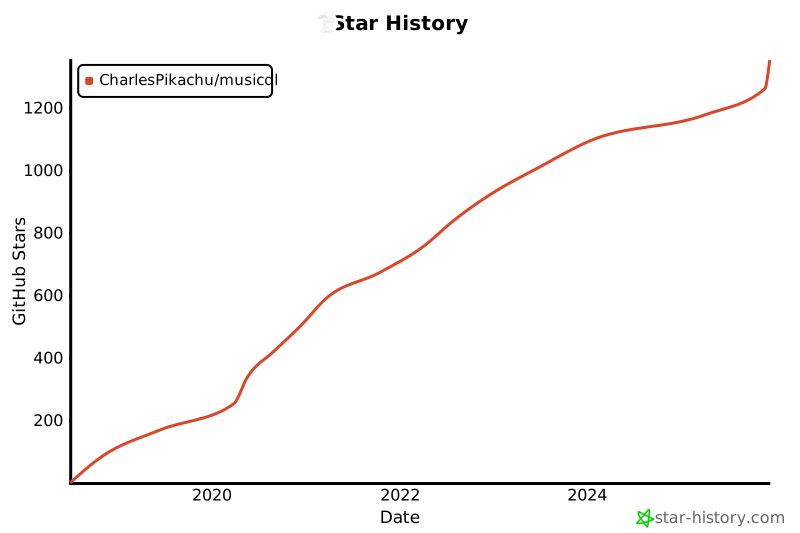
# 🌟 Star History
[](https://www.star-history.com/#CharlesPikachu/musicdl&type=date&legend=top-left)
# ☕ Appreciation (赞赏 / 打赏)
| WeChat Appreciation QR Code (微信赞赏码) | Alipay Appreciation QR Code (支付宝赞赏码) |
| :--------: | :----------: |
|  |
|  |
# 📢 WeChat Official Account (微信公众号):
Charles的皮卡丘 (*Charles_pikachu*)

|
# 📢 WeChat Official Account (微信公众号):
Charles的皮卡丘 (*Charles_pikachu*)