
 ## ✨ 核心特性
* **灵活的 RFT 模式:**
- 支持同步/异步、on-policy/off-policy 以及在线/离线训练。采样与训练可分离运行,并可在多设备上独立扩展。
## ✨ 核心特性
* **灵活的 RFT 模式:**
- 支持同步/异步、on-policy/off-policy 以及在线/离线训练。采样与训练可分离运行,并可在多设备上独立扩展。
 * **兼容 Agent 框架的工作流:**
- 支持拼接式和通用多轮智能体工作流。可自动收集来自模型 API 客户端(如 OpenAI)的训练数据,并兼容 AgentScope 等智能体框架。
* **兼容 Agent 框架的工作流:**
- 支持拼接式和通用多轮智能体工作流。可自动收集来自模型 API 客户端(如 OpenAI)的训练数据,并兼容 AgentScope 等智能体框架。
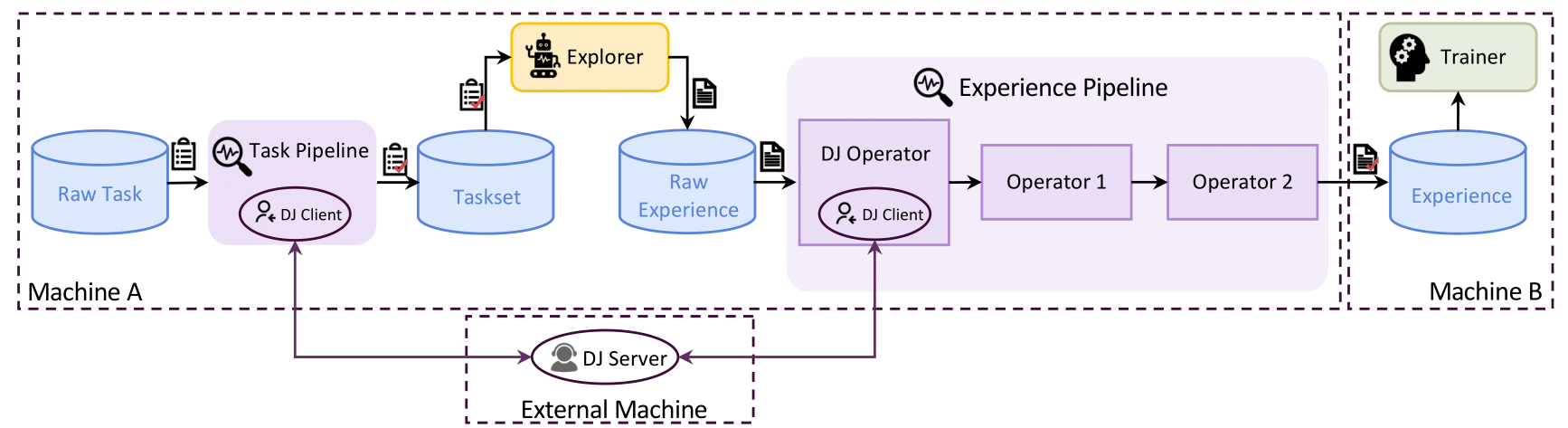
 * **强大的数据流水线:**
- 支持 rollout 和经验数据的流水线处理,贯穿 RFT 生命周期实现主动管理(优先级、清洗、增强等)。
* **强大的数据流水线:**
- 支持 rollout 和经验数据的流水线处理,贯穿 RFT 生命周期实现主动管理(优先级、清洗、增强等)。
 * **用户友好的框架设计:**
- 模块化、解耦架构,便于快速上手和二次开发。丰富的图形界面支持低代码使用。
* **用户友好的框架设计:**
- 模块化、解耦架构,便于快速上手和二次开发。丰富的图形界面支持低代码使用。
 ## 🛠️ Trinity-RFT 能做什么?
* **用 RL 训练智能体应用** [[教程]](https://modelscope.github.io/Trinity-RFT/main/tutorial/trinity_programming_guide.html#workflows-for-rl-environment-developers)
- 在 Workflow 中实现智能体-环境交互逻辑 ([示例1](https://modelscope.github.io/Trinity-RFT/main/tutorial/example_multi_turn.html),[示例2](https://modelscope.github.io/Trinity-RFT/main/tutorial/example_step_wise.html)),
- 或直接使用 Agent 框架(如 AgentScope)编写好的工作流 ([示例](https://modelscope.github.io/Trinity-RFT/main/tutorial/example_react.html))。
* **快速设计和验证 RL 算法** [[教程]](https://modelscope.github.io/Trinity-RFT/main/tutorial/trinity_programming_guide.html#algorithms-for-rl-algorithm-developers)
- 在简洁、可插拔的类中开发自定义 RL 算法(损失、采样及其他技巧)([示例](https://modelscope.github.io/Trinity-RFT/main/tutorial/example_react.html))。
* **为 RFT 定制数据集和数据流水线** [[教程]](https://modelscope.github.io/Trinity-RFT/main/tutorial/trinity_programming_guide.html#operators-for-data-developers)
- 设计任务定制数据集,构建数据流水线以支持清洗、增强和人类参与场景 ([示例](https://modelscope.github.io/Trinity-RFT/main/tutorial/example_data_functionalities.html))。
---
## 目录
- [快速上手](#getting-started)
- [第一步:安装](#step-1-installation)
- [第二步:准备数据集和模型](#step-2-prepare-dataset-and-model)
- [第三步:配置](#step-3-configurations)
- [第四步:运行 RFT 流程](#step-4-run-the-rft-process)
- [更多教程](#further-tutorials)
- [未来功能](#upcoming-features)
- [贡献指南](#contribution-guide)
- [致谢](#acknowledgements)
- [引用](#citation)
## 快速上手
> [!NOTE]
> 本项目正处于活跃开发阶段。欢迎提出意见和建议!
### 第一步:安装
#### 环境要求
在安装之前,请确保您的系统满足以下要求:
- **Python**:版本 3.10 至 3.12(含)
- **CUDA**:版本 12.4 至 12.8(含)
- **GPU**:至少 2 块 GPU
#### 方式 A:从源码安装(推荐)
这种方式可以让您完全控制项目代码,适合打算自定义功能或参与项目开发的用户。
##### 1. 克隆代码仓库
```bash
git clone https://github.com/modelscope/Trinity-RFT
cd Trinity-RFT
```
##### 2. 创建虚拟环境
选择以下任意一种方式,创建一个独立的 Python 环境:
###### 使用 Conda
```bash
conda create -n trinity python=3.10
conda activate trinity
```
###### 使用 venv
```bash
python3.10 -m venv .venv
source .venv/bin/activate
```
##### 3. 安装软件包
以“可编辑模式”安装,这样您可以修改代码而无需重新安装:
```bash
pip install -e ".[dev]"
```
##### 4. 安装 Flash Attention
Flash Attention 可以显著提升训练速度。编译需要几分钟时间,请耐心等待!
```bash
pip install flash-attn==2.8.1
```
如果安装过程中出现问题,可以尝试以下命令:
```bash
pip install flash-attn==2.8.1 --no-build-isolation
```
##### ⚡ 快速替代方案:使用 `uv`(可选)
如果您希望安装得更快,可以试试 [`uv`](https://github.com/astral-sh/uv),这是一个现代化的 Python 包安装工具:
```bash
uv venv
source .venv/bin/activate
uv pip install -e ".[dev]"
uv pip install flash-attn==2.8.1 --no-build-isolation
```
#### 方式 B:通过 pip 安装(快速开始)
如果您只是想使用这个工具,不需要修改代码,可以选择这种方式:
```bash
pip install trinity-rft==0.3.0
pip install flash-attn==2.8.1 # 单独安装 Flash Attention
# 也可以用 uv 来安装 trinity-rft
# uv pip install trinity-rft==0.3.0
# uv pip install flash-attn==2.8.1
```
#### 方式 C:使用 Docker
我们提供了 Docker 配置,可以免去复杂的环境设置。
```bash
git clone https://github.com/modelscope/Trinity-RFT
cd Trinity-RFT
# 构建 Docker 镜像
# 注意:您可以编辑 Dockerfile 来定制环境
# 例如,设置 pip 镜像源或设置 API 密钥
docker build -f scripts/docker/Dockerfile -t trinity-rft:latest .
# 启动容器
docker run -it \
--gpus all \
--shm-size="64g" \
--rm \
-v $PWD:/workspace \
-v
## 🛠️ Trinity-RFT 能做什么?
* **用 RL 训练智能体应用** [[教程]](https://modelscope.github.io/Trinity-RFT/main/tutorial/trinity_programming_guide.html#workflows-for-rl-environment-developers)
- 在 Workflow 中实现智能体-环境交互逻辑 ([示例1](https://modelscope.github.io/Trinity-RFT/main/tutorial/example_multi_turn.html),[示例2](https://modelscope.github.io/Trinity-RFT/main/tutorial/example_step_wise.html)),
- 或直接使用 Agent 框架(如 AgentScope)编写好的工作流 ([示例](https://modelscope.github.io/Trinity-RFT/main/tutorial/example_react.html))。
* **快速设计和验证 RL 算法** [[教程]](https://modelscope.github.io/Trinity-RFT/main/tutorial/trinity_programming_guide.html#algorithms-for-rl-algorithm-developers)
- 在简洁、可插拔的类中开发自定义 RL 算法(损失、采样及其他技巧)([示例](https://modelscope.github.io/Trinity-RFT/main/tutorial/example_react.html))。
* **为 RFT 定制数据集和数据流水线** [[教程]](https://modelscope.github.io/Trinity-RFT/main/tutorial/trinity_programming_guide.html#operators-for-data-developers)
- 设计任务定制数据集,构建数据流水线以支持清洗、增强和人类参与场景 ([示例](https://modelscope.github.io/Trinity-RFT/main/tutorial/example_data_functionalities.html))。
---
## 目录
- [快速上手](#getting-started)
- [第一步:安装](#step-1-installation)
- [第二步:准备数据集和模型](#step-2-prepare-dataset-and-model)
- [第三步:配置](#step-3-configurations)
- [第四步:运行 RFT 流程](#step-4-run-the-rft-process)
- [更多教程](#further-tutorials)
- [未来功能](#upcoming-features)
- [贡献指南](#contribution-guide)
- [致谢](#acknowledgements)
- [引用](#citation)
## 快速上手
> [!NOTE]
> 本项目正处于活跃开发阶段。欢迎提出意见和建议!
### 第一步:安装
#### 环境要求
在安装之前,请确保您的系统满足以下要求:
- **Python**:版本 3.10 至 3.12(含)
- **CUDA**:版本 12.4 至 12.8(含)
- **GPU**:至少 2 块 GPU
#### 方式 A:从源码安装(推荐)
这种方式可以让您完全控制项目代码,适合打算自定义功能或参与项目开发的用户。
##### 1. 克隆代码仓库
```bash
git clone https://github.com/modelscope/Trinity-RFT
cd Trinity-RFT
```
##### 2. 创建虚拟环境
选择以下任意一种方式,创建一个独立的 Python 环境:
###### 使用 Conda
```bash
conda create -n trinity python=3.10
conda activate trinity
```
###### 使用 venv
```bash
python3.10 -m venv .venv
source .venv/bin/activate
```
##### 3. 安装软件包
以“可编辑模式”安装,这样您可以修改代码而无需重新安装:
```bash
pip install -e ".[dev]"
```
##### 4. 安装 Flash Attention
Flash Attention 可以显著提升训练速度。编译需要几分钟时间,请耐心等待!
```bash
pip install flash-attn==2.8.1
```
如果安装过程中出现问题,可以尝试以下命令:
```bash
pip install flash-attn==2.8.1 --no-build-isolation
```
##### ⚡ 快速替代方案:使用 `uv`(可选)
如果您希望安装得更快,可以试试 [`uv`](https://github.com/astral-sh/uv),这是一个现代化的 Python 包安装工具:
```bash
uv venv
source .venv/bin/activate
uv pip install -e ".[dev]"
uv pip install flash-attn==2.8.1 --no-build-isolation
```
#### 方式 B:通过 pip 安装(快速开始)
如果您只是想使用这个工具,不需要修改代码,可以选择这种方式:
```bash
pip install trinity-rft==0.3.0
pip install flash-attn==2.8.1 # 单独安装 Flash Attention
# 也可以用 uv 来安装 trinity-rft
# uv pip install trinity-rft==0.3.0
# uv pip install flash-attn==2.8.1
```
#### 方式 C:使用 Docker
我们提供了 Docker 配置,可以免去复杂的环境设置。
```bash
git clone https://github.com/modelscope/Trinity-RFT
cd Trinity-RFT
# 构建 Docker 镜像
# 注意:您可以编辑 Dockerfile 来定制环境
# 例如,设置 pip 镜像源或设置 API 密钥
docker build -f scripts/docker/Dockerfile -t trinity-rft:latest .
# 启动容器
docker run -it \
--gpus all \
--shm-size="64g" \
--rm \
-v $PWD:/workspace \
-v