# beagle-im
**Repository Path**: xdj11/beagle-im
## Basic Information
- **Project Name**: beagle-im
- **Description**: No description available
- **Primary Language**: Unknown
- **License**: GPL-3.0
- **Default Branch**: master
- **Homepage**: None
- **GVP Project**: No
## Statistics
- **Stars**: 0
- **Forks**: 0
- **Created**: 2025-08-05
- **Last Updated**: 2025-08-05
## Categories & Tags
**Categories**: Uncategorized
**Tags**: None
## README
> # NOTE: Tigase BeagleIM has new home at [tigase.dev/tigase/_clients/beagle-im/](https://tigase.dev/tigase/_clients/beagle-im/) - please submit all issues/pull-requests there!
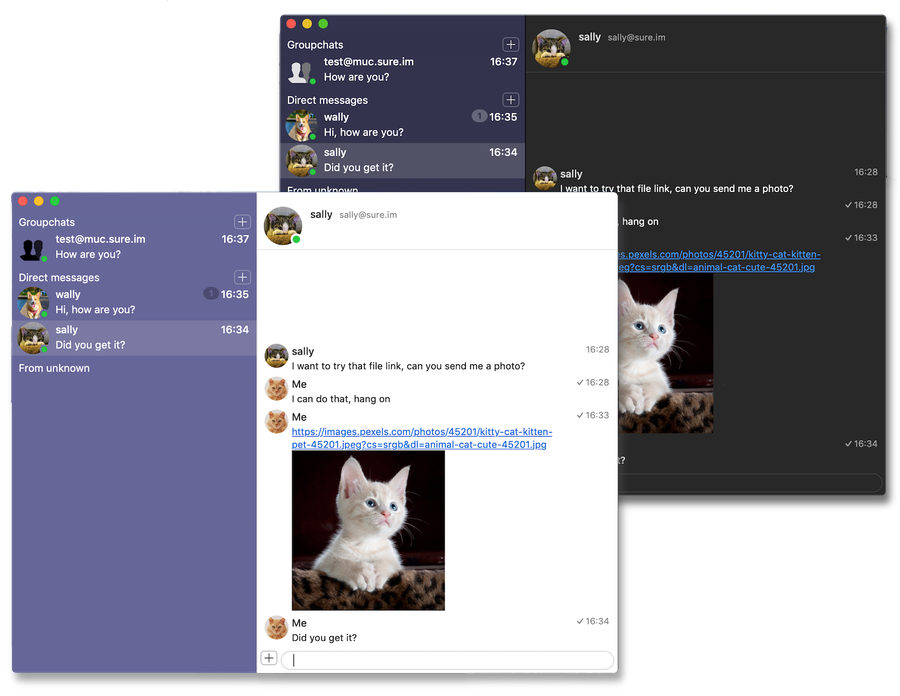
XMPP client for macOS 

# What it is
XMPP client for macOS based on [TigaseSwift XMPP library](https://github.com/tigaseinc/tigase-swift).
# Features
BeagleIM is powerful XMPP client with support for file transfer, VoIP and end-to-end encryption.
To learn more about the XMPP client features visit https://beagle.im.
# Support
When looking for support, please first search for answers to your question in the available online channels:
* Our online documentation: [Tigase Docs](https://docs.tigase.net)
* Existing tickets: [GitHub issues](https://github.com/tigase/beagle-im/issues)
If you didn't find an answer in the resources above, feel free to submit an [issue](https://github.com/tigase/beagle-im/issues/new/choose).
# Downloads
You can download it from the [Mac App Store](https://itunes.apple.com/us/app/beagleim-by-tigase-inc/id1445349494?l=pl&ls=1&mt=1) or using [Homebrew](https://brew.sh/) package manager:
```
brew tap tigase/tigase
brew install beagleim
```
See [our Homebrew tap](https://github.com/tigase/homebrew-tigase) for details
# Using software
After installing it, go to **Preferences** and add an account or register a new one. After that you can start using XMPP client for chatting over XMPP with your account.
# License
 Official Tigase repository is available at: https://github.com/tigase/beagle-im/.
Copyright (c) 2004 Tigase, Inc.
Licensed under GPL License Version 3. Other licensing options available upon request.
Official Tigase repository is available at: https://github.com/tigase/beagle-im/.
Copyright (c) 2004 Tigase, Inc.
Licensed under GPL License Version 3. Other licensing options available upon request.