# mobile-select **Repository Path**: xiangfz/mobile-select ## Basic Information - **Project Name**: mobile-select - **Description**: No description available - **Primary Language**: Unknown - **License**: MIT - **Default Branch**: master - **Homepage**: None - **GVP Project**: No ## Statistics - **Stars**: 0 - **Forks**: 0 - **Created**: 2026-01-16 - **Last Updated**: 2026-01-16 ## Categories & Tags **Categories**: Uncategorized **Tags**: None ## README

Mobile Select

Package version GitHub stars GitHub forks dependencies GitHub issues
download/months size MIT license

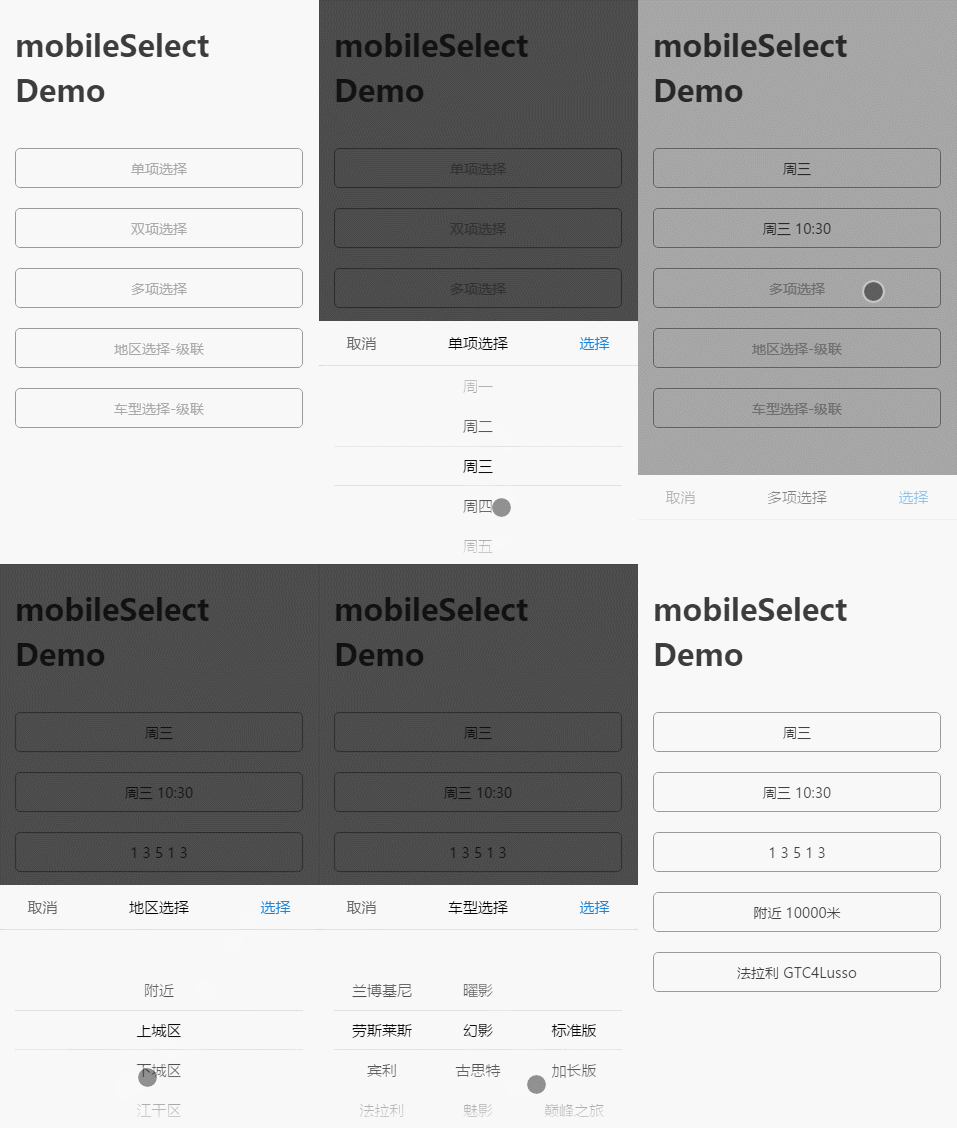
A multi-function mobile phone scrolling selector, support single to multi-select, support multi-level cascade, provide callback function, provide update function redraw, relocation function, compatible pc drag and so on. English Docs | [中文文档](https://github.com/onlyhom/mobile-select/blob/master/docs/README-CN.md) ## 🎨 Features - A mobile select component with vanilla js, do not dependent on any library - Can be passed to an ordinary array or json array - According to the length of the parameters passed, automatically render the corresponding number of columns, support for individual to multiple options - Automatic identification is cascading - Provide a custom callback function 'onChange()' - After each gesture sliding, it also provides a callback function 'onTransitionEnd()' - Provide update function, pass the other parameters to render again - Provide relocation function ## 📺 Preview #### Use mobile phone scan code to preview: #### Gif preview: ![Image text](https://github.com/onlyhom/img-folder/blob/master/gif/ms_preview_all.gif?raw=true) ## 🗂 Main package files ```text dist/ ├── mobile-select.umd.js (UMD, default) ├── mobile-select.esm.js (ECMAScript Module) ├── mobile-select.iife.js (Immediately-invoked Function Expression) ├── mobile-select.iife.min.js (Immediately-invoked Function Expression, compressed) ├── mobile-select.d.ts (TypeScript Declaration File) ├── style/ ├── mobile-select.css └── mobile-select.less ``` ## 🥤 Setup and Scripts #### script include: ```html ``` CDN Path: > https://unpkg.com/mobile-select@latest/dist/ > https://cdn.jsdelivr.net/npm/mobile-select@latest/dist/ #### npm / pnpm / yarn: Using npm: ```shell npm install mobile-select ``` Using pnpm: ```shell pnpm add mobile-select ``` Using Yarn: ```shell yarn add mobile-select ``` Import in your file: ```javascript import MobileSelect from "mobile-select"; ``` ## 🧩 Use in Platforms Demo

VanillaJS
📦Sandbox

Angular
📦Sandbox

React-ts
📦Sandbox

Vue
📦Sandbox

Svelte
📦Sandbox

Solid
📦Sandbox
## 📗 Quick Start #### ①Ordinary array format - Non-cascade ```html
``` #### ②Json format - Non-cascade ```html
``` ##### Example: ![Image text](https://github.com/onlyhom/img-folder/blob/master/gif/ms_no_cascade.gif?raw=true) #### ③Json format - Cascade ```html
``` ##### Example: ![Image text](https://raw.githubusercontent.com/onlyhom/img-folder/master/gif/%E7%BA%A7%E8%81%94.gif) #### ④How to use in React or Vue ##### Use in React demo: ```tsx import { useState, useRef, useEffect } from "react"; import MobileSelect from "mobile-select"; export default function MsComponent(props) { const tirggerRef = useRef(null); const [selectedVal, setSelectedVal] = useState(''); let msInstance = null; useEffect(() => { if(!msInstance){ msInstance = new MobileSelect({ wheels: [ { data: ["周日", "周一", "周二", "周三", "周四", "周五", "周六"] }, ], trigger: tirggerRef.current, triggerDisplayValue: false, // If you don't want to overwrite the HTML inside the trigger, you need to set this to false onChange: (data) => { setSelectedVal(JSON.stringify(data)); }, }); } return () => { msInstance?.destroy(); // Destroying instance }; }, []); return (
{ selectedVal || 'please select...' }
); } ``` ##### Use in Vue demo: ```html ``` #### ⑤Json format - Data field mapping ```html
``` ## Options | Option | Default | Type | Version | Description | | -----------------| -------------------------------------------| ---------| -----------| ----------------| | trigger | Required parameter. No default value | String or HTMLElement | | DOM selector string or HTMLElement element
e.g. '#my-trigger' or document.querySelector('#my-trigger') | | wheels | Required parameter. No default value | Array | | The data displayed on the wheel | | onChange | function(data, indexArr, instance){} | function |≥1.2.0 | A callback function after successful selected| | onTransitionEnd | function(data, indexArr, instance){} | function |≥1.2.0 | A callback function that after each gesture sliding| | onCancel | function(data, indexArr, instance){} | function | | A callback function after cancel selected, return last successful selected data| | onShow | function(instance){} | function | | A callback when the panel is show| | onHide | function(instance){} | function | | A callback when the panel is hidden| | title | `''` | String | | Component title | | position | [0,0,0,…] | Array | | Initialize positioning| | colWidth | [1,1,2,…] | Array | | col width setting | | connector | `' '` | String | | When there are multiple wheels, set the connection to connect multiple values, the default value is a space.| | initValue | `'1 2'` | String |≥1.2.0 | initial value, usually used in scene that show form data.
(If a 'connector' is configured, the 'initValue' should also be joining character strings by custom connector.) | | autoFocus | `false` | Boolean |≥1.2.0 | auto show panel after initialization| | ensureBtnText | `'确认'` | String | | The text content of comfirm button | | cancelBtnText | `'取消'` | String | | The text content of cancel button | | ensureBtnColor | `'#1e83d3'` | String | | The text color of the comfirm button | | cancelBtnColor | `'#666666'` | String | | The text color of the cancel button | | titleColor | `'#000000'` | String | | The text color of the component title | | titleBgColor | `'#ffffff'` | String | | The background color of the component title | | textColor | `'#000000'` | String | | The text color of the wheels | | bgColor | `'#ffffff'` | String | | The Wheels background color | | maskOpacity | `0.7` | Number | | Mask opacity | | keyMap | `{id:'id', value:'value', childs:'childs'`} | Object | | Field name mapping, applies to field names that do not match id, value, childs | | triggerDisplayValue | `true` | Boolean |≥1.2.0 | When the click is confirmed, the trigger's innerHtml becomes the selected data.
( If there are other elements in the trigger, you can set it to false. If you need to display data elsewhere, you can use the data returned by 'onChange()' to stitch yourself ) | | scrollSpeed | `1` | Number |≥1.2.0 | The (wheels)slider scroll speed | #### Tips: The meaning of the parameters returned in the callback function is as follows - **indexArr** is the currently selected index array, such as[0,0,1] - **data** is the currently selected json array, such as[{id:'1',value:'hello'},{id:'2',value:'world'}] ## Functions: | Function | Arguments | Version | Description | | ---------------- | --------------------- | ---|----------------------| | show() | no-argument | | show the compontent | | hide() | no-argument | | hide the compontent | | setTitle() | string | | Set the title of the component | | locatePosition() | sliderIndex, posIndex | | Pass the position array parameter, relocate the position of the wheel | | updateWheel() | sliderIndex, data | | Re-render the specified wheel | | updateWheels() | data | | Re-render the all wheel(Only used in cascading data forma) | | getValue() | no-argument | | Gets the value selected by the component | | setValue() | data (the parameter format should be same with `getValue()` return) | ≥1.4.0 | Set the value for the component | | destroy() | no-argument |≥1.2.0 | Destroying a component instance | #### Tips: The function parameters need to be passed as follows - SliderIndex represents the index of the wheel to be modified - PosIndex represents the location index #### ①Demo of use the function : ```html
``` Base example → Function after operation ![基础实例](https://github.com/onlyhom/img-folder/blob/master/QQscreenshot/before20170306234037.png?raw=true) ![功能函数操作后](https://github.com/onlyhom/img-folder/blob/master/QQscreenshot/after-20170306233954.png?raw=true) #### ②ajax asynchronous fill data ```html
``` ## Project demo: Use the onTransitionEnd (), onChange (), updateWheel (), locatePosition () functions to do the following: - choose the date of the day, not more than today has been too. - Select the time to take the car, the car must not exceed the time to take the car (including the date and time). ![Image text](https://github.com/onlyhom/img-folder/blob/master/gif/limit%E5%87%BD%E6%95%B0.gif?raw=true) ## 📘 License [MIT LICENSE](https://github.com/onlyhom/mobileSelect.js/blob/master/LICENSE) Copyright (c) 2017-present, LIHONG OU(onlyhom)