# pin_code_fields
**Repository Path**: xiaofan232/pin_code_fields
## Basic Information
- **Project Name**: pin_code_fields
- **Description**: A flutter package which will help you to generate pin code fields with beautiful design and animations. Can be useful for OTP or pin code inputs 🤓🤓
- **Primary Language**: Unknown
- **License**: MIT
- **Default Branch**: master
- **Homepage**: None
- **GVP Project**: No
## Statistics
- **Stars**: 0
- **Forks**: 0
- **Created**: 2020-07-07
- **Last Updated**: 2020-12-19
## Categories & Tags
**Categories**: Uncategorized
**Tags**: None
## README


 A flutter package which will help you to generate pin code fields with beautiful design and animations. Can be useful for OTP or pin code inputs 🤓🤓
## Features 💚
- Automatically focuses the next field on typing and focuses previous field on deletation
- Can be set to any length. (3-6 fields recommended)
- 3 different shapes for text fields
- Highly customizable
- 3 different types of animation for input texts
- Animated active, inactive, selected and disabled field color switching
- Autofocus option
- Otp-code pasting from clipboard
- iOS autofill support
- Error animation. Currently have shake animation only. Watch the example app for how to integrate.
- Works with Flutter's Form. You can use Form validator right off the bat.
- Get currently typed text and use your condition to validate it. (for example: if (currentText.length != 6 || currentText != "your desired code"))
## Properties 🔖
```Dart
/// length of how many cells there should be. 3-8 is recommended by me
final int length;
/// you already know what it does i guess :P default is false
final bool obsecureText;
/// returns the current typed text in the fields
final ValueChanged onChanged;
/// returns the typed text when all pins are set
final ValueChanged onCompleted;
/// returns the typed text when user presses done/next action on the keyboard
final ValueChanged onSubmitted;
/// the style of the text, default is [ fontSize: 20, color: Colors.black, fontWeight: FontWeight.bold]
final TextStyle textStyle;
/// background color for the whole row of pin code fields. Default is [Colors.white]
final Color backgroundColor;
/// This defines how the elements in the pin code field align. Default to [MainAxisAlignment.spaceBetween]
final MainAxisAlignment mainAxisAlignment;
/// [AnimationType] for the text to appear in the pin code field. Default is [AnimationType.slide]
final AnimationType animationType;
/// Duration for the animation. Default is [Duration(milliseconds: 150)]
final Duration animationDuration;
/// [Curve] for the animation. Default is [Curves.easeInOut]
final Curve animationCurve;
/// [TextInputType] for the pin code fields. default is [TextInputType.visiblePassword]
final TextInputType textInputType;
/// If the pin code field should be autofocused or not. Default is [false]
final bool autoFocus;
/// Should pass a [FocusNode] to manage it from the parent
final FocusNode focusNode;
/// A list of [TextInputFormatter] that goes to the TextField
final List inputFormatters;
/// Enable or disable the Field. Default is [true]
final bool enabled;
/// [TextEditingController] to control the text manually. Sets a default [TextEditingController()] object if none given
final TextEditingController controller;
/// Auto dismiss the keyboard upon inputting the value for the last field. Default is [true]
final bool autoDismissKeyboard;
/// Auto dispose the [controller] and [FocusNode] upon the destruction of widget from the widget tree. Default is [true]
final bool autoDisposeControllers;
/// Configures how the platform keyboard will select an uppercase or lowercase keyboard.
/// Only supports text keyboards, other keyboard types will ignore this configuration. Capitalization is locale-aware.
/// - Copied from 'https://api.flutter.dev/flutter/services/TextCapitalization-class.html'
/// Default is [TextCapitalization.none]
final TextCapitalization textCapitalization;
final TextInputAction textInputAction;
/// Triggers the error animation
final StreamController errorAnimationController;
/// Configuration for paste dialog. Read more [DialogConfig]
final DialogConfig dialogConfig;
/// Theme for the pin cells. Read more [PinTheme]
final PinTheme pinTheme;
/// Callback method to validate if text can be pasted. This is helpful when we need to validate text before pasting.
/// e.g. validate if text is number. Default will be pasted as received.
final bool Function(String text) beforeTextPaste;
/// Validator for the [TextFormField]
final FormFieldValidator validator;
/// enables auto validation for the [TextFormField]
/// Default is false
final bool autoValidate;
/// The vertical padding from the [PinCodeTextField] to the error text
/// Default is 16.
final double errorTextSpace;
```
**PinTheme**
```Dart
/// Colors of the input fields which have inputs. Default is [Colors.green]
final Color activeColor;
/// Color of the input field which is currently selected. Default is [Colors.blue]
final Color selectedColor;
/// Colors of the input fields which don't have inputs. Default is [Colors.red]
final Color inactiveColor;
/// Colors of the input fields if the [PinCodeTextField] is disabled. Default is [Colors.grey]
final Color disabledColor;
/// Colors of the input fields which have inputs. Default is [Colors.green]
final Color activeFillColor;
/// Color of the input field which is currently selected. Default is [Colors.blue]
final Color selectedFillColor;
/// Colors of the input fields which don't have inputs. Default is [Colors.red]
final Color inactiveFillColor;
/// Border radius of each pin code field
final BorderRadius borderRadius;
/// [height] for the pin code field. default is [50.0]
final double fieldHeight;
/// [width] for the pin code field. default is [40.0]
final double fieldWidth;
/// Border width for the each input fields. Default is [2.0]
final double borderWidth;
/// this defines the shape of the input fields. Default is underlined
final PinCodeFieldShape shape;
```
**DialogConfig**
```Dart
/// title of the [AlertDialog] while pasting the code. Default to [Paste Code]
final String dialogTitle;
/// content of the [AlertDialog] while pasting the code. Default to ["Do you want to paste this code "]
final String dialogContent;
/// Affirmative action text for the [AlertDialog]. Default to "Paste"
final String affirmativeText;
/// Negative action text for the [AlertDialog]. Default to "Cancel"
final String negativeText;
```
## Contributors ✨
Thanks to everyone whoever suggested their thoughts to improve this package. And special thanks goes to these people:
## Getting Started ⚡️
#### Demo
A flutter package which will help you to generate pin code fields with beautiful design and animations. Can be useful for OTP or pin code inputs 🤓🤓
## Features 💚
- Automatically focuses the next field on typing and focuses previous field on deletation
- Can be set to any length. (3-6 fields recommended)
- 3 different shapes for text fields
- Highly customizable
- 3 different types of animation for input texts
- Animated active, inactive, selected and disabled field color switching
- Autofocus option
- Otp-code pasting from clipboard
- iOS autofill support
- Error animation. Currently have shake animation only. Watch the example app for how to integrate.
- Works with Flutter's Form. You can use Form validator right off the bat.
- Get currently typed text and use your condition to validate it. (for example: if (currentText.length != 6 || currentText != "your desired code"))
## Properties 🔖
```Dart
/// length of how many cells there should be. 3-8 is recommended by me
final int length;
/// you already know what it does i guess :P default is false
final bool obsecureText;
/// returns the current typed text in the fields
final ValueChanged onChanged;
/// returns the typed text when all pins are set
final ValueChanged onCompleted;
/// returns the typed text when user presses done/next action on the keyboard
final ValueChanged onSubmitted;
/// the style of the text, default is [ fontSize: 20, color: Colors.black, fontWeight: FontWeight.bold]
final TextStyle textStyle;
/// background color for the whole row of pin code fields. Default is [Colors.white]
final Color backgroundColor;
/// This defines how the elements in the pin code field align. Default to [MainAxisAlignment.spaceBetween]
final MainAxisAlignment mainAxisAlignment;
/// [AnimationType] for the text to appear in the pin code field. Default is [AnimationType.slide]
final AnimationType animationType;
/// Duration for the animation. Default is [Duration(milliseconds: 150)]
final Duration animationDuration;
/// [Curve] for the animation. Default is [Curves.easeInOut]
final Curve animationCurve;
/// [TextInputType] for the pin code fields. default is [TextInputType.visiblePassword]
final TextInputType textInputType;
/// If the pin code field should be autofocused or not. Default is [false]
final bool autoFocus;
/// Should pass a [FocusNode] to manage it from the parent
final FocusNode focusNode;
/// A list of [TextInputFormatter] that goes to the TextField
final List inputFormatters;
/// Enable or disable the Field. Default is [true]
final bool enabled;
/// [TextEditingController] to control the text manually. Sets a default [TextEditingController()] object if none given
final TextEditingController controller;
/// Auto dismiss the keyboard upon inputting the value for the last field. Default is [true]
final bool autoDismissKeyboard;
/// Auto dispose the [controller] and [FocusNode] upon the destruction of widget from the widget tree. Default is [true]
final bool autoDisposeControllers;
/// Configures how the platform keyboard will select an uppercase or lowercase keyboard.
/// Only supports text keyboards, other keyboard types will ignore this configuration. Capitalization is locale-aware.
/// - Copied from 'https://api.flutter.dev/flutter/services/TextCapitalization-class.html'
/// Default is [TextCapitalization.none]
final TextCapitalization textCapitalization;
final TextInputAction textInputAction;
/// Triggers the error animation
final StreamController errorAnimationController;
/// Configuration for paste dialog. Read more [DialogConfig]
final DialogConfig dialogConfig;
/// Theme for the pin cells. Read more [PinTheme]
final PinTheme pinTheme;
/// Callback method to validate if text can be pasted. This is helpful when we need to validate text before pasting.
/// e.g. validate if text is number. Default will be pasted as received.
final bool Function(String text) beforeTextPaste;
/// Validator for the [TextFormField]
final FormFieldValidator validator;
/// enables auto validation for the [TextFormField]
/// Default is false
final bool autoValidate;
/// The vertical padding from the [PinCodeTextField] to the error text
/// Default is 16.
final double errorTextSpace;
```
**PinTheme**
```Dart
/// Colors of the input fields which have inputs. Default is [Colors.green]
final Color activeColor;
/// Color of the input field which is currently selected. Default is [Colors.blue]
final Color selectedColor;
/// Colors of the input fields which don't have inputs. Default is [Colors.red]
final Color inactiveColor;
/// Colors of the input fields if the [PinCodeTextField] is disabled. Default is [Colors.grey]
final Color disabledColor;
/// Colors of the input fields which have inputs. Default is [Colors.green]
final Color activeFillColor;
/// Color of the input field which is currently selected. Default is [Colors.blue]
final Color selectedFillColor;
/// Colors of the input fields which don't have inputs. Default is [Colors.red]
final Color inactiveFillColor;
/// Border radius of each pin code field
final BorderRadius borderRadius;
/// [height] for the pin code field. default is [50.0]
final double fieldHeight;
/// [width] for the pin code field. default is [40.0]
final double fieldWidth;
/// Border width for the each input fields. Default is [2.0]
final double borderWidth;
/// this defines the shape of the input fields. Default is underlined
final PinCodeFieldShape shape;
```
**DialogConfig**
```Dart
/// title of the [AlertDialog] while pasting the code. Default to [Paste Code]
final String dialogTitle;
/// content of the [AlertDialog] while pasting the code. Default to ["Do you want to paste this code "]
final String dialogContent;
/// Affirmative action text for the [AlertDialog]. Default to "Paste"
final String affirmativeText;
/// Negative action text for the [AlertDialog]. Default to "Cancel"
final String negativeText;
```
## Contributors ✨
Thanks to everyone whoever suggested their thoughts to improve this package. And special thanks goes to these people:
## Getting Started ⚡️
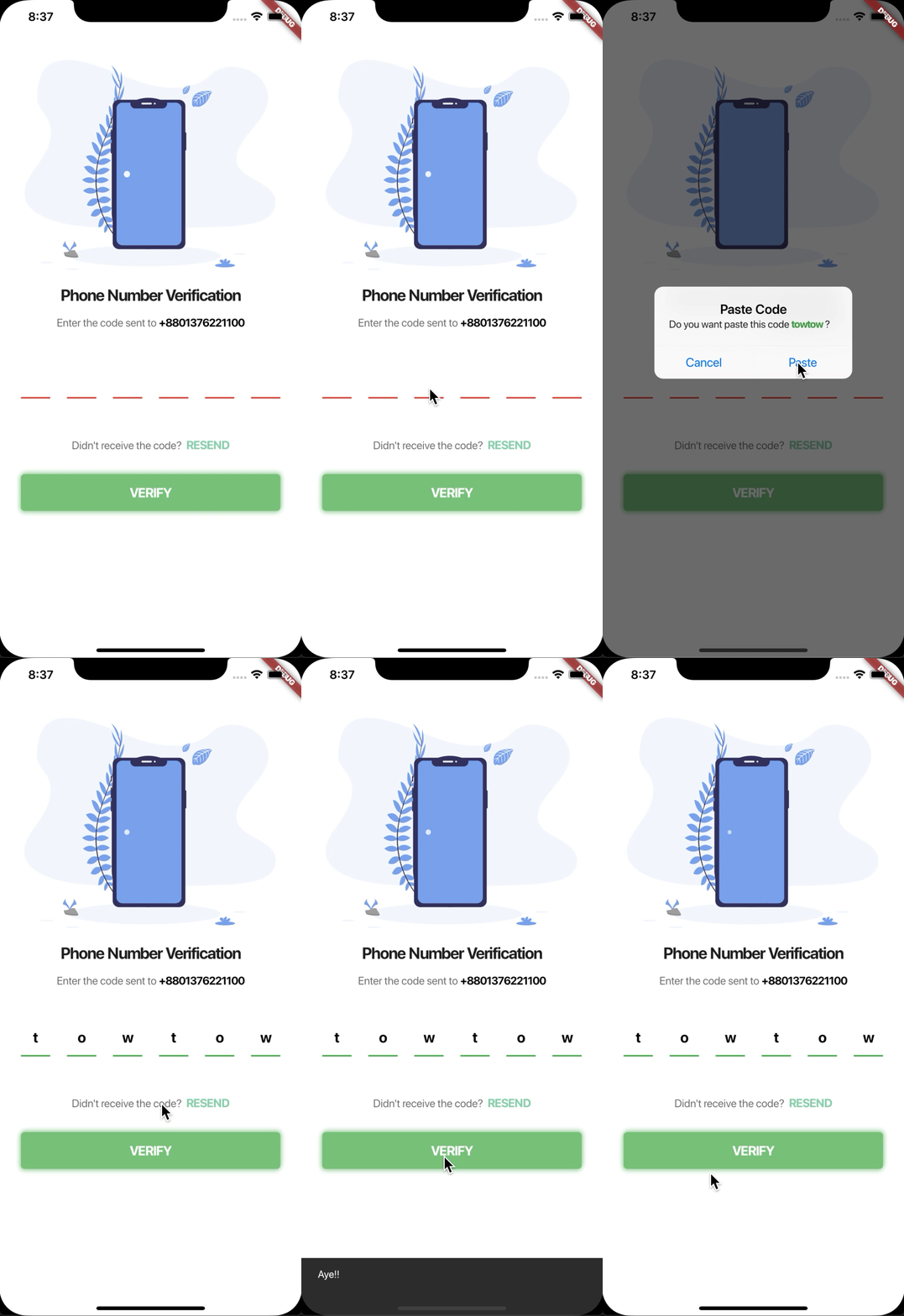
#### Demo


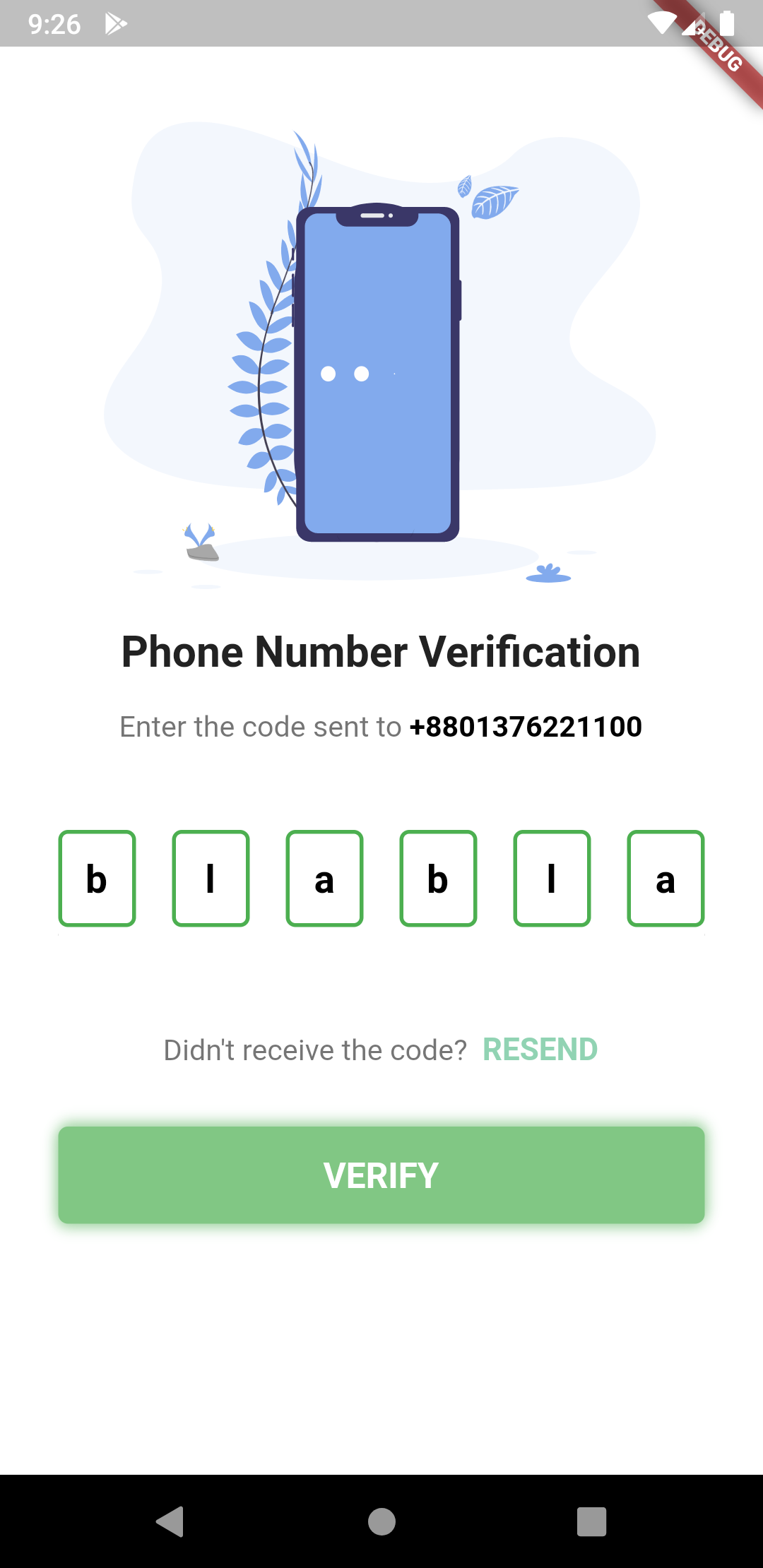
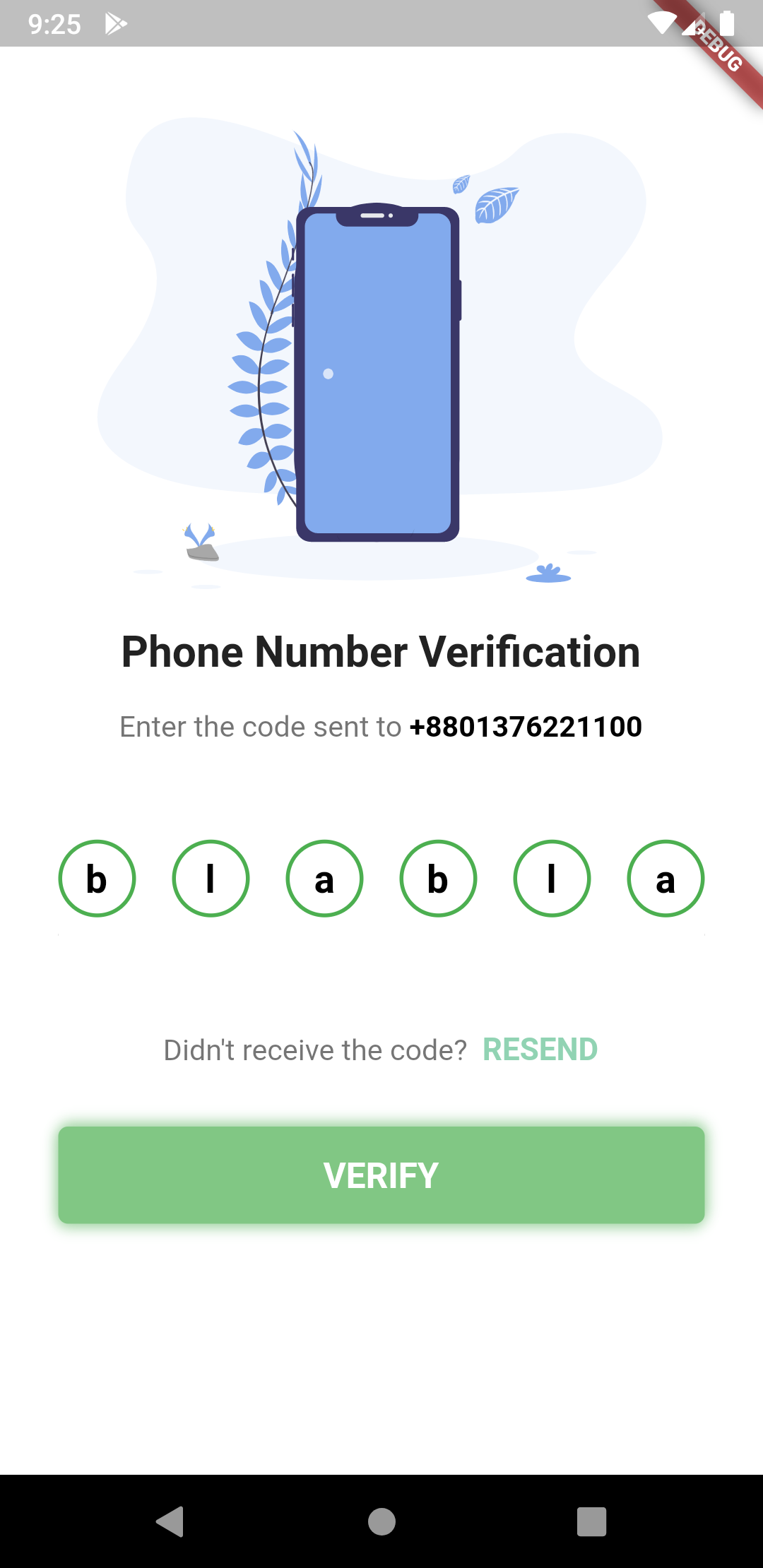
 #### Different Shapes
 **The pin code text field widget example**
```Dart
PinCodeTextField(
length: 6,
obsecureText: false,
animationType: AnimationType.fade,
pinTheme: PinTheme(
shape: PinCodeFieldShape.box,
borderRadius: BorderRadius.circular(5),
fieldHeight: 50,
fieldWidth: 40,
activeFillColor: Colors.white,
),
animationDuration: Duration(milliseconds: 300),
backgroundColor: Colors.blue.shade50,
enableActiveFill: true,
errorAnimationController: errorController,
controller: textEditingController,
onCompleted: (v) {
print("Completed");
},
onChanged: (value) {
print(value);
setState(() {
currentText = value;
});
},
beforeTextPaste: (text) {
print("Allowing to paste $text");
//if you return true then it will show the paste confirmation dialog. Otherwise if false, then nothing will happen.
//but you can show anything you want here, like your pop up saying wrong paste format or etc
return true;
},
)
```
**Shape can be among these 3 types**
```Dart
enum PinCodeFieldShape { box, underline, circle }
```
**Animations can be among these 3 types**
```Dart
enum AnimationType { scale, slide, fade, none }
```
**Trigger Error animation**
**The pin code text field widget example**
```Dart
PinCodeTextField(
length: 6,
obsecureText: false,
animationType: AnimationType.fade,
pinTheme: PinTheme(
shape: PinCodeFieldShape.box,
borderRadius: BorderRadius.circular(5),
fieldHeight: 50,
fieldWidth: 40,
activeFillColor: Colors.white,
),
animationDuration: Duration(milliseconds: 300),
backgroundColor: Colors.blue.shade50,
enableActiveFill: true,
errorAnimationController: errorController,
controller: textEditingController,
onCompleted: (v) {
print("Completed");
},
onChanged: (value) {
print(value);
setState(() {
currentText = value;
});
},
beforeTextPaste: (text) {
print("Allowing to paste $text");
//if you return true then it will show the paste confirmation dialog. Otherwise if false, then nothing will happen.
//but you can show anything you want here, like your pop up saying wrong paste format or etc
return true;
},
)
```
**Shape can be among these 3 types**
```Dart
enum PinCodeFieldShape { box, underline, circle }
```
**Animations can be among these 3 types**
```Dart
enum AnimationType { scale, slide, fade, none }
```
**Trigger Error animation**
1. Create a StreamController
```Dart
StreamController errorController = StreamController();
```
2. And pass the controller like this.
```Dart
PinCodeTextField(
length: 6,
obsecureText: false,
animationType: AnimationType.fade,
animationDuration: Duration(milliseconds: 300),
errorAnimationController: errorController, // Pass it here
onChanged: (value) {
setState(() {
currentText = value;
});
},
)
```
3. Then you can trigger the animation just by writing this:
```Dart
errorController.add(ErrorAnimationType.shake); // This will shake the pin code field
```
**This full code is from the example folder. You can run the example to see.**
```Dart
class MyApp extends StatelessWidget {
// This widget is the root of your application.
@override
Widget build(BuildContext context) {
return MaterialApp(
title: 'Flutter Demo',
theme: ThemeData(
primarySwatch: Colors.blue,
),
home: PinCodeVerificationScreen(
"+8801376221100"), // a random number, please don't call xD
);
}
}
class PinCodeVerificationScreen extends StatefulWidget {
final String phoneNumber;
PinCodeVerificationScreen(this.phoneNumber);
@override
_PinCodeVerificationScreenState createState() =>
_PinCodeVerificationScreenState();
}
class _PinCodeVerificationScreenState extends State {
var onTapRecognizer;
TextEditingController textEditingController = TextEditingController()
..text = "123456";
StreamController errorController;
bool hasError = false;
String currentText = "";
final GlobalKey scaffoldKey = GlobalKey();
final formKey = GlobalKey();
@override
void initState() {
onTapRecognizer = TapGestureRecognizer()
..onTap = () {
Navigator.pop(context);
};
errorController = StreamController();
super.initState();
}
@override
void dispose() {
errorController.close();
super.dispose();
}
@override
Widget build(BuildContext context) {
return Scaffold(
backgroundColor: Colors.blue.shade50,
key: scaffoldKey,
body: GestureDetector(
onTap: () {
FocusScope.of(context).requestFocus(FocusNode());
},
child: Container(
height: MediaQuery.of(context).size.height,
width: MediaQuery.of(context).size.width,
child: ListView(
children: [
SizedBox(height: 30),
Container(
height: MediaQuery.of(context).size.height / 3,
child: FlareActor(
"assets/otp.flr",
animation: "otp",
fit: BoxFit.fitHeight,
alignment: Alignment.center,
),
),
// Image.asset(
// 'assets/verify.png',
// height: MediaQuery.of(context).size.height / 3,
// fit: BoxFit.fitHeight,
// ),
SizedBox(height: 8),
Padding(
padding: const EdgeInsets.symmetric(vertical: 8.0),
child: Text(
'Phone Number Verification',
style: TextStyle(fontWeight: FontWeight.bold, fontSize: 22),
textAlign: TextAlign.center,
),
),
Padding(
padding:
const EdgeInsets.symmetric(horizontal: 30.0, vertical: 8),
child: RichText(
text: TextSpan(
text: "Enter the code sent to ",
children: [
TextSpan(
text: widget.phoneNumber,
style: TextStyle(
color: Colors.black,
fontWeight: FontWeight.bold,
fontSize: 15)),
],
style: TextStyle(color: Colors.black54, fontSize: 15)),
textAlign: TextAlign.center,
),
),
SizedBox(
height: 20,
),
Form(
key: formKey,
child: Padding(
padding: const EdgeInsets.symmetric(
vertical: 8.0, horizontal: 30),
child: PinCodeTextField(
length: 6,
obsecureText: false,
animationType: AnimationType.fade,
validator: (v) {
if (v.length < 3) {
return "I'm from validator";
} else {
return null;
}
},
pinTheme: PinTheme(
shape: PinCodeFieldShape.box,
borderRadius: BorderRadius.circular(5),
fieldHeight: 50,
fieldWidth: 40,
activeFillColor:
hasError ? Colors.orange : Colors.white,
),
animationDuration: Duration(milliseconds: 300),
backgroundColor: Colors.blue.shade50,
enableActiveFill: true,
errorAnimationController: errorController,
controller: textEditingController,
onCompleted: (v) {
print("Completed");
},
onChanged: (value) {
print(value);
setState(() {
currentText = value;
});
},
beforeTextPaste: (text) {
print("Allowing to paste $text");
//if you return true then it will show the paste confirmation dialog. Otherwise if false, then nothing will happen.
//but you can show anything you want here, like your pop up saying wrong paste format or etc
return true;
},
)),
),
Padding(
padding: const EdgeInsets.symmetric(horizontal: 30.0),
child: Text(
hasError ? "*Please fill up all the cells properly" : "",
style: TextStyle(color: Colors.red, fontSize: 12, fontWeight: FontWeight.w400),
),
),
SizedBox(
height: 20,
),
RichText(
textAlign: TextAlign.center,
text: TextSpan(
text: "Didn't receive the code? ",
style: TextStyle(color: Colors.black54, fontSize: 15),
children: [
TextSpan(
text: " RESEND",
recognizer: onTapRecognizer,
style: TextStyle(
color: Color(0xFF91D3B3),
fontWeight: FontWeight.bold,
fontSize: 16))
]),
),
SizedBox(
height: 14,
),
Container(
margin:
const EdgeInsets.symmetric(vertical: 16.0, horizontal: 30),
child: ButtonTheme(
height: 50,
child: FlatButton(
onPressed: () {
formKey.currentState.validate();
// conditions for validating
if (currentText.length != 6 || currentText != "towtow") {
errorController.add(ErrorAnimationType
.shake); // Triggering error shake animation
setState(() {
hasError = true;
});
} else {
setState(() {
hasError = false;
scaffoldKey.currentState.showSnackBar(SnackBar(
content: Text("Aye!!"),
duration: Duration(seconds: 2),
));
});
}
},
child: Center(
child: Text(
"VERIFY".toUpperCase(),
style: TextStyle(
color: Colors.white,
fontSize: 18,
fontWeight: FontWeight.bold),
)),
),
),
decoration: BoxDecoration(
color: Colors.green.shade300,
borderRadius: BorderRadius.circular(5),
boxShadow: [
BoxShadow(
color: Colors.green.shade200,
offset: Offset(1, -2),
blurRadius: 5),
BoxShadow(
color: Colors.green.shade200,
offset: Offset(-1, 2),
blurRadius: 5)
]),
),
SizedBox(
height: 16,
),
Row(
mainAxisAlignment: MainAxisAlignment.center,
children: [
FlatButton(
child: Text("Clear"),
onPressed: () {
textEditingController.clear();
},
),
FlatButton(
child: Text("Set Text"),
onPressed: () {
textEditingController.text = "123456";
},
),
],
)
],
),
),
),
);
}
}
```


