# searchable_dropdown
**Repository Path**: xiaofan232/searchable_dropdown
## Basic Information
- **Project Name**: searchable_dropdown
- **Description**: Simple and robust Dropdown with item search feature, making it possible to use an offline item list or filtering URL for easy customization.
- **Primary Language**: Unknown
- **License**: MIT
- **Default Branch**: master
- **Homepage**: None
- **GVP Project**: No
## Statistics
- **Stars**: 0
- **Forks**: 0
- **Created**: 2020-08-20
- **Last Updated**: 2020-12-19
## Categories & Tags
**Categories**: Uncategorized
**Tags**: None
## README
Flutter DropdownSearch
Flutter simple and robust DropdownSearch with item search feature, making it possible to use an offline item list or filtering URL for easy customization.


Key Features •
Examples •
License
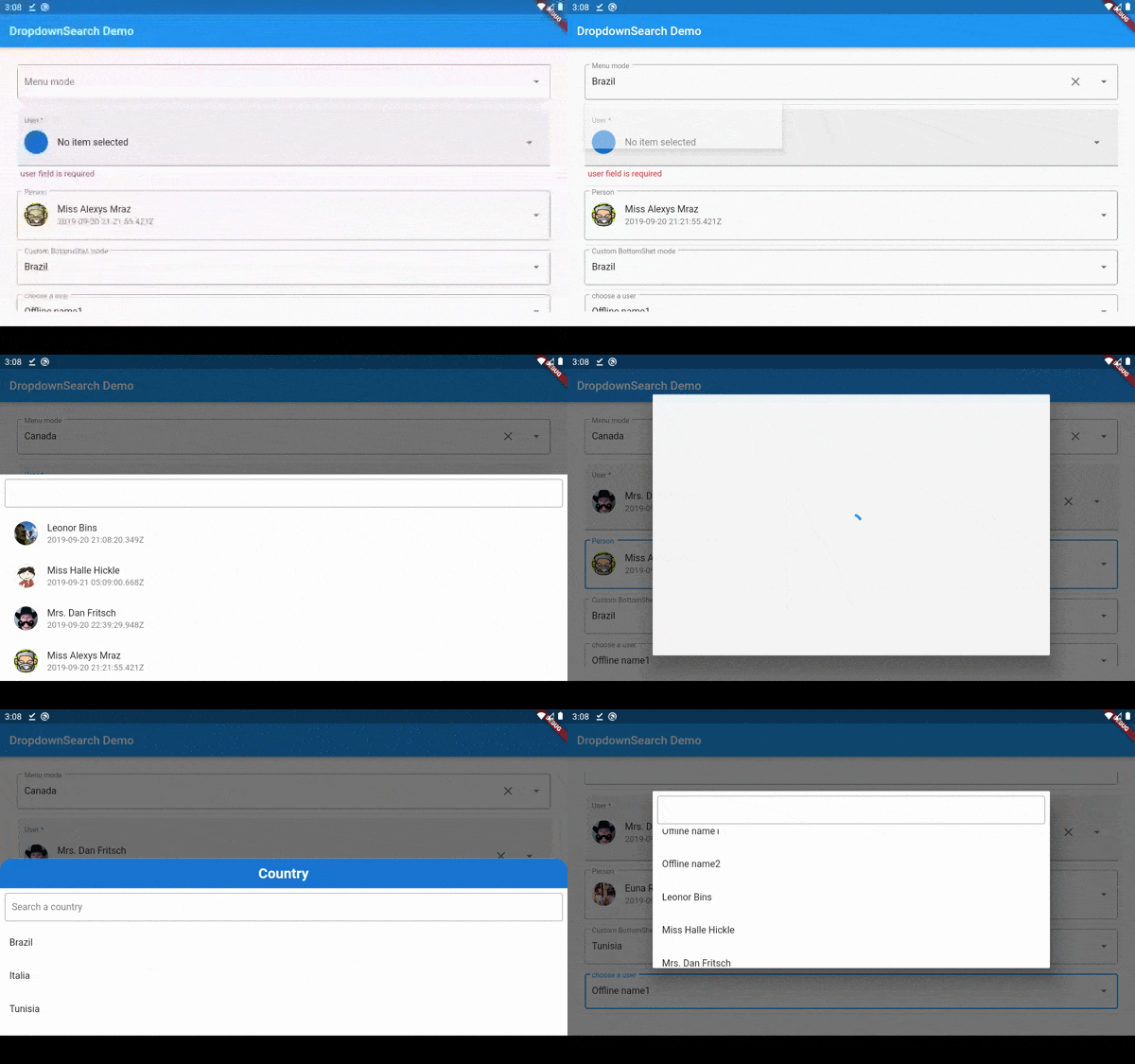
## Key Features
* Online and offline items
* Searchable dropdown
* Three dropdown mode: Menu/ BottomSheet/ Dialog
* Material dropdown
* Easy customizable UI
* Handle Light and Dark theme
* Easy implementation into statelessWidget

## packages.yaml
```yaml
dropdown_search:
```
## Import
```dart
import 'package:dropdown_search/dropdown_search.dart';
```
## Simple implementation
```dart
DropdownSearch(
mode: Mode.MENU,
showSelectedItem: true,
items: ["Brazil", "Italia (Disabled)", "Tunisia", 'Canada'],
label: "Menu mode",
hint: "country in menu mode",
popupItemDisabled: (String s) => s.startsWith('I'),
onChanged: print,
selectedItem: "Brazil"),
```
## customize showed field (itemAsString)
```dart
DropdownSearch(
label: "Name",
onFind: (String filter) => getData(filter),
itemAsString: (UserModel u) => u.userAsStringByName(),
onChanged: (UserModel data) => print(data),
),
DropdownSearch(
label: "Name",
onFind: (String filter) => getData(filter),
itemAsString: (UserModel u) => u.userAsStringById(),
onChanged: (UserModel data) => print(data),
),
```
## customize Filter Function
```dart
DropdownSearch(
label: "Name",
filterFn: (user, filter) => user.userFilterByCreationDate(filter),
onFind: (String filter) => getData(filter),
itemAsString: (UserModel u) => u.userAsStringByName(),
onChanged: (UserModel data) => print(data),
),
```
## customize Search Mode
```dart
DropdownSearch(
mode: Mode.BOTTOM_SHEET,
label: "Name",
onFind: (String filter) => getData(filter),
itemAsString: (UserModel u) => u.userAsString(),
onChanged: (UserModel data) => print(data),
),
```
## Validation
```dart
DropdownSearch(
items: ["Brazil", "France", "Tunisia", "Canada"],
label: "Country",
onChanged: print,
selectedItem: "Tunisia",
validator: (String item) {
if (item == null)
return "Required field";
else if (item == "Brazil")
return "Invalid item";
else
return null;
},
);
```
## Endpoint implementation (using [Dio package](https://pub.dev/packages/dio))
```dart
DropdownSearch(
label: "Name",
onFind: (String filter) async {
var response = await Dio().get(
"http://5d85ccfb1e61af001471bf60.mockapi.io/user",
queryParameters: {"filter": filter},
);
var models = UserModel.fromJsonList(response.data);
return models;
},
onChanged: (UserModel data) {
print(data);
},
);
```
## Layout customization
You can customize the layout of the DropdownSearch and its items. [EXAMPLE](https://github.com/salim-lachdhaf/searchable_dropdown/tree/master/example#custom-layout-endpoint-example)
| Properties | Description|
| ------------ | ------------ |
|`label`|DropDownSearch label|
|`showSearchBox`|show/hide the search box|
|`isFilteredOnline`|true if the filter on items is applied onlie (via API)|
|`showClearButton`| show/hide clear selected item|
|`items`| offline items list|
|`selectedItem`| selected item|
|`onFind`|function that returns item from API|
|`onChanged`|called when a new item is selected|
|`dropdownBuilder`|to customize list of items UI|
|`popupItemBuilder`|to customize selected item|
|`validator`|function to apply the validation formula|
|`searchBoxDecoration`|decoration for the search box|
|`popupBackgroundColor`|background color for the dialog/menu/bottomSheet|
|`popupTitle`|Custom widget for the popup title|
|`itemAsString`|customize the fields the be shown|
|`filterFn`|custom filter function|
|`enabled`|enable/disable dropdownSearch|
|`mode`| MENU / DIALOG/ BOTTOM_SHEET|
|`maxHeight`| the max height for dialog/bottomSheet/Menu|
|`dialogMaxWidth`| the max width for the dialog|
|`showSelectedItem`| manage selected item visibility (if true, the selected item will be highlighted)|
|`compareFn`| Function(T item, T selectedItem), custom comparing function|
|`dropdownSearchDecoration`| DropdownSearch input decoration|
|`emptyBuilder`| custom layout for empty results|
|`loadingBuilder`| custom layout for loading items|
|`errorBuilder`| custom layout for error|
|`autoFocusSearchBox`| the search box will be focused if true|
|`popupShape`| custom shape for the popup|
|`autoValidate`|handle auto validation|
|`onSaved`|An optional method to call with the final value when the form is saved via|
|`validator`|An optional method that validates an input. Returns an error string to display if the input is invalid, or null otherwise.|
|`clearButton`|customize clear button widget|
|`dropDownButton`|customize dropdown button widget|
|`dropdownBuilderSupportsNullItem`|If true, the dropdownBuilder will continue the uses of material behavior. This will be useful if you want to handle a custom UI only if the item !=null|
|`popupItemDisabled`|defines if an item of the popup is enabled or not, if the item is disabled, it cannot be clicked|
|`popupBarrierColor`|set a custom color for the popup barrier|
# Attention
To use a template as an item type, and you don't want to use a custom fonction **itemAsString** and **compareFn** you **need** to implement **toString**, **equals** and **hashcode**, as shown below:
```dart
class UserModel {
final String id;
final DateTime createdAt;
final String name;
final String avatar;
UserModel({this.id, this.createdAt, this.name, this.avatar});
factory UserModel.fromJson(Map json) {
if (json == null) return null;
return UserModel(
id: json["id"],
createdAt:
json["createdAt"] == null ? null : DateTime.parse(json["createdAt"]),
name: json["name"],
avatar: json["avatar"],
);
}
static List fromJsonList(List list) {
if (list == null) return null;
return list.map((item) => UserModel.fromJson(item)).toList();
}
///this method will prevent the override of toString
String userAsString() {
return '#${this.id} ${this.name}';
}
///this method will prevent the override of toString
bool userFilterByCreationDate(String filter) {
return this?.createdAt?.toString()?.contains(filter);
}
///custom comparing function to check if two users are equal
bool isEqual(UserModel model) {
return this?.id == model?.id;
}
@override
String toString() => name;
}
```
# [View more Examples](https://github.com/salim-lachdhaf/searchable_dropdown/tree/master/example)
## Support
If this plugin was useful to you, helped you to deliver your app, saved you a lot of time, or you just want to support the project, I would be very grateful if you buy me a cup of coffee.
 ## License
MIT
## License
MIT