# tuios
**Repository Path**: xiongyejun/tuios
## Basic Information
- **Project Name**: tuios
- **Description**: No description available
- **Primary Language**: Unknown
- **License**: MIT
- **Default Branch**: main
- **Homepage**: None
- **GVP Project**: No
## Statistics
- **Stars**: 0
- **Forks**: 0
- **Created**: 2025-12-18
- **Last Updated**: 2025-12-18
## Categories & Tags
**Categories**: Uncategorized
**Tags**: None
## README
TUIOS - Terminal UI Operating System




TUIOS is a terminal-based window manager that provides a modern, efficient interface for managing multiple terminal sessions. Built with Go using the Charm stack (Bubble Tea v2 and Lipgloss v2), TUIOS offers a vim-like modal interface with comprehensive keyboard shortcuts, workspace support, and mouse interaction.
## Documentation
- **[Keybindings Reference](docs/KEYBINDINGS.md)** - Complete keyboard shortcut reference
- **[Configuration Guide](docs/CONFIGURATION.md)** - Customize keybindings and settings
- **[CLI Reference](docs/CLI_REFERENCE.md)** - Command-line options and flags
- **[Web Terminal](docs/WEB.md)** - Browser-based terminal access
- **[Architecture Guide](docs/ARCHITECTURE.md)** - Technical architecture and design
Table of Contents
- [TUIOS - Terminal UI Operating System](#tuios-terminal-ui-operating-system)
- [Documentation](#documentation)
- [Installation](#installation)
- [Features](#features)
- [Quick Start](#quick-start)
- [Tape Scripting](#tape-scripting)
- [Architecture](#architecture)
- [Performance](#performance)
- [Troubleshooting](#troubleshooting)
- [Roadmap](#roadmap)
- [Development](#development)
- [Star History](#star-history)
- [License](#license)
- [Acknowledgments](#acknowledgments)
## Installation
### Package Managers
**Homebrew (macOS/Linux):**
```bash
# TUIOS terminal window manager
brew install tuios
# tuios-web (separate binary for web terminal server)
brew install tuios-web
```
**Arch Linux (AUR):**
```bash
# TUIOS terminal window manager
yay -S tuios-bin
# tuios-web (separate binary for web terminal server)
yay -S tuios-web-bin
```
**Nix:**
```bash
# Run directly
nix run github:Gaurav-Gosain/tuios#tuios
# Or add to your configuration
nix-shell -p tuios
```
### Quick Install Script
**Linux/macOS:**
```bash
curl -fsSL https://raw.githubusercontent.com/Gaurav-Gosain/tuios/main/install.sh | bash
```
**Alternative Methods:**
- **[GitHub Releases](https://github.com/Gaurav-Gosain/tuios/releases)** - Download pre-built binaries for both `tuios` and `tuios-web`
- **Go Install:**
- `go install github.com/Gaurav-Gosain/tuios/cmd/tuios@latest` (main binary)
- `go install github.com/Gaurav-Gosain/tuios/cmd/tuios-web@latest` (web server)
- **Docker:** `docker run -it --rm ghcr.io/gaurav-gosain/tuios:latest`
- **Build from Source:** See [Development](#development) section below
**Requirements:**
- A terminal with true color support (most modern terminals)
- Go 1.24+ (if building from source)
## Features

- **Multiple Terminal Windows**: Create and manage multiple terminal sessions
- **9 Workspaces**: Organize windows across independent workspaces
- **Modal Interface**: Vim-inspired Window Management and Terminal modes
- **BSP Tiling**: Binary Space Partitioning with automatic spiral layout (alternating V/H splits)
- **Vim-Style Copy Mode**: Navigate scrollback (10,000 lines), search, and select text with vim keybindings
- **Customizable Keybindings**: TOML configuration file with full keybinding customization (Kitty protocol support)
- **Mouse Support**: Click, drag, and resize with full mouse interaction
- **Daemon Mode**: Persistent sessions with detach/reattach (like tmux)
- **SSH Server Mode**: Remote terminal multiplexing with per-connection isolation
- **Web Terminal Mode**: Access TUIOS from any browser with WebGL rendering
- **Smart Performance**: Style caching, viewport culling, adaptive refresh (60Hz/30Hz)
## Quick Start
**Launch TUIOS:**
```bash
tuios
```
**Essential Keys:**
*Window Management Mode (default):*
- n - Create new window
- i or Enter - Enter Terminal Mode
*Works from any mode:*
- Ctrl + B c - Create new window
- Ctrl + B ? - Toggle help overlay
- Ctrl + B [ - Enter copy mode (vim-style scrollback)
- Ctrl + B d or Esc - Return to Window Management Mode
- Ctrl + B q - Quit
*Alternative (Ctrl + B t submenu):*
- Ctrl + B t n - Create new window
- Ctrl + B t x - Close window
- Ctrl + B t r - Rename window
**Daemon Mode (Session Persistence):**
```bash
tuios new mysession # Create a new persistent session
tuios attach mysession # Attach to existing session
tuios ls # List all sessions
tuios kill-session mysession # Kill a session
tuios kill-server # Stop the daemon
```
**SSH Server Mode:**
```bash
tuios ssh # Start on localhost:2222
tuios ssh --host 0.0.0.0 --port 8022 # Custom host/port
ssh -p 2222 localhost # Connect
```
**Web Terminal Mode** (requires separate `tuios-web` binary):
```bash
tuios-web # Start on http://localhost:7681
tuios-web --port 8080 # Custom port
tuios-web --theme dracula # With theme
open http://localhost:7681 # Open in browser
```
Features: WebGL rendering, WebTransport/WebSocket, bundled Nerd Fonts, settings panel.
**Install tuios-web:**
```bash
# Homebrew
brew install tuios-web
# AUR
yay -S tuios-web-bin
# Go install
go install github.com/Gaurav-Gosain/tuios/cmd/tuios-web@latest
```
**Tape Scripting (Automation):**
```bash
# Run tape script in headless mode (background)
tuios tape run examples/demo.tape
# Run tape script with visible TUI (watch automation)
tuios tape play examples/demo.tape
# Validate tape file syntax
tuios tape validate examples/demo.tape
```
**Configuration:**
```bash
tuios config edit # Edit keybindings in $EDITOR
tuios config path # Print config file location
tuios config reset # Reset to defaults
tuios keybinds list # View all current keybindings
tuios keybinds list-custom # View only your customizations
```
**Shell Completions:**
```bash
# Bash
tuios completion bash > /etc/bash_completion.d/tuios
# Zsh
tuios completion zsh > "${fpath[1]}/_tuios"
# Fish
tuios completion fish > ~/.config/fish/completions/tuios.fish
# PowerShell
tuios completion powershell > tuios.ps1
```
For complete keybindings, configuration options, and CLI flags, see the [Documentation](#documentation) section above.
## Tape Scripting
TUIOS supports automation through `.tape` files - a simple, declarative format for automating interactions. Perfect for:
- Recording and replaying terminal workflows
- Automated testing
- Demo recording
- CI/CD automation
- Terminal workflow documentation
- Setup of development environments
**Basic Tape File Syntax:**
```tape
# Create windows and windows
NewWindow
Sleep 500ms
# Type text with delays
Type "echo 'Hello, TUIOS!'"
Enter
# Key presses and combinations
Ctrl+B
Type "n"
# Navigation and window management
SwitchWorkspace 2
Sleep 1s
# Sleep between commands
Sleep 500ms
```
**Supported Commands:**
- `Type "text"` - Type text
- `Type@100ms "text"` - Type with custom speed
- `Enter`, `Space`, `Tab`, `Escape` - Special keys
- `Backspace`, `Delete` - Editing keys
- `Up`, `Down`, `Left`, `Right` - Navigation
- `Ctrl+X`, `Alt+X`, `Shift+X` - Key combinations
- `Sleep 500ms` or `Sleep 2s` - Delays
- `NewWindow`, `CloseWindow`, `ToggleTiling` - Window management
- `SwitchWorkspace N` - Switch to workspace
- `MoveToWorkspace N` - Move window to workspace
- `Focus`, `Split` - Window manipulation
**Running Tape Scripts:**
```bash
# Headless mode (background) - useful for automation
tuios tape run script.tape
# Interactive mode (visible TUI) - watch it happen
tuios tape play script.tape
# Validate syntax
tuios tape validate script.tape
```
**Example Tapes:**
- `examples/simple.tape` - Basic tape file
- `examples/demo.tape` - Comprehensive demo
- `examples/advanced.tape` - Complex scenarios
## Architecture
TUIOS is built on the Bubble Tea v2 framework following the Model-View-Update pattern. For detailed architecture diagrams and technical documentation, see [Architecture Guide](docs/ARCHITECTURE.md).
**Key Technologies:**
- **[Bubble Tea v2](https://github.com/charmbracelet/bubbletea)** - Event-driven TUI framework
- **[Lipgloss v2](https://github.com/charmbracelet/lipgloss)** - Terminal styling
- **[go-pty](https://github.com/aymanbagabas/go-pty)** - Cross-platform PTY interface
- **[Wish v2](https://github.com/charmbracelet/wish)** - SSH server
- **Vendored VT** - ANSI/VT100 terminal emulator
**Core Components:**
- **Window Manager** ([`internal/app/os.go`](./internal/app/os.go)) - Central state and workspace orchestration
- **Terminal Emulation** ([`internal/vt/`](./internal/vt/)) - ANSI parser with 10,000 line scrollback
- **Rendering Engine** ([`internal/app/render.go`](./internal/app/render.go)) - Layer composition with viewport culling
- **Input System** ([`internal/input/`](./internal/input/)) - Modal routing and 100+ configurable keybindings
- **Configuration** ([`internal/config/`](./internal/config/)) - TOML-based keybinding customization
## Performance
**Optimization Strategies:**
- Smart caching with sequence-based change detection
- Viewport culling for off-screen windows
- Adaptive refresh rates (60Hz focused, 30Hz background)
- Memory pooling for strings, buffers, and styles
- LRU style cache (40-60% allocation reduction)
- Frame skipping when no changes detected
## Troubleshooting
**Common Issues:**
- **Colors not displaying**: Set `COLORTERM=truecolor` environment variable
- **SSH connection issues**: Use `--host 0.0.0.0` for remote access, check firewall settings
- **Performance with many windows**: Enable tiling mode (t key)
**Debug Mode:** Press Ctrl + L to view system logs.
## Roadmap
**Completed:**
- ✓ Multiple windows with 9 workspaces
- ✓ Automatic tiling and snapping
- ✓ Vim-style copy mode with search
- ✓ SSH server mode
- ✓ Performance optimizations
- ✓ TOML configuration system with custom keybindings
- ✓ Session persistence (daemon mode)
**Planned:**
- [ ] Theme and color customization
- [ ] Split panes and tabs
- [ ] Plugin system
## Development
Contributions are welcome! Feel free to open issues or pull requests.
**Build from Source:**
```bash
git clone https://github.com/gaurav-gosain/tuios.git
cd tuios
go build -o tuios ./cmd/tuios
./tuios
```
**Run Tests:**
```bash
go test ./...
```
**Support:** [](https://ko-fi.com/B0B81N8V1R)
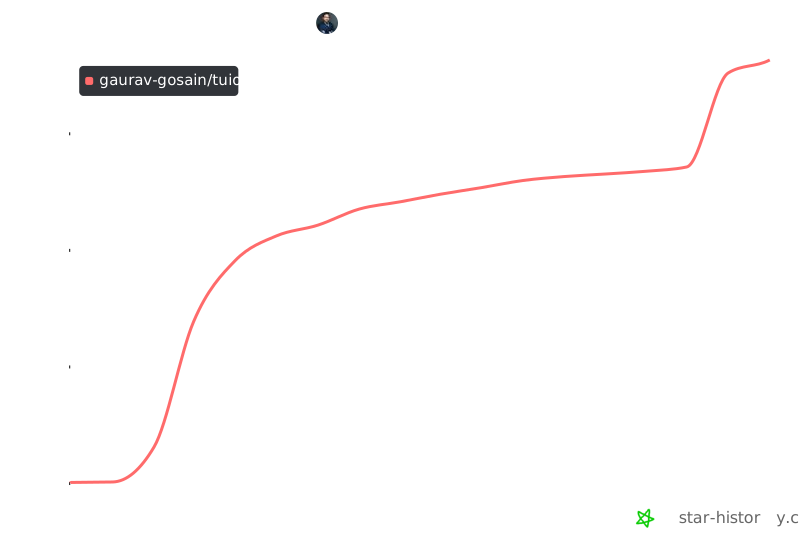
## Star History
[](https://star-history.com/#Gaurav-Gosain/tuios&Date)










## License
This project is licensed under the MIT License -
see the [LICENSE](LICENSE) file for details.
## Acknowledgments
- The Charm team for Bubble Tea and Lipgloss libraries
- The Go terminal ecosystem for PTY and VT implementations
- The vim and tmux communities for interface design inspiration