# neural-backed-decision-trees
**Repository Path**: xlk0101/neural-backed-decision-trees
## Basic Information
- **Project Name**: neural-backed-decision-trees
- **Description**: No description available
- **Primary Language**: Unknown
- **License**: MIT
- **Default Branch**: master
- **Homepage**: None
- **GVP Project**: No
## Statistics
- **Stars**: 0
- **Forks**: 0
- **Created**: 2021-03-30
- **Last Updated**: 2021-03-30
## Categories & Tags
**Categories**: Uncategorized
**Tags**: None
## README
# Neural-Backed Decision Trees · [Site](http://nbdt.alvinwan.com) · [Paper](http://nbdt.alvinwan.com/paper/) · [Blog](https://towardsdatascience.com/what-explainable-ai-fails-to-explain-and-how-we-fix-that-1e35e37bee07) · [Video](https://youtu.be/fQ2eNFCSRiA)
[](https://colab.research.google.com/github/alvinwan/neural-backed-decision-trees/blob/master/examples/load_pretrained_nbdts.ipynb)
Alvin Wan, \*Lisa Dunlap, \*Daniel Ho, Jihan Yin, Scott Lee, Henry Jin, Suzanne Petryk, Sarah Adel Bargal, Joseph E. Gonzalez
*denotes equal contribution
NBDTs match or outperform modern neural networks on CIFAR10, CIFAR100, TinyImagenet200, ImageNet and better generalize to unseen classes by up to 16%. Furthermore, our loss improves the original model’s accuracy by up to 2%. We attain 76.60% on ImageNet. [See the 3-minute YouTube summary](https://youtu.be/fQ2eNFCSRiA).
**Table of Contents**
- [Quickstart: Running and loading NBDTs](#quickstart)
- [Convert your own neural network into a decision tree](#convert-neural-networks-to-decision-trees)
- [Training and evaluation](#training-and-evaluation)
- [Results](#results)
- [Customize Repository for Your Application](#customize-repository-for-your-application)
- [Citation](#citation)
**Updates**
- **2/2/21 Talks**: released a [3-minute YouTube video summarizing NBDT](https://youtu.be/fQ2eNFCSRiA), along with a [15-minute technical talk](https://youtu.be/bC5n1Yov7D0)
- **1/28/21 arXiv**: updated [arXiv](https://arxiv.org/pdf/2004.00221.pdf) with latest results, improving neural network accuracy, generalization, and interpretability (4 new human studies, 600 responses each).
- **1/22/21 Accepted**: NBDT was accepted to ICLR 2021. Repository has been updated with new results and supporting code.
# Quickstart
## Running Pretrained NBDT on Examples
Don't want to download? Try your own images on the [web demo](http://nbdt.alvinwan.com/demo/).
`pip install nbdt`, and run our CLI on any image. Below, we run a CIFAR10 model on images from the web, which outputs both the class prediction and all the intermediate decisions. Although the *Bear* and *Zebra* classes were not seen at train time, the model still correctly picks *Animal* over *Vehicle* for both.
```bash
# install our cli
pip install nbdt
# Cat picture - can be a local image path or an image URL
nbdt https://images.pexels.com/photos/126407/pexels-photo-126407.jpeg?auto=compress&cs=tinysrgb&dpr=2&w=32
# Prediction: cat // Decisions: animal (Confidence: 99.47%), chordate (Confidence: 99.20%), carnivore (Confidence: 99.42%), cat (Confidence: 99.86%)
# Zebra picture (not in CIFAR10) - picks the closest CIFAR10 animal, which is horse
nbdt https://images.pexels.com/photos/750539/pexels-photo-750539.jpeg?auto=compress&cs=tinysrgb&dpr=2&h=32
# Prediction: horse // Decisions: animal (Confidence: 99.31%), ungulate (Confidence: 99.25%), horse (Confidence: 99.62%)
# Bear picture (not in CIFAR10)
nbdt https://images.pexels.com/photos/158109/kodiak-brown-bear-adult-portrait-wildlife-158109.jpeg?auto=compress&cs=tinysrgb&dpr=2&w=32
# Prediction: dog // Decisions: animal (Confidence: 99.51%), chordate (Confidence: 99.35%), carnivore (Confidence: 99.69%), dog (Confidence: 99.22%)
```

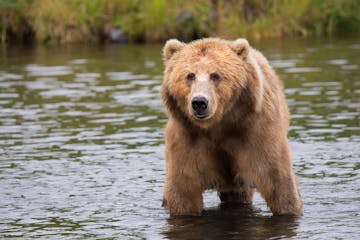
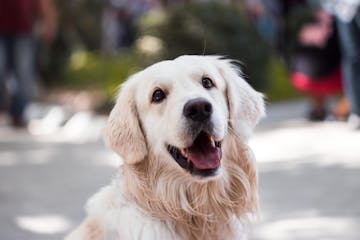
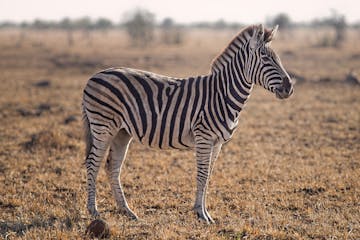 *Pictures are taken from [pexels.com](http://pexels.com), which are free to use per the [Pexels license](https://www.pexels.com/photo-license/).*
## Loading Pretrained NBDTs in Code
Don't want to download? Try inference on a pre-filled [Google Colab Notebook](https://colab.research.google.com/github/alvinwan/neural-backed-decision-trees/blob/master/examples/load_pretrained_nbdts.ipynb).
`pip install nbdt` to use our models. We have pretrained models for ResNet18 and WideResNet28x10 for CIFAR10, CIFAR100, and TinyImagenet200. See [Models](#models) for adding other models. See [nbdt-pytorch-image-models](https://github.com/alvinwan/nbdt-pytorch-image-models) for EfficientNet on ImageNet.
[Try below script on Google Colab](https://colab.research.google.com/github/alvinwan/neural-backed-decision-trees/blob/master/examples/load_pretrained_nbdts.ipynb)
```python
from nbdt.model import SoftNBDT
from nbdt.models import ResNet18, wrn28_10_cifar10, wrn28_10_cifar100, wrn28_10 # use wrn28_10 for TinyImagenet200
model = wrn28_10_cifar10()
model = SoftNBDT(
pretrained=True,
dataset='CIFAR10',
arch='wrn28_10_cifar10',
model=model)
```
**Example in ~30 lines**: See [`nbdt/bin/nbdt`](https://github.com/alvinwan/neural-backed-decision-trees/blob/master/nbdt/bin/nbdt), which loads the pretrained model, loads an image, and runs inference on the image in ~30 lines. This file is the executable `nbdt` in the previous section. Try this in a [Google Colab Notebook](https://colab.research.google.com/github/alvinwan/neural-backed-decision-trees/blob/master/examples/load_pretrained_nbdts.ipynb).
# Convert Neural Networks to Decision Trees
**To convert your neural network** into a neural-backed decision tree, perform the following 3 steps:
1. **First**, if you haven't already, pip install the `nbdt` utility:
```bash
pip install nbdt
```
2. **Second, train the original neural network with an NBDT loss**. All NBDT losses work by wrapping the original criterion. To demonstrate this, we wrap the original loss `criterion` with a soft tree supervision loss.
```python
from nbdt.loss import SoftTreeSupLoss
criterion = SoftTreeSupLoss(dataset='CIFAR10', criterion=criterion) # `criterion` is your original loss function e.g., nn.CrossEntropyLoss
```
3. **Third, perform inference or validate using an NBDT model**. All NBDT models work by wrapping the original model you trained in step 2. To demonstrate this, we wrap the `model` with a custom NBDT wrapper below. Note this model wrapper is *only* for inference and validation, *not* for train time.
```python
from nbdt.model import SoftNBDT
model = SoftNBDT(dataset='CIFAR10', model=model) # `model` is your original model
```
**Example integration with repository**: See [`nbdt-pytorch-image-models`](https://github.com/alvinwan/nbdt-pytorch-image-models), which applies this 3-step integration to a popular image classification repository `pytorch-image-models`.
*Pictures are taken from [pexels.com](http://pexels.com), which are free to use per the [Pexels license](https://www.pexels.com/photo-license/).*
## Loading Pretrained NBDTs in Code
Don't want to download? Try inference on a pre-filled [Google Colab Notebook](https://colab.research.google.com/github/alvinwan/neural-backed-decision-trees/blob/master/examples/load_pretrained_nbdts.ipynb).
`pip install nbdt` to use our models. We have pretrained models for ResNet18 and WideResNet28x10 for CIFAR10, CIFAR100, and TinyImagenet200. See [Models](#models) for adding other models. See [nbdt-pytorch-image-models](https://github.com/alvinwan/nbdt-pytorch-image-models) for EfficientNet on ImageNet.
[Try below script on Google Colab](https://colab.research.google.com/github/alvinwan/neural-backed-decision-trees/blob/master/examples/load_pretrained_nbdts.ipynb)
```python
from nbdt.model import SoftNBDT
from nbdt.models import ResNet18, wrn28_10_cifar10, wrn28_10_cifar100, wrn28_10 # use wrn28_10 for TinyImagenet200
model = wrn28_10_cifar10()
model = SoftNBDT(
pretrained=True,
dataset='CIFAR10',
arch='wrn28_10_cifar10',
model=model)
```
**Example in ~30 lines**: See [`nbdt/bin/nbdt`](https://github.com/alvinwan/neural-backed-decision-trees/blob/master/nbdt/bin/nbdt), which loads the pretrained model, loads an image, and runs inference on the image in ~30 lines. This file is the executable `nbdt` in the previous section. Try this in a [Google Colab Notebook](https://colab.research.google.com/github/alvinwan/neural-backed-decision-trees/blob/master/examples/load_pretrained_nbdts.ipynb).
# Convert Neural Networks to Decision Trees
**To convert your neural network** into a neural-backed decision tree, perform the following 3 steps:
1. **First**, if you haven't already, pip install the `nbdt` utility:
```bash
pip install nbdt
```
2. **Second, train the original neural network with an NBDT loss**. All NBDT losses work by wrapping the original criterion. To demonstrate this, we wrap the original loss `criterion` with a soft tree supervision loss.
```python
from nbdt.loss import SoftTreeSupLoss
criterion = SoftTreeSupLoss(dataset='CIFAR10', criterion=criterion) # `criterion` is your original loss function e.g., nn.CrossEntropyLoss
```
3. **Third, perform inference or validate using an NBDT model**. All NBDT models work by wrapping the original model you trained in step 2. To demonstrate this, we wrap the `model` with a custom NBDT wrapper below. Note this model wrapper is *only* for inference and validation, *not* for train time.
```python
from nbdt.model import SoftNBDT
model = SoftNBDT(dataset='CIFAR10', model=model) # `model` is your original model
```
**Example integration with repository**: See [`nbdt-pytorch-image-models`](https://github.com/alvinwan/nbdt-pytorch-image-models), which applies this 3-step integration to a popular image classification repository `pytorch-image-models`.
Example integration with a random neural network in 16 lines [click to expand]
You can also include arbitrary image classification neural networks not explicitly supported in this repository. For example, after installing [`pretrained-models.pytorch`](https://github.com/Cadene/pretrained-models.pytorch#quick-examples) using pip, you can instantiate and pass any pretrained model into our NBDT utility functions.
```python
import torch.nn as nn
from nbdt.model import SoftNBDT
from nbdt.loss import SoftTreeSupLoss
from nbdt.hierarchy import generate_hierarchy
import pretrainedmodels
model = pretrainedmodels.__dict__['fbresnet152'](num_classes=1000, pretrained='imagenet')
# 1. generate hierarchy from pretrained model
generate_hierarchy(dataset='Imagenet1000', arch='fbresnet152', model=model)
# 2. Fine-tune model with tree supervision loss
criterion = nn.CrossEntropyLoss()
criterion = SoftTreeSupLoss(dataset='Imagenet1000', hierarchy='induced-fbresnet152', criterion=criterion)
# 3. Run inference using embedded decision rules
model = SoftNBDT(model=model, dataset='Imagenet1000', hierarchy='induced-fbresnet152')
```
For more information on generating different hierarchies, see [Induced Hierarchy](#induced-hierarchy).
Want to build and use your own induced hierarchy? [click to expand]
Use the `nbdt-hierarchy` utility to generate a new induced hierarchy from a pretrained model.
```bash
nbdt-hierarchy --arch=efficientnet_b0 --dataset=Imagenet1000
```
Then, pass the hierarchy name to the loss and models. You may alternatively pass the fully-qualified `path_graph` path.
```python
from nbdt.loss import SoftTreeSupLoss
from nbdt.model import SoftNBDT
criterion = SoftTreeSupLoss(dataset='Imagenet1000', criterion=criterion, hierarchy='induced-efficientnet_b0')
model = SoftNBDT(dataset='Imagenet1000', model=model, hierarchy='induced-efficientnet_b0')
```
For more information on generating different hierarchies, see [Induced Hierarchy](#induced-hierarchy).
See how it works and how to configure. [click to expand]
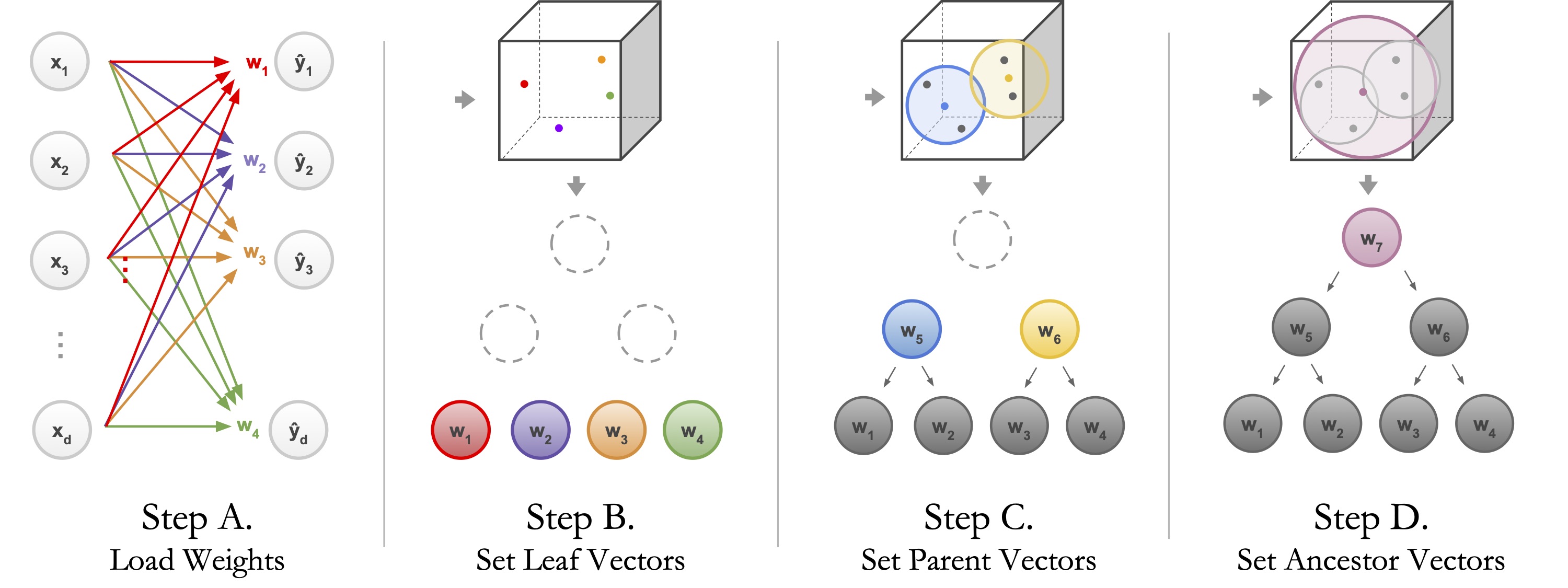
The script loads the pretrained model (Step A), populates the leaves of the tree with fully-connected layer weights (Step B) and performs hierarchical agglomerative clustering (Step C). Note that the above command can be rerun with different architectures, different datasets, or random neural network checkpoints to produce different hierarchies.
```bash
# different architecture: ResNet18
nbdt-hierarchy --arch=ResNet18 --dataset=CIFAR10
# different dataset: ImageNet
nbdt-hierarchy --arch=efficientnet_b7 --dataset=Imagenet1000
# arbitrary checkpoint
wget https://download.pytorch.org/models/resnet18-5c106cde.pth -O resnet18.pth
nbdt-hierarchy --checkpoint=resnet18.pth --dataset=Imagenet1000
```
You can also run the hierarchy generation from source directly, without using the command-line tool, by passing in a pretrained model.
```
from nbdt.hierarchy import generate_hierarchy
from nbdt.models import wrn28_10_cifar10
model = wrn28_10_cifar10(pretrained=True)
generate_hierarchy(dataset='Imagenet1000', arch='wrn28_10_cifar10', model=model)
```
See example visualization. [click to expand]
By default, the generation script outputs the HTML file containing a d3
visualization. All visualizations are stored in `out/`. We will generate another visualization with larger font size and includes wordnet IDs where available.
```
nbdt-hierarchy --vis-sublabels --vis-zoom=1.25 --dataset=CIFAR10 --arch=wrn28_10_cifar10
```
The above script's output will end with the following.
```
==> Reading from ./nbdt/hierarchies/CIFAR10/graph-induced-wrn28_10_cifar10.json
Found just 1 root.
==> Wrote HTML to out/induced-wrn28_10_cifar10-tree.html
```
Open up `out/induced-wrn28_10_cifar10-tree.html` in your browser to view the d3 tree visualization.

Want to reproduce hierarchy visualizations from the paper? [click to expand]
Generate WordNet hierarchy and see how it works. [click to expand]
Run the following to generate and test WordNet hierarchies for CIFAR10, CIFAR100, and TinyImagenet200. The script also downloads the NLTK WordNet corpus.
```bash
bash scripts/generate_hierarchies_wordnet.sh
```
The below just explains the above `generate_hierarchies_wordnet.sh`, using CIFAR10. You do not need to run the following after running the above bash script.
```bash
# Generate mapping from classes to WNID. This is required for CIFAR10 and CIFAR100.
nbdt-wnids --dataset=CIFAR10
# Generate hierarchy, using the WNIDs. This is required for all datasets: CIFAR10, CIFAR100, TinyImagenet200
nbdt-hierarchy --method=wordnet --dataset=CIFAR10
```
See example WordNet visualization. [click to expand]
We can generate a visualization with a slightly improved zoom and with wordnet IDs. By default, the script builds the Wordnet hierarchy for CIFAR10.
```
nbdt-hierarchy --method=wordnet --vis-zoom=1.25 --vis-sublabels
```
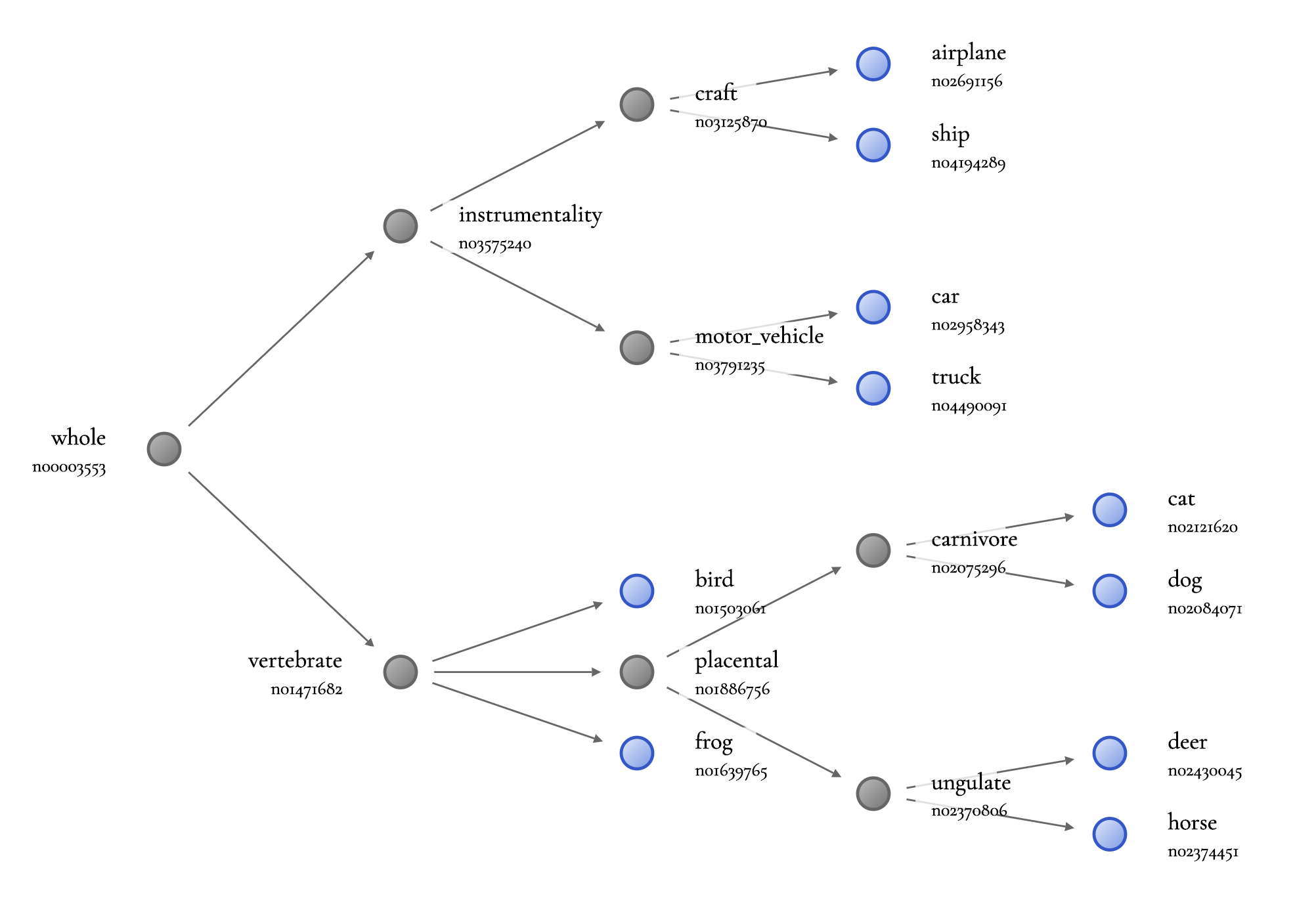
Generate random hierarchy. [click to expand]
Use `--method=random` to randomly generate a binary-ish hierarchy. Optionally, use the `--seed` (`--seed=-1` to *not* shuffle leaves) and `--branching-factor` flags. When debugging, we set branching factor to the number of classes. For example, the sanity check hierarchy for CIFAR10 is
```bash
nbdt-hierarchy --seed=-1 --branching-factor=10 --dataset=CIFAR10
```
## 2. Tree Supervision Loss
In the below training commands, we uniformly use `--path-resume=
--lr=0.01` to fine-tune instead of training from scratch. Our results using a recently state-of-the-art pretrained checkpoint (WideResNet) were fine-tuned. Run the following to fine-tune WideResNet with soft tree supervision loss on CIFAR10.
```bash
python main.py --lr=0.01 --dataset=CIFAR10 --arch=wrn28_10_cifar10 --hierarchy=induced-wrn28_10_cifar10 --pretrained --loss=SoftTreeSupLoss
```
See how it works and how to configure. [click to expand]

The tree supervision loss features two variants: a hard version and a soft version. Simply change the loss to `HardTreeSupLoss` or `SoftTreeSupLoss`, depending on the one you want.
```bash
# fine-tune the wrn pretrained checkpoint on CIFAR10 with hard tree supervision loss
python main.py --lr=0.01 --dataset=CIFAR10 --arch=wrn28_10_cifar10 --hierarchy=induced-wrn28_10_cifar10 --pretrained --loss=HardTreeSupLoss
# fine-tune the wrn pretrained checkpoint on CIFAR10 with soft tree supervision loss
python main.py --lr=0.01 --dataset=CIFAR10 --arch=wrn28_10_cifar10 --hierarchy=induced-wrn28_10_cifar10 --pretrained --loss=SoftTreeSupLoss
```
To train from scratch, use `--lr=0.1` and do not pass the `--path-resume` or `--pretrained` flags. We fine-tune WideResnet on CIFAR10, CIFAR100, but where the baseline neural network accuracy is reproducible, we train from scratch.
See how it works and how to configure. [click to expand]

Note the following commands are nearly identical to the corresponding train commands -- we drop the `lr`, `pretrained` flags and add `resume`, `eval`, and the `analysis` type (hard or soft inference). The best results in our paper, oddly enough, were obtained by running hard and soft inference *both* on the neural network supervised by a soft tree supervision loss. This is reflected in the commands below.
```bash
# running soft inference on soft-supervised model
python main.py --dataset=CIFAR10 --arch=wrn28_10_cifar10 --hierarchy=induced-wrn28_10_cifar10 --loss=SoftTreeSupLoss --eval --resume --analysis=SoftEmbeddedDecisionRules
# running hard inference on soft-supervised model
python main.py --dataset=CIFAR10 --arch=wrn28_10_cifar10 --hierarchy=induced-wrn28_10_cifar10 --loss=SoftTreeSupLoss --eval --resume --analysis=HardEmbeddedDecisionRules
```
Logging maximum and minimum 'path entropy' samples. [click to expand]
```
# get min and max entropy samples for baseline neural network
python main.py --pretrained --dataset=TinyImagenet200 --eval --dataset-test=Imagenet1000 --disable-test-eval --analysis=TopEntropy # or Entropy, or TopDifference
# download public checkpoint
wget https://github.com/alvinwan/neural-backed-decision-trees/releases/download/0.0.1/ckpt-TinyImagenet200-ResNet18-induced-ResNet18-SoftTreeSupLoss-tsw10.0.pth -O checkpoint/ckpt-TinyImagenet200-ResNet18-induced-ResNet18-SoftTreeSupLoss-tsw10.0.pth
# get min and max 'path entropy' samples for NBDT
python main.py --dataset TinyImagenet200 --resume --path-resume checkpoint/ckpt-TinyImagenet200-ResNet18-induced-ResNet18-SoftTreeSupLoss-tsw10.0.pth --eval --analysis NBDTEntropyMaxMin --dataset-test=Imagenet1000 --disable-test-eval --hierarchy induced-ResNet18
```
Running zero-shot evaluation on superclasses. [click to expand]
```
# get wnids for animal and vehicle -- use the outputted wnids for below commands
nbdt-wnids --classes animal vehicle
# evaluate CIFAR10-trained ResNet18 on "Animal vs. Vehicle" superclasses, with images from TinyImagenet200
python main.py --dataset-test=TinyImagenet200 --dataset=CIFAR10 --disable-test-eval --eval --analysis=Superclass --superclass-wnids n00015388 n04524313 --pretrained
# download public checkpoint
wget https://github.com/alvinwan/neural-backed-decision-trees/releases/download/0.0.1/ckpt-CIFAR100-ResNet18-induced-ResNet18-SoftTreeSupLoss.pth -O checkpoint/ckpt-CIFAR10-ResNet18-induced-SoftTreeSupLoss.pth
# evaluate CIFAR10-trained NBDT-ResNet18 on "Animal vs. Vehicle" superclasses, with images from TinyImagenet200
python main.py --dataset-test=TinyImagenet200 --dataset=CIFAR10 --disable-test-eval --eval --analysis=SuperclassNBDT --superclass-wnids n00015388 n04524313 --loss=SoftTreeSupLoss --resume
```
Visualize decision nodes using 'prototypical' samples. [click to expand]
```
# get wnids for animal and vehicle -- use the outputted wnids for below commands
nbdt-wnids --classes animal vehicle
# find samples representative for CIFAR10-trained ResNet18, from animal and vehicle ImageNet images
python main.py --dataset-test=Imagenet1000 --dataset=CIFAR10 --disable-test-eval --eval --analysis=VisualizeDecisionNode --vdnw=n00015388 --pretrained --superclass-wnids n00015388 n04524313 # samples for "animal" node
python main.py --dataset-test=Imagenet1000 --dataset=CIFAR10 --disable-test-eval --eval --analysis=VisualizeDecisionNode --vdnw=n00015388 --pretrained --superclass-wnids n00015388 n04524313 # samples for "ungulate" node
# download public checkpoint
wget https://github.com/alvinwan/neural-backed-decision-trees/releases/download/0.0.1/ckpt-CIFAR100-ResNet18-induced-ResNet18-SoftTreeSupLoss.pth -O checkpoint/ckpt-CIFAR10-ResNet18-induced-SoftTreeSupLoss.pth
# find samples representative for CIFAR10-trained NBDT with ResNet18 backbone, from animal and vehicle ImageNet images
python main.py --dataset-test=Imagenet1000 --dataset=CIFAR10 --disable-test-eval --eval --analysis=VisualizeDecisionNode --vdnw=n01466257 --loss=SoftTreeSupLoss --resume --hierarchy=induced-ResNet18 --superclass-wnids n00015388 n04524313 # samples for "animal" node
```
Visualize inference probabilities in hierarchy. [click to expand]
```
python main.py --analysis=VisualizeHierarchyInference --eval --pretrained # soft inference by default
```


