# ESP智能安防系统
**Repository Path**: xrdzsw/esp-intelligent-security
## Basic Information
- **Project Name**: ESP智能安防系统
- **Description**: 基于esp8266开发板实现智能安防。
- **Primary Language**: Unknown
- **License**: Not specified
- **Default Branch**: master
- **Homepage**: None
- **GVP Project**: No
## Statistics
- **Stars**: 0
- **Forks**: 1
- **Created**: 2023-04-16
- **Last Updated**: 2023-04-16
## Categories & Tags
**Categories**: Uncategorized
**Tags**: None
## README
[TOC]
# 基于esp8266单片机的智能安防报警系统设计与实现
摘 要:本系统一种基于 esp8266单片机(后文简称esp)的家庭智能安防报警系统,它基于eps单片机的信息处理和无线通信功能,实现用户对家庭安防情况的了解。本项目以Esp8266通过火焰传感器,MQ135传感器实现火灾监测、可燃性气体泄漏监测。同时,当传感器数值超过阈值,触发警报,LED灯闪烁,蜂鸣器蜂鸣,相应处理的装置启动。Esp基于stmp协议通过发送E-mail至用户邮箱实现提醒,以提醒用户及时处理警报事件。本系统接入OLED显示,且设计网页UI,用户可通过家庭网络访问网页实时了解安防报警系统各个传感器状态。本系统基于充分挖掘单片机功能理念,在原有基础上添加了DHT11温湿度传感器,光照传感器,增加了本系统的丰富性。
关键词:安防报警系统;esp8266单片机;火焰传感器:蜂鸣器;温湿度传感器(DHT11);舵机;MQ135传感器
# 1背景介绍
随着科技的进步,家庭安防系统也随之得到迅猛发展。家庭安防系统基本原理家庭安防系统利用主机,通过无线或有线连接各类探测器,实现防盗报警功能。家庭安防系统通常由:探测器(又称报警器)、传输通道和报警控制器三部分构成。传感器是报警探测器的核心元件。采用不同原理的传感器件,可以构成不同种类、不同用途、达到不同探测目的的报警探测装置。常见的探测器有红外人体感应器,门窗磁感应器,烟雾火灾探测器,燃气泄漏探测器等。本系统选用火焰传感器,MQ135传感器与esp8266为核心部件构成安防警报系统,成本低,大体能满足用户需求。
安防报警系统是将火焰传感器、MQ135传感器,蜂鸣器,LED灯连接到esp,以实现火灾、可燃性气体泄漏自动报警的系统。通常情况下,根据实际情况,可将不同的传感器安装在不同的位置,当有警情发生时,esp就会控制蜂鸣器蜂鸣,LED亮和通过网络发送E-mail至用户手机,提醒用户处理紧急情况。
## 2报警系统整体框架
该系统主要包括感知设备、通信设备、处理装置3 个部分。系统整体硬件如图 1 所示。
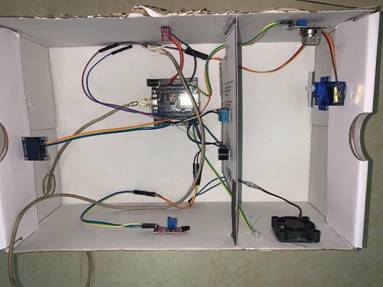
图1 系统整体硬件
此系统能够实现多种监测报警,比如可燃气泄漏报警、火灾报警、邮箱提醒,温湿度和光照检测。
# 2系统框架设计
## 2.1家庭安防警报系统框架
家庭安防警报系统框架如图 2所示。
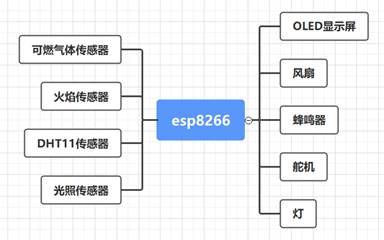
图2家庭安防警报系统框架图
家庭安防警报系统是由 esp8266 单片机主控模块、OLED 液晶显示模块、蜂鸣器模块、风扇和舵机模块,可燃性气体检测模块、温湿度模块和火焰检测模块组成的。OLED 液晶显示模块用于显示传感器信息;可燃性气体检测模块、火灾模块直接与单片机的引脚相连,用于监测家庭环境是否安全;蜂鸣器模块在有警情发生时工作,提醒有突发事件发生。风扇和舵机模块对警情做出反应。
## 2.2系统通信网络
当传感器数值超过阈值,esp8266通过smtp协议发送邮件至用户。系统通信网络如图 3 所示。
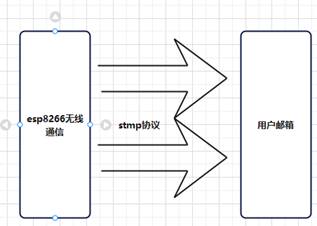
图3系统通信网络图
## 2.2编程软件应用
选用软件为Arduino,它是一款便捷灵活、方便上手的开源电子原型平台。包含硬件(各种型号的Arduino板)和软件。Arduino能通过各种各样的传感器来感知环境,通过控制灯光、马达和其他的装置来反馈、影响环境。板子上的微控制器可以通过Arduino的编程语言来编写程序,编译成二进制文件,烧录进微控制器
# 3系统软件设计
## 3.1 家庭安防警报系统流程设计
家庭安防警报系统通电工作,用户通过手机连接系统热点进入WI-FI配置,配置成功,传感器与系统软件初始化。串口输出打印系统软件状态,显示屏显示各传感器数据。当esp8266接收传感器数值超过规定阈值,触发警报设置, 蜂鸣器蜂鸣,风扇工作,LED亮灯,发送邮件至用户邮箱。家庭安防警报系统工作流程如图 4 所示。
图4家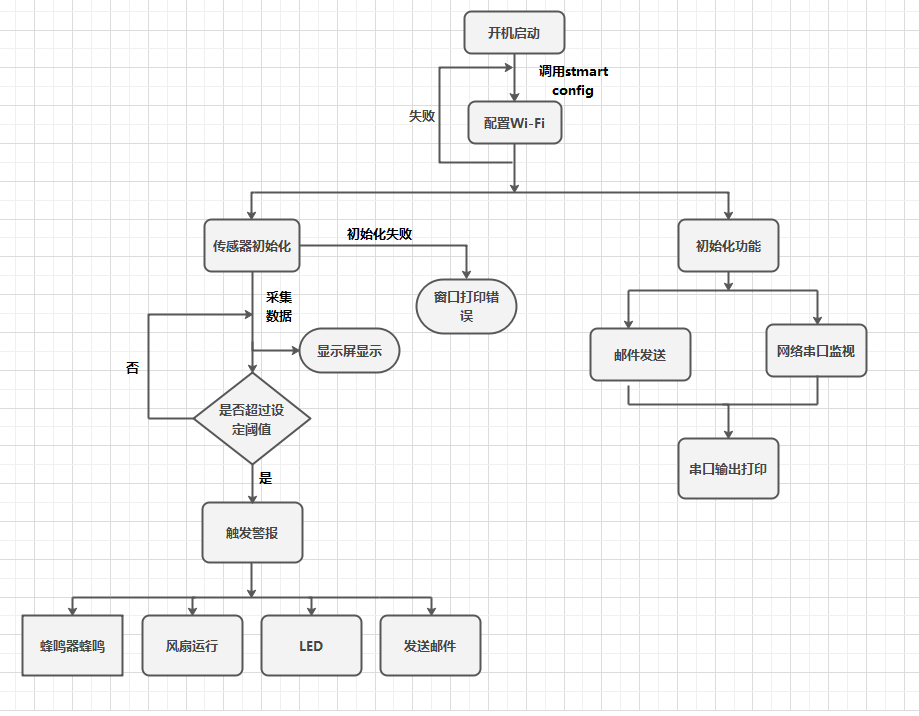庭安防警报系
统工作流程图
# 4家庭安防警报系统工作演示
## 4.1火灾警报
家庭安防警报系统初始化完成,进入工作状态。当火焰传感器发现火焰,通过串口向esp上传数据,esp接收数据后蜂鸣器蜂鸣,led亮且通过OLED显示火焰警报,同时上传数据至esp ip网页,并通过无线网络向用户邮箱
发送邮件。在进行火灾警报的同时,esp驱动舵机进行灭火。实现预警并及时处理火灾警报。火灾警报如图5;
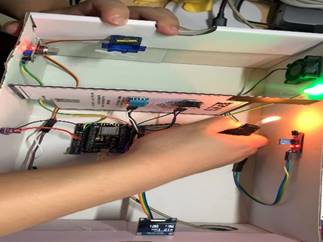
图5火灾警报警报图
## 4.2 可燃气泄漏警报
家庭安防警报系统初始化完成,进入工作状态。当可燃气泄漏传感器发现火焰,通过串口向esp上传数据,esp接收数据后蜂鸣器蜂鸣,led亮且通过OLED显示可燃气泄漏警报,同时上传数据至esp ip网页,并通过无线网络向用户邮箱发送邮件。在进行可燃气泄漏警报的同时,esp驱动风扇进行通风,驱动舵机打开窗户。实现预警并及时处理可燃气泄漏警报。可燃气泄漏警报如图6,图7报警邮件;
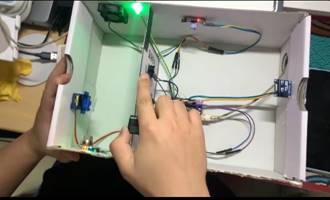
图6可燃气泄漏警报图
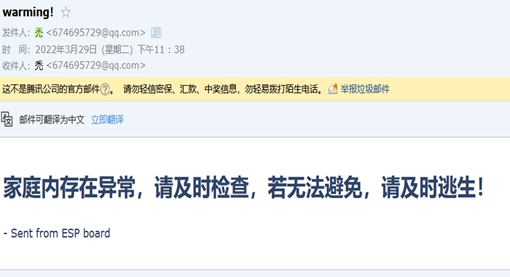
图7报警邮件
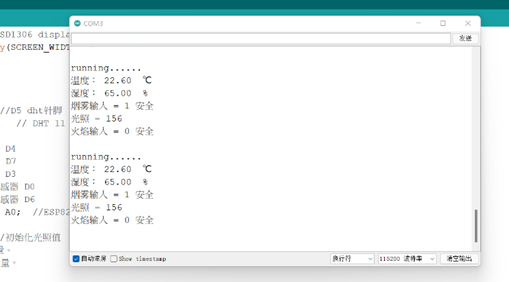
图8 串口监控
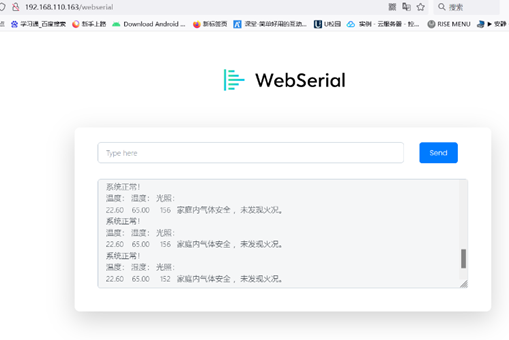
图9 IP页面监控
# 5 系统设计评价
## 5.1 系统实际设计要求
该系统使用火焰模块来检测是否有火灾的情况发生。此模块灵敏度比较低,监测范围有限,并且只能检测明火,对温度过高的蓝色火焰无法识别。这样就会导致错误报警或者有火灾不报警的情况发生。所以,在实际设计中,选用红外温度传感器。
此系统警报通知以通过蜂鸣,LED提醒居家人员,但远程通过邮箱提醒,邮箱适用人群有限且起到及时警报有限,所以,在实际设计中,增选GSM模块远程警报。
## 5.2 系统设计创新点
与传统的家庭报警系统相比,基于 esp8266单片机的小区智能安防报警系统具有以下优点:①采用 esp单片机能够快速处理数据。②多重警报。当有警情发生时,系统通过蜂鸣器,LED灯,OLED显示屏和邮箱警报。③功能丰富,此系统在保障安防功能之外,增添了温湿度和光照传感器,提高系统的功能性。④应急处理装置。当警报发生,esp驱动相应处理装置进行紧急处理。⑤成本低。此系统选择硬件价格亲民。
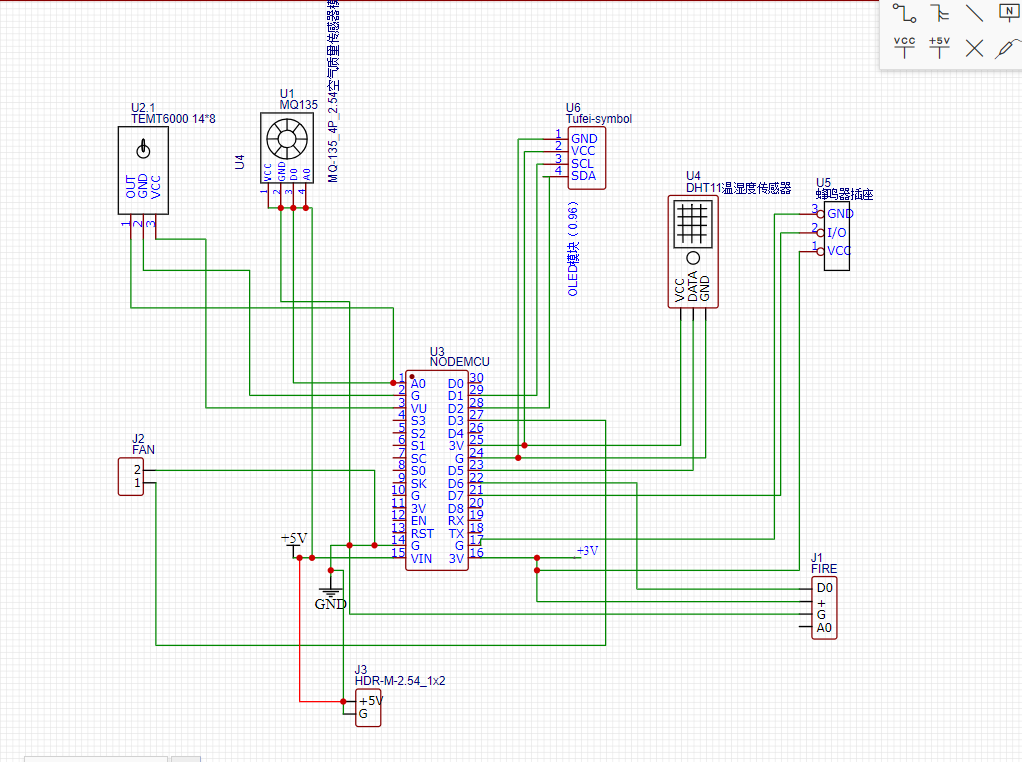
## 接线图
# 6结束语
现代,我们生活在一个和平的年代,人类社会科技不断进步,人们对物质、精神生活的追求越来越高。然而,安防始终是人类最基本的需求。在安防设计之初要充分考虑用户需求,才能将安防隐患泯灭在萌芽阶段。
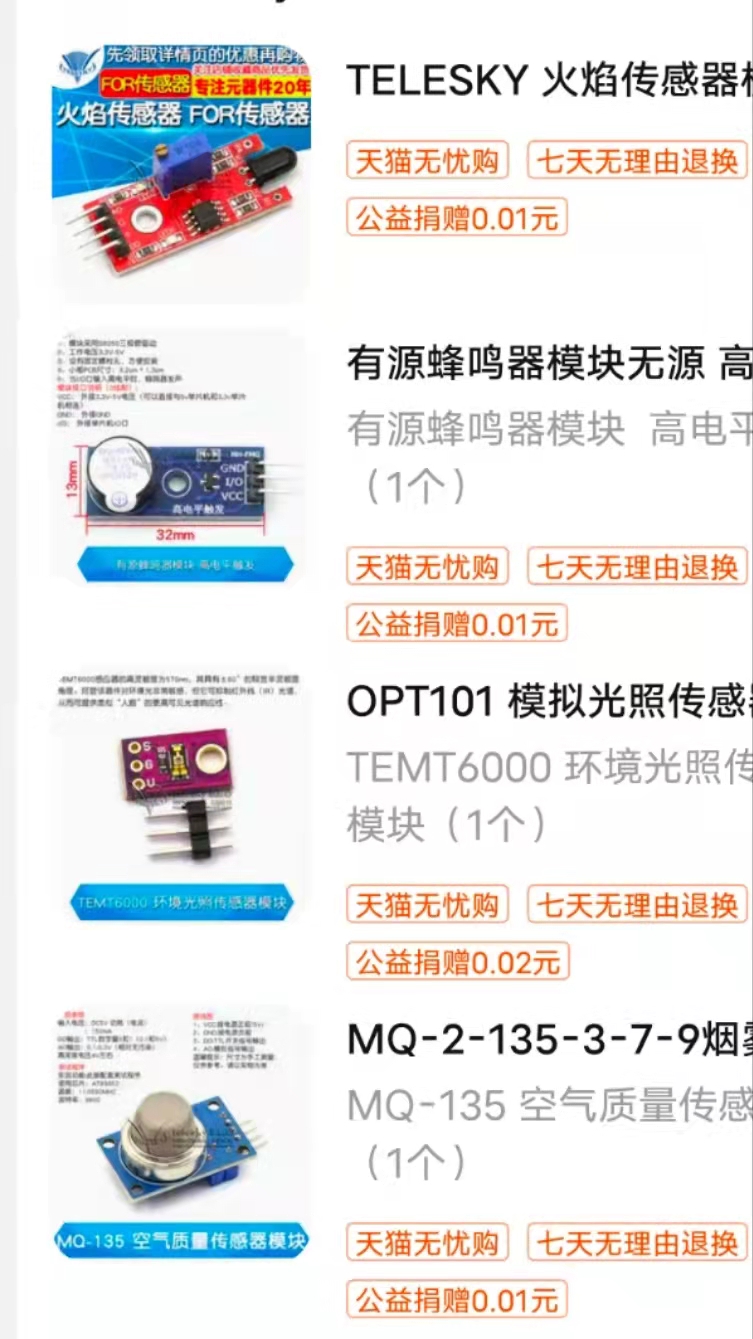
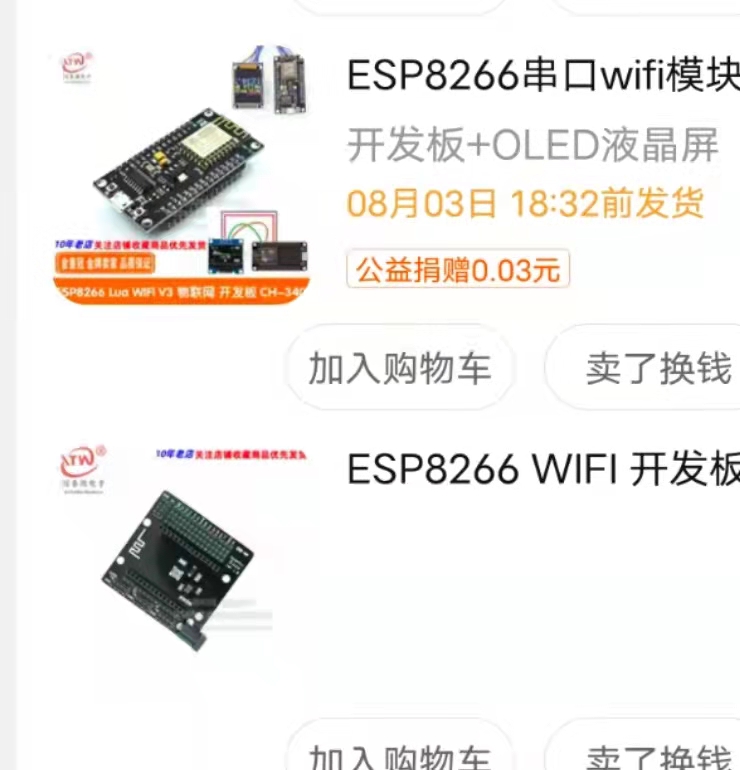
# 7物料
 # 8源码
```c
/*
说明:
主要功能:监控家庭的环境,温度、湿度、有害气体、火焰发生;
并显示在小oled屏幕上,为各个量设置一个阈值,若超
过此阈值则视为危险情况;会为设定好的邮箱地址发送
警告邮件,蜂鸣器工作,以达到
警示作用,避免造成不必要伤害。
*/
#include
#if defined(ESP32)
#include
#elif defined(ESP8266)
#include
#endif
#include
#include
#include
#include
#include
#include
#include
#include
#define SCREEN_WIDTH 128 // OLED display width, in pixels
#define SCREEN_HEIGHT 64 // OLED display height, in pixels
// Declaration for an SSD1306 display connected to I2C (SDA, SCL pins)
Adafruit_SSD1306 display(SCREEN_WIDTH, SCREEN_HEIGHT, &Wire, -1);
/*
显示屏定义
*/
#define DHTPIN 14 //D5 dht针脚
#define DHTTYPE DHT11 // DHT 11
#define LED 2 //led D4
#define BEE 13 //蜂鸣器 D7
#define FAN 0 //fan D3
int yan_in = 16;//烟雾传感器 D0
int fire = 12; //火焰传感器 D6
const int analogInPin = A0; //ESP8266模拟引脚ADC0,也就是A0,模拟量
int sensorValue = 0; //初始化光照值
int yan_d;//烟雾值,数字量。
int fire_d;//火焰值,数字量。
Servo myServo; // 定义Servo对象来控制舵机D8 15口
int pos = 0; // 角度存储变量
AsyncWebServer server(80);
#define WIFI_SSID "ZTE-E8820S"
#define WIFI_PASSWORD "12345678"
#define SMTP_HOST "smtp.qq.com"
#define SMTP_PORT 465
/* The sign in credentials */
#define AUTHOR_EMAIL "********8@qq.com" //发送邮箱
#define AUTHOR_PASSWORD "*********"
/*改成你的qq邮箱,需要申请stmp服务*/
/* Recipient's email*/
#define RECIPIENT_EMAIL "*******@qq.com" //接收邮箱
/* The SMTP Session object used for Email sending */
SMTPSession smtp;
SMTP_Message message;
/* Callback function to get the Email sending status */
void smtpCallback(SMTP_Status status);
DHT dht(DHTPIN, DHTTYPE);
/*变量接收*/
float t,h;
/*
↑上为功能定义,及参数定义
↓下为函数定义,调用,初始化
*/
/*
dht读取函数
*/
void dht11()
{
//read temperature and humidity
t = dht.readTemperature();
h = dht.readHumidity();
Serial.print("温度: ");
Serial.print(t);
Serial.println(" ℃");
Serial.print("湿度: ");
Serial.print(h);
Serial.println(" %");
//判断传感器是否存在
if (isnan(h) || isnan(t)) {
Serial.println("Failed to read from DHT sensor!");
}
}
void disconfig()
{
// clear display
display.clearDisplay();
display.setTextSize(2);
display.setTextColor(WHITE);
display.setCursor(0, 10);
display.print("ESP-touch to config wifi...");
display.display();
}
void disdht(float t,float h)
{
// clear display
display.clearDisplay();
// display temperature
display.setTextSize(1);
display.setCursor(0,0);
display.print("Temperature: ");
display.setTextSize(2);
display.setCursor(0,10);
display.print(t);
display.print(" ");
display.setTextSize(1);
display.cp437(true);
display.write(167);
display.setTextSize(2);
display.print("C");
// display humidity
display.setTextSize(1);
display.setCursor(0, 35);
display.print("Humidity: ");
display.setTextSize(2);
display.setCursor(0, 45);
display.print(h);
display.print(" %");
display.display();
}
/*
* *
* 显示屏2页
*
*/
void disp2(int ld,int yd,int fd)
{
int ldd=ld*2,ydd=yd,fdd=fd;
String x1,x2;
if(ydd==1)
{
x1= "OK!";
}
if(ydd==0)
{ x1="warming";
}
if(fdd==1)
{
x2= "warming";
}
if(fdd==0)
{ x2="OK!";
}
// clear display
display.clearDisplay();
// display temperature
display.setTextSize(1);
display.setCursor(0,0);
display.print("Illumination: ");
display.setTextSize(2);
display.setCursor(0,10);
display.print(ldd);
display.print(" ");
display.setTextSize(2);
display.print("lux");
// display GAS
display.setTextSize(1);
display.setCursor(0, 35);
display.print("Gas: ");
display.setTextSize(2);
display.setCursor(0, 45);
display.print(x1);
// display Fire
display.setTextSize(1);
display.setCursor(60, 35);
display.print("Fire: ");
display.setTextSize(2);
display.setCursor(60, 45);
display.print(x2);
display.display();
}
/*网络串口测试*/
void recvMsg(uint8_t *data, size_t len){
WebSerial.println("Received Data...");
String d = "";
for(int i=0; i < len; i++){
d += char(data[i]);
}
WebSerial.println(d);
if (d == "ON"){
digitalWrite(LED, LOW);
}
if (d=="OFF"){
digitalWrite(LED, HIGH);
}
if (d=="FO"){
digitalWrite(FAN, HIGH);
}
if (d=="FF"){
digitalWrite(FAN, LOW);
}
if(d=="BO"){
bee(1);
}
if(d=="BF"){
bee(0);
}
}
/*网络串口打印程序*/
void webprint(String s)
{
String str=s;
WebSerial.println(str);
}
/*smtp初始化*/
void stmp_server()
{
/** Enable the debug via Serial port
* none debug or 0
* basic debug or 1
*/
smtp.debug(1);
/* Set the callback function to get the sending results */
smtp.callback(smtpCallback);
/* Declare the session config data */
ESP_Mail_Session session;
/* Set the session config */
session.server.host_name = SMTP_HOST;
session.server.port = SMTP_PORT;
session.login.email = AUTHOR_EMAIL;
session.login.password = AUTHOR_PASSWORD;
session.login.user_domain = "";
/* Declare the message class */
/*SMTP_Message message;*/
/* Set the message headers */
message.sender.name = "ESP-SAFT";
message.sender.email = AUTHOR_EMAIL;
message.subject = "warming!";
message.addRecipient("Sara", RECIPIENT_EMAIL);
/*Send HTML message*/
String htmlMsg = "
# 8源码
```c
/*
说明:
主要功能:监控家庭的环境,温度、湿度、有害气体、火焰发生;
并显示在小oled屏幕上,为各个量设置一个阈值,若超
过此阈值则视为危险情况;会为设定好的邮箱地址发送
警告邮件,蜂鸣器工作,以达到
警示作用,避免造成不必要伤害。
*/
#include
#if defined(ESP32)
#include
#elif defined(ESP8266)
#include
#endif
#include
#include
#include
#include
#include
#include
#include
#include
#define SCREEN_WIDTH 128 // OLED display width, in pixels
#define SCREEN_HEIGHT 64 // OLED display height, in pixels
// Declaration for an SSD1306 display connected to I2C (SDA, SCL pins)
Adafruit_SSD1306 display(SCREEN_WIDTH, SCREEN_HEIGHT, &Wire, -1);
/*
显示屏定义
*/
#define DHTPIN 14 //D5 dht针脚
#define DHTTYPE DHT11 // DHT 11
#define LED 2 //led D4
#define BEE 13 //蜂鸣器 D7
#define FAN 0 //fan D3
int yan_in = 16;//烟雾传感器 D0
int fire = 12; //火焰传感器 D6
const int analogInPin = A0; //ESP8266模拟引脚ADC0,也就是A0,模拟量
int sensorValue = 0; //初始化光照值
int yan_d;//烟雾值,数字量。
int fire_d;//火焰值,数字量。
Servo myServo; // 定义Servo对象来控制舵机D8 15口
int pos = 0; // 角度存储变量
AsyncWebServer server(80);
#define WIFI_SSID "ZTE-E8820S"
#define WIFI_PASSWORD "12345678"
#define SMTP_HOST "smtp.qq.com"
#define SMTP_PORT 465
/* The sign in credentials */
#define AUTHOR_EMAIL "********8@qq.com" //发送邮箱
#define AUTHOR_PASSWORD "*********"
/*改成你的qq邮箱,需要申请stmp服务*/
/* Recipient's email*/
#define RECIPIENT_EMAIL "*******@qq.com" //接收邮箱
/* The SMTP Session object used for Email sending */
SMTPSession smtp;
SMTP_Message message;
/* Callback function to get the Email sending status */
void smtpCallback(SMTP_Status status);
DHT dht(DHTPIN, DHTTYPE);
/*变量接收*/
float t,h;
/*
↑上为功能定义,及参数定义
↓下为函数定义,调用,初始化
*/
/*
dht读取函数
*/
void dht11()
{
//read temperature and humidity
t = dht.readTemperature();
h = dht.readHumidity();
Serial.print("温度: ");
Serial.print(t);
Serial.println(" ℃");
Serial.print("湿度: ");
Serial.print(h);
Serial.println(" %");
//判断传感器是否存在
if (isnan(h) || isnan(t)) {
Serial.println("Failed to read from DHT sensor!");
}
}
void disconfig()
{
// clear display
display.clearDisplay();
display.setTextSize(2);
display.setTextColor(WHITE);
display.setCursor(0, 10);
display.print("ESP-touch to config wifi...");
display.display();
}
void disdht(float t,float h)
{
// clear display
display.clearDisplay();
// display temperature
display.setTextSize(1);
display.setCursor(0,0);
display.print("Temperature: ");
display.setTextSize(2);
display.setCursor(0,10);
display.print(t);
display.print(" ");
display.setTextSize(1);
display.cp437(true);
display.write(167);
display.setTextSize(2);
display.print("C");
// display humidity
display.setTextSize(1);
display.setCursor(0, 35);
display.print("Humidity: ");
display.setTextSize(2);
display.setCursor(0, 45);
display.print(h);
display.print(" %");
display.display();
}
/*
* *
* 显示屏2页
*
*/
void disp2(int ld,int yd,int fd)
{
int ldd=ld*2,ydd=yd,fdd=fd;
String x1,x2;
if(ydd==1)
{
x1= "OK!";
}
if(ydd==0)
{ x1="warming";
}
if(fdd==1)
{
x2= "warming";
}
if(fdd==0)
{ x2="OK!";
}
// clear display
display.clearDisplay();
// display temperature
display.setTextSize(1);
display.setCursor(0,0);
display.print("Illumination: ");
display.setTextSize(2);
display.setCursor(0,10);
display.print(ldd);
display.print(" ");
display.setTextSize(2);
display.print("lux");
// display GAS
display.setTextSize(1);
display.setCursor(0, 35);
display.print("Gas: ");
display.setTextSize(2);
display.setCursor(0, 45);
display.print(x1);
// display Fire
display.setTextSize(1);
display.setCursor(60, 35);
display.print("Fire: ");
display.setTextSize(2);
display.setCursor(60, 45);
display.print(x2);
display.display();
}
/*网络串口测试*/
void recvMsg(uint8_t *data, size_t len){
WebSerial.println("Received Data...");
String d = "";
for(int i=0; i < len; i++){
d += char(data[i]);
}
WebSerial.println(d);
if (d == "ON"){
digitalWrite(LED, LOW);
}
if (d=="OFF"){
digitalWrite(LED, HIGH);
}
if (d=="FO"){
digitalWrite(FAN, HIGH);
}
if (d=="FF"){
digitalWrite(FAN, LOW);
}
if(d=="BO"){
bee(1);
}
if(d=="BF"){
bee(0);
}
}
/*网络串口打印程序*/
void webprint(String s)
{
String str=s;
WebSerial.println(str);
}
/*smtp初始化*/
void stmp_server()
{
/** Enable the debug via Serial port
* none debug or 0
* basic debug or 1
*/
smtp.debug(1);
/* Set the callback function to get the sending results */
smtp.callback(smtpCallback);
/* Declare the session config data */
ESP_Mail_Session session;
/* Set the session config */
session.server.host_name = SMTP_HOST;
session.server.port = SMTP_PORT;
session.login.email = AUTHOR_EMAIL;
session.login.password = AUTHOR_PASSWORD;
session.login.user_domain = "";
/* Declare the message class */
/*SMTP_Message message;*/
/* Set the message headers */
message.sender.name = "ESP-SAFT";
message.sender.email = AUTHOR_EMAIL;
message.subject = "warming!";
message.addRecipient("Sara", RECIPIENT_EMAIL);
/*Send HTML message*/
String htmlMsg = "家庭内存在异常,请及时检查,若无法避免,请及时逃生!
- Sent from ESP board