# obsidian-latex-suite
**Repository Path**: xsjx/obsidian-latex-suite
## Basic Information
- **Project Name**: obsidian-latex-suite
- **Description**: No description available
- **Primary Language**: Unknown
- **License**: MIT
- **Default Branch**: main
- **Homepage**: None
- **GVP Project**: No
## Statistics
- **Stars**: 0
- **Forks**: 0
- **Created**: 2024-01-19
- **Last Updated**: 2024-01-19
## Categories & Tags
**Categories**: Uncategorized
**Tags**: None
## README
# Obsidian Latex Suite 
 A plugin for Obsidian that aims to make typesetting LaTeX math as fast as handwriting.
Inspired by [Gilles Castel's setup using UltiSnips](https://castel.dev/post/lecture-notes-1/).

The plugin's main feature is **snippets**, which help you write LaTeX quicker through shortcuts and text expansion! For example, type
- "sqx" instead of "\sqrt{x}"
- "a/b" instead of "\frac{a}{b}"
- "par x y " instead of "\frac{\partial x}{\partial y}"
See [Gilles Castel's writeup](https://castel.dev/post/lecture-notes-1/) for more information.
The plugin comes with a [set of default snippets](https://github.com/artisticat1/obsidian-latex-suite/blob/main/src/default_snippets.js), loosely based on [Gilles Castel's](https://castel.dev/post/lecture-notes-1/#other-snippets). You can modify them, remove them, and write your own.
## Usage
To get started, type "dm" to enter display math mode. Try typing the following:
- "xsr" → "x^{2}".
- "x/y Tab" → "\\frac{x}{y}".
- "sin @t" → "\\sin \\theta".
**Have a look at the [cheatsheet](#cheatsheet)** for a list of commonly used default snippets.
Once these feel familiar, you can check out the [default snippets](https://github.com/artisticat1/obsidian-latex-suite/blob/main/src/default_snippets.js) for more commands. e.g.
- "par Tab f Tab x Tab" → "\\frac{\\partial f}{\\partial x}".
- "dint Tab 2pi Tab sin @t Tab @t Tab" → "\\int_{0}^{2\pi} \\sin \\theta \\, d\\theta".
You can also add your own snippets! [See here for more info on writing snippets](#snippets). You can [view snippets written by others and share your own snippets here](https://github.com/artisticat1/obsidian-latex-suite/discussions/50).
## Features
### Auto-fraction
Lets you type "1/x" instead of "\frac{1}{x}".
For example, it makes the following expansions:
- `x/` → `\frac{x}{}`
- `(a + b(c + d))/` → `\frac{a + b(c + d)}{}`
and moves the cursor inside the brackets.
Once done typing the denominator, press Tab to exit the fraction.

### Matrix shortcuts
While inside a matrix, array, align, or cases environment,
- Pressing Tab will insert the "&" symbol
- Pressing Enter will insert "\\\\" and move to a new line
- Pressing Shift + Enter will move to the end of the next line (can be used to exit the matrix)

### Conceal
*This feature must be enabled in settings!*
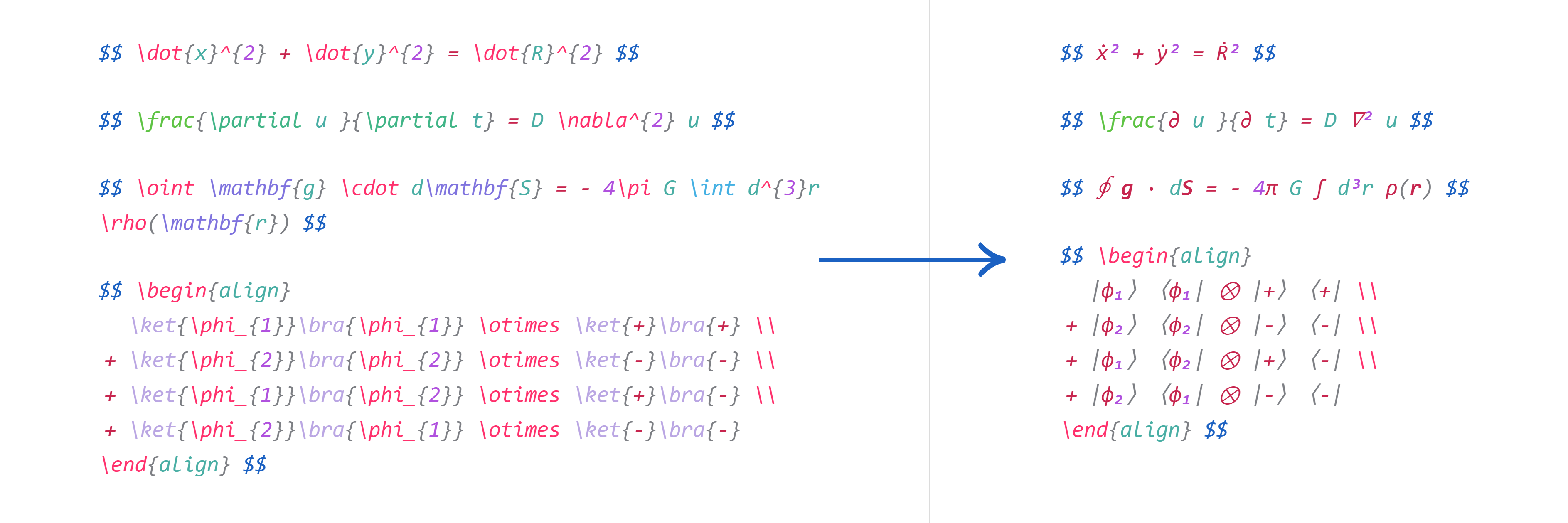
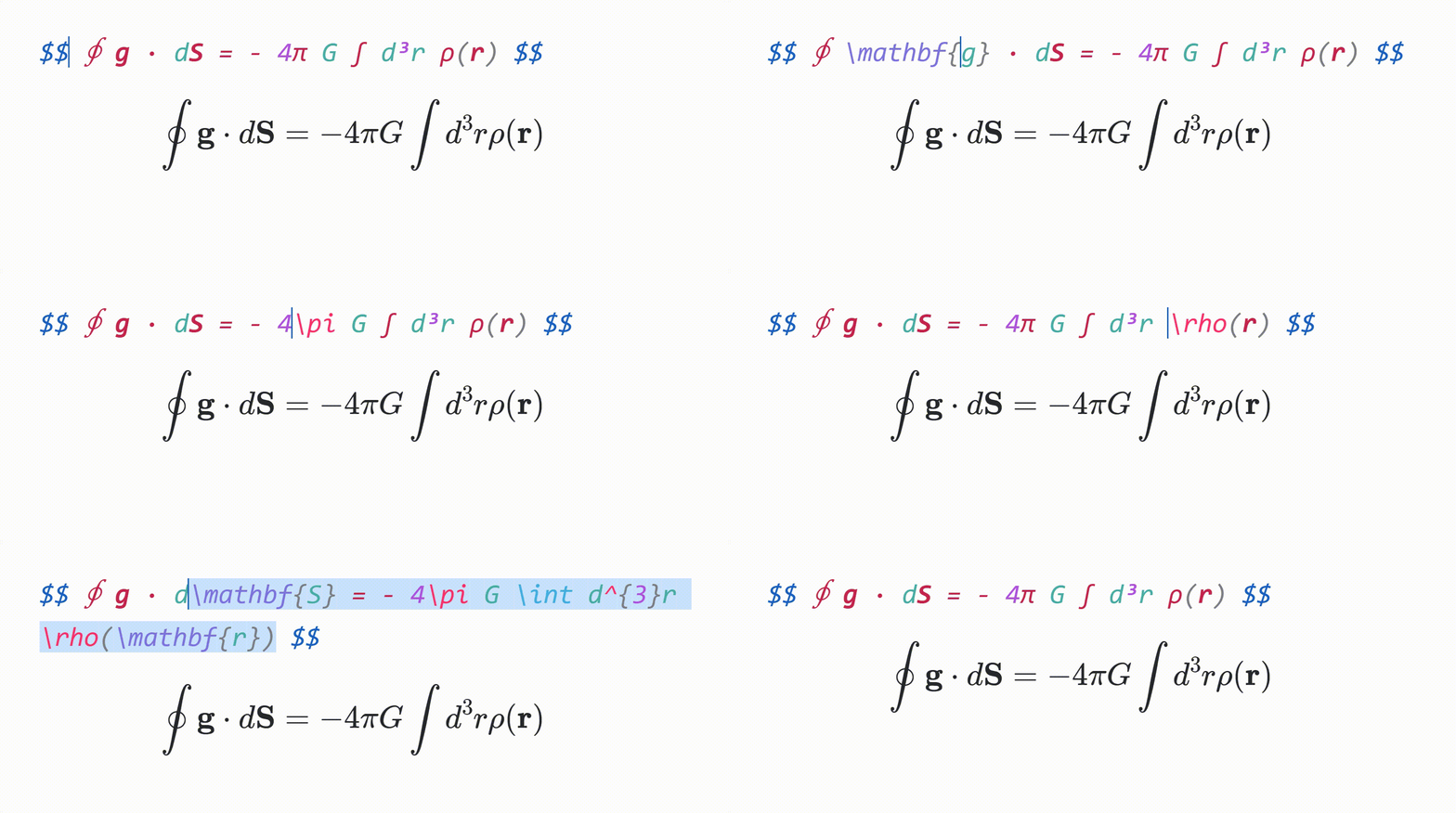
Make your equations more readable by hiding LaTeX code, instead rendering it in a pretty format.
For example, "\dot{x}^{2} + \dot{y}^{2}" will be displayed as "ẋ² + ẏ²".
To reveal the LaTeX code, move the cursor over it.
### Tabout
- Pressing Tab while the cursor is at the end of an equation will move the cursor outside the $ symbols.
- Otherwise, pressing Tab will advance the cursor to the next closing bracket: ), ], }, >, or |.
### Preview inline math
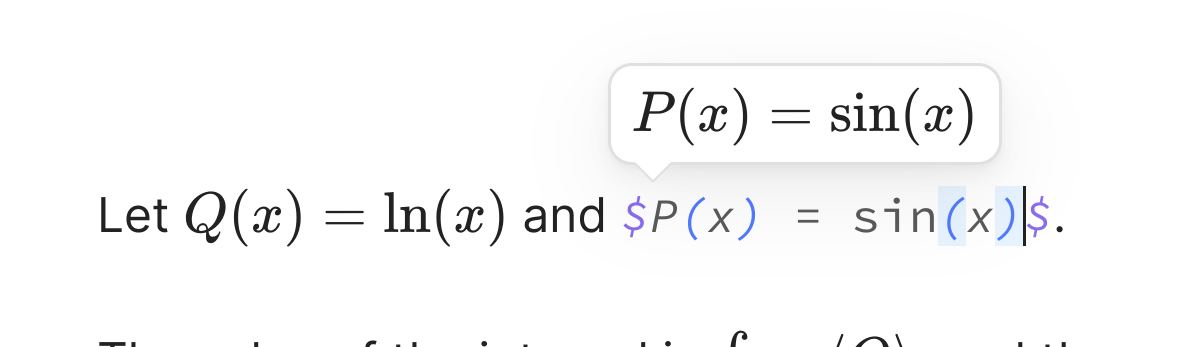
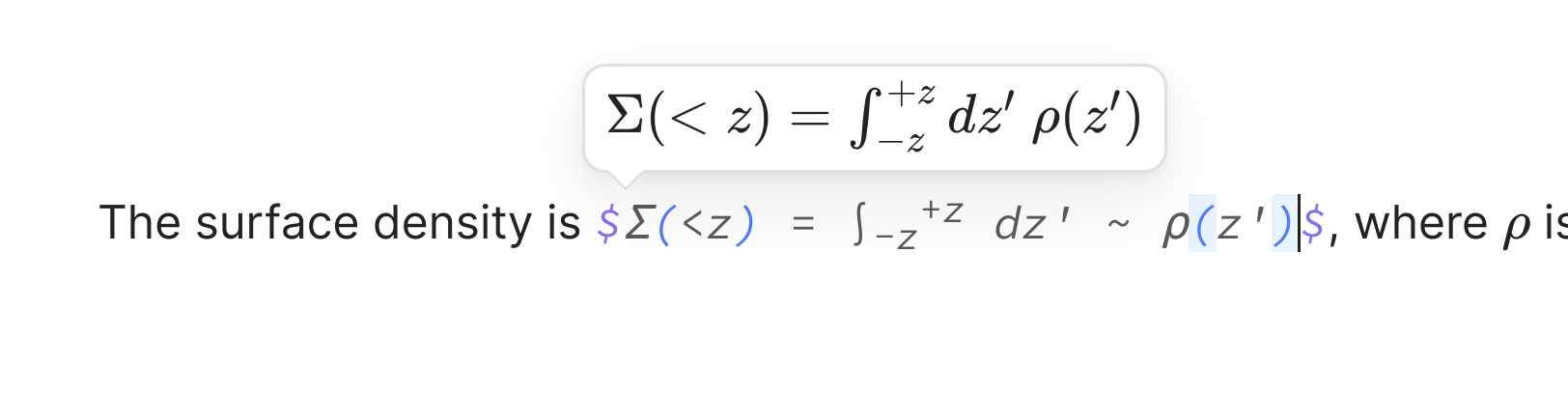
When the cursor is inside inline math, a popup window showing the rendered math will be displayed.
A plugin for Obsidian that aims to make typesetting LaTeX math as fast as handwriting.
Inspired by [Gilles Castel's setup using UltiSnips](https://castel.dev/post/lecture-notes-1/).

The plugin's main feature is **snippets**, which help you write LaTeX quicker through shortcuts and text expansion! For example, type
- "sqx" instead of "\sqrt{x}"
- "a/b" instead of "\frac{a}{b}"
- "par x y " instead of "\frac{\partial x}{\partial y}"
See [Gilles Castel's writeup](https://castel.dev/post/lecture-notes-1/) for more information.
The plugin comes with a [set of default snippets](https://github.com/artisticat1/obsidian-latex-suite/blob/main/src/default_snippets.js), loosely based on [Gilles Castel's](https://castel.dev/post/lecture-notes-1/#other-snippets). You can modify them, remove them, and write your own.
## Usage
To get started, type "dm" to enter display math mode. Try typing the following:
- "xsr" → "x^{2}".
- "x/y Tab" → "\\frac{x}{y}".
- "sin @t" → "\\sin \\theta".
**Have a look at the [cheatsheet](#cheatsheet)** for a list of commonly used default snippets.
Once these feel familiar, you can check out the [default snippets](https://github.com/artisticat1/obsidian-latex-suite/blob/main/src/default_snippets.js) for more commands. e.g.
- "par Tab f Tab x Tab" → "\\frac{\\partial f}{\\partial x}".
- "dint Tab 2pi Tab sin @t Tab @t Tab" → "\\int_{0}^{2\pi} \\sin \\theta \\, d\\theta".
You can also add your own snippets! [See here for more info on writing snippets](#snippets). You can [view snippets written by others and share your own snippets here](https://github.com/artisticat1/obsidian-latex-suite/discussions/50).
## Features
### Auto-fraction
Lets you type "1/x" instead of "\frac{1}{x}".
For example, it makes the following expansions:
- `x/` → `\frac{x}{}`
- `(a + b(c + d))/` → `\frac{a + b(c + d)}{}`
and moves the cursor inside the brackets.
Once done typing the denominator, press Tab to exit the fraction.

### Matrix shortcuts
While inside a matrix, array, align, or cases environment,
- Pressing Tab will insert the "&" symbol
- Pressing Enter will insert "\\\\" and move to a new line
- Pressing Shift + Enter will move to the end of the next line (can be used to exit the matrix)

### Conceal
*This feature must be enabled in settings!*
Make your equations more readable by hiding LaTeX code, instead rendering it in a pretty format.
For example, "\dot{x}^{2} + \dot{y}^{2}" will be displayed as "ẋ² + ẏ²".
To reveal the LaTeX code, move the cursor over it.


### Tabout
- Pressing Tab while the cursor is at the end of an equation will move the cursor outside the $ symbols.
- Otherwise, pressing Tab will advance the cursor to the next closing bracket: ), ], }, >, or |.
### Preview inline math
When the cursor is inside inline math, a popup window showing the rendered math will be displayed.
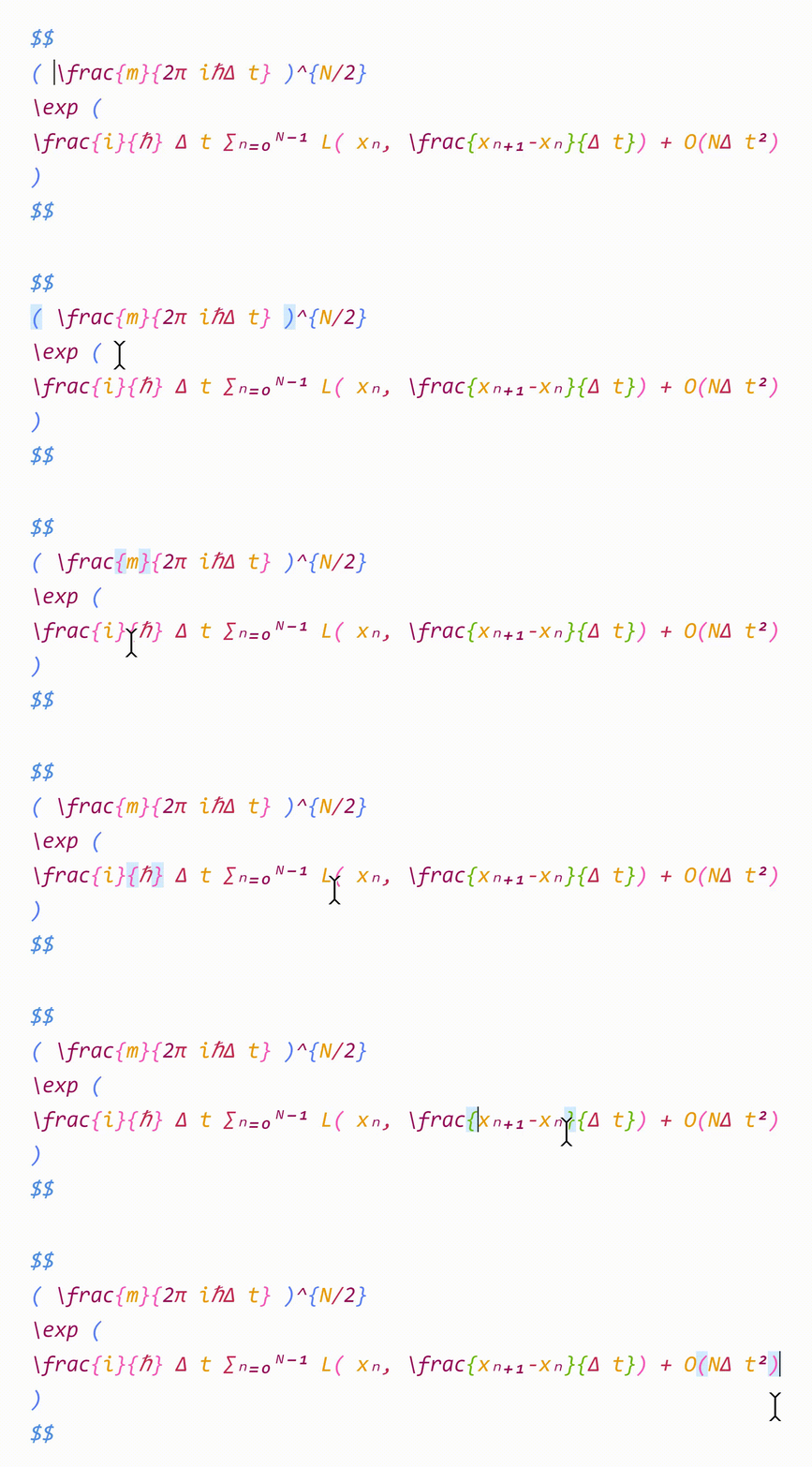
 ### Color & highlight matching brackets
- Matching brackets are rendered in the same color, to help with readability.
- When the cursor is adjacent to a bracket, that bracket and its pair will be highlighted.
- When the cursor is inside brackets, the enclosing brackets will be highlighted.
### Visual snippets
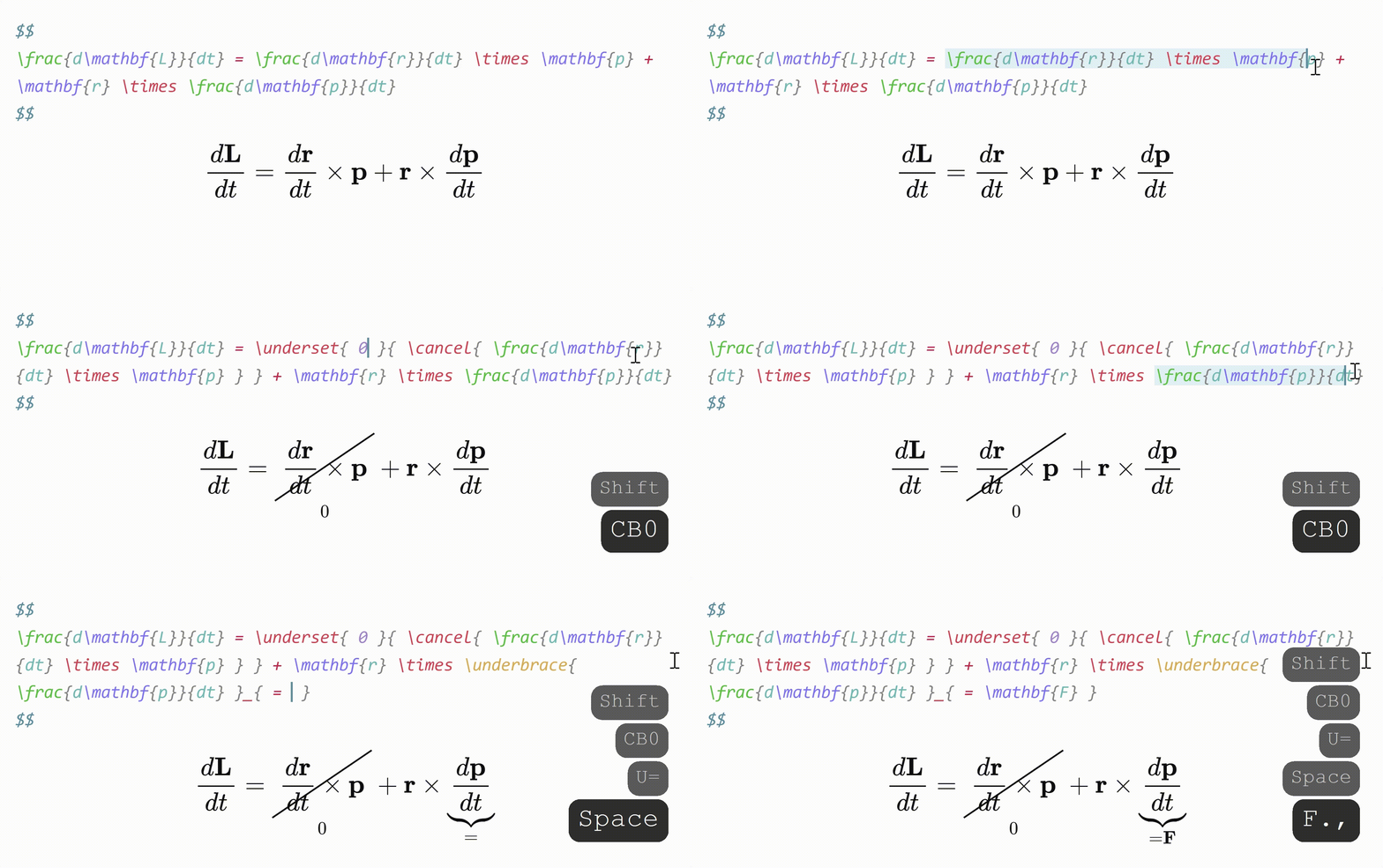
Sometimes you want to annotate math, or cancel or cross out terms. Selecting some math with the cursor and typing
- "U" will surround it with "\\underbrace".
- "C" will surround it with "\\cancel".
- "K" will surround it with "\\cancelto".
- "B" will surround it with "\\underset".
### Auto-enlarge brackets
When a snippet containing "\\sum", "\\int" or "\\frac" is triggered, any enclosing brackets will be enlarged with "\\left" and "\\right".

### Editor commands
- Box current equation – surround the equation the cursor is currently in with a box.
- Select current equation – select the equation the cursor is currently in.
### Snippets
Snippets are formatted as follows:
```typescript
{
trigger: string | RegExp,
replacement: string,
options: string,
priority?: number,
description?: string,
flags?: string,
}
```
- `trigger` : The text that triggers this snippet.
- Triggers can also be regular expressions. [See here for more info.](./DOCS.md#regex-snippets)
- `replacement` : The text to replace the `trigger` with.
- Replacements can also be JavaScript functions. [See here for more info.](./DOCS.md#function-snippets)
- `options` : See below.
- `priority` (optional): This snippet's priority. Snippets with higher priority are run first. Can be negative. Defaults to 0.
- `description` (optional): A description for this snippet.
- `flags` (optional): Flags for regex snippets.
#### Options
- `t` : Text mode. Only run this snippet outside math
- `m` : Math mode. Only run this snippet inside math. Shorthand for both `M` and `n`
- `M` : Block math mode. Only run this snippet inside a `$$ ... $$` block
- `n` : Inline math mode. Only run this snippet inside a `$ ... $` block
- `A` : Auto. Expand this snippet as soon as the trigger is typed. If omitted, the Tab key must be pressed to expand the snippet
- `r` : [Regex](./DOCS.md#regex-snippets). The `trigger` will be treated as a regular expression
- `v` : [Visual](./DOCS.md#visual-snippets). Only run this snippet on a selection. The trigger should be a single character
- `w` : Word boundary. Only run this snippet when the trigger is preceded (and followed by) a word delimiter, such as `.`, `,`, or `-`.
- `c` : Code mode. Only run this snippet inside a ```` ``` ... ``` ```` block
Insert **tabstops** for the cursor to jump to by writing "$0", "$1", etc. in the `replacement`.
For more details on writing snippets, including **regex** snippets and **function** snippets, [see the **documentation** here](DOCS.md). You can [view snippets written by others and share your own snippets here](https://github.com/artisticat1/obsidian-latex-suite/discussions/50).
> [!WARNING]
> Snippet files are interpreted as JavaScript and can execute arbitrary code.
> Always be careful with snippets shared from others to avoid running malicious code.
## Cheatsheet
| Trigger | Replacement |
| ------------------ | ---------------- |
| mk | \$ \$ |
| dm | \$\$
### Color & highlight matching brackets
- Matching brackets are rendered in the same color, to help with readability.
- When the cursor is adjacent to a bracket, that bracket and its pair will be highlighted.
- When the cursor is inside brackets, the enclosing brackets will be highlighted.

### Visual snippets
Sometimes you want to annotate math, or cancel or cross out terms. Selecting some math with the cursor and typing
- "U" will surround it with "\\underbrace".
- "C" will surround it with "\\cancel".
- "K" will surround it with "\\cancelto".
- "B" will surround it with "\\underset".

### Auto-enlarge brackets
When a snippet containing "\\sum", "\\int" or "\\frac" is triggered, any enclosing brackets will be enlarged with "\\left" and "\\right".

### Editor commands
- Box current equation – surround the equation the cursor is currently in with a box.
- Select current equation – select the equation the cursor is currently in.
### Snippets
Snippets are formatted as follows:
```typescript
{
trigger: string | RegExp,
replacement: string,
options: string,
priority?: number,
description?: string,
flags?: string,
}
```
- `trigger` : The text that triggers this snippet.
- Triggers can also be regular expressions. [See here for more info.](./DOCS.md#regex-snippets)
- `replacement` : The text to replace the `trigger` with.
- Replacements can also be JavaScript functions. [See here for more info.](./DOCS.md#function-snippets)
- `options` : See below.
- `priority` (optional): This snippet's priority. Snippets with higher priority are run first. Can be negative. Defaults to 0.
- `description` (optional): A description for this snippet.
- `flags` (optional): Flags for regex snippets.
#### Options
- `t` : Text mode. Only run this snippet outside math
- `m` : Math mode. Only run this snippet inside math. Shorthand for both `M` and `n`
- `M` : Block math mode. Only run this snippet inside a `$$ ... $$` block
- `n` : Inline math mode. Only run this snippet inside a `$ ... $` block
- `A` : Auto. Expand this snippet as soon as the trigger is typed. If omitted, the Tab key must be pressed to expand the snippet
- `r` : [Regex](./DOCS.md#regex-snippets). The `trigger` will be treated as a regular expression
- `v` : [Visual](./DOCS.md#visual-snippets). Only run this snippet on a selection. The trigger should be a single character
- `w` : Word boundary. Only run this snippet when the trigger is preceded (and followed by) a word delimiter, such as `.`, `,`, or `-`.
- `c` : Code mode. Only run this snippet inside a ```` ``` ... ``` ```` block
Insert **tabstops** for the cursor to jump to by writing "$0", "$1", etc. in the `replacement`.
For more details on writing snippets, including **regex** snippets and **function** snippets, [see the **documentation** here](DOCS.md). You can [view snippets written by others and share your own snippets here](https://github.com/artisticat1/obsidian-latex-suite/discussions/50).
> [!WARNING]
> Snippet files are interpreted as JavaScript and can execute arbitrary code.
> Always be careful with snippets shared from others to avoid running malicious code.
## Cheatsheet
| Trigger | Replacement |
| ------------------ | ---------------- |
| mk | \$ \$ |
| dm | \$\$
\$\$ |
| sr | ^{2} |
| cb | ^{3} |
| rd | ^{ } |
| \_ | \_{ } |
| sq | \\sqrt{ } |
| x/y Tab | \\frac{x}{y} |
| // | \\frac{ }{ } |
| te Tab | \\text{ } |
| x1 | x_{1} |
| x,. | \\mathbf{x} |
| x., | \\mathbf{x} |
| xdot | \\dot{x} |
| xhat | \\hat{x} |
| xbar | \\bar{x} |
| xvec | \\vec{x} |
| xtilde | \\tilde{x} |
| xund | \\underline{x} |
| ee | e^{ } |
When running a snippet that **moves the cursor inside brackets {}, press Tab to exit the brackets**.
### Greek letters
| Trigger | Replacement | Trigger | Replacement |
| ------- | ------------ | ------- | ----------- |
| @a | \\alpha | eta | \\eta |
| @b | \\beta | mu | \\mu |
| @g | \\gamma | nu | \\nu |
| @G | \\Gamma | xi | \\xi |
| @d | \\delta | Xi | \\Xi |
| @D | \\Delta | pi | \\pi |
| @e | \\epsilon | Pi | \\Pi |
| :e | \\varepsilon | rho | \\rho |
| @z | \\zeta | tau | \\tau |
| @t | \\theta | phi | \\phi |
| @T | \\Theta | Phi | \\Phi |
| @k | \\kappa | chi | \\chi |
| @l | \\lambda | psi | \\psi |
| @L | \\Lambda | Psi | \\Psi |
| @s | \\sigma | | |
| @S | \\Sigma | | |
| @o | \\omega | | |
| ome | \\omega | | |
For greek letters with short names (2-3 characters), just type their name,
e.g. "pi" → "\\pi"
## Contributing
Any contributions and PRs are welcome!
## Acknowledgements
- [@tth05](https://github.com/tth05)'s [Obsidian Completr](https://github.com/tth05/obsidian-completr) for the basis of the tabstop code
- [Dynamic Highlights](https://github.com/nothingislost/obsidian-dynamic-highlights/blob/master/src/settings/ui.ts) for reference
- [Quick Latex for Obsidian](https://github.com/joeyuping/quick_latex_obsidian) for inspiration
## Support
If you like this plugin and want to say thanks, you can buy me a coffee here!
