# Email-Crawler-Lead-Generator
**Repository Path**: xzx1024/Email-Crawler-Lead-Generator
## Basic Information
- **Project Name**: Email-Crawler-Lead-Generator
- **Description**: 爬取目标网页中的邮箱爬虫
- **Primary Language**: Python
- **License**: MIT
- **Default Branch**: master
- **Homepage**: None
- **GVP Project**: No
## Statistics
- **Stars**: 0
- **Forks**: 0
- **Created**: 2021-06-04
- **Last Updated**: 2024-03-01
## Categories & Tags
**Categories**: Uncategorized
**Tags**: None
## README
Email Crawler and Lead generator in python

This crawler takes an webaddress as input and then extracts all emails from that website by sequentially visiting every url in that domain.
·
Email-Crawler-Lead-Generatorrt Bug
·
Request Feature
##### [Old version without duplicate handling, no multithreading and memory management.](https://github.com/amitupreti/Email-Crawler-Lead-Generator/tree/old)
## Table of Contents
* [About the Project](#about-the-project)
* [Built With](#built-with)
* [Getting Started](#getting-started)
* [Installation](#installation)
* [Usage](#usage)
* [Roadmap](#roadmap)
* [Contributing](#contributing)
* [License](#license)
* [Contact](#contact)
* [Acknowledgements](#acknowledgements)
## About The Project
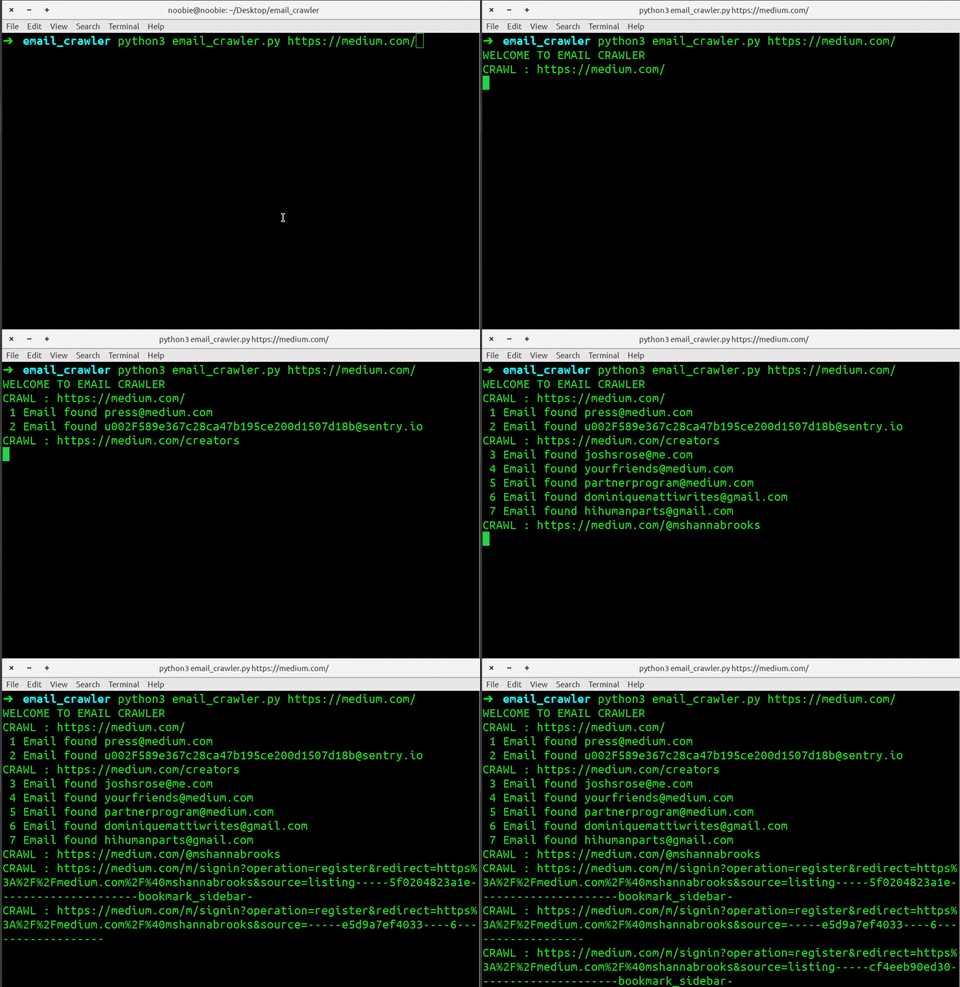
The Email Crawler makes sure that it only visits the urls in same domain and doesnot save duplicate emails.It also keeps the log of urls visited and dumps them at the end of crawling
### Built With
* [python](https://www.python.org/)
* [requests](https://3.python-requests.org/)
* [urllib](https://docs.python.org/3/library/urllib.parse.html#)
* [lxml](https://lxml.de/)
## Getting Started
To get a local copy up and running follow these simple steps.
### Installation
1. Clone the Email-Crawler-Lead-Generator
```sh
git clone https://github.com/nOOBIE-nOOBIE/Email-Crawler-Lead-Generator.git
```
2. Install dependencies
```sh
pip install -r requirements.txt
```
If you have python2 and python3 both installed. You might need to do.
```sh
pip3 install -r requirements.txt
```
## Usage
Simply pass the url as an argument
```sh
python email_crawler.py https://medium.com/
```
If you have python2 and python3 both installed. You might need to do.
```sh
python3 email_crawler.py https://medium.com/
```
### Output
```sh
➜ email_crawler python3 email_crawler.py https://medium.com/
WELCOME TO EMAIL CRAWLER
CRAWL : https://medium.com/
1 Email found press@medium.com
2 Email found u002F589e367c28ca47b195ce200d1507d18b@sentry.io
CRAWL : https://medium.com/creators
3 Email found joshsrose@me.com
4 Email found yourfriends@medium.com
5 Email found partnerprogram@medium.com
6 Email found dominiquemattiwrites@gmail.com
7 Email found hihumanparts@gmail.com
CRAWL : https://medium.com/@mshannabrooks
CRAWL : https://medium.com/m/signin?operation=register&redirect=https%3A%2F%2Fmedium.com%2F%40mshannabrooks&source=listing-----5f0204823a1e---------------------bookmark_sidebar-
CRAWL : https://medium.com/m/signin?operation=register&redirect=https%3A%2F%2Fmedium.com%2F%40mshannabrooks&source=-----e5d9a7ef4033----6------------------
```
## Roadmap
See the [open issues](https://github.com/nOOBIE-nOOBIE/Email-Crawler-Lead-Generator/issues) for a list of proposed features (and known issues).
## Contributing
Contributions are what make the open source community such an amazing place to be learn, inspire, and create. Any contributions you make are **greatly appreciated**.
1. Fork the Project
2. Create your Feature Branch (`git checkout -b feature/AmazingFeature`)
3. Commit your Changes (`git commit -m 'Add some AmazingFeature'`)
4. Push to the Branch (`git push origin feature/AmazingFeature`)
5. Open a Pull Request
## License
Distributed under the MIT License. See `LICENSE` for more information.
## Contact
Amit Upreti - [@amitupreti](https://www.linkedin.com/in/amitupreti/)
Project Link: [https://github.com/nOOBIE-nOOBIE/Email-Crawler-Lead-Generator](https://github.com/nOOBIE-nOOBIE/Email-Crawler-Lead-Generator)