#### 3.2 表情包乱码
```
sudo apt-get install fonts-noto-color-emoji
```
## 4、👨💻如何部署
**注意:node版本必须大于18**
### 手动安装环境部署 linux
保姆级教程:Linux (Ubuntu) 部署流光卡片开源 API:https://blog.csdn.net/weixin_46184095/article/details/140297726
### Docker执行
#### docker cli
#### 编译
```bash
docker build -t ygh3279799773/streamer-card:latest .
```
#### 运行
```bash
docker run -d --name streamer-card -p 3003:3003 --restart always ygh3279799773/streamer-card:latest
```
#### 停止
```bash
docker stop streamer-card
```
##### 使用方式
```bash
# 安装依赖:
yarn install
#运行示例:
ts-node src/index.ts
or
node src/index.js
```
## 5、接口说明 POST
本地部署请求地址:http://localhost:3003/api/saveImg
线上公开请求地址:http://fireflycard-api.302ai.cn/api/saveImg
### 快速入门
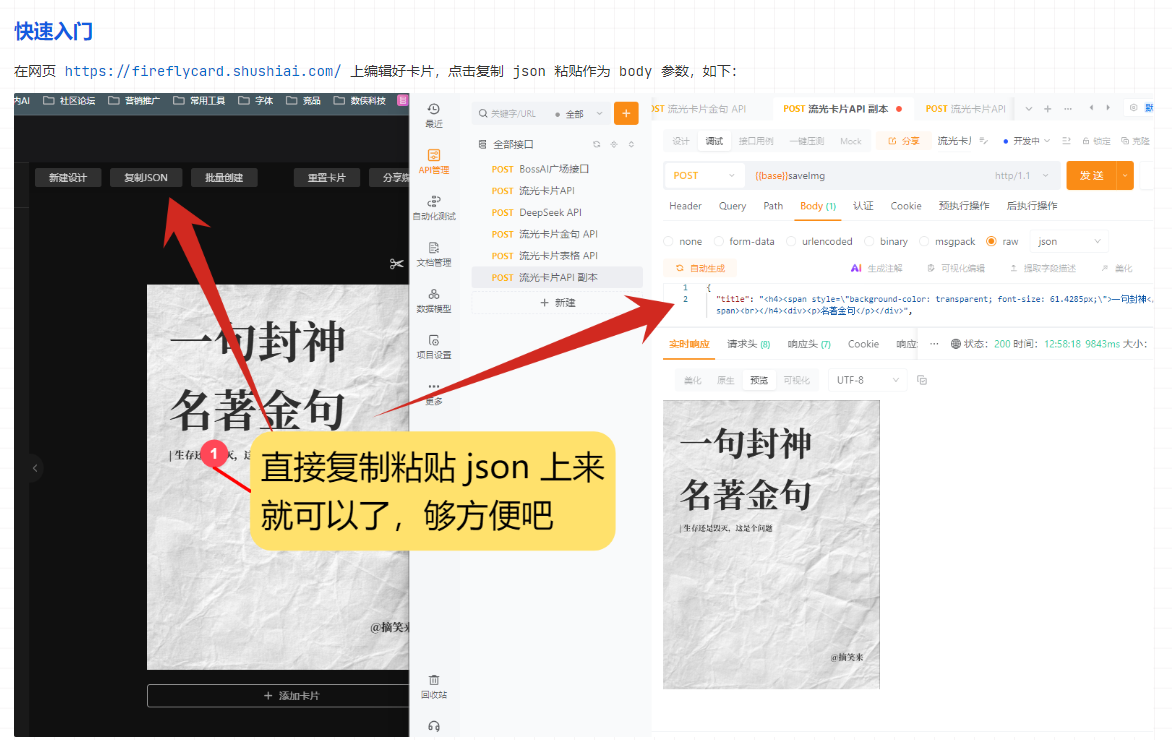
在网页 https://fireflycard.shushiai.com/ 上编辑好卡片,点击复制 json 粘贴作为 body 参数,如下:

### 具体参数说明
一些参数说明可能不太全面,有什么问题随时跟我说
| 字段名 | 类型 | 描述 |
| ---------------- | ---------- | ------------------------------------------------------------ |
| `temp` | String | 模板别名,**往下看参数说明** |
| `color` | String | 颜色别名,也可以直接上传图片 url 实现自定义背景图片,**往下看参数说明** |
| `hasRandomColor` | Boolean | 随机颜色,如果传递了 `color` 这个参数不会生效 |
| `icon` | String | 头像链接 |
| `title` | String | 标题 |
| `date` | String | 时间显示,不传递默认展示当前时间 |
| `content` | String | 卡片正文 |
| `foreword` | String | 前言 |
| `author` | String | 作者 |
| `qrcodetitle` | String | 二维码头部 |
| `qrcodetext` | String | 二维码描述文字 |
| `qrcode` | String | 你的二维码链接 |
| `qrcodeImg` | String | 你的二维码图片(优先级比`qrcode`高,选其一即可) |
| `watermark` | String | 水印 |
| `switchConfig` | **Object** | 展示控制,**往下看参数说明** |
| `width` | String | 宽度,最小 300 |
| `height` | String | 高度 |
| `padding` | String | 内边距 |
| `fontScale` | String | 文字大小比例(例如传入1.2或者1.4等) |
| `useFont` | String | 字体类型,**往下看参数说明** |
| `imgScale` | String | 图片清晰度,默认为 2,数值越大越清晰,同时下载时间也更长 |
| `textCount` | number | 计数描述 |
| `align` | String | 对齐方式:left、align、right、justify(两端对齐) |
| `signature` | String | 个性签名 |
| `textColor` | String | 文本颜色,例如:#FFFFFF |
| `fonts` | **Object** | 调整字体大小,**往下看参数说明** |
### switchConfig 参数说明
| 字段名 | 类型 | 描述 |
| --------------- | ------- | -------- |
| `showIcon` | Boolean | 图标显示 |
| `showDate` | Boolean | 日期显示 |
| `showTitle` | Boolean | 标题显示 |
| `showContent` | Boolean | 文本显示 |
| `showAuthor` | Boolean | 作者显示 |
| `showTextCount` | Boolean | 计数描述 |
| `showQRCode` | Boolean | 二维码 |
| `showForeword` | Boolean | 前言 |
### fonts 参数说明
这个参数只有金句模板会用到,其他模板不会生效
| 字段名 | 类型 | 描述 |
| --------- | ------ | -------- |
| title | number | 标题倍数 |
| content | number | 标题倍数 |
| translate | number | 标题倍数 |
| author | number | 标题倍数 |
例如:
```json
{
"title": 2.1329337874720125,
"content": 1.9079435748084854,
"translate": 1.1415042034904328,
"author": 0.801229782035275
```
### useFont 参数说明
打开网页 https://fireflycard.shushiai.com/,选择好字体类型,复制 json 查看内容找到 useFont 属性,就能看到字体参数名称
**注意:**暂不支持自定义字体
### temp 参数说明
打开网页 https://fireflycard.shushiai.com/,鼠标移动到模板上会弹出别名,就是这个

### color参数说明
打开网页 https://fireflycard.shushiai.com/,然后在右侧菜单栏就能看到颜色别名
也可以直接输入图片 url 实现自定义背景图片

### 请求示例
本地部署请求地址:http://localhost:3003/api/saveImg
线上公开请求地址:http://fireflycard-api.302ai.cn/api/saveImg
```json
{
"title": "
#### 3.2 表情包乱码
```
sudo apt-get install fonts-noto-color-emoji
```
## 4、👨💻如何部署
**注意:node版本必须大于18**
### 手动安装环境部署 linux
保姆级教程:Linux (Ubuntu) 部署流光卡片开源 API:https://blog.csdn.net/weixin_46184095/article/details/140297726
### Docker执行
#### docker cli
#### 编译
```bash
docker build -t ygh3279799773/streamer-card:latest .
```
#### 运行
```bash
docker run -d --name streamer-card -p 3003:3003 --restart always ygh3279799773/streamer-card:latest
```
#### 停止
```bash
docker stop streamer-card
```
##### 使用方式
```bash
# 安装依赖:
yarn install
#运行示例:
ts-node src/index.ts
or
node src/index.js
```
## 5、接口说明 POST
本地部署请求地址:http://localhost:3003/api/saveImg
线上公开请求地址:http://fireflycard-api.302ai.cn/api/saveImg
### 快速入门
在网页 https://fireflycard.shushiai.com/ 上编辑好卡片,点击复制 json 粘贴作为 body 参数,如下:

### 具体参数说明
一些参数说明可能不太全面,有什么问题随时跟我说
| 字段名 | 类型 | 描述 |
| ---------------- | ---------- | ------------------------------------------------------------ |
| `temp` | String | 模板别名,**往下看参数说明** |
| `color` | String | 颜色别名,也可以直接上传图片 url 实现自定义背景图片,**往下看参数说明** |
| `hasRandomColor` | Boolean | 随机颜色,如果传递了 `color` 这个参数不会生效 |
| `icon` | String | 头像链接 |
| `title` | String | 标题 |
| `date` | String | 时间显示,不传递默认展示当前时间 |
| `content` | String | 卡片正文 |
| `foreword` | String | 前言 |
| `author` | String | 作者 |
| `qrcodetitle` | String | 二维码头部 |
| `qrcodetext` | String | 二维码描述文字 |
| `qrcode` | String | 你的二维码链接 |
| `qrcodeImg` | String | 你的二维码图片(优先级比`qrcode`高,选其一即可) |
| `watermark` | String | 水印 |
| `switchConfig` | **Object** | 展示控制,**往下看参数说明** |
| `width` | String | 宽度,最小 300 |
| `height` | String | 高度 |
| `padding` | String | 内边距 |
| `fontScale` | String | 文字大小比例(例如传入1.2或者1.4等) |
| `useFont` | String | 字体类型,**往下看参数说明** |
| `imgScale` | String | 图片清晰度,默认为 2,数值越大越清晰,同时下载时间也更长 |
| `textCount` | number | 计数描述 |
| `align` | String | 对齐方式:left、align、right、justify(两端对齐) |
| `signature` | String | 个性签名 |
| `textColor` | String | 文本颜色,例如:#FFFFFF |
| `fonts` | **Object** | 调整字体大小,**往下看参数说明** |
### switchConfig 参数说明
| 字段名 | 类型 | 描述 |
| --------------- | ------- | -------- |
| `showIcon` | Boolean | 图标显示 |
| `showDate` | Boolean | 日期显示 |
| `showTitle` | Boolean | 标题显示 |
| `showContent` | Boolean | 文本显示 |
| `showAuthor` | Boolean | 作者显示 |
| `showTextCount` | Boolean | 计数描述 |
| `showQRCode` | Boolean | 二维码 |
| `showForeword` | Boolean | 前言 |
### fonts 参数说明
这个参数只有金句模板会用到,其他模板不会生效
| 字段名 | 类型 | 描述 |
| --------- | ------ | -------- |
| title | number | 标题倍数 |
| content | number | 标题倍数 |
| translate | number | 标题倍数 |
| author | number | 标题倍数 |
例如:
```json
{
"title": 2.1329337874720125,
"content": 1.9079435748084854,
"translate": 1.1415042034904328,
"author": 0.801229782035275
```
### useFont 参数说明
打开网页 https://fireflycard.shushiai.com/,选择好字体类型,复制 json 查看内容找到 useFont 属性,就能看到字体参数名称
**注意:**暂不支持自定义字体
### temp 参数说明
打开网页 https://fireflycard.shushiai.com/,鼠标移动到模板上会弹出别名,就是这个

### color参数说明
打开网页 https://fireflycard.shushiai.com/,然后在右侧菜单栏就能看到颜色别名
也可以直接输入图片 url 实现自定义背景图片

### 请求示例
本地部署请求地址:http://localhost:3003/api/saveImg
线上公开请求地址:http://fireflycard-api.302ai.cn/api/saveImg
```json
{
"title": "名著金句
| 生存还是毁灭,这是个问题
", "author": "是魔王哒", "font": "SourceHanSerifCN_Bold", "align": "left", "width": 400, "height": 533, "fontScale": 1.2, "ratio": "3:4", "padding": 30, "switchConfig": { "showIcon": false, "showTitle": true, "showContent": false, "showTranslation": true, "showAuthor": true, "showQRCode": false, "showSignature": true, "showQuotes": true }, "temp": "tempJin", "fonts": { "title": 2.1329337874720125, "content": 1.9079435748084854, "translate": 1.1415042034904328, "author": 0.801229782035275 }, "signature": "打工人,吃吃喝喝睡饱饱", "textColor": "rgba(0,0,0,0.8)", "subTempId": "tempJin", "borderRadius": 15, "color": "bg-color-11", "useFont": "SourceHanSerifCN_Bold", "useLoadingFont": true } ``` ### 响应示例 > 会直接响应二进制图片,使用 ApiPost 可以直接预览相应图片  ## 6、如果你对我们感兴趣 推特:@huangzh65903362 即刻:https://web.okjike.com/u/ec41d7d5-407d-4395-ac8a-bd0f04fb202c 小红书:https://www.xiaohongshu.com/user/profile/6220bf22000000001000e083