# openzen
**Repository Path**: yang_baowei/openzen
## Basic Information
- **Project Name**: openzen
- **Description**: No description available
- **Primary Language**: C++
- **License**: LGPL-3.0
- **Default Branch**: master
- **Homepage**: None
- **GVP Project**: No
## Statistics
- **Stars**: 0
- **Forks**: 0
- **Created**: 2021-11-06
- **Last Updated**: 2024-08-05
## Categories & Tags
**Categories**: Uncategorized
**Tags**: None
## README
# OpenZen
High performance sensor data streaming and processing
Full documentation:
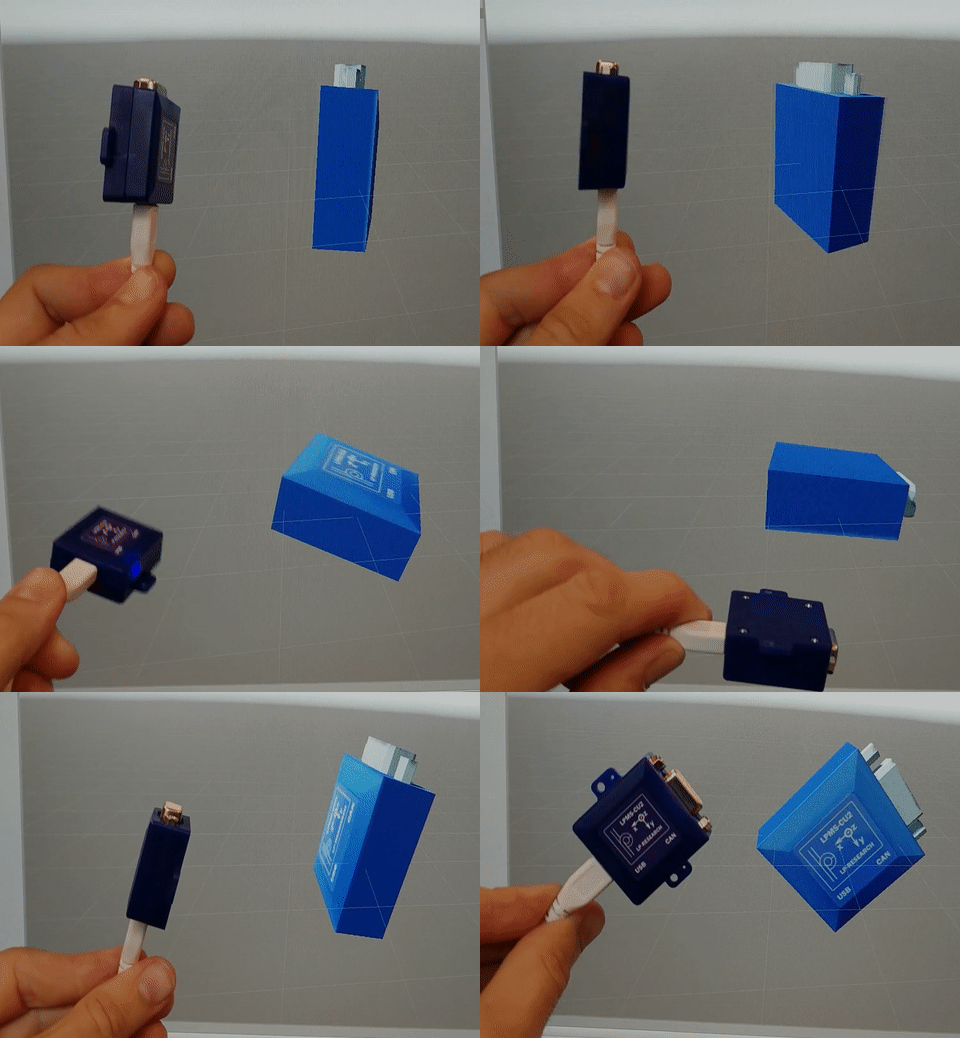
OpenZen Unity plugin connected to a LPMS-CU2 sensor and live visualization of sensor orientation.
## Overview
OpenZen is a framework that allows access to Sensor Hardware from multiple vendors without requiring understanding of the target hardware or communication layer by providing a homogeneous API to application developers and a communication protocol to hardware developers.
Currently, OpenZen has full support for communication over Bluetooth and USB (using the Silabs driver), as well as support for Bluetooth Low-Energy, CAN (using the PCAN Basic driver) and USB (using the Ftdi driver). At the moment OpenZen has only been used with IMU and GPS sensors, but is easily extensible to any type of sensor or range of properties.
Where possible we favour open standards, but as OpenZen finds its origin in [OpenMAT](https://bitbucket.org/lpresearch/openmat-2-os/) it needs to provide backwards compatibility for all sensors that originally worked with its *LpSensor* library. As such, OpenZen still contains some custom protocols which will be phased out over time. Legacy protocols are generally referred to with the v0 indicator.
You can find the full documentation for OpenZen here:
## Download Pre-Compiled Library
You can download the newest pre-compiled version of OpenZen for your platform here:
At this time, we provide a binary release for Windows x64-bit, Ubuntu 16.04 (and newer) x64-bit and ARM64-bit. Please contact us, if you need a binary release for a platform that is not provided yet.
## Build OpenZen from Source
OpenZen uses CMake (3.11 or higher) as build system, and has been built and tested on Windows (Microsoft Visual Studio 2017 and 2019) and Ubuntu (gcc7). As OpenZen is written in C++17, an up-to-date compiler is required. The following steps guide you through setting up OpenZen in Windows and Linux.
### Windows
1. Install MSVC build tools, or the Visual Studio IDE (requires C++17 support)
2. Install CMake, or a GUI (e.g. Visual Studio) that incorporates CMake
3. Clone the OpenZen repository: `git clone --recurse-submodules https://bitbucket.org/lpresearch/openzen.git`
Now you can open and compile OpenZen with Visual Studio. When starting Visual Studio, use the top menu and do File -> Open -> Folder... and select the OpenZen directory.
### Linux
1. Install gcc7 (requires C++17 support) or newer: `sudo apt-get install gcc-7`
2. Install CMake (requires version 3.11 or newer)
3. Clone the OpenZen repository: `git clone --recurse-submodules https://bitbucket.org/lpresearch/openzen.git`
4. Create a build folder and run cmake:
```
cd openzen
mkdir build && cd build
cmake ..
```
6. Compile and run the *OpenZenExample*:
```
make -j4
examples/OpenZenExample
```
An example of how to use the OpenZen API is included with the repository. If you are looking for more information on how to use the API, visit the documentation on the [Wiki](https://bitbucket.org/lpresearch/openzen/wiki/API%20Documentation).
## Available Build Options
These build options can be supplied to the cmake command to customize your OpenZen build. For example
```
cmake -DZEN_BLUETOOTH=OFF -DZEN_PYTHON=ON ..
```
| Name | Default | Description |
|------------------------|---------|---------------------------------------------------------------------------------|
| ZEN_USE_STATIC_LIBS | OFF | Compile OpenZen as a static library |
| ZEN_STATIC_LINK_LIBCXX | OFF | Option to statically link libstdc++ to be portable to older systems (Linux only)|
| ZEN_BLUETOOTH | ON | Compile with bluetooth support |
| ZEN_BLUETOOTH_BLE | OFF | Compile with bluetooth low-energy support, needs Qt installed |
| ZEN_NETWORK | OFF | Compile with support for network streaming of measurement data |
| ZEN_CSHARP | ON | Compile C# bindings for OpenZen |
| ZEN_PYTHON | OFF | Compile Python bindings for OpenZen |
| ZEN_TESTS | ON | Compile with OpenZen tests |
| ZEN_EXAMPLES | ON | Compile with OpenZen examples |
## Deployment
If you want to compile OpenZen and use the binary library on other systems, you can use CMake for that too. To build a standlone version of OpenZen, you can use the following command:
```
cmake -DCMAKE_BUILD_TYPE=Release -DZEN_STATIC_LINK_LIBCXX=On -DZEN_BLUETOOTH=OFF -DCMAKE_INSTALL_PREFIX=../OpenZenRelease/ ..
make -j4 install
```
This will compile OpenZen without Bluetooth support (if you don't need it). Furthermore, it will statically link libstdc++ which increase the size of the library bigger but makes it more portable.
After calling `make install`, the folder `OpenZenRelease` will contain the binary library, the required interface header files and CMake configuration file to easily integrate the library into your project.
Please see this [CMake file](https://bitbucket.org/lpresearch/openzen/src/master/standalone_example/CMakeLists.txt) for an example how to use OpenZen as an external, binary-only package in your build.
## Note on Licensing
OpenZen is licensed under a simple MIT-type license and thus is free to use and modify for all purposes. Please be aware
that OpenZen relies on the Qt library for Bluetooth BLE functionality and thus Qt's license conditions may apply to the resulting
binary.
## Contributing
We welcome any contributions to OpenZen through pull requests. The most up-to-date builds are on the Master branch, so we prefer to take pull requests there. There is no official coding standard, but we ask you to at least adhere to the following guidelines:
* Use spaces instead of tabs
* Put braces on a new line
* Use upper camel case for class names: `FooBar`
* Use camel case for function names: `fooBar()`
* Use camel case for variable names: `fooBar`
* Prepend `m_` to member variables: `m_fooBar`
* Prepend `g_` to global variables: `g_fooBar`
In general, we ask you to prefer legible code with descriptive variable names over comments, but to not shy away from using commands where necessary. Apart from this you are free to write code the way you like it. It is however left to the code reviewers judgement whether your pull request complies with the standards of OpenZen.
Currently, OpenZen is required to be compileable on Ubuntu 18.04 (CMake 3.10 and GCC 7.4.0) and Microsoft Visual Studio 2017. So don't introduce any
C++ or CMake features which are not supported by these build tools.