This repository is archived in the GitHub Arctic Code Vault.
## ABSTRACT
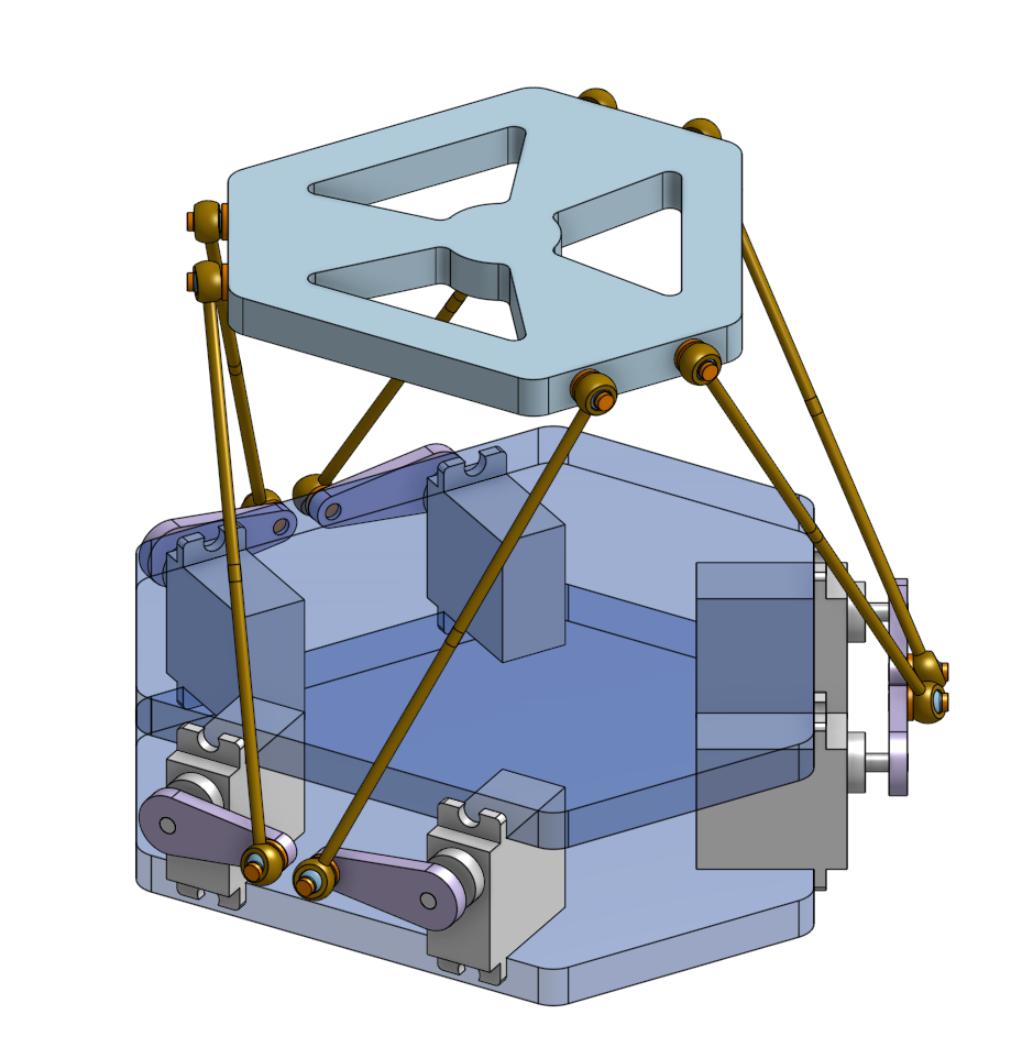
This is an ESP32 implementation of a six-degree-of-freedom hexapod — also called _Stewart Platform_, _Gough-Stewart Platform_ or _Parallel manipulator_.
The actuators are PWM rotary servo motors and the program is written in _Arduino C_ compiled with [_PlatformIO_](https://platformio.org/).
This project is done in the frame of the _P19 project_ at the [Microclub](https://microclub.ch).
Currently the platform can be operated:
- With a _Nunchuck_.
- With _Arduino C_ code (see [`Hexapod_Demo.cpp`](./src/Hexapod_Demo.cpp)).
- With _G-Code_ sent by a computer to the ESP through the serial port (see [`python/gcode2serial.py`](./gcode2serial/gcode2serial.py)).
The calculation of the kinematics is performed in [`Hexapod_Kinematics.cpp`](./src/Hexapod_Kinematics.cpp) and can be also be compiled in a desktop C++ program to cross-check calculations (i.e. without actuating the servos).
I managed to compile it with `g++` on _macOS Mojave_ and _macOS Monterey_.
See [`hexapod_desktop_app/hexapod_desktop_app.cpp`](./hexapod_desktop_app_cpp/hexapod_desktop_app.cpp).
## HOME PAGE OF THE PROJECT
The home page is a work in progress, but the video shows what the platform can do.
The original implementation used an analog joystick, but the current version uses a Wii Nunchuck.
The automatic translation in English can be read here:
The original version in French is here:
## PREREQUISITES
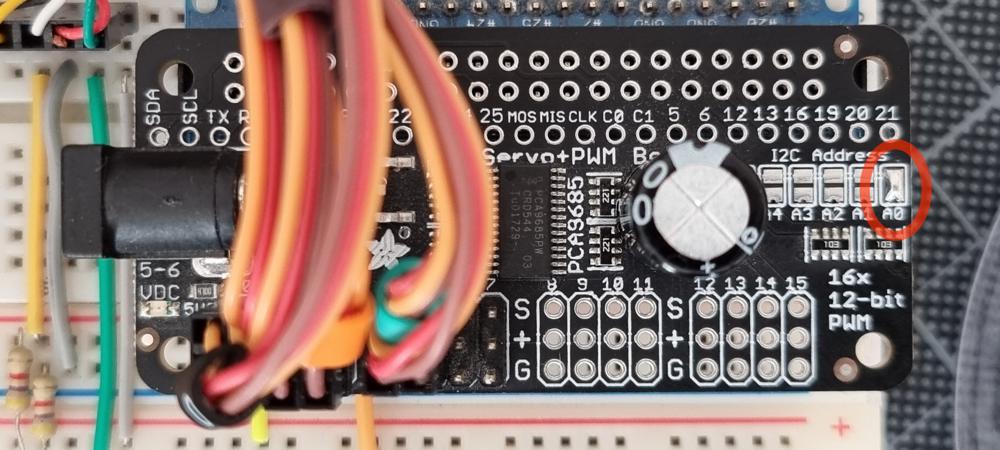
- Change the default I²C address of the PCA9685 driver from `0x40` to `0x41` by shorting the A0 jumper beside the capacitor.
- Create a file called `src/WifiSettings.h` containing:
```C++
#pragma once
const char *ssid = ""; // SSID of your WiFi router.
const char *password = ""; // Password of your WiFi router.
const char *ap_ssid = "STEW32-"; // SSID of the ESP32 WiFi network in soft-AP mode (15 char max).
const char *ap_password = ""; // Password of the ESP32 WiFi network in soft-AP mode.
// Must be 8 char min or empty for no password.
```
## GEOMETRY SETTINGS
Geometry settings are defined in
[`Hexapod_Config_1.h`](./src/Hexapod_Config_1.h).
The meaning of the parameters is explained in
[`doc/hexapod-parameters.pdf`](./doc/hexapod-parameters.pdf).
## PARTS TO BUILD
### Base plates
The two base plates are identical and the DXF file to reproduce them is here (right-click + save as):
[`doc/hexapod-base-plate.dxf`](https://raw.githubusercontent.com/NicHub/stewart-platform-esp32/master/doc/hexapod-base-plate.dxf).
### Top plate
The top plate is 3D-printed (right-click + save as):
[`doc/hexapod-top-plate.stl.zip`](https://raw.githubusercontent.com/NicHub/stewart-platform-esp32/master/doc/hexapod-top-plate.stl.zip).
## PARTS TO BUY
| QTY | PART |
| :--- | :---------------------------------------------------------------------------------------------------------------------------------------------------------------- |
| 1 | [WeMos ESP32 WROOM](https://www.banggood.com/fr/WeMos-ESP32-WiFi-Bluetooth-Development-Board-Ultra-Low-Power-Consumption-Dual-Core-ESP-32-ESP-32S-p-1175488.html) |
| 1 | [Adafruit PCA9685 16-Channel Servo I²C Driver](https://www.mouser.ch/ProductDetail/adafruit/3416/?qs=F5EMLAvA7ICYzX4Av%252bhRHw==) |
| 1 | [Breadboard adapter for PCA9685](https://www.aliexpress.com/item/1005004132188471.html) |
| 1 | [5 V / 10 A power supply](https://aliexpress.com/af/32810906485.html) |
| 6 | [Rods M3x100mm (140mm total)](https://aliexpress.com/af/32775630549.html) |
| 6 | ¹ [Tower Pro MG996R servo (clone)](https://fr.aliexpress.com/item/32636102294.html) |
| 1 | [Nunchuck](https://fr.aliexpress.com/item/1005003050706988.html) |
| 1 | ² [Nunchuck cable extension](https://fr.aliexpress.com/item/32784720613.html) |
| 1 | ³ [Adafruit Wii Nunchuck Breakout Adapter](https://www.adafruit.com/product/4836) |
| 1 | [6 pin Dupont connector to connect Nunchuck to breadboard](https://www.aliexpress.com/item/32809965211.html) |
| 1 | [Set of cable markers](https://fr.aliexpress.com/item/1005004255868271.html) |
| 6 | [M3×5×6 Brass insert nuts](https://www.aliexpress.com/item/32828848326.html) |
| 12 | Small screws to hold the motors on the base plates |
| 6 | M3×12 screw |
| 6 | M3×12 nut |
| 1 | Breadboard |
| some | Breadboard wires |
| 2 | 4.7 kΩ resistor |
### Notes
- ¹ I currently use clones of the _Tower Pro MG996R_ servos, but they are bad and I don’t recommend them.
I formerly used clones of the _Tower Pro MG90s_ Servos, but they were also bad and too small for this application.
In the future, I will probalbly use _Parallax 900-00005_ servos.
It seems that these are the one used by _fullmotiondynamics_ in their videos.
- ² The Nunchuck cable extension is not mandatory.
The idea is not to have a longer cable but rather to use the extension as an adapter between the Nunchuck and the breadboard, that is to say that it allows to leave the Nunchunk cable uncut.
- ³ This breakout adapter is not mandatory, but it could simplify wiring.
I haven’t used it myself.
## WIRING
### Nunchuck
> The Nunchuck library uses `Wire.h` and standard I²C connections internaly.
>
> Pins are seen from left to right and top to bottom looking at the Nunchuck connector.
>
> Cut the cable extension to connect to the ESP32.
| color | signal | ESP32 pin |
| :----- | :----- | :---------------------------------------------------- |
| white | SCL | IO22 |
| NC | | |
| red | GND | GND |
| green | VCC | VCC |
| black | ATT | IO32 (or connect to 3.3V to force Nunchunk detection) |
| yellow | SDA | IO21 |
## EXTERNAL LIBRARIES
The external libraries are installed automatically during the first build because they are declared under `lib_deps` in `platformio.ini`.
## I²C ADDRESSES
> By default, the PCA9685 driver and the Nunchuck share the same I²C address `0x40`.
> Fortunately, the address of the PCA9685 driver can easily be changed to `0x41` by shorting the A0 jumper next to the capacitor.
| Default address | New address | Device |
| :-------------- | :---------- | :------------------------------------------------------------------------ |
| 0x40 | 0x41 | PCA9685 |
| 0x70 | = | PCA9685 (broadcast) |
| 0x40 | = | Nunchuck ([IMU](https://en.wikipedia.org/wiki/Inertial_measurement_unit)) |
| 0x52 | = | Nunchuck (joystick) |
| 0x68 | = | GY-91 (MPU9250) |
| 0x76 | = | GY-91 (BMP280) |
## CREDITS
### My sources of inspiration
- San-José State University / Full Motion Dynamics:
-
- ~~fullmotiondynamics.com~~
### Kinematics
- Hexapod kinematics of this project was originaly based on _6dof-stewduino, by Philippe Desrosiers_, althought I reworked it in depth:
-
- He derived his implementation from the work of _Daniel Waters_:
-
- Kinematics calculation is also explained in this document by an unknown author from the _Wokingham U3A Math Group_:
-
-
- The project _memememememememe_ was also an excellent source of inspiration.
They share the code for _RPi_ and a simulator in the _Processing_ langage:
-
-
### Serial buffer for G-Code
- Derived from _MarginallyClever_:
-
## FURTHER READINGS
- The code for this project was used by Jakob Frabosilio for his Master’s thesis, which he presented in September 2024 at Cal Poly (Faculty of California Polytechnic State University), San Luis Obispo.
- [Design and Implementation of an Inverted Short Baseline Acoustic Positioning System](https://digitalcommons.calpoly.edu/theses/2914/)
- Some images and videos of his work are available here:
- PID Control System Analysis and Design, By YUN LI, KIAM HEONG ANG, and GREGORY C.Y. CHONG
- See Table 1, p.33
- Understanding PID Control, Part 1: What is PID Control?
-
- Modern Robotics, Chapter 7: Kinematics of Closed Chains
-