# running_page
**Repository Path**: yihong0618/running_page
## Basic Information
- **Project Name**: running_page
- **Description**: Make your own running home page
- **Primary Language**: Python
- **License**: MIT
- **Default Branch**: master
- **Homepage**: None
- **GVP Project**: No
## Statistics
- **Stars**: 3
- **Forks**: 0
- **Created**: 2021-03-25
- **Last Updated**: 2025-07-04
## Categories & Tags
**Categories**: Uncategorized
**Tags**: None
## README
# [打造个人跑步主页](https://yihong.run/running)
[English](README-EN.md) | 简体中文
GIF 展示

## [大家的跑步主页展示](https://github.com/yihong0618/running_page/issues/12)
| Runner | page | App |
| ------- | ------- | ------- |
| [shaonianche](https://github.com/shaonianche) | https://run.duangfei.org | Nike |
| [yihong0618](https://github.com/yihong0618) | https://yihong.run/running | Nike |
| [superleeyom](https://github.com/superleeyom) | https://running.leeyom.top | Nike |
| [geekplux](https://github.com/geekplux) | https://activities.geekplux.com | Nike |
| [guanlan](https://github.com/guanlan) | https://grun.vercel.app | Strava |
| [tuzimoe](https://github.com/tuzimoe) | https://run.tuzi.moe | Nike |
| [ben_29](https://github.com/ben-29) | https://running.ben29.xyz | Strava |
| [kcllf](https://github.com/kcllf) | https://running-tau.vercel.app | Garmin-cn |
| [mq](https://github.com/MQ-0707) | https://running-iota.vercel.app | Keep |
| [zhaohongxuan](https://github.com/zhaohongxuan) | https://running-page-psi.vercel.app | Keep |
| [yvetterowe](https://github.com/yvetterowe) | https://run.haoluo.io | Strava |
| [love-exercise](https://github.com/KaiOrange) | https://run.kai666666.top | Keep |
| [zstone12](https://github.com/zstone12) | https://running-page.zstone12.vercel.app | Keep |
| [Lax](https://github.com/Lax) | https://lax.github.io/running | Keep |
| [lusuzi](https://github.com/lusuzi) | https://running.lusuzi.vercel.app | Nike |
| [wh1994](https://github.com/wh1994) | https://run4life.fun | Garmin |
| [liuyihui](https://github.com/YiHui-Liu) | https://run.foolishfox.cn | Keep |
| [FrankSun](https://github.com/hi-franksun) | https://hi-franksun.github.io/running_page | Nike |
| [AhianZhang](https://github.com/AhianZhang) | https://running.ahianzhang.com | Keep |
| [L1cardo](https://github.com/L1cardo) | https://run.licardo.cn | Nike |
| [luckylele666](https://github.com/luckylele666) | https://0000928.xyz | Strava |
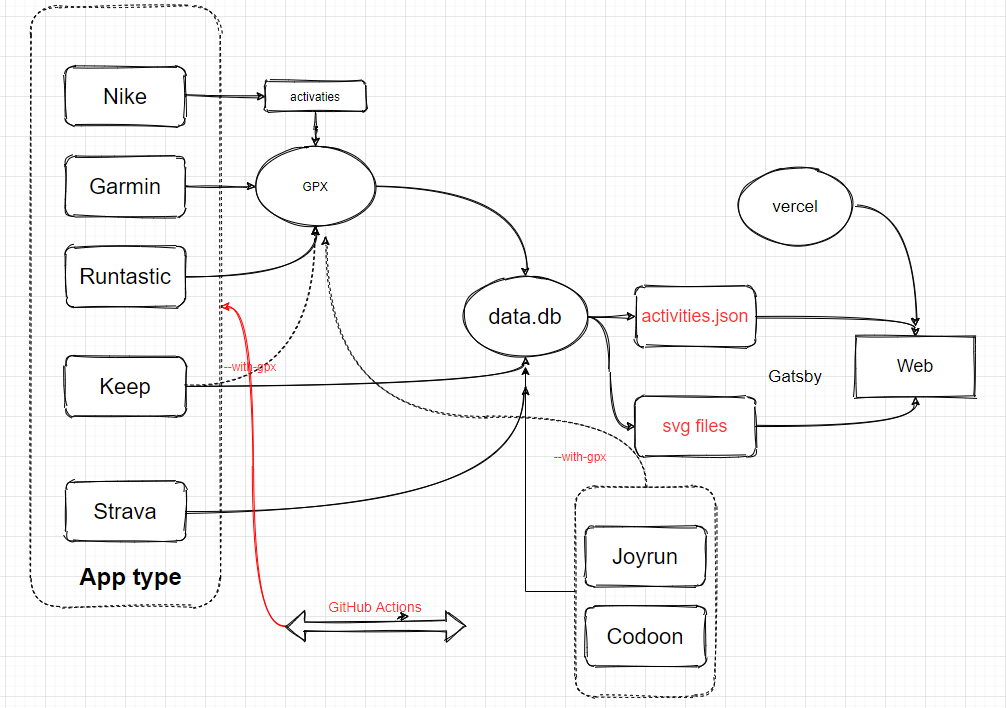
## 它是怎么工作的
## 特性
1. GitHub Actions 管理自动同步跑步进程及自动生成新的页面
2. Gatsby 生成的静态网页,速度快
3. 支持 Vercel(推荐) 和 GitHub Pages 自动部署
4. React Hooks
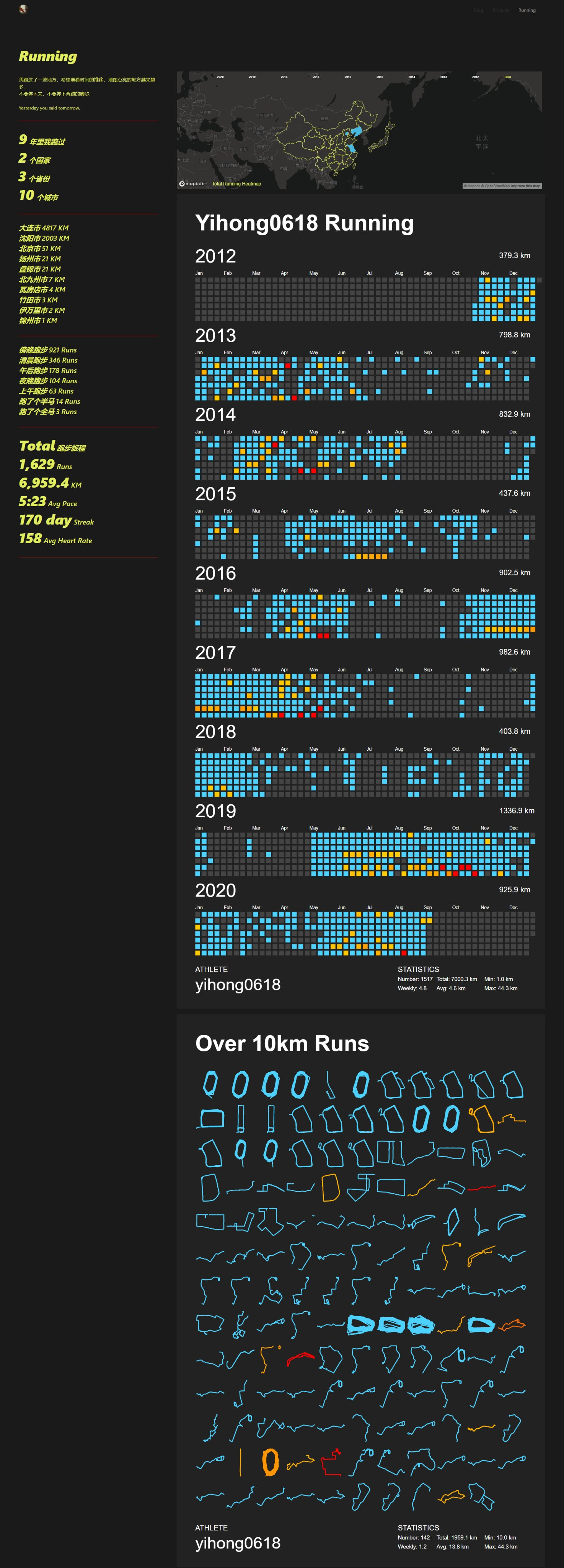
5. Mapbox 进行地图展示
6. Nike 及 Runtastic(Adidas Run) 以及佳明(佳明中国)及 Keep 等, 自动备份 gpx 数据,方便备份及上传到其它软件
> 因为数据存在 gpx 和 data.db 中,理论上支持几个软件一起,你可以把之前各类 app 的数据都同步到这里(建议本地同步,之后 actions 选择正在用的 app)
缩放地图彩蛋
## 支持
- **[Strava](#strava)**
- **[Nike Run Club](#nike-run-club)**
- **[Garmin](#Garmin)**
- **[Garmin-cn](#garmin-cn-大陆用户请用这个)**
- **[Keep](#Keep)**
- **[悦跑圈](#joyrun悦跑圈)** (因悦跑圈限制单个设备原因,无法自动化)
- **[咕咚](#codoon咕咚)** (因咕咚限制单个设备原因,无法自动化)
- **[GPX](#GPX)**
- **[Nike+Strava(Using NRC Run, Strava backup data)](#nikestrava)**
## 下载
```
git clone https://github.com/yihong0618/running_page.git
```
## 安装及测试
```
pip3 install -r requirements.txt
yarn install
yarn develop
```
访问 http://localhost:8000/ 查看
## 替换 `src/utils/const.js` 文件中的 Mapbox token
>建议有能力的同学把代码中的 Mapbox token 自己的 [Mapbox token](https://www.mapbox.com/)
```javascript
const MAPBOX_TOKEN = 'pk.eyJ1IjoieWlob25nMDYxOCIsImEiOiJja2J3M28xbG4wYzl0MzJxZm0ya2Fua2p2In0.PNKfkeQwYuyGOTT_x9BJ4Q';
```
### 如果你是海外用户请更改 `IS_CHINESE = false` in `src/utils/const.js`
## 一些个性化选项
### 左上角的头像
修改 `src/utils/const.js` 里的 `export const AVATAR =
'https://encrypted-tbn0.gstatic.com/images?q=tbn:ANd9GcQTtc69JxHNcmN1ETpMUX4dozAgAN6iPjWalQ&usqp=CAU';` 换成你想要的图片的链接。
### 右上角默认的 Blog 和 About
修改 `src/utils/const.js` 里的 `NAVS`,换成你想要的链接,如:
```javascript
export const NAVS = [
{ text: 'Blog', link: 'https://yihong.run/running' },
{ text: 'About', link: 'https://github.com/yihong0618/running_page/blob/master/README-CN.md' },
];
```
你也可以自行添加多个链接,照葫芦画瓢即可。
### 页面标题与网站链接
在仓库目录下找到 `gatsby-config.js`,找到以下内容并修改成你自己想要的。
```javascript
siteMetadata: {
title: 'Running page',
siteUrl: 'https://yihong.run',
description: 'Personal site and blog',
},
```
## 下载您的 Nike Run Club/Strava/Garmin/Garmin-cn/Keep 数据, [别忘了在 `total` 页面生成可视化 SVG](#Total-Data-Analysis).
### GPX
Make your GPX data
把其它软件生成的 gpx files 拷贝到 GPX_OUT 之后运行
```python
python3(python) scripts/gpx_sync.py
```
### Keep
获取您的 Keep 数据
确保自己的账号能用手机号 + 密码登陆 (不要忘记添加 secret 和更改自己的账号,在 GitHub Actions 中), 注: 海外手机号需要换成国内 +86 的手机号
```python
python3(python) scripts/keep_sync.py ${your mobile} ${your password}
```
示例:
```python
python3(python) scripts/keep_sync.py 13333xxxx example
```
> 注:我增加了 keep 可以导出 gpx 功能(因 keep 的原因,距离和速度会有一定缺失), 执行如下命令,导出的 gpx 会加入到 GPX_OUT 中,方便上传到其它软件
```python
python3(python) scripts/keep_sync.py ${your mobile} ${your password} --with-gpx
```
示例:
```python
python3(python) scripts/keep_sync.py 13333xxxx example --with-gpx
```
### JoyRun(悦跑圈)
获取您的悦跑圈数据
获取登陆验证码:
确保自己的账号能用手机号 + 验证码登陆
点击获取验证码, 注: **不要在手机输入验证码,拿到验证码就好,用这个验证码放到下方命令中**

```python
python3(python) scripts/joyrun_sync.py ${your mobile} ${your 验证码}
```
示例:
```python
python3(python) scripts/joyrun_sync.py 13333xxxx xxxx
```
> 注:我增加了 joyrun 可以导出 gpx 功能, 执行如下命令,导出的 gpx 会加入到 GPX_OUT 中,方便上传到其它软件
```python
python3(python) scripts/joyrun_sync.py ${your mobile} ${your 验证码} --with-gpx
```
示例:
```python
python3(python) scripts/joyrun_sync.py 13333xxxx example --with-gpx
```
> 注:因为验证码有过期时间,我增加了 cookie uid sid 登陆的方式, uid 及 sid 在您登陆过程中会在控制台打印出来

示例:
```python
python3(python) scripts/joyrun_sync.py 1393xx30xxxx 97e5fe4997d20f9b1007xxxxx --from-uid-sid --with-gpx
```
### Codoon(咕咚)
获取您的咕咚数据
```python
python3(python) scripts/codoon_sync.py ${your mobile or email} ${your password}
```
示例:
```python
python3(python) scripts/codoon_sync.py 13333xxxx xxxx
```
> 注:我增加了 Codoon 可以导出 gpx 功能, 执行如下命令,导出的 gpx 会加入到 GPX_OUT 中,方便上传到其它软件
```python
python3(python) scripts/codoon_sync.py ${your mobile or email} ${your password} --with-gpx
```
示例:
```python
python3(python) scripts/codoon_sync.py 13333xxxx xxxx --with-gpx
```
> 注:因为登录token有过期时间限制,我增加了 refresh_token&user_id 登陆的方式, refresh_token 及 user_id 在您登陆过程中会在控制台打印出来

示例:
```python
python3(python) scripts/codoon_sync.py 54bxxxxxxx fefxxxxx-xxxx-xxxx --from-auth-token
```
### Garmin
获取您的 Garmin 数据
```python
python3(python) scripts/garmin_sync.py ${your email} ${your password}
```
示例:
```python
python3(python) scripts/garmin_sync.py example@gmail.com example
```
### Garmin-CN (大陆用户请用这个)
获取您的 Garmin-CN 数据
```python
python3(python) scripts/garmin_sync.py ${your email} ${your password} --is-cn
```
示例:
```python
python3(python) scripts/garmin_sync.py example@gmail.com example --is-cn
```
### Nike Run Club
获取 Nike Run Club 数据
获取 Nike 的 refresh_token
1. 登录 [Nike](https://www.nike.com) 官网
2. In Developer -> Application-> Storage -> https:unite.nike.com 中找到 refresh_token

3. 在项目根目录下执行:
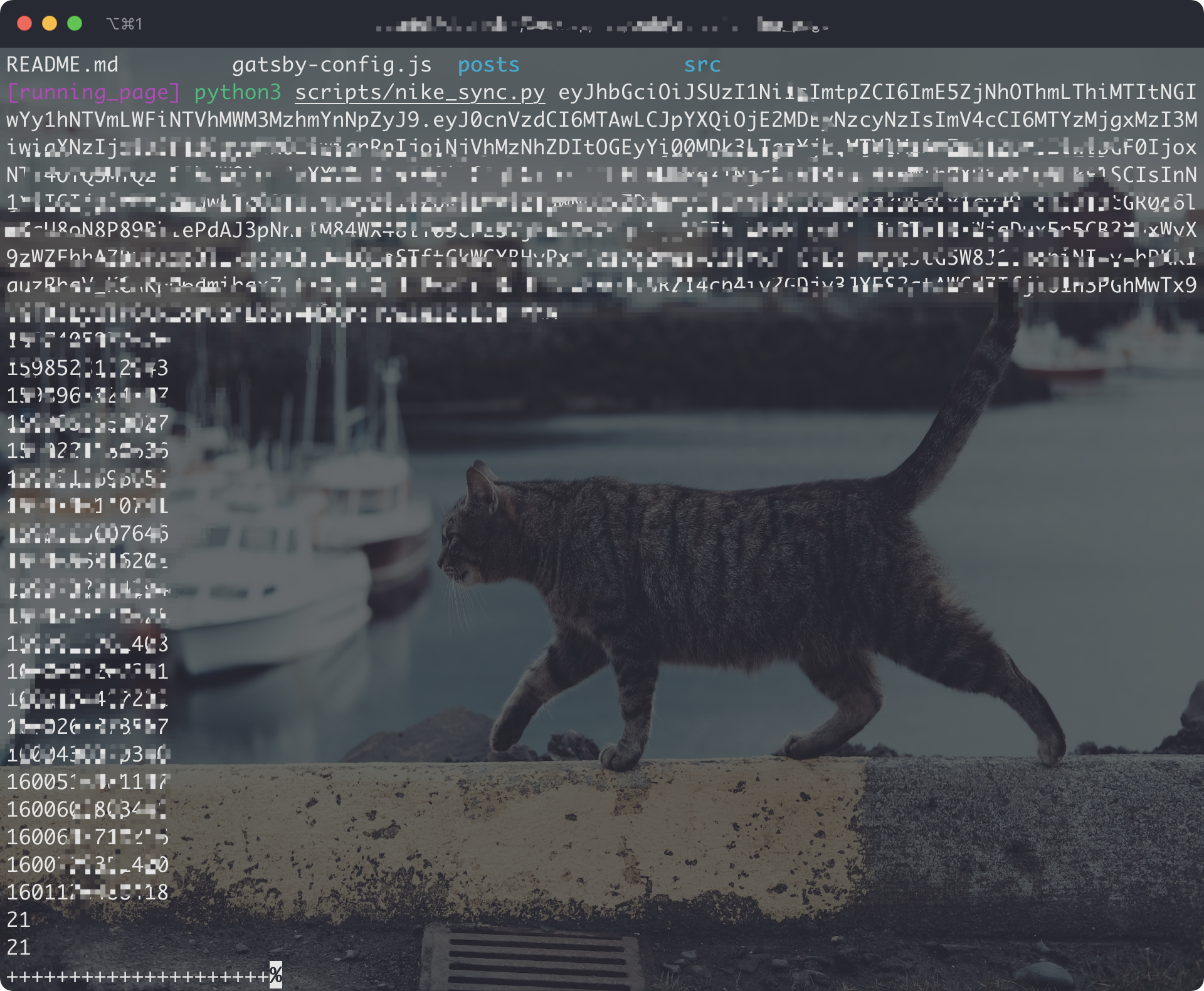
```python
python3(python) scripts/nike_sync.py ${nike refresh_token}
```
示例:
```python
python3(python) scripts/nike_sync.py eyJhbGciThiMTItNGIw******
```
### Strava
获取 Strava 数据
1. 注册/登陆 [Strava](https://www.strava.com/) 账号
2. 登陆成功后打开 [Strava Developers](http://developers.strava.com) -> [Create & Manage Your App](https://strava.com/settings/api)
3. 创建 `My API Application`
输入下列信息:
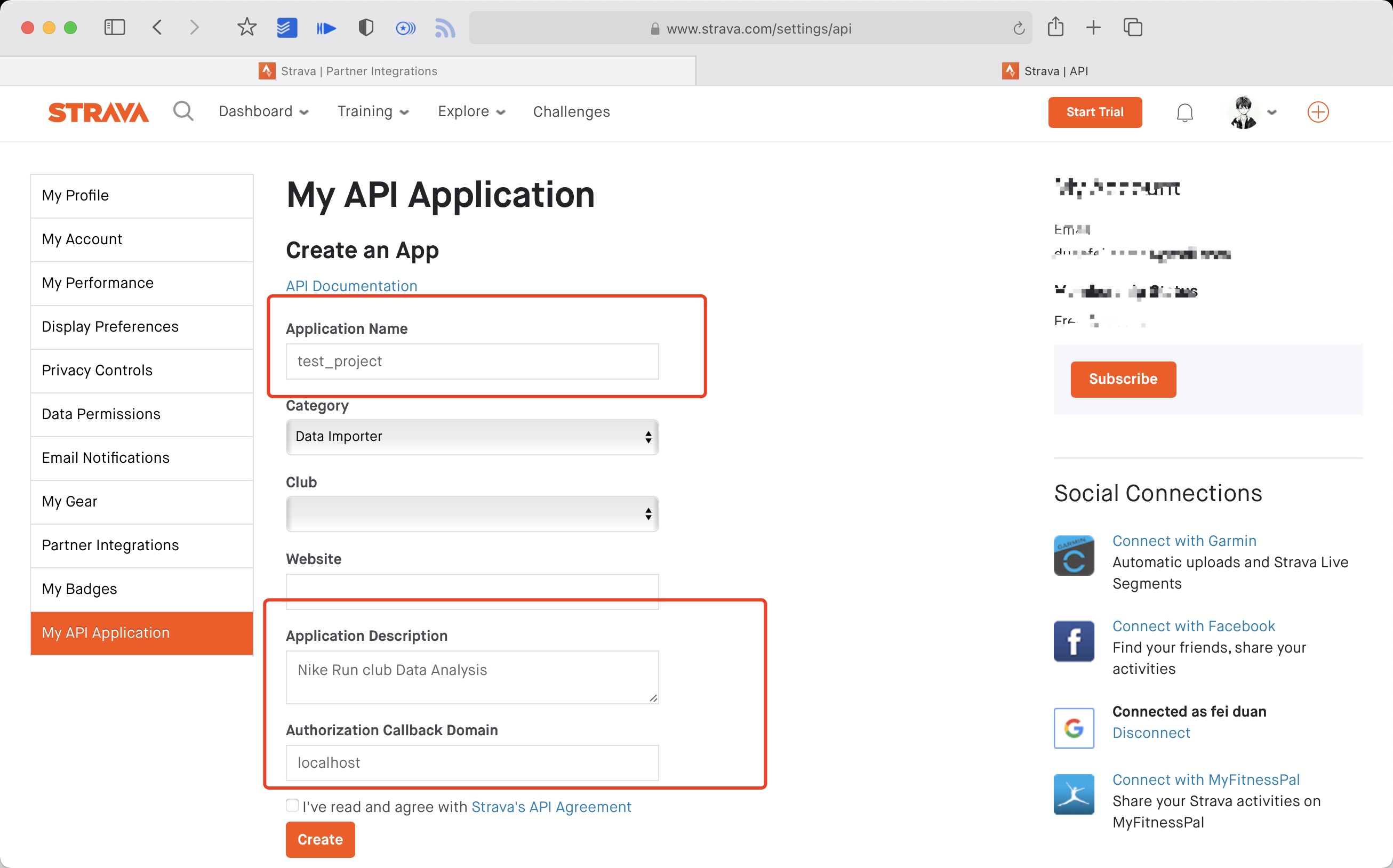
创建成功:

4. 使用以下链接请求所有权限
将 ${your_id} 替换为 My API Application 中的 Client ID 后访问完整链接
```
https://www.strava.com/oauth/authorize?client_id=${your_id}&response_type=code&redirect_uri=http://localhost/exchange_token&approval_prompt=force&scope=read_all,profile:read_all,activity:read_all,profile:write,activity:write
```
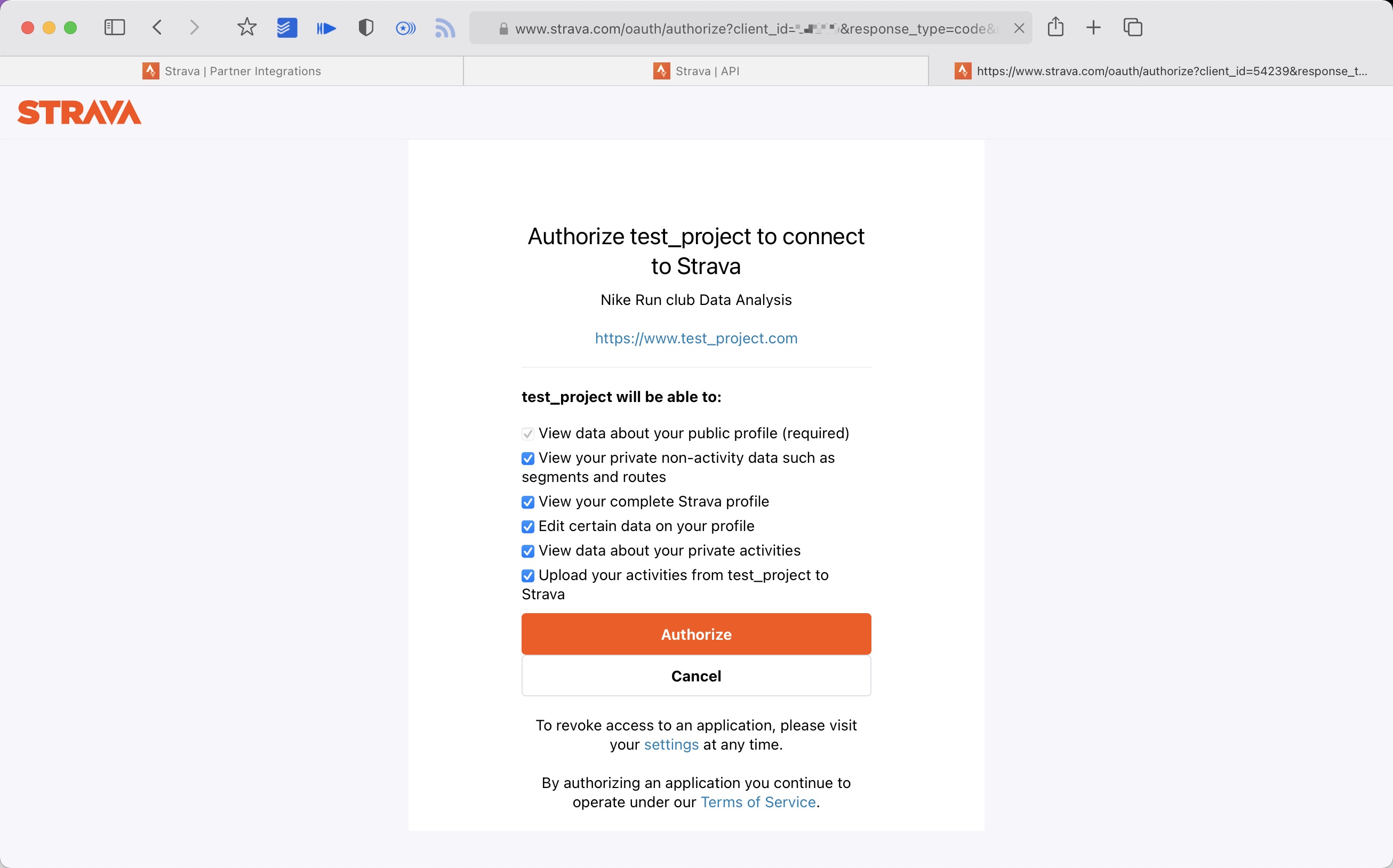
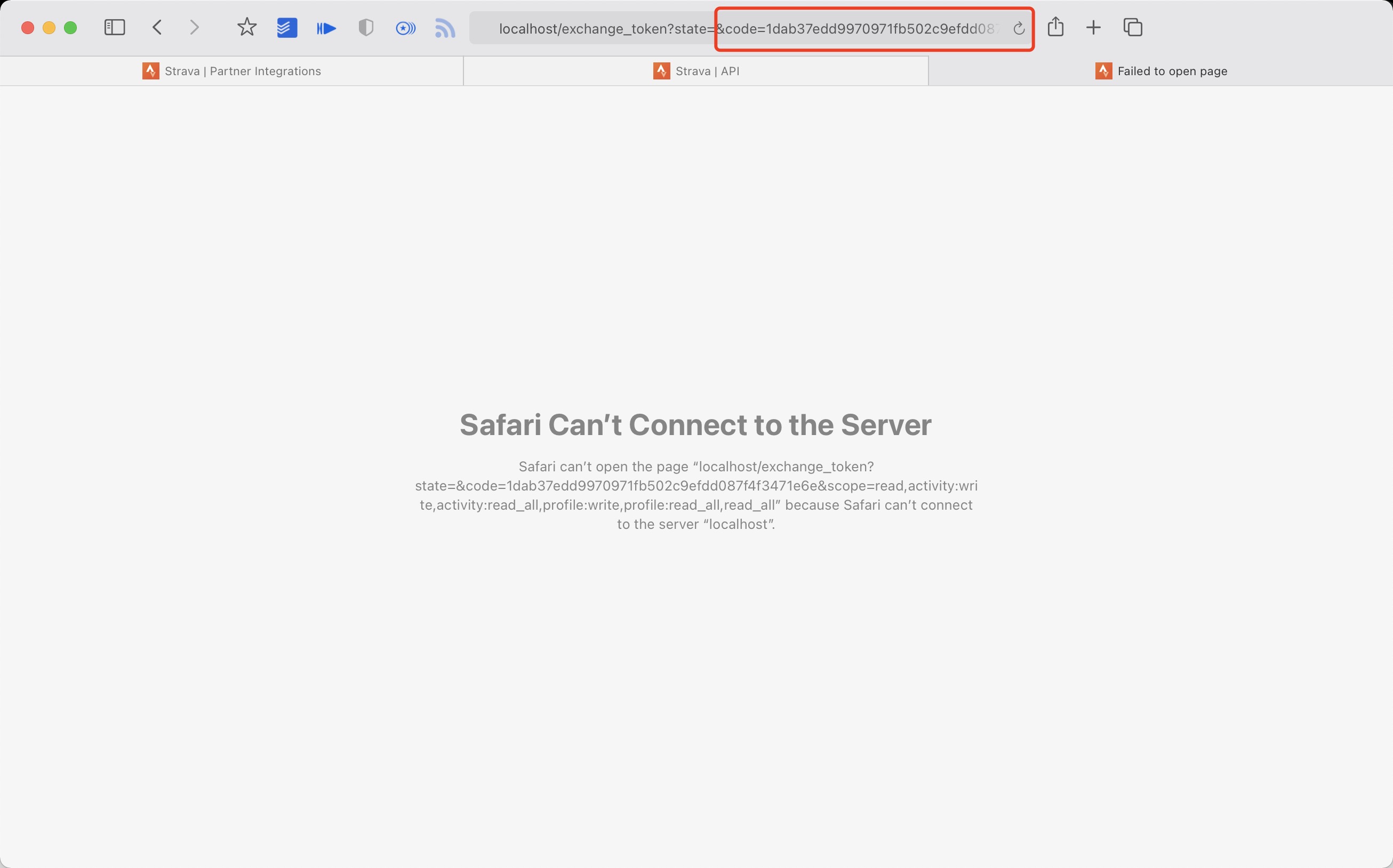
5. 提取授权后返回链接中的 code 值
例如:
```
http://localhost/exchange_token?state=&code=1dab37edd9970971fb502c9efdd087f4f3471e6e&scope=read,activity:write,activity:read_all,profile:write,profile:read_all,read_all
```
`code` 数值为:
```
1dab37edd9970971fb502c9efdd087f4f3471e6
```
6. 使用 Client_id、Client_secret、Code 请求 refresch_token
在 `终端/iTerm` 中执行:
```
curl -X POST https://www.strava.com/oauth/token \
-F client_id=${Your Client ID} \
-F client_secret=${Your Client Secret} \
-F code=${Your Code} \
-F grant_type=authorization_code
```
示例:
```
curl -X POST https://www.strava.com/oauth/token \
-F client_id=12345 \
-F client_secret=b21******d0bfb377998ed1ac3b0 \
-F code=d09******b58abface48003 \
-F grant_type=authorization_code
```

7. 同步数据至 Strava
在项目根目录执行:
```python
python3(python) scripts/strava_sync.py ${client_id} ${client_secret} ${refresch_token}
```
其他资料参见
https://developers.strava.com/docs/getting-started
https://github.com/barrald/strava-uploader
https://github.com/strava/go.strava
### Nike+Strava
Get your Nike Run Club data and upload to strava
1. 完成 nike 和 strava 的步骤
2. 在项目根目录下执行::
```python
python3(python) scripts/nike_to_strava_sync.py ${nike_refresh_token} ${client_id} ${client_secret} ${strava_refresch_token}
```
示例:
```python
python3(python) scripts/nike_to_strava_sync.py eyJhbGciThiMTItNGIw****** xxx xxx xxx
```
### Total Data Analysis
生成数据展示
- 生成数据展示 SVG
- 展示效果:[点击查看](https://raw.githubusercontent.com/yihong0618/running_page/master/assets/github.svg)、[点击查看](https://raw.githubusercontent.com/yihong0618/running_page/28fa801e4e30f30af5ae3dc906bf085daa137936/assets/grid.svg)
> 注: 感兴趣的同学可以改下方参数 (--special-distance 10 --special-distance2 20, 10km~20km 展示为 special-color1 20km 以上展示为 special-color2, --min-distance 10.0用来筛选 10km 以上的)
```
python3(python) scripts/gen_svg.py --from-db --title "${{ env.TITLE }}" --type github --athlete "${{ env.ATHLETE }}" --special-distance 10 --special-distance2 20 --special-color yellow --special-color2 red --output assets/github.svg --use-localtime --min-distance 0.5
```
```
python3(python) scripts/gen_svg.py --from-db --title "${{ env.TITLE_GRID }}" --type grid --athlete "${{ env.ATHLETE }}" --output assets/grid.svg --min-distance 10.0 --special-color yellow --special-color2 red --special-distance 20 --special-distance2 40 --use-localtime
```
生成年度环形数据
```
python3(python) scripts/gen_svg.py --from-db --type circular --use-localtime
```
更多展示效果参见:
https://github.com/flopp/GpxTrackPoster
## server(recommend vercel)
使用 vercel 部署
1. vercel 连接你的 GitHub repo
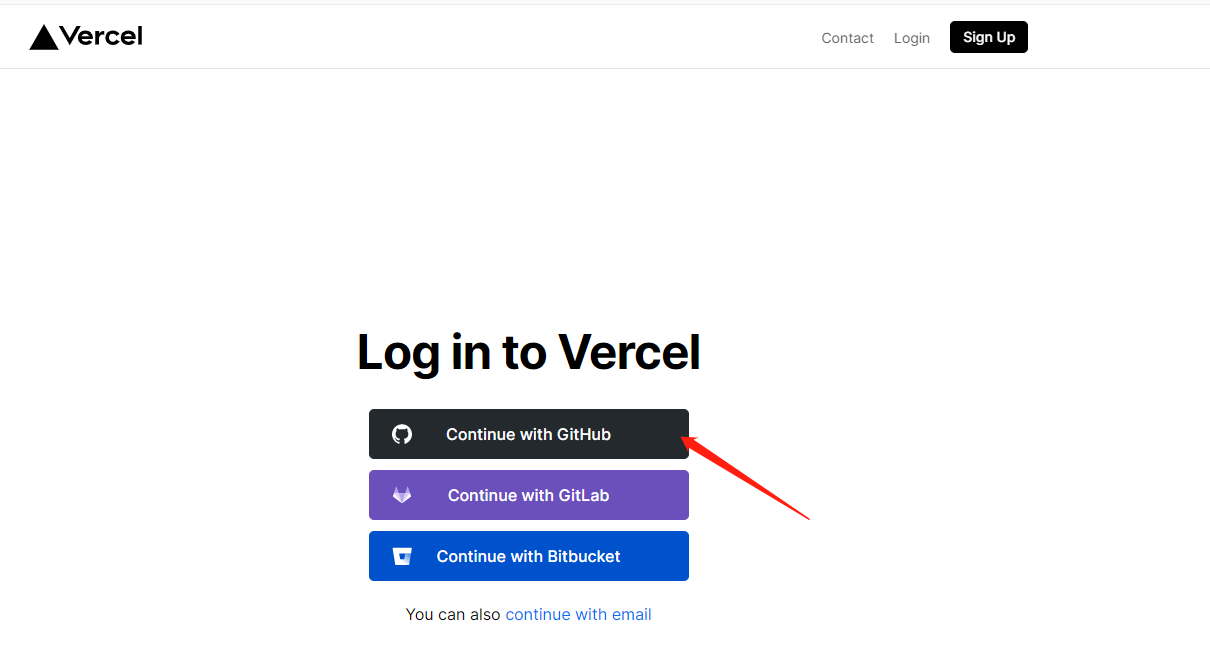
2. import repo

2. 等待部署完毕
3. 访问
部署到 GitHub Pages
1. 配置 GitHub Action。如需使用自定义域名,可以修改 [.github/workflows/gh-pages.yml](.github/workflows/gh-pages.yml) 中的 `fqdn`(默认已注释掉)
2. 修改 `gatsby-config.js`,更新 `pathPrefix`。【如果使用自定义域名,可跳过这一步】
3. 在项目的 `Actions -> Workflows -> All Workflows` 中选择 Publish GitHub Pages,点击 `Run workflow`
4. 在项目的 `Settings -> GitHub Pages -> Source` 部分,选择 `Branch: gh-pages` 并点击 `Save`。
## GitHub Actions (Fork 的同学请一定不要忘了把 GitHub Token 改成自己的,否则会 push 到我的 repo 中,谢谢大家。)
修改 GitHub Actions Token
Actions [源码](https://github.com/yihong0618/running_page/blob/master/.github/workflows/run_data_sync.yml)
需要做如下步骤
1. 更改成你的 app type 及info

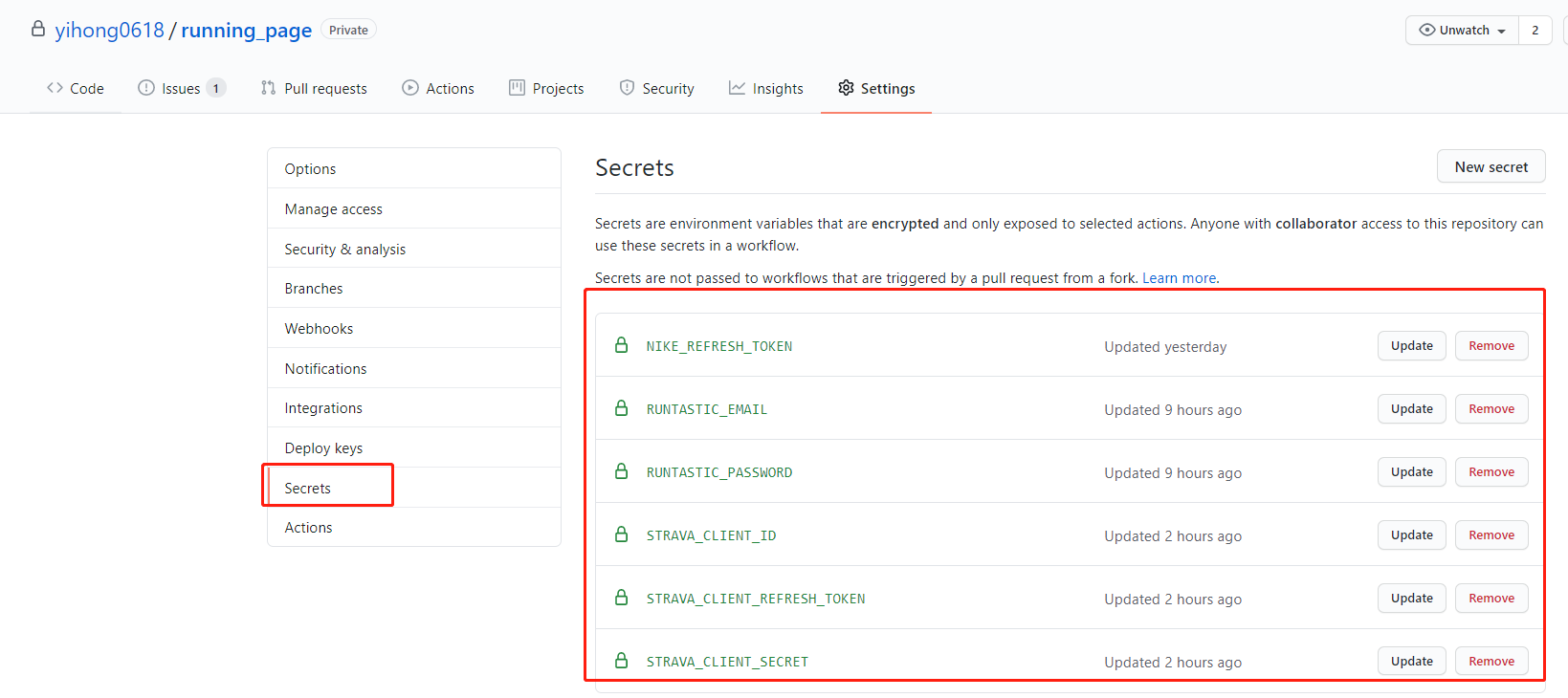
2. 在 repo Settings > Secrets 中增加你的 secret (只添加你需要的即可)

我的 secret 如下
3. 添加你的 [GitHub secret](https://github.com/settings/tokens)并和项目中的 GitHub secret 同名

# TODO
- [x] 完善这个文档
- [x] 支持佳明,佳明中国
- [x] 支持 keep
- [ ] 支持苹果自带运动
- [x] 支持 nike + strava
- [x] 支持咕咚
- [ ] 尝试支持小米运动
- [x] 支持英语
- [x] 完善代码
- [x] 清理整个项目
- [x] 完善前端代码
- [x] better actions
- [ ] 支持不同的运动类型
# 参与项目
- 任何 Issues PR 均欢迎。
- 可以提交 PR share 自己的 Running page 在 README 中。
提交PR前:
- 使用 black 对 Python 代码进行格式化。
# 特别感谢
- @[flopp](https://github.com/flopp) 特别棒的项目 [GpxTrackPoster](https://github.com/flopp/GpxTrackPoster)
- @[shaonianche](https://github.com/shaonianche) icon 设计及文档
- @[geekplux](https://github.com/geekplux) 帮助及鼓励, 重构了前端代码,学到了不少~
- @[ben-29](https://github.com/ben-29) 搞定了咕咚,和我一起搞定了悦跑圈,太厉害了。
# 赞赏
谢谢就够了