# TikTokDownloader
**Repository Path**: yonglelolu/TikTokDownloader
## Basic Information
- **Project Name**: TikTokDownloader
- **Description**: GitHub 同步仓库:TikTok 发布/喜欢/合辑/直播/视频/图集/音乐;抖音发布/喜欢/收藏/收藏夹/视频/图集/实况/直播/音乐/合集/评论/账号/搜索/热榜数据采集工具/下载工具
- **Primary Language**: Python
- **License**: GPL-3.0
- **Default Branch**: master
- **Homepage**: https://github.com/JoeanAmier/TikTokDownloader
- **GVP Project**: No
## Statistics
- **Stars**: 39
- **Forks**: 17
- **Created**: 2024-03-02
- **Last Updated**: 2026-04-28
## Categories & Tags
**Categories**: Uncategorized
**Tags**: None
## README
🔥 TikTok 发布/喜欢/合辑/直播/视频/图集/音乐;抖音发布/喜欢/收藏/收藏夹/视频/图集/实况/直播/音乐/合集/评论/账号/搜索/热榜数据采集工具:完全开源,基于 HTTPX 模块实现的免费数据采集和文件下载工具;批量下载抖音账号发布、喜欢、收藏、收藏夹作品;批量下载 TikTok 账号发布、喜欢作品;下载抖音链接或 TikTok 链接作品;获取抖音直播拉流地址;下载抖音直播视频;获取 TikTok 直播拉流地址;下载 TikTok 直播视频;采集抖音作品评论数据;批量下载抖音合集作品;批量下载 TikTok 合辑作品;采集抖音账号详细数据;采集抖音用户 / 作品 / 直播搜索结果;采集抖音热榜数据。
⭐ 本项目历史名称:TikTokDownloader
📣 本项目将于未来进行代码结构重构,目标是让代码更加稳健,并具备更好的可维护性与扩展性;如果你对项目设计、实现方式或优化思路有想法,欢迎提出建议或参与讨论!
# 📝 项目功能
功能列表(点击展开)
- ✅ 下载抖音视频/图集
- ✅ 下载抖音实况/动图
- ✅ 下载最高画质视频文件
- ✅ 下载 TikTok 视频原画
- ✅ 下载 TikTok 视频/图集
- ✅ 下载抖音账号发布/喜欢/收藏/收藏夹作品
- ✅ 下载 TikTok 账号发布/喜欢作品
- ✅ 采集抖音 / TikTok 详细数据
- ✅ 批量下载链接作品
- ✅ 多账号批量下载作品
- ✅ 自动跳过已下载的文件
- ✅ 持久化保存采集数据
- ✅ 支持 CSV/XLSX/SQLite 格式保存数据
- ✅ 下载动态/静态封面图
- ✅ 获取抖音直播拉流地址
- ✅ 获取 TikTok 直播拉流地址
- ✅ 调用 ffmpeg 下载直播
- ✅ Web UI 交互界面
- ✅ 采集抖音作品评论数据
- ✅ 下载抖音合集作品
- ✅ 下载 TikTok 合辑作品
- ✅ 记录点赞收藏等统计数据
- ✅ 筛选作品发布时间
- ✅ 支持账号作品增量下载
- ✅ 支持使用代理采集数据
- ✅ 支持局域网远程访问
- ✅ 采集抖音账号详细数据
- ✅ 作品统计数据更新
- ✅ 支持自定义账号/合集标识
- ✅ 自动更新账号昵称/标识
- ✅ 部署至私有服务器
- ✅ 部署至公开服务器
- ✅ 采集抖音搜索数据
- ✅ 采集抖音热榜数据
- ✅ 记录已下载作品 ID
- ☑️
扫码登陆获取 Cookie
- ✅ 从浏览器读取 Cookie
- ✅ 支持 Web API 调用
- ✅ 支持多线程下载作品
- ✅ 文件完整性处理机制
- ✅ 自定义规则筛选作品
- ✅ 按文件夹归档保存作品文件
- ✅ 自定义设置文件大小上限
- ✅ 支持文件断点续传下载
- ✅ 监听剪贴板链接下载作品
# 💻 程序截图
前往 bilibili 观看演示;前往 YouTube 观看演示
## 终端交互模式
建议通过配置文件管理账号,更多介绍请查阅 文档

*****

*****

## Web UI 交互模式
> **项目代码已重构,该模式代码尚未更新,未来开发完成重新开放!**
## Web API 接口模式

*****

> **启动该模式后,访问 `http://127.0.0.1:5555/docs` 或者 `http://127.0.0.1:5555/redoc` 可以查阅自动生成的文档!**
### API 调用示例代码
```python
from httpx import post
from rich import print
def demo():
headers = {"token": ""}
data = {
"detail_id": "0123456789",
"pages": 2,
}
api = "http://127.0.0.1:5555/douyin/comment"
response = post(api, json=data, headers=headers)
print(response.json())
demo()
```
# 📋 项目说明
## 快速入门
⭐ Mac OS、Windows 10 及以上用户可前往 Releases 或者 Actions 下载已编译的程序,开箱即用!
⭐ 本项目包含自动构建可执行文件的 GitHub Actions,使用者可以随时使用 GitHub Actions 将最新源码构建为可执行文件!
⭐ 自动构建可执行文件教程请查阅本文档的 构建可执行文件指南 部分;如果需要更加详细的图文教程,请 查阅文章!
注意:由于 Mac OS 平台的可执行文件 main 未经过代码签名,首次运行时会受到系统安全限制。请先在终端执行 xattr -cr 项目文件夹路径 命令移除安全标记,执行一次后即可正常运行。
- 运行可执行文件 或者 配置环境运行(二选一)
运行可执行文件
- 下载 Releases 或者 Actions 构建的可执行文件压缩包
- 解压后打开程序文件夹,双击运行
main
配置环境运行
[//]: # (- 安装不低于
3.12 版本的 Python 解释器 )
- 安装
3.12 版本的 Python 解释器
- 下载最新的源码或 Releases 发布的源码至本地
使用 pip 安装项目依赖
- 运行
python -m venv venv 命令创建虚拟环境(可选)
- 运行
.\venv\Scripts\activate.ps1 或者 venv\Scripts\activate 命令激活虚拟环境(可选)
- 运行
pip install -i https://pypi.tuna.tsinghua.edu.cn/simple -r requirements.txt 命令安装程序所需模块
- 运行
python .\main.py 或者 python main.py 命令启动 DouK-Downloader
使用 uv 安装项目依赖(推荐)
- 运行
uv sync --no-dev 命令同步环境依赖
- 运行
uv run main.py 命令启动 DouK-Downloader
- 阅读 DouK-Downloader 的免责声明,根据提示输入内容
- 将 Cookie 信息写入配置文件
从剪贴板读取 Cookie(推荐)
- 参考 Cookie 提取教程,复制所需 Cookie 至剪贴板
- 选择
从剪贴板读取 Cookie 选项,程序会自动读取剪贴板的 Cookie 并写入配置文件
从浏览器读取 Cookie
- 选择
从浏览器读取 Cookie 选项,按照提示输入浏览器类型或序号
扫码登录获取 Cookie(失效)
选择 扫码登录获取 Cookie 选项,程序会显示登录二维码图片,并使用默认应用打开图片使用抖音 APP 扫描二维码并登录账号按照提示操作,程序会自动将 Cookie 写入配置文件
- 返回程序界面,依次选择
终端交互模式 -> 批量下载链接作品 -> 手动输入待采集的作品链接
- 输入抖音作品链接即可下载作品文件(TikTok 平台需要更多初始设置,详见文档)
- 更多详细说明请查看 项目文档
⭐ 推荐使用 Windows 终端(Windows 11 自带默认终端)
### Docker 容器
- 获取镜像
- 方式一:使用
Dockerfile 文件构建镜像
- 方式二:使用
docker pull joeanamier/tiktok-downloader 命令拉取镜像
- 方式三:使用
docker pull ghcr.io/joeanamier/tiktok-downloader 命令拉取镜像
- 创建容器:
docker run --name 容器名称(可选) -p 主机端口号:5555 -v tiktok_downloader_volume:/app/Volume -it <镜像名称>
注意:此处的 <镜像名称> 需与您在第一步中使用的镜像名称保持一致(例如 joeanamier/tiktok-downloader 或 ghcr.io/joeanamier/tiktok-downloader)
- 运行容器
- 启动容器:
docker start -i 容器名称/容器 ID
- 重启容器:
docker restart -i 容器名称/容器 ID
Docker 容器无法直接访问宿主机的文件系统,部分功能不可用,例如:从浏览器读取 Cookie;其他功能如有异常请反馈!
## 关于 Cookie
[点击查看 Cookie 获取教程](https://github.com/JoeanAmier/TikTokDownloader/blob/master/docs/Cookie%E8%8E%B7%E5%8F%96%E6%95%99%E7%A8%8B.md)
> * Cookie 仅需在失效后重新写入配置文件,并非每次运行程序都要写入配置文件!
>
> * Cookie 会影响下载的视频文件分辨率,如果无法下载最高分辨率的视频文件,请尝试更新 Cookie!
>
> * 程序获取数据失败时,可以尝试更新 Cookie 或者使用已登录的 Cookie!
## 其他说明
- 本项目内置智能延时请求机制,避免请求频率过高影响平台服务器,如需关闭,请参考 文档
- 程序提示用户输入时,直接回车代表返回上级菜单,输入
Q 或 q 代表结束运行
- 由于获取账号喜欢作品和收藏作品数据仅返回喜欢 / 收藏作品的发布日期,不返回操作日期,因此程序需要获取全部喜欢 / 收藏作品数据再进行日期筛选;如果作品数量较多,可能会花费较长的时间;可通过
max_pages 参数控制请求次数
- 获取私密账号的发布作品数据需要登录后的 Cookie,且登录的账号需要关注该私密账号
- 批量下载账号作品或合集作品时,如果对应的昵称或标识发生变化,程序会自动更新已下载作品文件名称中的昵称和标识
- 程序下载文件时会先将文件下载至临时文件夹,下载完成后再移动至储存文件夹;程序运行结束时会清空临时文件夹
批量下载收藏作品模式 目前仅支持下载当前已登录 Cookie 对应账号的收藏作品,暂不支持多账号- 如果需要程序使用代理请求数据,请在配置文件
settings.json 设置 proxy 参数 (可以考虑使用代理平台: Swiftproxy)
- 如果您的计算机没有合适的程序编辑 JSON 文件,建议使用 在线工具 编辑配置文件内容,修改后需要重启软件才能生效。
- 当程序请求用户输入内容或链接时,请注意避免输入的内容或链接包含换行符,这可能会导致预期之外的问题
- 本项目不会支持付费作品下载,请勿反馈任何关于付费作品下载的问题
- Windows 系统需要以管理员身份运行程序才能读取 Chromium、Chrome、Edge 浏览器 Cookie
- 本项目并未针对程序多开的情况进行优化,如需程序多开,请复制整个项目的文件夹,避免出现预期之外的问题
- 程序运行过程中,如需终止程序或
ffmpeg,请按下 Ctrl + C 终止运行,不要直接点击终端窗口的关闭按钮
构建可执行文件指南
构建可执行文件指南(点击展开)
本指南将引导您通过 Fork 本仓库并执行 GitHub Actions 自动完成基于最新源码的程序构建和打包!
---
### 使用步骤
#### 1. Fork 本仓库
1. 点击项目仓库右上角的 **Fork** 按钮,将本仓库 Fork 到您的个人 GitHub 账户中
2. 您的 Fork 仓库地址将类似于:`https://github.com/your-username/this-repo`
---
#### 2. 启用 GitHub Actions
1. 前往您 Fork 的仓库页面
2. 点击顶部的 **Settings** 选项卡
3. 点击右侧的 **Actions** 选项卡
4. 点击 **General** 选项
5. 在 **Actions permissions** 下,选择 **Allow all actions and reusable workflows** 选项,点击 **Save** 按钮
---
#### 3. 手动触发打包流程
1. 在您 Fork 的仓库中,点击顶部的 **Actions** 选项卡
2. 找到名为 **构建可执行文件** 的工作流
3. 点击右侧的 **Run workflow** 按钮:
- 选择 **master** 或者 **develop** 分支
- 点击 **Run workflow**
---
#### 4. 查看打包进度
1. 在 **Actions** 页面中,您可以看到触发的工作流运行记录
2. 点击运行记录,查看详细的日志以了解打包进度和状态
---
#### 5. 下载打包结果
1. 打包完成后,进入对应的运行记录页面
2. 在页面底部的 **Artifacts** 部分,您将看到打包的结果文件
3. 点击下载并保存到本地,即可获得打包好的程序
---
### 注意事项
1. **资源使用**:
- Actions 的运行环境由 GitHub 免费提供,普通用户每月有一定的免费使用额度(2000 分钟)
2. **代码修改**:
- 您可以自由修改 Fork 仓库中的代码以定制程序打包流程
- 修改后重新触发打包流程,您将得到自定义的构建版本
3. **与主仓库保持同步**:
- 如果主仓库更新了代码或工作流,建议您定期同步 Fork 仓库以获取最新功能和修复
---
### Actions 常见问题
#### Q1: 为什么我无法触发工作流?
A: 请确认您已按照步骤 **启用 Actions**,否则 GitHub 会禁止运行工作流
#### Q2: 打包流程失败怎么办?
A:
- 检查运行日志,了解失败原因
- 确保代码没有语法错误或依赖问题
- 如果问题仍未解决,可以在本仓库的 [Issues 页面](https://github.com/JoeanAmier/TikTokDownloader/issues) 提出问题
#### Q3: 我可以直接使用主仓库的 Actions 吗?
A: 由于权限限制,您无法直接触发主仓库的 Actions。请通过 Fork 仓库的方式执行打包流程
## 程序更新
方案一:下载并解压文件,将旧版本的 _internal\Volume 文件夹复制到新版本的 _internal 文件夹。
方案二:下载并解压文件(不要运行程序),复制全部文件,直接覆盖旧版本文件。
# ⚠️ 免责声明
- 使用者对本项目的使用由使用者自行决定,并自行承担风险。作者对使用者使用本项目所产生的任何损失、责任、或风险概不负责。
- 本项目的作者提供的代码和功能是基于现有知识和技术的开发成果。作者按现有技术水平努力确保代码的正确性和安全性,但不保证代码完全没有错误或缺陷。
- 本项目依赖的所有第三方库、插件或服务各自遵循其原始开源或商业许可,使用者需自行查阅并遵守相应协议,作者不对第三方组件的稳定性、安全性及合规性承担任何责任。
- 使用者在使用本项目时必须严格遵守 GNU
General Public License v3.0 的要求,并在适当的地方注明使用了 GNU General Public License
v3.0 的代码。
- 使用者在使用本项目的代码和功能时,必须自行研究相关法律法规,并确保其使用行为合法合规。任何因违反法律法规而导致的法律责任和风险,均由使用者自行承担。
- 使用者不得使用本工具从事任何侵犯知识产权的行为,包括但不限于未经授权下载、传播受版权保护的内容,开发者不参与、不支持、不认可任何非法内容的获取或分发。
- 本项目不对使用者涉及的数据收集、存储、传输等处理活动的合规性承担责任。使用者应自行遵守相关法律法规,确保处理行为合法正当;因违规操作导致的法律责任由使用者自行承担。
- 使用者在任何情况下均不得将本项目的作者、贡献者或其他相关方与使用者的使用行为联系起来,或要求其对使用者使用本项目所产生的任何损失或损害负责。
- 本项目的作者不会提供 DouK-Downloader 项目的付费版本,也不会提供与 DouK-Downloader 项目相关的任何商业服务。
- 基于本项目进行的任何二次开发、修改或编译的程序与原创作者无关,原创作者不承担与二次开发行为或其结果相关的任何责任,使用者应自行对因二次开发可能带来的各种情况负全部责任。
- 本项目不授予使用者任何专利许可;若使用本项目导致专利纠纷或侵权,使用者自行承担全部风险和责任。未经作者或权利人书面授权,不得使用本项目进行任何商业宣传、推广或再授权。
- 作者保留随时终止向任何违反本声明的使用者提供服务的权利,并可能要求其销毁已获取的代码及衍生作品。
- 作者保留在不另行通知的情况下更新本声明的权利,使用者持续使用即视为接受修订后的条款。
在使用本项目的代码和功能之前,请您认真考虑并接受以上免责声明。如果您对上述声明有任何疑问或不同意,请不要使用本项目的代码和功能。如果您使用了本项目的代码和功能,则视为您已完全理解并接受上述免责声明,并自愿承担使用本项目的一切风险和后果。
🌟 贡献指南
欢迎对本项目做出贡献!为了保持代码库的整洁、高效和易于维护,请仔细阅读以下指南,以确保您的贡献能够顺利被接受和整合。
- 在开始开发前,请从
develop 分支拉取最新的代码,以此为基础进行修改;这有助于避免合并冲突并保证您的改动基于最新的项目状态。
- 如果您的更改涉及多个不相关的功能或问题,请将它们分成多个独立的提交或拉取请求。
- 每个拉取请求应尽可能专注于单一功能或修复,以便于代码审查和测试。
- 遵循现有的代码风格;请确保您的代码与项目中已有的代码风格保持一致;建议使用 Ruff 工具保持代码格式规范。
- 编写可读性强的代码;添加适当的注释帮助他人理解您的意图。
- 每个提交都应该包含一个清晰、简洁的提交信息,以描述所做的更改。提交信息应遵循以下格式:
<类型>: <简短描述>
- 当您准备提交拉取请求时,请优先将它们提交到
develop 分支;这是为了给维护者一个缓冲区,在最终合并到 master
分支之前进行额外的测试和审查。
- 建议在开发前或遇到疑问时与作者沟通,确保开发方向一致,避免重复劳动或无效提交。
参考资料:
# ♥️ 支持项目
如果 DouK-Downloader 对您有帮助,请考虑为它点个 Star ⭐,感谢您的支持!
| 微信(WeChat) |
支付宝(Alipay) |
 |
 |
如果您愿意,可以考虑提供资助为 DouK-Downloader 提供额外的支持!
# 💰 项目赞助
## DartNode
[](https://dartnode.com "Powered by DartNode - Free VPS for Open Source")
***
## ZMTO

ZMTO:一家专业的云基础设施提供商,以可靠的尖端技术与专业支持,提供高效的解决方案,并为符合条件的开源项目提供企业级VPS基础设施,支持开源生态系统的可持续发展与创新。
***
## Swiftproxy

接入覆盖全球的 8000万+ 住宅 IP,专为 TikTok / 抖音数据采集与下载优化,Swiftproxy 可有效降低限流与封禁风险,保障下载稳定性与自动轮换。
***
## TikHub

TikHub API 提供超过 700 个端点,可用于从 14+ 个社交媒体平台获取与分析数据 —— 包括视频、用户、评论、商店、商品与趋势等,一站式完成所有数据访问与分析。
使用 邀请码:ZrdH8McC 注册并充值即可获得 $2 额度。
# ✉️ 联系作者
- 作者邮箱:yonglelolu@foxmail.com
- 作者微信: Downloader_Tools
- 微信公众号: Downloader Tools
- Discord 社区: 点击加入社区
- QQ 群聊(用于项目交流与摸鱼闲聊): 扫码加入群聊
✨ 作者的其他开源项目:
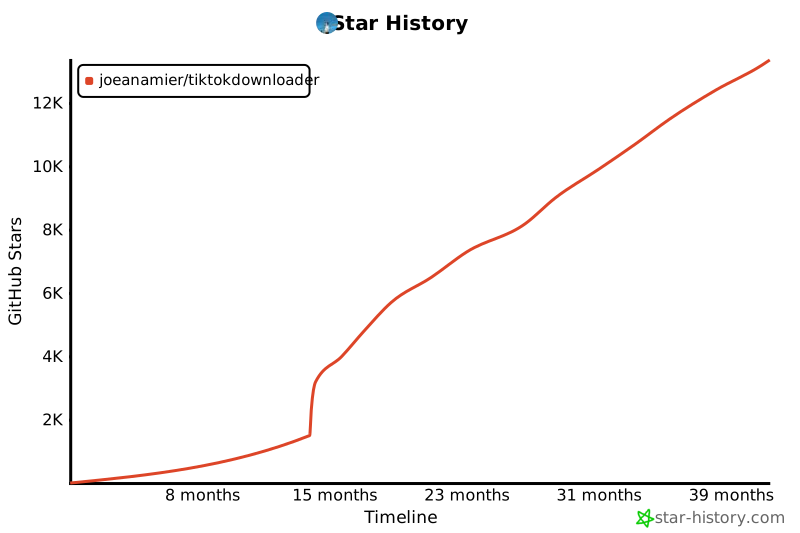
⭐ Star 趋势
# 💡 项目参考
* https://github.com/Johnserf-Seed/f2
* https://github.com/Evil0ctal/Douyin_TikTok_Download_API
* https://github.com/justbeluga/tiktok-web-reverse-engineering
* https://github.com/ihmily/DouyinLiveRecorder
* https://github.com/encode/httpx/
* https://github.com/Textualize/rich
* https://github.com/omnilib/aiosqlite
* https://github.com/Tinche/aiofiles
* https://github.com/pyinstaller/pyinstaller
* https://foss.heptapod.net/openpyxl/openpyxl
* https://github.com/carpedm20/emoji/
* https://github.com/lxml/lxml
* https://ffmpeg.org/ffmpeg-all.html 






