# AIOS-LLM
**Repository Path**: youjiao/AIOS-LLM
## Basic Information
- **Project Name**: AIOS-LLM
- **Description**: AIOS 是以大语言模型(LLM)为核心的操作系统代理 (Agent),将大语言模型嵌入到操作系统(OS)中,作为操作系统的大脑,使操作系统“有灵魂”
- **Primary Language**: Python
- **License**: MIT
- **Default Branch**: main
- **Homepage**: https://www.oschina.net/p/aios
- **GVP Project**: No
## Statistics
- **Stars**: 0
- **Forks**: 2
- **Created**: 2024-05-28
- **Last Updated**: 2024-05-28
## Categories & Tags
**Categories**: Uncategorized
**Tags**: None
## README
# AIOS: LLM Agent Operating System

 [](https://github.com/agiresearch/AIOS/blob/main/LICENSE)
[](https://github.com/agiresearch/AIOS/blob/main/LICENSE)
 AIOS, a Large Language Model (LLM) Agent operating system, embeds large language model into Operating Systems (OS) as the brain of the OS, enabling an operating system "with soul" -- an important step towards AGI. AIOS is designed to optimize resource allocation, facilitate context switch across agents, enable concurrent execution of agents, provide tool service for agents, maintain access control for agents, and provide a rich set of toolkits for LLM Agent developers.
## 🏠 1. Architecture of AIOS
AIOS, a Large Language Model (LLM) Agent operating system, embeds large language model into Operating Systems (OS) as the brain of the OS, enabling an operating system "with soul" -- an important step towards AGI. AIOS is designed to optimize resource allocation, facilitate context switch across agents, enable concurrent execution of agents, provide tool service for agents, maintain access control for agents, and provide a rich set of toolkits for LLM Agent developers.
## 🏠 1. Architecture of AIOS

## 📰 2. News
- **[2024-05-01]** 🛠️ The agent creation in AIOS is refactored, which can be found in our [OpenAGI](https://github.com/agiresearch/OpenAGI) package.
- **[2024-04-29]** 📊 The evaluation mode of AIOS is added, which supports customizable agent types and agent instance numbers in each agent type.
- **[2024-04-14]** 🚀 AIOS currently supports generation interrupt (for open-sourced llms from huggingface) and customized console loggers.
- **[2024-04-05]** 🛠️ AIOS codebase has been updated to add shell simulator, rapid API calls, and pre-commit test cases. Please see [CONTRIBUTE](https://github.com/agiresearch/AIOS/blob/main/CONTRIBUTE.md) for how to test your contributions and create pull requests.
- **[2024-04-02]** 🤝 AIOS [Discord Community](https://discord.gg/B2HFxEgTJX) is up. Welcome to join the community for discussions, brainstorming, development, or just random chats!
- **[2024-03-25]** ✈️ Our paper [AIOS: LLM Agent Operating System](https://arxiv.org/abs/2403.16971) is released and AIOS repository is officially launched!
- **[2023-12-06]** 📋 After several months of working, our perspective paper [LLM as OS, Agents as Apps: Envisioning AIOS, Agents and the AIOS-Agent Ecosystem](https://arxiv.org/abs/2312.03815) is officially released.
## ✈️ 3. Getting Started
### 3.1 Installation
To run AIOS, you will need to install our agent creation package, [OpenAGI](https://github.com/agiresearch/OpenAGI).
**Git clone AIOS and [OpenAGI]((https://github.com/agiresearch/OpenAGI))**
```bash
git clone https://github.com/agiresearch/AIOS.git
git clone https://github.com/agiresearch/OpenAGI.git
```
**Make sure you have Python = 3.11**
Install the required packages using pip
```bash
conda create -n AIOS python=3.11
source activate AIOS
cd AIOS
pip install -r requirements.txt
```
**Allow your code to be able to see 'openagi'**
```
cd ../OpenAGI
pip install -e .
```
### 3.2 Usage
If you use open-sourced models from huggingface, you need to setup your [Hugging Face token](https://huggingface.co/settings/tokens) and cache directory
```bash
export HUGGING_FACE_HUB_TOKEN=
export HF_HOME=
```
If you use LLM APIs, you need to setup your API key such as [OpenAI API Key](https://platform.openai.com/api-keys), [Gemini API Key](https://aistudio.google.com/app/apikey)
```bash
export OPENAI_API_KEY=
export GEMINI_API_KEY=
```
If you use external API tools in your agents, please refer to the [How to setup external tools](https://github.com/agiresearch/OpenAGI/blob/main/tools.md).
You can also create .env file from the .env.example file, and then use dotenv to load the environment variables using .env file into your application's environment at runtime.
```bash
cp .env.example .env
```
#### (1) Demonstration Mode
In the demonstration mode, we provide a toy example: we hardcode three agents and allow you to change the parameters. Then you can see the output of each step in running multiple agents
For open-sourced LLMs, you need to setup the name of the LLM you would like to use the max gpu memory, the evaluation device and the maximum length of generated new tokens.
```bash
# For open-sourced LLMs
python main.py --llm_name --max_gpu_memory --eval_device --max_new_tokens
## Use google/gemma-1.1-2b-it for example
python main.py --llm_name google/gemma-1.1-2b-it --max_gpu_memory '{"0": "24GB"}' --eval_device "cuda:0" --max_new_tokens 256
```
For close-sourced LLMs, you just need to setup the name of the LLM.
```bash
# For close-sourced LLMs
python main.py --llm_name
## Use gpt-4 for example
python main.py --llm_name gpt-4
```
You can use bash script to start the agent execution like this
```bash
bash scripts/run/gpt4.sh
````
You can use an open-source model on an Apple MacBook with Ollama. First, you will need to pull the model. Let's use llama3 as an example:
```bash
ollama pull llama3
```
Then, you can run the Python script with the input parameter to start using AIOS with Llama3 and Ollama on your MacBook:
```bash
python main.py --llm_name ollama/llama3
```
#### (2) Interactive Mode
In the deployment mode, the outputs of running agents are stored in files. And in this mode, you are provided with multiple commands to run agents and see resource usage of agents (e.g., run \: \, print agent).
Different from the interactive mode, you need to set all the default loggers as file loggers.
```bash
# For open-sourced LLMs
python simulator.py --llm_name --max_gpu_memory --eval_device --max_new_tokens --scheduler_log_mode file --agent_log_mode file --llm_kernel_log_mode file
## Use google/gemma-1.1-2b-it for example
python simulator.py --llm_name google/gemma-1.1-2b-it --max_gpu_memory '{"0": "24GB"}' --eval_device "cuda:0" --max_new_tokens 256 --scheduler_log_mode file --agent_log_mode file --llm_kernel_log_mode file
```
```bash
# For close-sourced LLMs
python simulator.py --llm_name --scheduler_log_mode file --agent_log_mode file --llm_kernel_log_mode file
## Use gpt-4 for example
python simulator.py --llm_name gpt-4 --scheduler_log_mode file --agent_log_mode file --llm_kernel_log_mode file
```
You can use bash script to start the interactive simulation session like this
```bash
bash scripts/interactive/gpt4.sh
````
Instance of available commands
```bash
run MathAgent: Calculate the surface area and volume of a cylinder with a radius of 5 units and height of 10 units using the formulas "2 * pi * r * h + 2 * pi * r2" and "pi * r2 * h".
print agent
```
#### (3) Evaluation Mode
In the evaluation mode, we allow you to configure different types of predefined agents (MathAgent, NarrativeAgent, RecAgent) with a configurable number of agents for each type. Additionally, you can evaluate the acceleration performance with or without AIOS by comparing the waiting time and turnaround time.
```bash
python eval.py --llm_name gpt-3.5-turbo --agents MathAgent:1,TravelAgent:1,RecAgent:1,AcademicAgent:1,CreationAgent:1
```
You can use bash script to start the agent execution like this
```bash
bash scripts/eval/gpt4.sh
````
If you want to obtain metrics for either concurrent execution (with AIOS) or sequential execution (without AIOS), you can specify the mode parameter when running the eval.py file."
```bash
python eval.py --llm_name gpt-4 --agents MathAgent:1,TravelAgent:1,RecAgent:1,AcademicAgent:1,CreationAgent:1 --mode concurrent-only
python eval.py --llm_name gpt-4 --agents MathAgent:1,TravelAgent:1,RecAgent:1,AcademicAgent:1,CreationAgent:1 --mode sequential-only
```
### 3.3 Supported LLM backbones
- gpt-3.5-turbo, gpt-4
- gemini-pro
- open-sourced LLM from Huggingface
## 🖋️ 4. References
```
@article{mei2024aios,
title={AIOS: LLM Agent Operating System},
author={Mei, Kai and Li, Zelong and Xu, Shuyuan and Ye, Ruosong and Ge, Yingqiang and Zhang, Yongfeng}
journal={arXiv:2403.16971},
year={2024}
}
@article{ge2023llm,
title={LLM as OS, Agents as Apps: Envisioning AIOS, Agents and the AIOS-Agent Ecosystem},
author={Ge, Yingqiang and Ren, Yujie and Hua, Wenyue and Xu, Shuyuan and Tan, Juntao and Zhang, Yongfeng},
journal={arXiv:2312.03815},
year={2023}
}
```
## 🚀 5. Contributions
AIOS is dedicated to facilitating the development and deployment of LLM agents in a systematic way, collaborators and contributions are always welcome to foster a cohesive, effective and efficient AIOS-Agent ecosystem!
For detailed information on how to contribute, see [CONTRIBUTE](https://github.com/agiresearch/AIOS/blob/main/CONTRIBUTE.md). If you would like to contribute to the codebase, [issues](https://github.com/agiresearch/AIOS/issues) or [pull requests](https://github.com/agiresearch/AIOS/pulls) are always welcome!
## 🌍 6. AIOS Contributors
[](https://github.com/agiresearch/AIOS/graphs/contributors)
## 🤝 7. Discord Channel
If you would like to join the community, ask questions, chat with fellows, learn about or propose new features, and participate in future developments, join our [Discord Community](https://discord.gg/B2HFxEgTJX)!
## 📪 8. Contact
For issues related to AIOS development, we encourage submitting [issues](https://github.com/agiresearch/AIOS/issues), [pull requests](https://github.com/agiresearch/AIOS/pulls), or initiating discussions in the AIOS [Discord Channel](https://discord.gg/B2HFxEgTJX). For other issues please feel free to contact Kai Mei (marknju2018@gmail.com) and Yongfeng Zhang (yongfeng@email.com).
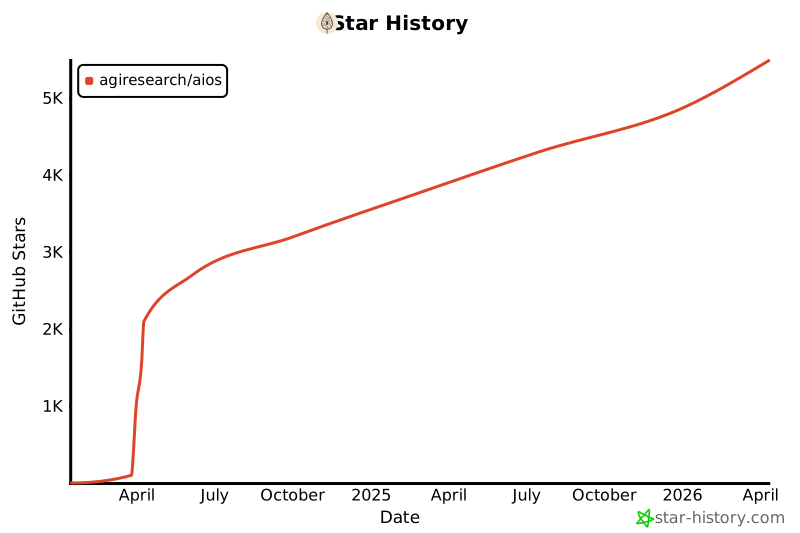
## 🌟 9. Star History
[](https://star-history.com/#agiresearch/AIOS&Date)