# ggbump
**Repository Path**: youmigo/ggbump
## Basic Information
- **Project Name**: ggbump
- **Description**: 备份,不用。
地铁图,地铁连线图。小水流图
- **Primary Language**: Unknown
- **License**: MIT
- **Default Branch**: master
- **Homepage**: None
- **GVP Project**: No
## Statistics
- **Stars**: 1
- **Forks**: 0
- **Created**: 2020-11-02
- **Last Updated**: 2024-06-01
## Categories & Tags
**Categories**: Uncategorized
**Tags**: None
## README
# ggbump  [](https://www.tidyverse.org/lifecycle/#maturing)
[](https://CRAN.R-project.org/package=ggbump)
[](https://github.com/HaydenMacDonald/ggbump/actions)
\[
The R package `ggbump` creates elegant bump charts in ggplot. Bump
charts are good to use to plot ranking over time, or other examples when
the path between two nodes have no statistical significance. Also
includes functions to create custom smooth lines called sigmoid curves.
## Installation
You can install ggbump from CRAN with:
``` r
install.packages("ggbump")
```
Or the latest development version from
[github](https://github.com/davidsjoberg/ggbump) with:
``` r
devtools::install_github("davidsjoberg/ggbump")
```
## Bump chart examples
Basic example:
[](https://www.tidyverse.org/lifecycle/#maturing)
[](https://CRAN.R-project.org/package=ggbump)
[](https://github.com/HaydenMacDonald/ggbump/actions)
\[
The R package `ggbump` creates elegant bump charts in ggplot. Bump
charts are good to use to plot ranking over time, or other examples when
the path between two nodes have no statistical significance. Also
includes functions to create custom smooth lines called sigmoid curves.
## Installation
You can install ggbump from CRAN with:
``` r
install.packages("ggbump")
```
Or the latest development version from
[github](https://github.com/davidsjoberg/ggbump) with:
``` r
devtools::install_github("davidsjoberg/ggbump")
```
## Bump chart examples
Basic example:
 A more advanced
example:
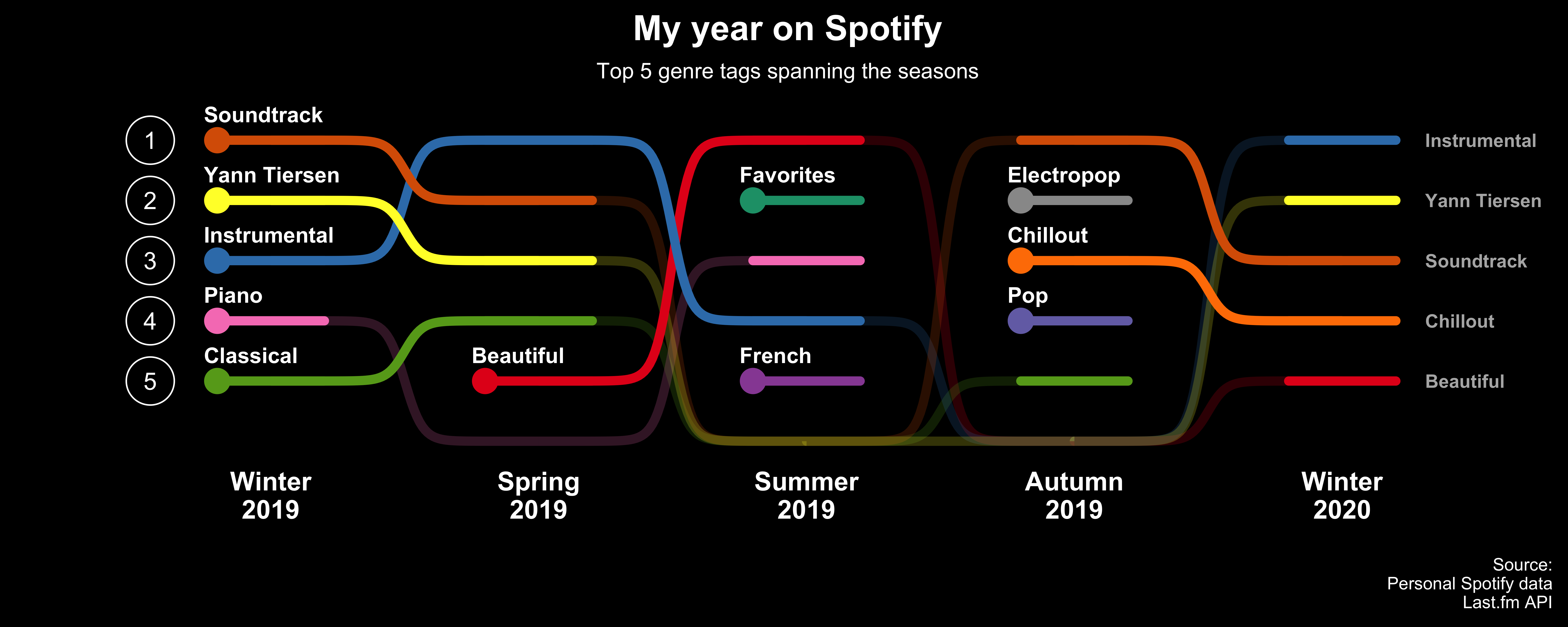
[Click here for code to the plot
above](https://github.com/davidsjoberg/ggbump/wiki/My-year-on-Spotify)
Flags could be used instead of
names:
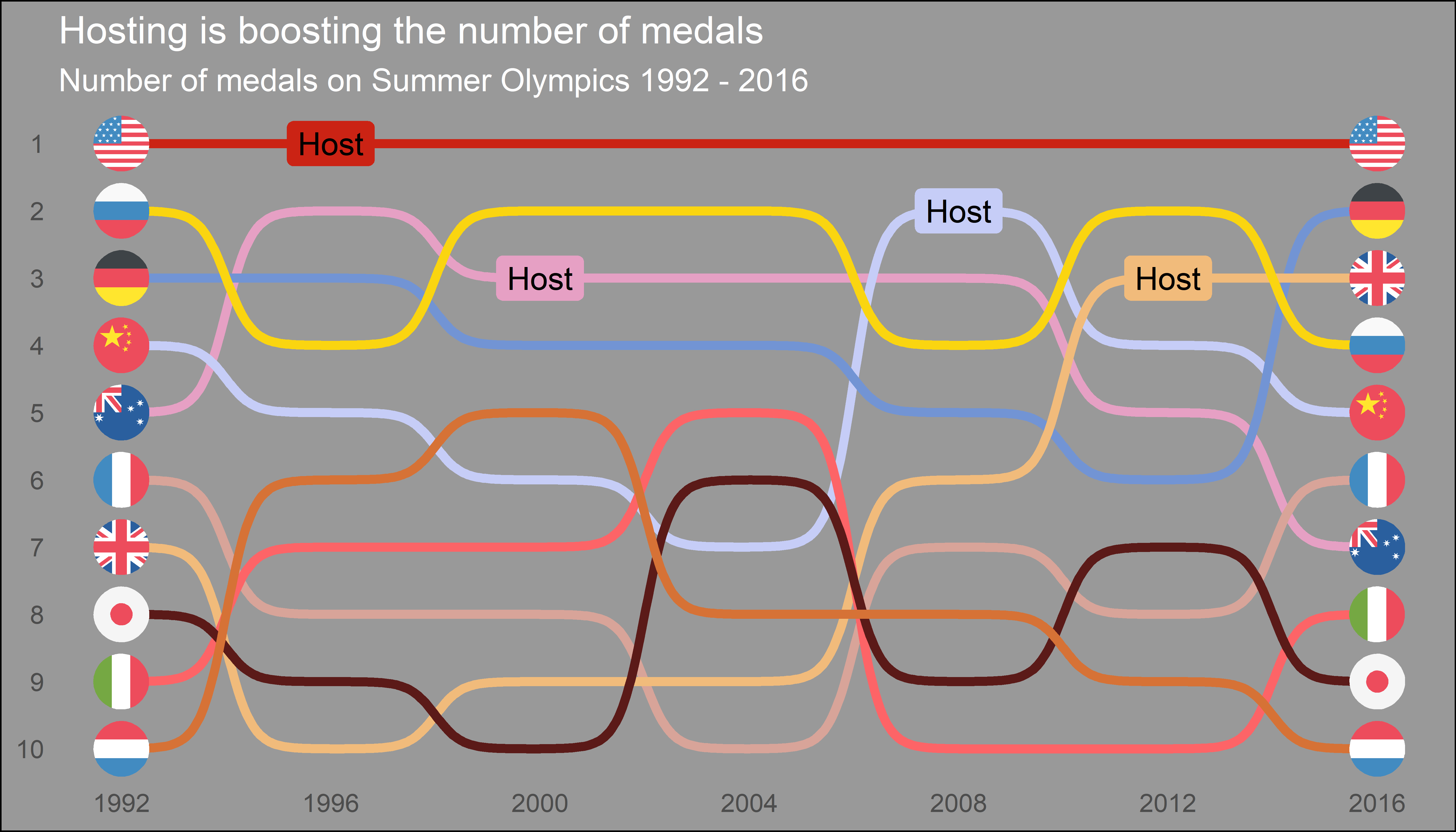
[Click here for code to the plot
above](https://github.com/davidsjoberg/ggbump/wiki/geom_bump-with-flags)
## Sigmoid curves examples
With `geom_sigmoid` you can make custom sigmoid
curves:
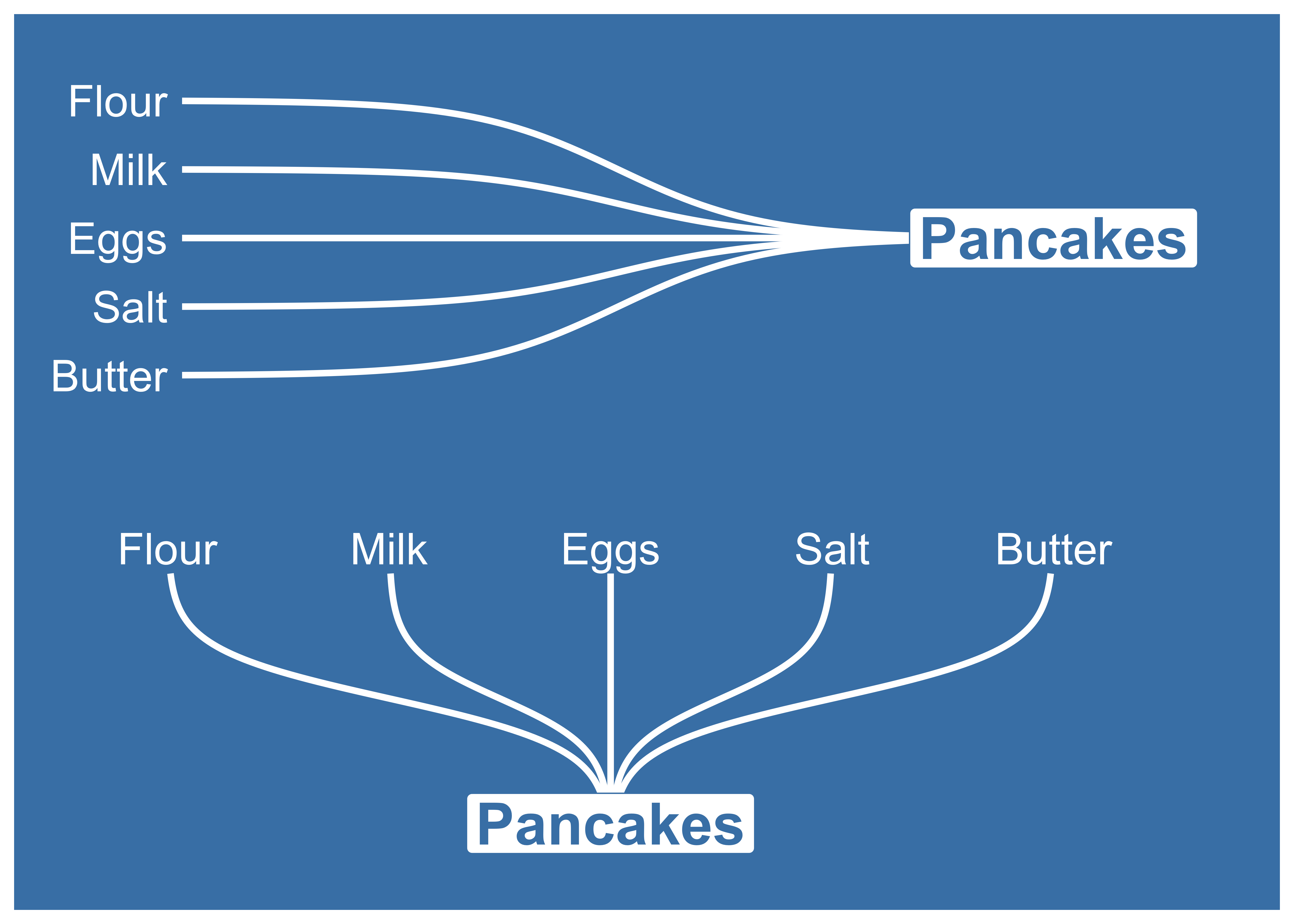
[Click here for code to the plot
above](https://github.com/davidsjoberg/ggbump/wiki/geom_sigmoid)
With `geom_sigmoid` you have the flexibility to make more complex plots:

[Click here for code to the plot
above](https://github.com/davidsjoberg/tidytuesday/blob/master/2020w17/2020w17_skript.R)
# Tutorial
## Prep
Load packages and get some data with rank:
``` r
if(!require(pacman)) install.packages("pacman")
library(ggbump)
pacman::p_load(tidyverse, cowplot, wesanderson)
df <- tibble(country = c("India", "India", "India", "Sweden", "Sweden", "Sweden", "Germany", "Germany", "Germany", "Finland", "Finland", "Finland"),
year = c(2011, 2012, 2013, 2011, 2012, 2013, 2011, 2012, 2013, 2011, 2012, 2013),
value = c(492, 246, 246, 369, 123, 492, 246, 369, 123, 123, 492, 369))
knitr::kable(head(df))
```
| country | year | value |
| :------ | ---: | ----: |
| India | 2011 | 492 |
| India | 2012 | 246 |
| India | 2013 | 246 |
| Sweden | 2011 | 369 |
| Sweden | 2012 | 123 |
| Sweden | 2013 | 492 |
To create a ranking column we use `rank` from base R. We specify
`ties.method = "random"` to make sure that each country have different
rankings if they have the same value.
``` r
df <- df %>%
group_by(year) %>%
mutate(rank = rank(value, ties.method = "random")) %>%
ungroup()
knitr::kable(head(df))
```
| country | year | value | rank |
| :------ | ---: | ----: | ---: |
| India | 2011 | 492 | 4 |
| India | 2012 | 246 | 2 |
| India | 2013 | 246 | 2 |
| Sweden | 2011 | 369 | 3 |
| Sweden | 2012 | 123 | 1 |
| Sweden | 2013 | 492 | 4 |
## Make a bump chart
Most simple use case:
``` r
ggplot(df, aes(year, rank, color = country)) +
geom_bump()
```
A more advanced
example:

[Click here for code to the plot
above](https://github.com/davidsjoberg/ggbump/wiki/My-year-on-Spotify)
Flags could be used instead of
names:

[Click here for code to the plot
above](https://github.com/davidsjoberg/ggbump/wiki/geom_bump-with-flags)
## Sigmoid curves examples
With `geom_sigmoid` you can make custom sigmoid
curves:

[Click here for code to the plot
above](https://github.com/davidsjoberg/ggbump/wiki/geom_sigmoid)
With `geom_sigmoid` you have the flexibility to make more complex plots:

[Click here for code to the plot
above](https://github.com/davidsjoberg/tidytuesday/blob/master/2020w17/2020w17_skript.R)
# Tutorial
## Prep
Load packages and get some data with rank:
``` r
if(!require(pacman)) install.packages("pacman")
library(ggbump)
pacman::p_load(tidyverse, cowplot, wesanderson)
df <- tibble(country = c("India", "India", "India", "Sweden", "Sweden", "Sweden", "Germany", "Germany", "Germany", "Finland", "Finland", "Finland"),
year = c(2011, 2012, 2013, 2011, 2012, 2013, 2011, 2012, 2013, 2011, 2012, 2013),
value = c(492, 246, 246, 369, 123, 492, 246, 369, 123, 123, 492, 369))
knitr::kable(head(df))
```
| country | year | value |
| :------ | ---: | ----: |
| India | 2011 | 492 |
| India | 2012 | 246 |
| India | 2013 | 246 |
| Sweden | 2011 | 369 |
| Sweden | 2012 | 123 |
| Sweden | 2013 | 492 |
To create a ranking column we use `rank` from base R. We specify
`ties.method = "random"` to make sure that each country have different
rankings if they have the same value.
``` r
df <- df %>%
group_by(year) %>%
mutate(rank = rank(value, ties.method = "random")) %>%
ungroup()
knitr::kable(head(df))
```
| country | year | value | rank |
| :------ | ---: | ----: | ---: |
| India | 2011 | 492 | 4 |
| India | 2012 | 246 | 2 |
| India | 2013 | 246 | 2 |
| Sweden | 2011 | 369 | 3 |
| Sweden | 2012 | 123 | 1 |
| Sweden | 2013 | 492 | 4 |
## Make a bump chart
Most simple use case:
``` r
ggplot(df, aes(year, rank, color = country)) +
geom_bump()
```
 ## Pimp the bump chart\!
Improve the bump chart by adding:
- A point for each rank observation.
- Choose a minimal theme, I use `theme_minimal_grid()` from `cowplot`.
- Choose nice colors so it does not look generic ggplot. I use a
palette from `wesanderson`.
- Remove legend and add labels at the start and end of the bumpy ride.
- Reverse the y-axis to get rank 1 at the top.
- Adjust the ‘smoothness’ of the lines by setting `smooth` to 8.
Higher means less smooth.
``` r
ggplot(df, aes(year, rank, color = country)) +
geom_point(size = 7) +
geom_text(data = df %>% filter(year == min(year)),
aes(x = year - .1, label = country), size = 5, hjust = 1) +
geom_text(data = df %>% filter(year == max(year)),
aes(x = year + .1, label = country), size = 5, hjust = 0) +
geom_bump(size = 2, smooth = 8) +
scale_x_continuous(limits = c(2010.6, 2013.4),
breaks = seq(2011, 2013, 1)) +
theme_minimal_grid(font_size = 14, line_size = 0) +
theme(legend.position = "none",
panel.grid.major = element_blank()) +
labs(y = "RANK",
x = NULL) +
scale_y_reverse() +
scale_color_manual(values = wes_palette(n = 4, name = "GrandBudapest1"))
```
## Pimp the bump chart\!
Improve the bump chart by adding:
- A point for each rank observation.
- Choose a minimal theme, I use `theme_minimal_grid()` from `cowplot`.
- Choose nice colors so it does not look generic ggplot. I use a
palette from `wesanderson`.
- Remove legend and add labels at the start and end of the bumpy ride.
- Reverse the y-axis to get rank 1 at the top.
- Adjust the ‘smoothness’ of the lines by setting `smooth` to 8.
Higher means less smooth.
``` r
ggplot(df, aes(year, rank, color = country)) +
geom_point(size = 7) +
geom_text(data = df %>% filter(year == min(year)),
aes(x = year - .1, label = country), size = 5, hjust = 1) +
geom_text(data = df %>% filter(year == max(year)),
aes(x = year + .1, label = country), size = 5, hjust = 0) +
geom_bump(size = 2, smooth = 8) +
scale_x_continuous(limits = c(2010.6, 2013.4),
breaks = seq(2011, 2013, 1)) +
theme_minimal_grid(font_size = 14, line_size = 0) +
theme(legend.position = "none",
panel.grid.major = element_blank()) +
labs(y = "RANK",
x = NULL) +
scale_y_reverse() +
scale_color_manual(values = wes_palette(n = 4, name = "GrandBudapest1"))
```
 ## geom\_bump with factors (development version only)
You can use `geom_bump` with factors or character as x axis. Just
remember to keep an eye on factor order.
``` r
# Original df
df <- tibble(season = c("Spring", "Pre-season", "Summer", "Season finale", "Autumn", "Winter",
"Spring", "Pre-season", "Summer", "Season finale", "Autumn", "Winter",
"Spring", "Pre-season", "Summer", "Season finale", "Autumn", "Winter",
"Spring", "Pre-season", "Summer", "Season finale", "Autumn", "Winter"),
rank = c(1, 3, 4, 2, 1, 4,
2, 4, 1, 3, 2, 3,
4, 1, 2, 4, 4, 1,
3, 2, 3, 1, 3, 2),
player = c(rep("David", 6),
rep("Anna", 6),
rep("Franz", 6),
rep("Ika", 6)))
# Create factors and order factor
df <- df %>%
mutate(season = factor(season, levels = unique(season)))
# Add manual axis labels to plot
ggplot(df, aes(season, rank, color = player)) +
geom_bump(size = 2, smooth = 20, show.legend = F) +
geom_point(size = 5, aes(shape = player)) +
theme_minimal_grid(font_size = 10, line_size = 0) +
theme(panel.grid.major = element_blank(),
axis.ticks = element_blank()) +
scale_color_manual(values = wes_palette(n = 4, name = "IsleofDogs1"))
```
## geom\_bump with factors (development version only)
You can use `geom_bump` with factors or character as x axis. Just
remember to keep an eye on factor order.
``` r
# Original df
df <- tibble(season = c("Spring", "Pre-season", "Summer", "Season finale", "Autumn", "Winter",
"Spring", "Pre-season", "Summer", "Season finale", "Autumn", "Winter",
"Spring", "Pre-season", "Summer", "Season finale", "Autumn", "Winter",
"Spring", "Pre-season", "Summer", "Season finale", "Autumn", "Winter"),
rank = c(1, 3, 4, 2, 1, 4,
2, 4, 1, 3, 2, 3,
4, 1, 2, 4, 4, 1,
3, 2, 3, 1, 3, 2),
player = c(rep("David", 6),
rep("Anna", 6),
rep("Franz", 6),
rep("Ika", 6)))
# Create factors and order factor
df <- df %>%
mutate(season = factor(season, levels = unique(season)))
# Add manual axis labels to plot
ggplot(df, aes(season, rank, color = player)) +
geom_bump(size = 2, smooth = 20, show.legend = F) +
geom_point(size = 5, aes(shape = player)) +
theme_minimal_grid(font_size = 10, line_size = 0) +
theme(panel.grid.major = element_blank(),
axis.ticks = element_blank()) +
scale_color_manual(values = wes_palette(n = 4, name = "IsleofDogs1"))
```
 ## Feedback
If you find any error or have suggestions for improvements you are more
than welcome to contact me :)
## Feedback
If you find any error or have suggestions for improvements you are more
than welcome to contact me :)