# hugo-theme-echo
**Repository Path**: ys9970/hugo-theme-echo
## Basic Information
- **Project Name**: hugo-theme-echo
- **Description**: A super concise theme for Hugo
- **Primary Language**: Unknown
- **License**: MIT
- **Default Branch**: master
- **Homepage**: None
- **GVP Project**: No
## Statistics
- **Stars**: 0
- **Forks**: 0
- **Created**: 2021-11-25
- **Last Updated**: 2021-11-25
## Categories & Tags
**Categories**: Uncategorized
**Tags**: None
## README
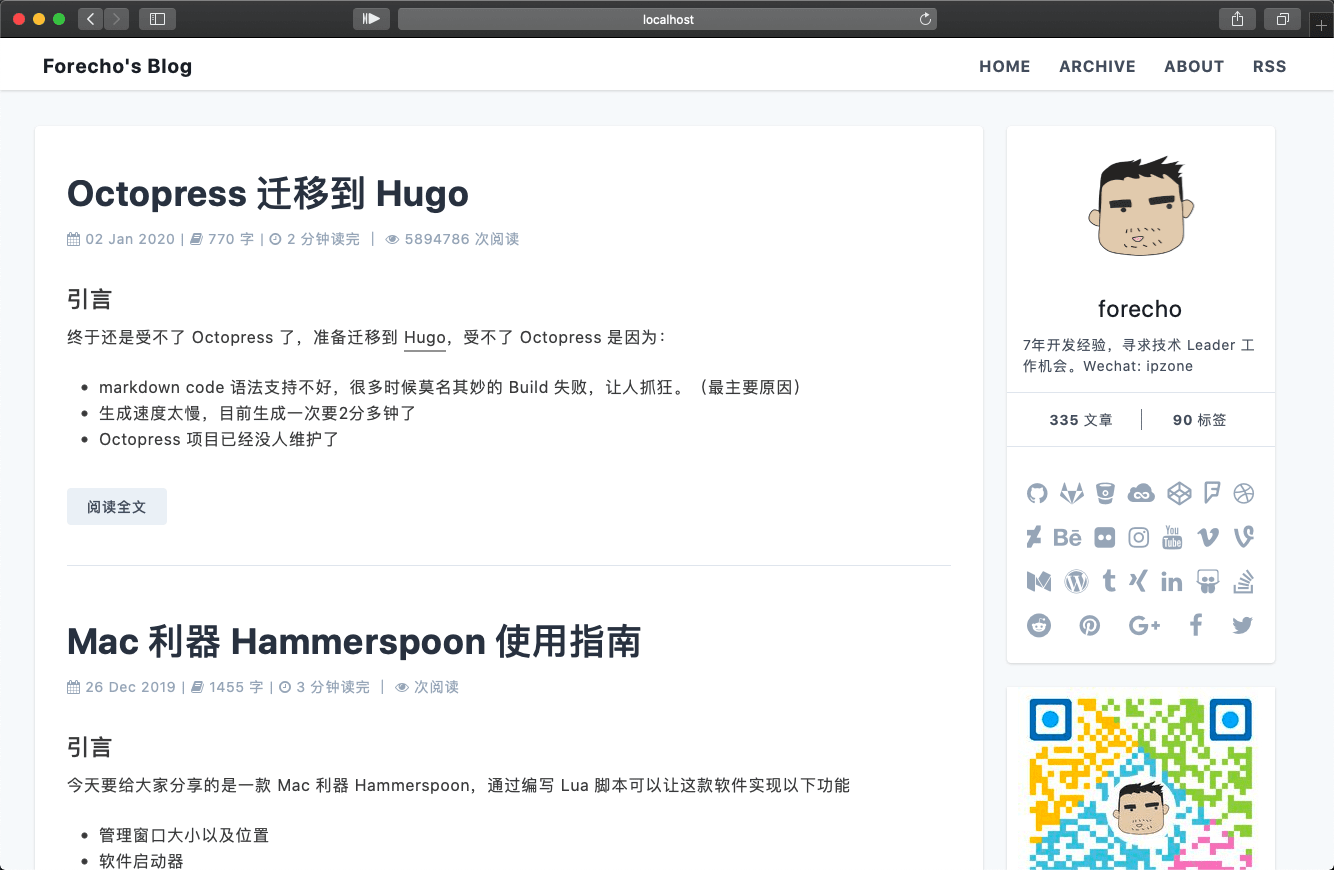
## hugo-theme-echo
Echo 是一个风格简洁的 Hugo 主题。
[我的博客](https://blog.forecho.com)
**主要特色:**
- 风格基于 [Tailwind CSS](https://tailwindcss.com/)
- 使用更快的 Chroma 代码高亮
- 自定义 css,自定义 js,自定义 head
- 文章支持目录
- 支持相关阅读
- [那年今天](https://github.com/forecho/hugo-theme-echo/wiki)
- 支持深度主题,可手动切换
## 谁在用 hugo-theme-echo
- [forecho](https://blog.forecho.com):[GitHub 源码](https://github.com/forecho/hugo-blog)
- Waiting to add more...
## 如何使用?
**注意:** 这个教程假设你 **第一次** 使用 [Hugo][] 。 [Hugo][] 是一个非常流行的静态网站生成工具。 你可查看官方文档 [Hugo Official Docs][] 获取更多帮助。
[Hugo]: https://gohugo.io/
[Hugo Official Docs]: https://gohugo.io/getting-started/
### 快速安装 Hugo
从 [Hugo Releases](https://github.com/gohugoio/hugo/releases) 上直接下载安装适合你的版本。
### 快速创建网站
```bash
hugo new site myBlog
```
上面的命令将会在一个名为 `myBlog` 的文件夹中创建一个新的 hugo 站点。
### 快速使用
把这个主题克隆到 `themes` 文件夹
```bash
cd myBlog
git submodule add https://github.com/forecho/hugo-theme-echo.git themes/echo
cd themes/echo
npm ci # 本地开发才需要
```
在根目录添加 `package.json` 文件,代码如下(一些个人信息请改成你自己的):
```json
{
"name": "forecho-blog",
"version": "0.0.1",
"description": "that is forecho blog",
"repository": "https://github.com/forecho/hugo-blog",
"license": "MIT",
"devDependencies": {
"autoprefixer": "^10.2.5",
"postcss": "^8.2.9",
"postcss-cli": "^8.3.1",
"tailwindcss": "^2.0.4"
},
"browserslist": [
"last 1 version",
"> 1%",
"maintained node versions",
"not dead"
]
}
```
站点设置示例:
```toml
baseURL = "http://localhost:1313"
languageCode = "en-us"
title = "Forecho's Blog"
theme = "echo"
DefaultContentLanguage = "cn"
# 自动检测是否包含中文/日文/韩文,该参数会影响摘要和字数统计功能,建议设置为 true
hasCJKLanguage = true
# 设置页面生成形式,将默认的网站路径/修改成.html
uglyURLs = true
googleAnalytics = "" # UA-XXXXXXXX-X
## 评论系统
changyanAppid = "" # Changyan app id # 畅言
changyanAppkey = "" # Changyan app key
disqusShortname = "forecho-blog" # disqus account name
livereUID = "" # LiveRe UID # 来必力
[markup.highlight]
codeFences = true # 高亮 markdown 的代码块
guessSyntax = true # 高亮 markdown 中没有标注语言的代码块
hl_Lines = ""
lineNoStart = 1
lineNos = true
lineNumbersInTable = true
noClasses = true
style = "manni"
tabWidth = 2
# https://gohugo.io/content-management/urls/#aliases
[permalinks]
posts = "/:filename"
[outputFormats.RSS]
mediatype = "application/rss"
baseName = "atom"
[services.rss]
limit = 20
[author]
name = "forecho"
avatar = "https://avatars0.githubusercontent.com/u/1725326?s=460&v=4"
bio = "7 年开发经验,寻求技术 Leader 工作机会。Wechat: ipzone"
homepage = "https://forecho.com/"
[params]
favicon = "https://avatars0.githubusercontent.com/u/1725326?s=460&v=4"
keywords = "Hugo, theme, echo"
description = "Hugo theme echo example site."
toc = true
navItems = [
["HOME", "/"],
["ARCHIVE", "/posts.html"],
["ABOUT", "/about.html"],
["RSS", "/atom.xml"]
]
# rss 全文输出
rssFullContent = true
uglyURLs = true
busuanzi = true # 是否使用不蒜子统计站点访问量
staticCDNPrefix = "https://cdn.bootcss.com/font-awesome/5.11.2"
extraHead = ''
postAds = ""
profileAds = ''
notFoundAds = ''
# 开启版权声明,协议名字和链接都可以换
[params.cc]
name = "署名 - 非商业性使用 4.0 国际 (CC BY-NC 4.0)"
link = "https://creativecommons.org/licenses/by-nc/4.0/deed.zh"
# 文章打赏
[params.reward]
enable = true
title = "打赏"
wechat = "https://blog-1251237404.cos.ap-guangzhou.myqcloud.com/20190424153510.png" # 微信二维码
alipay = "https://blog-1251237404.cos.ap-guangzhou.myqcloud.com/20190424153431.png" # 支付宝二维码
############## 评论系统 start ##############
[params.gitment] # Gitment is a comment system based on GitHub issues. see https://github.com/imsun/gitment
owner = "" # Your GitHub ID
repo = "" # The repo to store comments
clientId = "" # Your client ID
clientSecret = "" # Your client secret
[params.utterances] # https://utteranc.es/
owner = "" # Your GitHub ID
repo = "" # The repo to store comments
theme = "github-light"
issueterm = "pathname"
[params.gitalk] # Gitalk is a comment system based on GitHub issues. see https://github.com/gitalk/gitalk
owner = "" # Your GitHub ID
repo = "" # The repo to store comments
clientId = "" # Your client ID
clientSecret = "" # Your client secret
# Valine.
# You can get your appid and appkey from https://leancloud.cn
# more info please open https://valine.js.org
[params.valine]
enable = false
appId = '你的 appId'
appKey = '你的 appKey'
notify = false # mail notifier , https://github.com/xCss/Valine/wiki
verify = false # Verification code
avatar = 'mm'
placeholder = '说点什么吧...'
visitor = false
############ 评论系统 end ##############
## 社交链接
[social]
github = "forecho"
jsfiddle = "forecho"
codepen = "forecho"
dribbble = "forecho"
behance = "forecho"
flickr = "forecho"
instagram = "forecho"
youtube = "forecho"
vimeo = "forecho"
vine = "forecho"
medium = "forecho"
wordpress = "forecho"
tumblr = "forecho"
linkedin = "forecho"
slideshare = "forecho"
stackoverflow = "forecho"
reddit = "forecho"
pinterest = "forecho"
weibo = "forecho"
facebook = "forecho"
twitter = "caizhenghai"
douban = "ipzone"
rss = "/atom.xml"
```
启动 hugo server :
```bash
hugo server -D
```
打开 http://localhost:1313/ ,你将会看到一个示例网站。
### 开始你的博客
默认配置文件 `config.toml` 位于你的网站的根目录,请按自身需要进行定制。
默认的文章文件位于 `./content/posts` 目录。
### 生成你的网站
直接运行 `hugo` ,将会自动生成你的网站到 `public/` 目录。
如果你有额外的时间,并且想更多的了解 [Hugo][] ,请查阅官方文档 [Hugo Official Docs][] 。
## 单篇文章的设置
**Front Matter** : Hugo 允许你使用 yaml, toml 或者 json 语法在你每一篇文章的开头进行设置。
**YAML 示例:**
```yaml
---
# 常用定义
title: "An Example Post" # 标题
date: 2018-01-01T16:01:23+08:00 # 创建时间
lastmod: 2018-01-02T16:01:23+08:00 # 最后修改时间
draft: false # 是否是草稿?
tags: ["tag-1", "tag-2", "tag-3", "popular"] # 标签
categories: ["index"] # 分类
author: "forecho" # 作者
# 用户自定义
# 你可以选择 关闭 (false) 或者 打开 (true) 以下选项
comment: false # 关闭评论
toc: false # 关闭文章目录
reward: false # 关闭打赏
---
```
## 关于热门文章
如果标签里面含有 `popular` 就会自动出现再热门文章列表中,目前热门文章只会在侧边栏和 404 页面展示,热门文章列表最多展示 5 篇文章。
## 配合 Github Actions 自动部署
```yaml
name: github pages
name: "Close stale issues"
on:
schedule:
- cron: '0 0 * * *' # every day at midnight
push:
branches:
- master
jobs:
deploy:
runs-on: ubuntu-18.04
steps:
- uses: actions/checkout@v2
with:
submodules: true # Fetch Hugo themes (true OR recursive)
fetch-depth: 0 # Fetch all history for .GitInfo and .Lastmod
- name: Setup Hugo
uses: peaceiris/actions-hugo@v2
with:
hugo-version: '0.82.0'
extended: true
- name: Setup Node
uses: actions/setup-node@v2
with:
node-version: '12.x'
- name: Cache dependencies
uses: actions/cache@v1
with:
path: ~/.npm
key: ${{ runner.os }}-node-${{ hashFiles('**/package-lock.json') }}
restore-keys: |
${{ runner.os }}-node-
- run: npm i
- run: hugo --minify
- name: Deploy
uses: peaceiris/actions-gh-pages@v3
with:
github_token: ${{ secrets.GITHUB_TOKEN }}
cname: blog.forecho.com
publish_dir: ./public
user_name: "github-actions[bot]"
user_email: "github-actions[bot]@users.noreply.github.com"
- name: Slack Workflow Notification
uses: Gamesight/slack-workflow-status@master
with:
repo_token: ${{secrets.GITHUB_TOKEN}}
slack_webhook_url: ${{secrets.SLACK_WEBHOOK_URL}}
```
## 那年今天
效果如下:
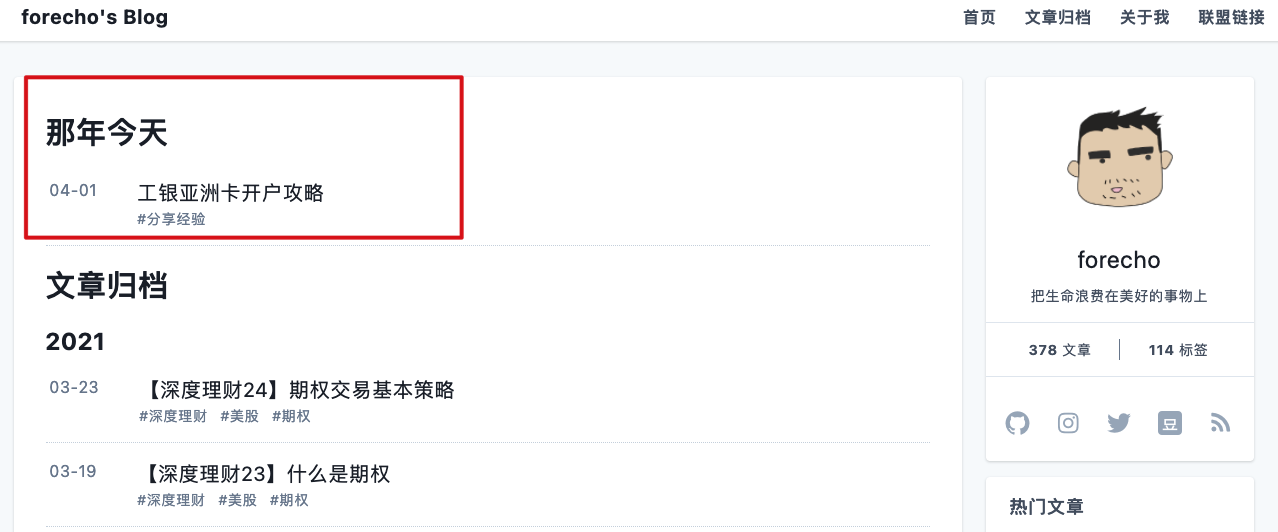
配合 GitHub Action 每天定时编译一起使用,效果最佳。
## 感谢
本主题参考了以下主题的部分代码:
- [hugo-theme-even](https://github.com/olOwOlo/hugo-theme-even)
- [hugo-theme-jane](https://github.com/xianmin/hugo-theme-jane)
## License
Hugo-theme-echo is licensed under the MIT license. Check the [LICENSE](LICENSE.md) file for details.