# mongodb-cluster-docker-compose
**Repository Path**: yudashu_admin/mongodb-cluster-docker-compose
## Basic Information
- **Project Name**: mongodb-cluster-docker-compose
- **Description**: No description available
- **Primary Language**: Unknown
- **License**: MIT
- **Default Branch**: master
- **Homepage**: None
- **GVP Project**: No
## Statistics
- **Stars**: 0
- **Forks**: 0
- **Created**: 2025-03-31
- **Last Updated**: 2025-03-31
## Categories & Tags
**Categories**: Uncategorized
**Tags**: None
## README
MongoDB [Auto Init] Sharded Cluster with Docker Compose
=========================================
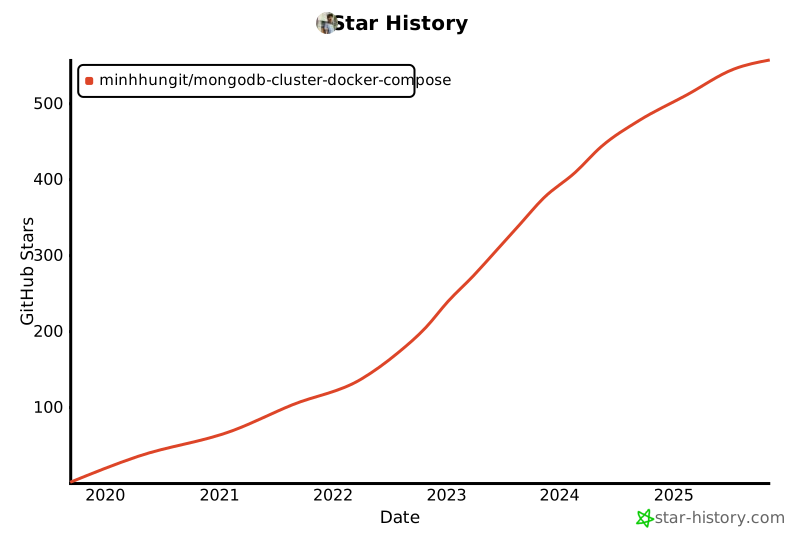
## Star History
[](https://star-history.com/#minhhungit/mongodb-cluster-docker-compose&Date)
### PSS Style (Primary -Secondary - Secondary)
- Need PSA? Check [here](https://github.com/minhhungit/mongodb-cluster-docker-compose/tree/master/PSA)
- If you need to set cluster with keyfile authentication, [check here](https://github.com/minhhungit/mongodb-cluster-docker-compose/tree/Feature/Auth/with-keyfile-auth)
---
## 📖 Table of Contents
- [❓ Mongo Components?](#-mongo-components-)
- [✨ Install](#-install-)
- [On-liner command](#-on-liner-command)
- [Manual step by step](#-manual-step-by-step)
- [✨ Enable sharding/sharding key for your database](#-enable-shardingsharding-key-for-your-database-)
- [✅ Verify](#-verify-)
- [Verify the status of the sharded cluster](#-verify-the-status-of-the-sharded-cluster-)
- [Verify status of replica set for each shard](#-verify-status-of-replica-set-for-each-shard-)
- [Check database status](#-check-database-status-)
- [🔎 More commands](#-more-commands-)
- [Normal Startup](#-normal-startup-)
- [Resetting the Cluster](#-resetting-the-cluster-)
- [Clean up docker-compose](#-clean-up-docker-compose-)
- [📺 Screenshot](#-screenshot-)
- [👌 Donate ^^](#-donate--)
- [📚 Refrences](#-refrences-)
### WARNING (Windows & OS X)
>The default Docker setup on Windows and OS X uses a VirtualBox VM to host the Docker daemon.
>Unfortunately, the mechanism VirtualBox uses to share folders between the host system and
>the Docker container is not compatible with the memory mapped files used by MongoDB
>(see [vbox bug](https://www.virtualbox.org/ticket/819), [docs.mongodb.org](https://docs.mongodb.com/manual/administration/production->notes/#fsync-on-directories)
>and related [jira.mongodb.org bug](https://jira.mongodb.org/browse/SERVER-8600)).
>This means that it is not possible to run a MongoDB container with the data directory mapped to the host.
>
>– Docker Hub ([source here](https://github.com/docker-library/docs/blob/b78d49c9dffe5dd8b3ffd1db338c62b9e1fc3db8/mongo/content.md#where-to-store-data)
>or [here](https://github.com/docker-library/mongo/issues/232#issuecomment-355423692))
---
### Note:
If you want to modify config files, on Windows you might need to save those file with EOL Conversion Unix (LF) mode. You can use notepad++ to do that [Edit menu => EOL Conversion => Unix](https://github.com/minhhungit/mongodb-cluster-docker-compose/tree/master/assets/EOL-unix-mode.png)
---
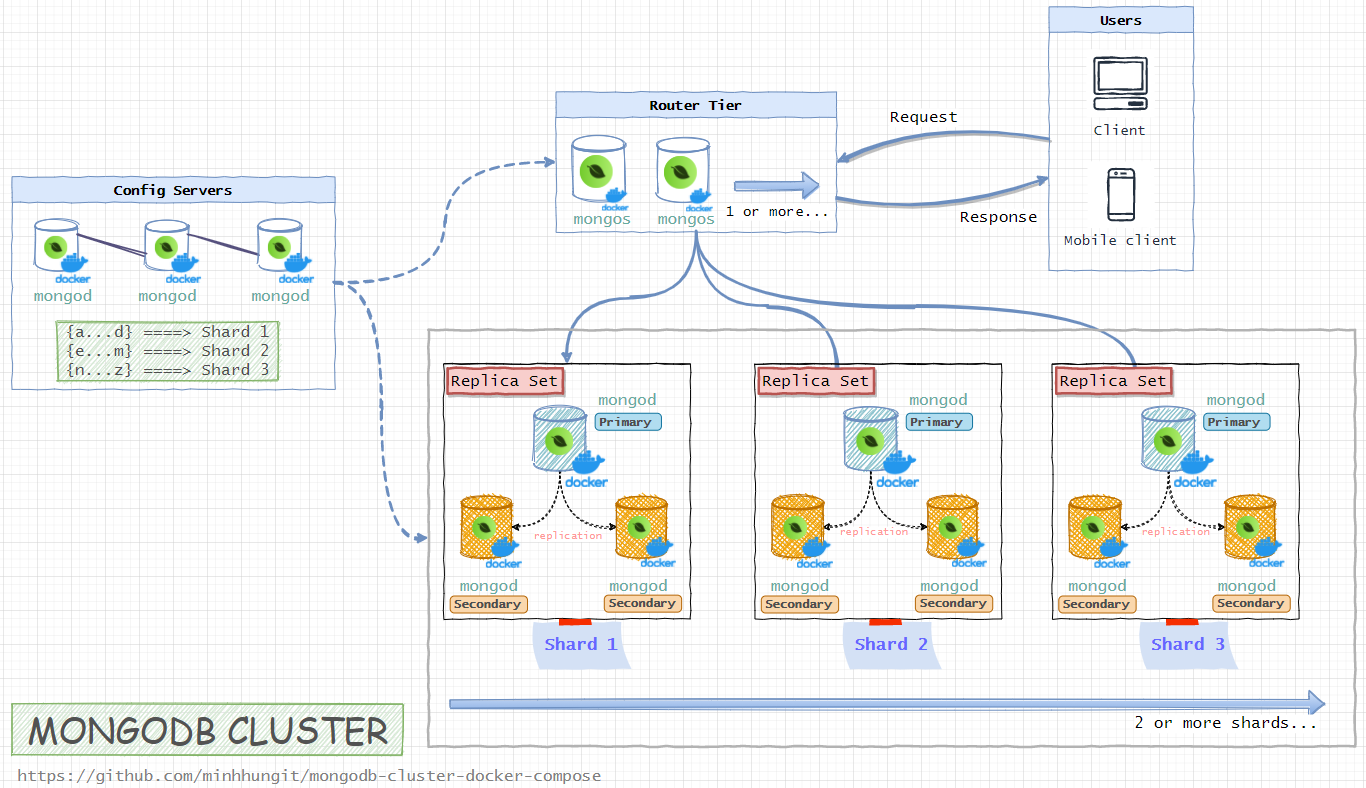
## ❓ Mongo Components [🔝](#-table-of-contents)
* Config Server (3 member replica set): `configsvr01`,`configsvr02`,`configsvr03`
* 3 Shards (each a 3 member `PSS` replica set):
* `shard01-a`,`shard01-b`, `shard01-c`
* `shard02-a`,`shard02-b`, `shard02-c`
* `shard03-a`,`shard03-b`, `shard03-c`
* 2 Routers (mongos): `router01`, `router02`
 ## ✨ Install [🔝](#-table-of-contents)
### 👉 On-liner command (convenience)
Clone this repository, open powershell or cmd on the repo folder and run:
```bash
docker-compose up -d && while true; do docker exec -it router-01 bash -c "echo 'sh.status()' | mongosh --port 27017" && break || sleep 2; done
```
### 👉 Manual step by step
#### Start all of the containers
> I have to remind again in case you missed 😊
> If you need to set cluster with keyfile authentication, [check here](https://github.com/minhhungit/mongodb-cluster-docker-compose/tree/Feature/Auth/with-keyfile-auth)
Clone this repository, open powershell or cmd on the repo folder and run:
```bash
docker-compose up -d
```
The command will trigger some entrypoint files in `/scripts` folder to init shard cluster/replicas automatically...
#### Verify
1. Check Cluster Initialization:
- After starting the cluster, it may take approximately 30 seconds for initialization.
- If the process takes longer, inspect the container logs for troubleshooting.
2. Run Verification Command: Use the following command to verify the sharding status:
```bash
while true; do docker exec -it router-01 bash -c "echo 'sh.status()' | mongosh --port 27017" && break || sleep 2; done
```
- This command continuously checks the sharding status using sh.status() on the router-01 container.
- It retries every 2 seconds until the status is successfully retrieved.
- Check more at this step [✅ Verify](#-verify-))
### ✨ Enable sharding/sharding key for your database [🔝](#-table-of-contents)
```bash
docker-compose exec router01 mongosh --port 27017
// Enable sharding for database `MyDatabase`
sh.enableSharding("MyDatabase")
// Setup shardingKey for collection `MyCollection`**
db.adminCommand( { shardCollection: "MyDatabase.MyCollection", key: { oemNumber: "hashed", zipCode: 1, supplierId: 1 }, numInitialChunks: 3 } )
```
---
### ✔️ Done !!!
Btw, here is mongodb connection string if you want to try to connect mongodb cluster with MongoDB Compass from your host computer (which is running docker)
```
mongodb://127.0.0.1:27117,127.0.0.1:27118
```
And if you are .NET developer there is a sample READ/WRITE data in mongodb cluster here: [https://github.com/minhhungit/mongodb-cluster-docker-compose/tree/master/client](https://github.com/minhhungit/mongodb-cluster-docker-compose/tree/master/client)
---
### Notes
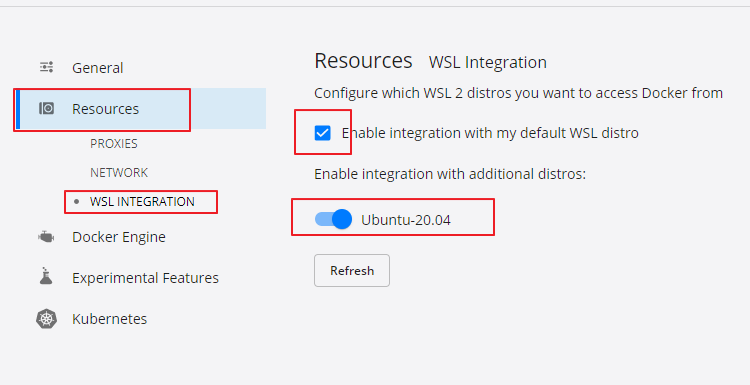
If you get error "docker.errors.DockerException: Error while fetching server API version" and
used WSL (Windows Subsystem for Linux) need to enable 'WSL Integration' for required distro
in Windows Docker Desktop (Settings -> Resources-> WSL Integration -> Enable integration with required distros).
## ✨ Install [🔝](#-table-of-contents)
### 👉 On-liner command (convenience)
Clone this repository, open powershell or cmd on the repo folder and run:
```bash
docker-compose up -d && while true; do docker exec -it router-01 bash -c "echo 'sh.status()' | mongosh --port 27017" && break || sleep 2; done
```
### 👉 Manual step by step
#### Start all of the containers
> I have to remind again in case you missed 😊
> If you need to set cluster with keyfile authentication, [check here](https://github.com/minhhungit/mongodb-cluster-docker-compose/tree/Feature/Auth/with-keyfile-auth)
Clone this repository, open powershell or cmd on the repo folder and run:
```bash
docker-compose up -d
```
The command will trigger some entrypoint files in `/scripts` folder to init shard cluster/replicas automatically...
#### Verify
1. Check Cluster Initialization:
- After starting the cluster, it may take approximately 30 seconds for initialization.
- If the process takes longer, inspect the container logs for troubleshooting.
2. Run Verification Command: Use the following command to verify the sharding status:
```bash
while true; do docker exec -it router-01 bash -c "echo 'sh.status()' | mongosh --port 27017" && break || sleep 2; done
```
- This command continuously checks the sharding status using sh.status() on the router-01 container.
- It retries every 2 seconds until the status is successfully retrieved.
- Check more at this step [✅ Verify](#-verify-))
### ✨ Enable sharding/sharding key for your database [🔝](#-table-of-contents)
```bash
docker-compose exec router01 mongosh --port 27017
// Enable sharding for database `MyDatabase`
sh.enableSharding("MyDatabase")
// Setup shardingKey for collection `MyCollection`**
db.adminCommand( { shardCollection: "MyDatabase.MyCollection", key: { oemNumber: "hashed", zipCode: 1, supplierId: 1 }, numInitialChunks: 3 } )
```
---
### ✔️ Done !!!
Btw, here is mongodb connection string if you want to try to connect mongodb cluster with MongoDB Compass from your host computer (which is running docker)
```
mongodb://127.0.0.1:27117,127.0.0.1:27118
```
And if you are .NET developer there is a sample READ/WRITE data in mongodb cluster here: [https://github.com/minhhungit/mongodb-cluster-docker-compose/tree/master/client](https://github.com/minhhungit/mongodb-cluster-docker-compose/tree/master/client)
---
### Notes
If you get error "docker.errors.DockerException: Error while fetching server API version" and
used WSL (Windows Subsystem for Linux) need to enable 'WSL Integration' for required distro
in Windows Docker Desktop (Settings -> Resources-> WSL Integration -> Enable integration with required distros).
 Link: https://stackoverflow.com/a/65347214/3007147
If you get error like "E QUERY [thread1] SyntaxError: unterminated string literal @(shellhelp2)", problem maybe due to:
>On Unix, you will get this error if your script has Dos/Windows end of lines (CRLF) instead of Unix end of lines (LF).
To fix it, modify script files in `scripts` folder, remove newline, change multi line to one line.
Or save the file with Unix mode in notepad++ [Edit menu => EOL Conversion => Unix](https://github.com/minhhungit/mongodb-cluster-docker-compose/tree/master/assets/EOL-unix-mode.png)
Link: https://stackoverflow.com/a/51728442/3007147
## 📋 Verify [🔝](#-table-of-contents)
### ✅ Verify the status of the sharded cluster [🔝](#-table-of-contents)
```bash
docker-compose exec router01 mongosh --port 27017
sh.status()
```
*Sample Result:*
```
sharding version: {
"_id" : 1,
"minCompatibleVersion" : 5,
"currentVersion" : 6,
"clusterId" : ObjectId("5d38fb010eac1e03397c355a")
}
shards:
{ "_id" : "rs-shard-01", "host" : "rs-shard-01/shard01-a:27017,shard01-b:27017,shard01-c:27017", "state" : 1 }
{ "_id" : "rs-shard-02", "host" : "rs-shard-02/shard02-a:27017,shard02-b:27017,shard02-c:27017", "state" : 1 }
{ "_id" : "rs-shard-03", "host" : "rs-shard-03/shard03-a:27017,shard03-b:27017,shard03-c:27017", "state" : 1 }
active mongoses:
"4.0.10" : 2
autosplit:
Currently enabled: yes
balancer:
Currently enabled: yes
Currently running: no
Failed balancer rounds in last 5 attempts: 0
Migration Results for the last 24 hours:
No recent migrations
databases:
{ "_id" : "config", "primary" : "config", "partitioned" : true }
```
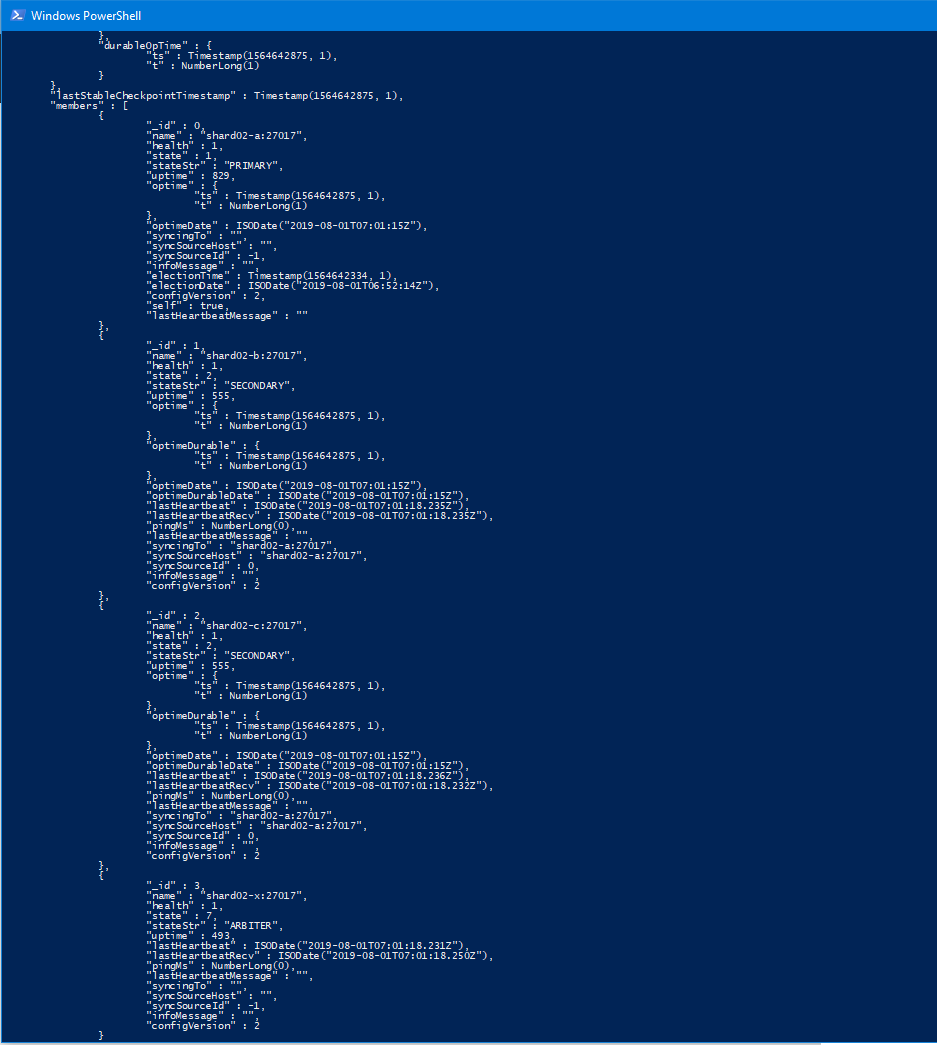
### ✅ Verify status of replica set for each shard [🔝](#-table-of-contents)
> You should see 1 PRIMARY, 2 SECONDARY
```bash
docker exec -it shard-01-node-a bash -c "echo 'rs.status()' | mongosh --port 27017"
docker exec -it shard-02-node-a bash -c "echo 'rs.status()' | mongosh --port 27017"
docker exec -it shard-03-node-a bash -c "echo 'rs.status()' | mongosh --port 27017"
```
*Sample Result:*
```ps1
MongoDB shell version v4.0.11
connecting to: mongodb://127.0.0.1:27017/?gssapiServiceName=mongodb
Implicit session: session { "id" : UUID("dcfe5d8f-75ef-45f7-9595-9d72dc8a81fc") }
MongoDB server version: 4.0.11
{
"set" : "rs-shard-01",
"date" : ISODate("2019-08-01T06:53:59.175Z"),
"myState" : 1,
"term" : NumberLong(1),
"syncingTo" : "",
"syncSourceHost" : "",
"syncSourceId" : -1,
"heartbeatIntervalMillis" : NumberLong(2000),
"optimes" : {
"lastCommittedOpTime" : {
"ts" : Timestamp(1564642438, 1),
"t" : NumberLong(1)
},
"readConcernMajorityOpTime" : {
"ts" : Timestamp(1564642438, 1),
"t" : NumberLong(1)
},
"appliedOpTime" : {
"ts" : Timestamp(1564642438, 1),
"t" : NumberLong(1)
},
"durableOpTime" : {
"ts" : Timestamp(1564642438, 1),
"t" : NumberLong(1)
}
},
"lastStableCheckpointTimestamp" : Timestamp(1564642428, 1),
"members" : [
{
"_id" : 0,
"name" : "shard01-a:27017",
"health" : 1,
"state" : 1,
"stateStr" : "PRIMARY",
"uptime" : 390,
"optime" : {
"ts" : Timestamp(1564642438, 1),
"t" : NumberLong(1)
},
"optimeDate" : ISODate("2019-08-01T06:53:58Z"),
"syncingTo" : "",
"syncSourceHost" : "",
"syncSourceId" : -1,
"infoMessage" : "",
"electionTime" : Timestamp(1564642306, 1),
"electionDate" : ISODate("2019-08-01T06:51:46Z"),
"configVersion" : 2,
"self" : true,
"lastHeartbeatMessage" : ""
},
{
"_id" : 1,
"name" : "shard01-b:27017",
"health" : 1,
"state" : 2,
"stateStr" : "SECONDARY",
"uptime" : 142,
"optime" : {
"ts" : Timestamp(1564642428, 1),
"t" : NumberLong(1)
},
"optimeDurable" : {
"ts" : Timestamp(1564642428, 1),
"t" : NumberLong(1)
},
"optimeDate" : ISODate("2019-08-01T06:53:48Z"),
"optimeDurableDate" : ISODate("2019-08-01T06:53:48Z"),
"lastHeartbeat" : ISODate("2019-08-01T06:53:57.953Z"),
"lastHeartbeatRecv" : ISODate("2019-08-01T06:53:57.967Z"),
"pingMs" : NumberLong(0),
"lastHeartbeatMessage" : "",
"syncingTo" : "shard01-a:27017",
"syncSourceHost" : "shard01-a:27017",
"syncSourceId" : 0,
"infoMessage" : "",
"configVersion" : 2
},
{
"_id" : 2,
"name" : "shard01-c:27017",
"health" : 1,
"state" : 2,
"stateStr" : "SECONDARY",
"uptime" : 142,
"optime" : {
"ts" : Timestamp(1564642428, 1),
"t" : NumberLong(1)
},
"optimeDurable" : {
"ts" : Timestamp(1564642428, 1),
"t" : NumberLong(1)
},
"optimeDate" : ISODate("2019-08-01T06:53:48Z"),
"optimeDurableDate" : ISODate("2019-08-01T06:53:48Z"),
"lastHeartbeat" : ISODate("2019-08-01T06:53:57.952Z"),
"lastHeartbeatRecv" : ISODate("2019-08-01T06:53:57.968Z"),
"pingMs" : NumberLong(0),
"lastHeartbeatMessage" : "",
"syncingTo" : "shard01-a:27017",
"syncSourceHost" : "shard01-a:27017",
"syncSourceId" : 0,
"infoMessage" : "",
"configVersion" : 2
}
],
"ok" : 1,
"operationTime" : Timestamp(1564642438, 1),
"$gleStats" : {
"lastOpTime" : Timestamp(0, 0),
"electionId" : ObjectId("7fffffff0000000000000001")
},
"lastCommittedOpTime" : Timestamp(1564642438, 1),
"$configServerState" : {
"opTime" : {
"ts" : Timestamp(1564642426, 2),
"t" : NumberLong(1)
}
},
"$clusterTime" : {
"clusterTime" : Timestamp(1564642438, 1),
"signature" : {
"hash" : BinData(0,"AAAAAAAAAAAAAAAAAAAAAAAAAAA="),
"keyId" : NumberLong(0)
}
}
}
bye
```
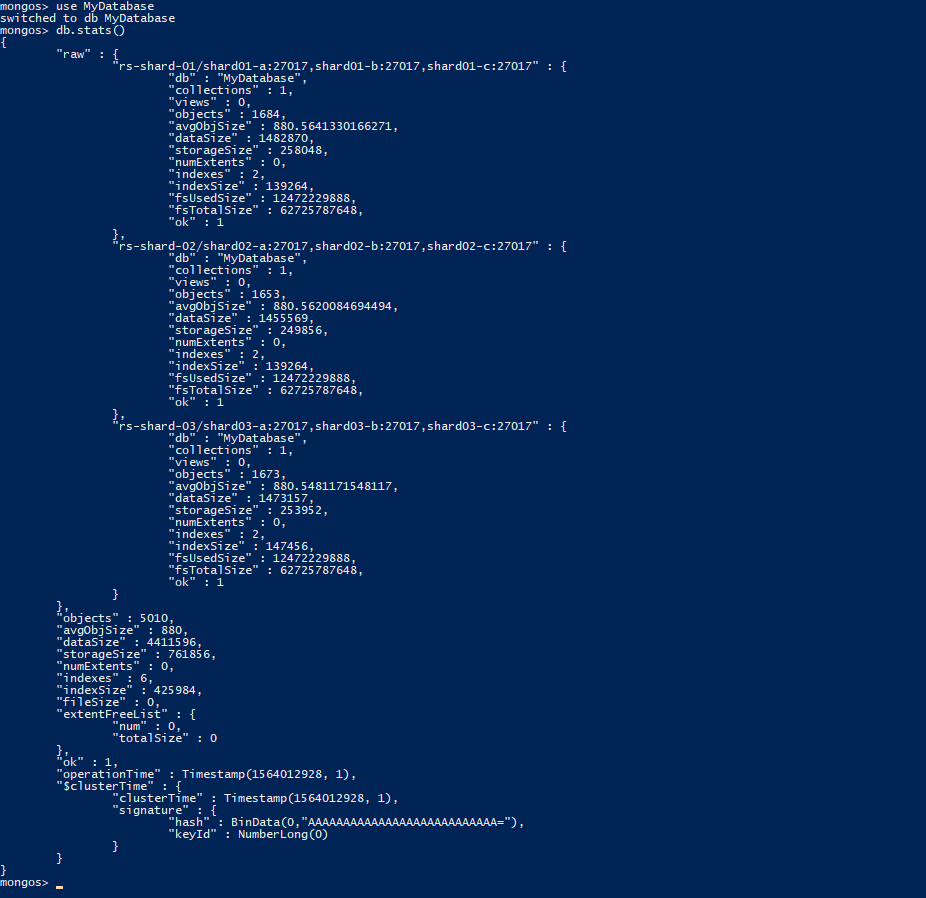
### ✅ Check database status [🔝](#-table-of-contents)
```bash
docker-compose exec router01 mongosh --port 27017
use MyDatabase
db.stats()
db.MyCollection.getShardDistribution()
```
*Sample Result:*
```
{
"raw" : {
"rs-shard-01/shard01-a:27017,shard01-b:27017,shard01-c:27017" : {
"db" : "MyDatabase",
"collections" : 1,
"views" : 0,
"objects" : 0,
"avgObjSize" : 0,
"dataSize" : 0,
"storageSize" : 4096,
"numExtents" : 0,
"indexes" : 2,
"indexSize" : 8192,
"fsUsedSize" : 12439990272,
"fsTotalSize" : 62725787648,
"ok" : 1
},
"rs-shard-03/shard03-a:27017,shard03-b:27017,shard03-c:27017" : {
"db" : "MyDatabase",
"collections" : 1,
"views" : 0,
"objects" : 0,
"avgObjSize" : 0,
"dataSize" : 0,
"storageSize" : 4096,
"numExtents" : 0,
"indexes" : 2,
"indexSize" : 8192,
"fsUsedSize" : 12439994368,
"fsTotalSize" : 62725787648,
"ok" : 1
},
"rs-shard-02/shard02-a:27017,shard02-b:27017,shard02-c:27017" : {
"db" : "MyDatabase",
"collections" : 1,
"views" : 0,
"objects" : 0,
"avgObjSize" : 0,
"dataSize" : 0,
"storageSize" : 4096,
"numExtents" : 0,
"indexes" : 2,
"indexSize" : 8192,
"fsUsedSize" : 12439994368,
"fsTotalSize" : 62725787648,
"ok" : 1
}
},
"objects" : 0,
"avgObjSize" : 0,
"dataSize" : 0,
"storageSize" : 12288,
"numExtents" : 0,
"indexes" : 6,
"indexSize" : 24576,
"fileSize" : 0,
"extentFreeList" : {
"num" : 0,
"totalSize" : 0
},
"ok" : 1,
"operationTime" : Timestamp(1564004884, 36),
"$clusterTime" : {
"clusterTime" : Timestamp(1564004888, 1),
"signature" : {
"hash" : BinData(0,"AAAAAAAAAAAAAAAAAAAAAAAAAAA="),
"keyId" : NumberLong(0)
}
}
}
```
## 🔎 More commands [🔝](#-table-of-contents)
```bash
docker exec -it mongo-config-01 bash -c "echo 'rs.status()' | mongosh --port 27017"
docker exec -it shard-01-node-a bash -c "echo 'rs.help()' | mongosh --port 27017"
docker exec -it shard-01-node-a bash -c "echo 'rs.status()' | mongosh --port 27017"
docker exec -it shard-01-node-a bash -c "echo 'rs.printReplicationInfo()' | mongosh --port 27017"
docker exec -it shard-01-node-a bash -c "echo 'rs.printSlaveReplicationInfo()' | mongosh --port 27017"
```
---
### ✦ Normal Startup [🔝](#-table-of-contents)
The cluster only has to be initialized on the first run.
Subsequent startup can be achieved simply with `docker-compose up` or `docker-compose up -d`
### ✦ Resetting the Cluster [🔝](#-table-of-contents)
To remove all data and re-initialize the cluster, make sure the containers are stopped and then:
```bash
docker-compose rm
```
### ✦ Clean up docker-compose [🔝](#-table-of-contents)
```bash
docker-compose down -v --rmi all --remove-orphans
```
## 📺 Screenshot [🔝](#-table-of-contents)
Link: https://stackoverflow.com/a/65347214/3007147
If you get error like "E QUERY [thread1] SyntaxError: unterminated string literal @(shellhelp2)", problem maybe due to:
>On Unix, you will get this error if your script has Dos/Windows end of lines (CRLF) instead of Unix end of lines (LF).
To fix it, modify script files in `scripts` folder, remove newline, change multi line to one line.
Or save the file with Unix mode in notepad++ [Edit menu => EOL Conversion => Unix](https://github.com/minhhungit/mongodb-cluster-docker-compose/tree/master/assets/EOL-unix-mode.png)
Link: https://stackoverflow.com/a/51728442/3007147
## 📋 Verify [🔝](#-table-of-contents)
### ✅ Verify the status of the sharded cluster [🔝](#-table-of-contents)
```bash
docker-compose exec router01 mongosh --port 27017
sh.status()
```
*Sample Result:*
```
sharding version: {
"_id" : 1,
"minCompatibleVersion" : 5,
"currentVersion" : 6,
"clusterId" : ObjectId("5d38fb010eac1e03397c355a")
}
shards:
{ "_id" : "rs-shard-01", "host" : "rs-shard-01/shard01-a:27017,shard01-b:27017,shard01-c:27017", "state" : 1 }
{ "_id" : "rs-shard-02", "host" : "rs-shard-02/shard02-a:27017,shard02-b:27017,shard02-c:27017", "state" : 1 }
{ "_id" : "rs-shard-03", "host" : "rs-shard-03/shard03-a:27017,shard03-b:27017,shard03-c:27017", "state" : 1 }
active mongoses:
"4.0.10" : 2
autosplit:
Currently enabled: yes
balancer:
Currently enabled: yes
Currently running: no
Failed balancer rounds in last 5 attempts: 0
Migration Results for the last 24 hours:
No recent migrations
databases:
{ "_id" : "config", "primary" : "config", "partitioned" : true }
```
### ✅ Verify status of replica set for each shard [🔝](#-table-of-contents)
> You should see 1 PRIMARY, 2 SECONDARY
```bash
docker exec -it shard-01-node-a bash -c "echo 'rs.status()' | mongosh --port 27017"
docker exec -it shard-02-node-a bash -c "echo 'rs.status()' | mongosh --port 27017"
docker exec -it shard-03-node-a bash -c "echo 'rs.status()' | mongosh --port 27017"
```
*Sample Result:*
```ps1
MongoDB shell version v4.0.11
connecting to: mongodb://127.0.0.1:27017/?gssapiServiceName=mongodb
Implicit session: session { "id" : UUID("dcfe5d8f-75ef-45f7-9595-9d72dc8a81fc") }
MongoDB server version: 4.0.11
{
"set" : "rs-shard-01",
"date" : ISODate("2019-08-01T06:53:59.175Z"),
"myState" : 1,
"term" : NumberLong(1),
"syncingTo" : "",
"syncSourceHost" : "",
"syncSourceId" : -1,
"heartbeatIntervalMillis" : NumberLong(2000),
"optimes" : {
"lastCommittedOpTime" : {
"ts" : Timestamp(1564642438, 1),
"t" : NumberLong(1)
},
"readConcernMajorityOpTime" : {
"ts" : Timestamp(1564642438, 1),
"t" : NumberLong(1)
},
"appliedOpTime" : {
"ts" : Timestamp(1564642438, 1),
"t" : NumberLong(1)
},
"durableOpTime" : {
"ts" : Timestamp(1564642438, 1),
"t" : NumberLong(1)
}
},
"lastStableCheckpointTimestamp" : Timestamp(1564642428, 1),
"members" : [
{
"_id" : 0,
"name" : "shard01-a:27017",
"health" : 1,
"state" : 1,
"stateStr" : "PRIMARY",
"uptime" : 390,
"optime" : {
"ts" : Timestamp(1564642438, 1),
"t" : NumberLong(1)
},
"optimeDate" : ISODate("2019-08-01T06:53:58Z"),
"syncingTo" : "",
"syncSourceHost" : "",
"syncSourceId" : -1,
"infoMessage" : "",
"electionTime" : Timestamp(1564642306, 1),
"electionDate" : ISODate("2019-08-01T06:51:46Z"),
"configVersion" : 2,
"self" : true,
"lastHeartbeatMessage" : ""
},
{
"_id" : 1,
"name" : "shard01-b:27017",
"health" : 1,
"state" : 2,
"stateStr" : "SECONDARY",
"uptime" : 142,
"optime" : {
"ts" : Timestamp(1564642428, 1),
"t" : NumberLong(1)
},
"optimeDurable" : {
"ts" : Timestamp(1564642428, 1),
"t" : NumberLong(1)
},
"optimeDate" : ISODate("2019-08-01T06:53:48Z"),
"optimeDurableDate" : ISODate("2019-08-01T06:53:48Z"),
"lastHeartbeat" : ISODate("2019-08-01T06:53:57.953Z"),
"lastHeartbeatRecv" : ISODate("2019-08-01T06:53:57.967Z"),
"pingMs" : NumberLong(0),
"lastHeartbeatMessage" : "",
"syncingTo" : "shard01-a:27017",
"syncSourceHost" : "shard01-a:27017",
"syncSourceId" : 0,
"infoMessage" : "",
"configVersion" : 2
},
{
"_id" : 2,
"name" : "shard01-c:27017",
"health" : 1,
"state" : 2,
"stateStr" : "SECONDARY",
"uptime" : 142,
"optime" : {
"ts" : Timestamp(1564642428, 1),
"t" : NumberLong(1)
},
"optimeDurable" : {
"ts" : Timestamp(1564642428, 1),
"t" : NumberLong(1)
},
"optimeDate" : ISODate("2019-08-01T06:53:48Z"),
"optimeDurableDate" : ISODate("2019-08-01T06:53:48Z"),
"lastHeartbeat" : ISODate("2019-08-01T06:53:57.952Z"),
"lastHeartbeatRecv" : ISODate("2019-08-01T06:53:57.968Z"),
"pingMs" : NumberLong(0),
"lastHeartbeatMessage" : "",
"syncingTo" : "shard01-a:27017",
"syncSourceHost" : "shard01-a:27017",
"syncSourceId" : 0,
"infoMessage" : "",
"configVersion" : 2
}
],
"ok" : 1,
"operationTime" : Timestamp(1564642438, 1),
"$gleStats" : {
"lastOpTime" : Timestamp(0, 0),
"electionId" : ObjectId("7fffffff0000000000000001")
},
"lastCommittedOpTime" : Timestamp(1564642438, 1),
"$configServerState" : {
"opTime" : {
"ts" : Timestamp(1564642426, 2),
"t" : NumberLong(1)
}
},
"$clusterTime" : {
"clusterTime" : Timestamp(1564642438, 1),
"signature" : {
"hash" : BinData(0,"AAAAAAAAAAAAAAAAAAAAAAAAAAA="),
"keyId" : NumberLong(0)
}
}
}
bye
```
### ✅ Check database status [🔝](#-table-of-contents)
```bash
docker-compose exec router01 mongosh --port 27017
use MyDatabase
db.stats()
db.MyCollection.getShardDistribution()
```
*Sample Result:*
```
{
"raw" : {
"rs-shard-01/shard01-a:27017,shard01-b:27017,shard01-c:27017" : {
"db" : "MyDatabase",
"collections" : 1,
"views" : 0,
"objects" : 0,
"avgObjSize" : 0,
"dataSize" : 0,
"storageSize" : 4096,
"numExtents" : 0,
"indexes" : 2,
"indexSize" : 8192,
"fsUsedSize" : 12439990272,
"fsTotalSize" : 62725787648,
"ok" : 1
},
"rs-shard-03/shard03-a:27017,shard03-b:27017,shard03-c:27017" : {
"db" : "MyDatabase",
"collections" : 1,
"views" : 0,
"objects" : 0,
"avgObjSize" : 0,
"dataSize" : 0,
"storageSize" : 4096,
"numExtents" : 0,
"indexes" : 2,
"indexSize" : 8192,
"fsUsedSize" : 12439994368,
"fsTotalSize" : 62725787648,
"ok" : 1
},
"rs-shard-02/shard02-a:27017,shard02-b:27017,shard02-c:27017" : {
"db" : "MyDatabase",
"collections" : 1,
"views" : 0,
"objects" : 0,
"avgObjSize" : 0,
"dataSize" : 0,
"storageSize" : 4096,
"numExtents" : 0,
"indexes" : 2,
"indexSize" : 8192,
"fsUsedSize" : 12439994368,
"fsTotalSize" : 62725787648,
"ok" : 1
}
},
"objects" : 0,
"avgObjSize" : 0,
"dataSize" : 0,
"storageSize" : 12288,
"numExtents" : 0,
"indexes" : 6,
"indexSize" : 24576,
"fileSize" : 0,
"extentFreeList" : {
"num" : 0,
"totalSize" : 0
},
"ok" : 1,
"operationTime" : Timestamp(1564004884, 36),
"$clusterTime" : {
"clusterTime" : Timestamp(1564004888, 1),
"signature" : {
"hash" : BinData(0,"AAAAAAAAAAAAAAAAAAAAAAAAAAA="),
"keyId" : NumberLong(0)
}
}
}
```
## 🔎 More commands [🔝](#-table-of-contents)
```bash
docker exec -it mongo-config-01 bash -c "echo 'rs.status()' | mongosh --port 27017"
docker exec -it shard-01-node-a bash -c "echo 'rs.help()' | mongosh --port 27017"
docker exec -it shard-01-node-a bash -c "echo 'rs.status()' | mongosh --port 27017"
docker exec -it shard-01-node-a bash -c "echo 'rs.printReplicationInfo()' | mongosh --port 27017"
docker exec -it shard-01-node-a bash -c "echo 'rs.printSlaveReplicationInfo()' | mongosh --port 27017"
```
---
### ✦ Normal Startup [🔝](#-table-of-contents)
The cluster only has to be initialized on the first run.
Subsequent startup can be achieved simply with `docker-compose up` or `docker-compose up -d`
### ✦ Resetting the Cluster [🔝](#-table-of-contents)
To remove all data and re-initialize the cluster, make sure the containers are stopped and then:
```bash
docker-compose rm
```
### ✦ Clean up docker-compose [🔝](#-table-of-contents)
```bash
docker-compose down -v --rmi all --remove-orphans
```
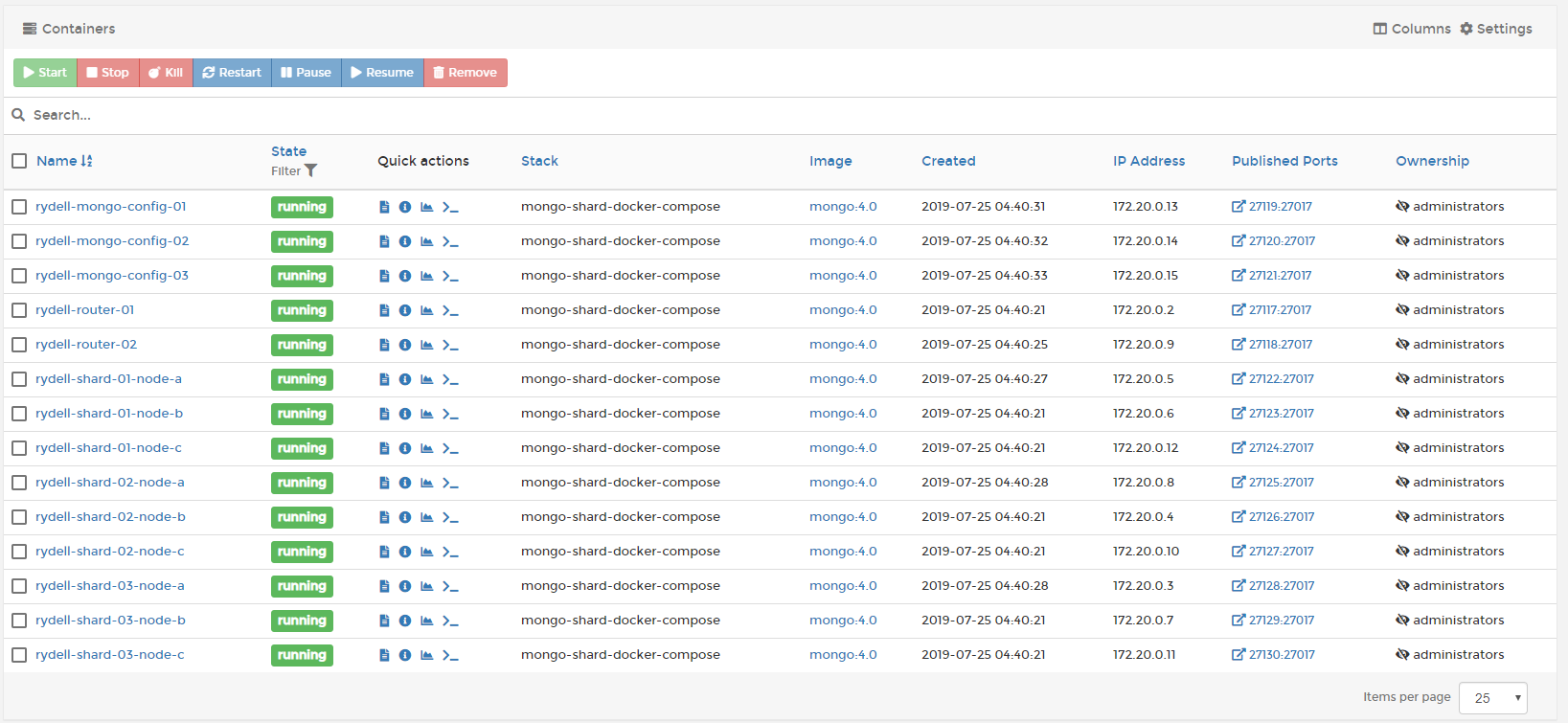
## 📺 Screenshot [🔝](#-table-of-contents)

 ---
## 👌 Donate ^^ [🔝](#-table-of-contents)
**If you like my works and would like to support then you can buy me a coffee ☕️ anytime**
---
## 👌 Donate ^^ [🔝](#-table-of-contents)
**If you like my works and would like to support then you can buy me a coffee ☕️ anytime**
 **I would appreciate it ❤️❤️❤️**
---
## 📚 Refrences [🔝](#-table-of-contents)
- https://github.com/jfollenfant/mongodb-sharding-docker-compose
- https://viblo.asia/p/cai-dat-mongo-cluster-voi-docker-m68Z0NN25kG
**I would appreciate it ❤️❤️❤️**
---
## 📚 Refrences [🔝](#-table-of-contents)
- https://github.com/jfollenfant/mongodb-sharding-docker-compose
- https://viblo.asia/p/cai-dat-mongo-cluster-voi-docker-m68Z0NN25kG