# restheart
**Repository Path**: yunwisdoms/restheart
## Basic Information
- **Project Name**: restheart
- **Description**: MongoDB的Rest API 微服务
- **Primary Language**: Unknown
- **License**: AGPL-3.0
- **Default Branch**: master
- **Homepage**: None
- **GVP Project**: No
## Statistics
- **Stars**: 0
- **Forks**: 0
- **Created**: 2019-11-11
- **Last Updated**: 2024-05-29
## Categories & Tags
**Categories**: Uncategorized
**Tags**: None
## README
# RESTHeart - REST API Microservice for MongoDB. #
[](https://travis-ci.org/SoftInstigate/restheart)
[](https://search.maven.org/search?q=g:%22org.restheart%22%20AND%20a:%22restheart%22)
[](https://hub.docker.com/r/softinstigate/restheart/)
[](https://hub.docker.com/r/softinstigate/restheart/)
[](https://gitter.im/SoftInstigate/restheart?utm_source=badge&utm_medium=badge&utm_campaign=pr-badge&utm_content=badge)
## Table of Contents
- [Summary](#summary)
- [Setup](#setup)
- [Use Docker](#use-docker)
- [Configuration](#configuration)
- [Security](#security)
- [How to Build](#how-to-Build)
- [Integration Tests](#integration-tests)
- [Maven Dependencies](#maven-dependencies)
- [Snapshot Builds](#snapshot-builds)
- [Maven Site](#maven-Site)
- [Continuous Integration](#continuous-integration)
- [Full documentation](#full-documentation)
## Summary
RESTHeart is a REST API Microservice for MongoDB.
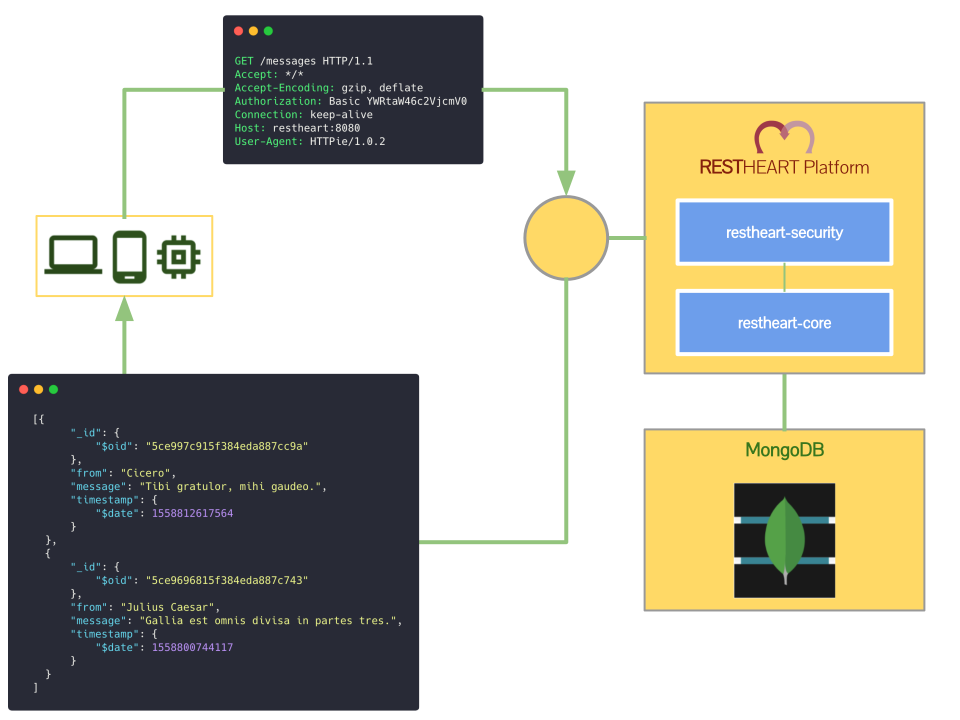
RESTHeart connects to __MongoDB__ and opens its data to the Web. Clients, such as mobile and JavaScript apps, can access the database via a simple __API__ based on __JSON__ messages.
With RESTHeart teams can focus on building Angular, React, Vue, iOS or Android applications, because most of the server-side logic usually necessary for CRUD (Create, Read, Update, Delete) operations is automatically handled, without the need to write any code except for the client logic.
For example, to insert data in MongoDB developers model client-side JSON documents and then execute POST operations via HTTP to RESTHeart: no more need to deal with complicated server-side code and database drivers in Java, JavaScript, PHP, Ruby, Python, etc.
For these reasons, RESTHeart is widely used by freelancers, Web agencies ans System Integrators with deadlines, because it allows them to focus on the most creative parts of their work.
For more ideas have a look at the collection of common [use cases](https://restheart.org/use-cases/).
## Setup
Download the latest release, then [install](https://docs.mongodb.com/manual/installation/#mongodb-community-edition-installation-tutorials) and [run](https://docs.mongodb.com/manual/tutorial/manage-mongodb-processes/) MongoDB
Assuming that MongoDB is running on `localhost` on port `27017`, then run RESTHeart as follows:
```bash
$ git clone git@github.com:SoftInstigate/restheart.git
$ cd restheart
$ java -jar restheart.jar etc/restheart.yml -e etc/dev.properties
```
RESTHeart will be up and running in few seconds, on HTTP port `8080`. Then go to the [tutorial](https://restheart.org/docs/tutorial/), which uses REST Ninja as a client.
__Security warning__: by default RESTHeart mounts only a `restheart` database, to avoid to accidentally exposing the whole set of MongoDB databases publicly. This is controlled by the `root-mongo-resource` in the [dev.properties](etc/dev.properties) file
```properties
...
# The MongoDb resource to bind to the root URI /
# The format is /db[/coll[/docid]] or '*' to expose all dbs
root-mongo-resource = /restheart
...
```
> It means that the root resource `/` is bound to the `/restheart` database. This database doesn't actually exist until you explicitly create it by issuing a `PUT /` HTTP command.
__NOTE__: for security reasons RESTHeart by default binds only on `localhost`, so it won't be reachable from external systems unless you edit the configuration. To accept connections from everywhere, you must set at least the http listener in the [dev.properties](etc/dev.properties) file to bind to `0.0.0.0` like this:
```properties
http-listener = 0.0.0.0
```
Beware that you must stop and run RESTHeart again to reload a new configuration.
## Use Docker
Alternatively, you can run RESTHeart with docker compose, which also starts a MongoDB container:
```bash
$ git clone git@github.com:SoftInstigate/restheart.git
$ cd restheart
$ docker-compose up -d
```
Again, point your browser to the [tutorial](https://restheart.org/docs/tutorial/) for more.
## Configuration
Refer to the [configuration file](https://github.com/SoftInstigate/restheart/blob/master/etc/restheart.yml) for inline documentation.
## Security
Starting from RESTHeart v4, security has been extracted as a separate layer handled by [restheart-security](https://github.com/SoftInstigate/restheart-security), which is a __reverse proxy microservice__ for HTTP resources, providing __Authentication__ and __Authorization__ services.
Alternatively, you can put any HTTP reverse proxy in front of RESTHeart and delegate security to it. For an example of using NGINX as a reverse proxy on top of RESTHeart, have a look at [this repository](https://github.com/SoftInstigate/nginx-restheart). Then it is possibile to configure NGINX to restrict access with [HTTP Basic Authentication](https://docs.nginx.com/nginx/admin-guide/security-controls/configuring-http-basic-authentication/).
## How to Build
> Building RESTHeart requires [Maven](http://www.oracle.com/technetwork/java/javase/downloads/index.html) and Java 11 or later.
Build the project with Maven:
```bash
$ mvn clean package
```
## Integration Tests
To run the integration test suite, first make sure that __mongod is running__ on `localhost`, on default port `27017` and without authentication enabled — i.e. no `--auth` option is specified.
```bash
$ mvn verify -DskipITs=false
```
Alternatively, if you have Docker, execute the following script:
```bash
$ ./bin/integration-tests.sh
```
The script starts a Docker container running MongoDB and then execute the integration tests with Maven. It will clean-up the container at the end.
## Maven Dependencies
RESTHeart's releases are available on [Maven Central](http://search.maven.org/#search%7Cga%7C1%7Cg%3A%22org.restheart%22).
Stable releases are available at:
https://oss.sonatype.org/content/repositories/releases/org/restheart/restheart/
If you want to embed RESTHeart in your project, add the dependency to your POM file:
```xml
org.restheart
restheart
4.0.0
```
### Snapshot Builds
Snapshots are available at [Sonatype](https://oss.sonatype.org/content/repositories/snapshots/org/restheart/restheart/). If you want to build your project against a development release, first add the SNAPSHOT repository:
```xml
restheart-mvn-repo
https://oss.sonatype.org/content/repositories/snapshots
true
always
```
Then include the SNAPSHOT dependency in your POM:
```xml
org.restheart
restheart
4.0.1-SNAPSHOT
```
### Maven Site
An automatically generated Maven Site for each build of the `master` branch is available at: http://softinstigate.github.io/restheart/
## Continuous Integration
We continually integrate and deploy development releases to Maven Central with [Travis-CI](https://travis-ci.org/SoftInstigate/restheart).
RESTHeart's public Docker images are also automatically built and pushed to [Docker Hub](https://hub.docker.com/r/softinstigate/restheart/). The `latest` tag for Docker images refers to the most recent SNAPSHOT release on the `master` branch.
## Full documentation
For more information, read the [documentation](http://restheart.org/docs/).
_Made with :heart: by [SoftInstigate](http://www.softinstigate.com/). Follow us on [Twitter](https://twitter.com/softinstigate)_.