# VideoClaw
**Repository Path**: zbgit11/VideoClaw
## Basic Information
- **Project Name**: VideoClaw
- **Description**: 🚀 AI 全自动化视频生成员工 | Your First AIGC Coworker. Chat an Idea. Get a Film. 🦞
- **Primary Language**: Unknown
- **License**: MIT
- **Default Branch**: main
- **Homepage**: None
- **GVP Project**: No
## Statistics
- **Stars**: 0
- **Forks**: 1
- **Created**: 2026-07-10
- **Last Updated**: 2026-08-11
## Categories & Tags
**Categories**: Uncategorized
**Tags**: None
## README

VideoClaw: AI 创意视频生成员工
简体中文 | English


直接与 OpenClaw 对话:"生成 X 的视频" → 搞定。
📺 [**Bilibili**](https://space.bilibili.com/2031891503?spm_id_from=333.1007.0.0) ▶️ [**YouTube**](https://www.youtube.com/@imryanxu) 📖 [**集成指南**](#方式三openclaw-自动配置) 🦀 [**ClawHub**](https://clawhub.ai/hit-cxf/video-claw)


VideoClaw 是一个面向创意视频生产的 AI 导演系统。**你只需要给出一句想法、一个故事梗概,甚至一个模糊概念,系统就会把它拆解为可执行的影视工作流,持续产出可查看、可确认、可修改、可交付的中间资产,最终生成完整成片**。
它不是单点式的文生视频工具,而是一条覆盖 **剧本策划 → 角色/场景设计 → 分镜规划 → 参考图生成 → 视频生成 → 后期剪辑** 的全流程生产线。相比只给你一个黑盒结果的闭源视频生成框架,VideoClaw是一个真正可协作的 AI 导演团队:前一阶段决定后一阶段,所有关键节点都能可视化、可编辑、可继续生成。
# 📺 创作展示
## 🎬 VideoClaw
点击查看WebUI界面设计
| 阶段 | 示意图 | 说明 |
| ------------- | -------------------------------------------------------------------- | -------------------------------------------------------------------------------------------------------------------------------------------------------- |
| 首页 |  | 展示系统概览,支持查看历史项目、创建新项目以及全局配置(API Key 和默认模型设置),是创作流程的起点。 |
| 剧本策划 |
| 展示系统概览,支持查看历史项目、创建新项目以及全局配置(API Key 和默认模型设置),是创作流程的起点。 |
| 剧本策划 |  | 输入创意标题与项目梗概,系统自动生成结构化的多场次剧本(包含旁白与对话),并支持对后续剧情的智能续写。 |
| 角色/场景设计 |
| 输入创意标题与项目梗概,系统自动生成结构化的多场次剧本(包含旁白与对话),并支持对后续剧情的智能续写。 |
| 角色/场景设计 |  | 基于剧本自动提取角色与场景的核心特征,生成风格统一的参考原画,作为后续分镜生成的视觉基础。 |
| 分镜规划 |
| 基于剧本自动提取角色与场景的核心特征,生成风格统一的参考原画,作为后续分镜生成的视觉基础。 |
| 分镜规划 |  | 将每一场剧本拆解为连续的视觉分镜,详细制定镜头视角、动作描述及参考内容,确保叙事连贯性。 |
| 参考图生成 |
| 将每一场剧本拆解为连续的视觉分镜,详细制定镜头视角、动作描述及参考内容,确保叙事连贯性。 |
| 参考图生成 |  | 为每个分镜场次生成高质量、高精度的参考底图,控制光影细节与画面构图,作为视频生成的关键视觉基准。 |
| 视频生成 |
| 为每个分镜场次生成高质量、高精度的参考底图,控制光影细节与画面构图,作为视频生成的关键视觉基准。 |
| 视频生成 |  | 调用主流高性能视频生成模型(如 Wan、Kling 等)将分镜图转化为动态片段,支持首帧生视频、首尾帧生视频、参考图生视频三种方式。 |
| 后期剪辑 |
| 调用主流高性能视频生成模型(如 Wan、Kling 等)将分镜图转化为动态片段,支持首帧生视频、首尾帧生视频、参考图生视频三种方式。 |
| 后期剪辑 |  | 聚合所有生成的视频片段,最终一键导出可供发布的成片视频。 |
### 📱 系列一:程序员被裁后利用 OpenClaw 收购原公司 (写实 短剧)
> 共 8 集,跌宕起伏的逆袭之路(首次生成 6 集 + 续写 2 集)

▶️ 第 1 集
被优化
|

▶️ 第 2 集
深夜启程 首单突破
|

▶️ 第 3 集
AI获投 旧主危机
|

▶️ 第 4 集
收购星耀
|

▶️ 第 5 集
收购清算 新生
|

▶️ 第 6 集
新生 回望
|

▶️ 第 7 集
技术反噬
|

▶️ 第 8 集
坚守伦理 共渡难关
|
### 🖥️ 系列二:乡村教师 (科幻 漫剧)
> 共 5 集,致敬伟大的文明传承

▶️ 第 1 集
最后一课
|

▶️ 第 2 集
清扫计划
|

▶️ 第 3 集
临终托付
|

▶️ 第 4 集
生死问答
|

▶️ 第 5 集
文明之光
|
|
### 🎞️ 更多演示
独立微短剧片段
微信交互
| | | | |
| :---------------------------------------------------: | :---------------------------------------------------: | :---------------------------------------------------: | :---------------------------------------------------: |
|  |  |  |  |
飞书交互
| | | | |
| :---------------------------------------------------: | :---------------------------------------------------: | :---------------------------------------------------: | :---------------------------------------------------: |
|  |  |  |  |
# ✨ 功能特性
| 能力 | 说明 |
| ---------------------------------------- | --------------------------------------------------------------------------------------------------------------- |
| 🎬**从创意到成片的全流程生成** | 一条链路打通剧本、角色、分镜、参考图、视频片段与后期剪辑,把零散生成能力升级为完整视频生产工作流。 |
| 🖼️**分镜驱动的可控创作** | 通过结构化剧本、分镜规划与参考图生成,让角色一致性、镜头表达和画面风格更稳定、更可控。 |
| ✍️**可修改、可续写、可继续生成** | 支持剧情 / 分镜智能续写,也支持角色、参考图、视频阶段修改后重新生成,避免每次都从头开始。 |
| 🧩**轻量 Pipeline 任务** | 支持解说短视频、动作迁移、数字人口播三类一次性任务,适合批量生成图文/动态短视频、动作迁移视频和口播视频。 |
| 📲**本地部署、多端协作、产物留存** | 支持 Web 界面、微信 / 飞书协作、OpenClaw Skill 集成,并对剧本、图片、视频片段和最终成片进行全链路留存。 |
### 🎥 视频生成方式
VideoClaw 主流程第五阶段支持三种视频生成方式,可在首页生成配置、顶栏生成配置或设置页中选择:
- **首帧生视频**:使用第四阶段生成的首帧参考图作为起点,结合分镜提示词生成单个视频片段。推荐优先使用该方式,已经完成过多次测试,表现最稳定。
- **首尾帧生视频**:使用当前片段参考图作为首帧,并尽量使用下一个片段参考图作为尾帧,适合追求片段之间画面衔接更强的场景。
- **参考图生视频**:直接读取第二阶段已选人物图和场景图作为参考素材,根据第三阶段片段中的人物与地点信息匹配输入图片,适合强调角色、场景参考一致性的生成。
---
# 🚀 快速开始
## 方式一:一键安装(推荐)
**Linux / MacOS 安装**:
```bash
# 1. 克隆项目
git clone https://github.com/HITsz-TMG/VideoClaw.git
cd VideoClaw
# 2. 进入应用目录并执行安装脚本
cd video-claw/video-claw
chmod +x install.sh
./install.sh
# 3. 返回项目根目录
cd ../..
```
**Windows 安装**:
```bat
# 1. 克隆项目
git clone https://github.com/HITsz-TMG/VideoClaw.git
cd VideoClaw
# 2. 进入应用目录并执行安装脚本
cd video-claw\video-claw
install.bat
# 3. 返回项目根目录
cd ../..
```
安装脚本会检查 Python、Node.js、npm 和 ffmpeg,安装后端与前端依赖,复制 `backend/config.yaml.example` 为 `backend/config.yaml`,并执行前端构建。安装完成后,先在 `backend/config.yaml` 中填入模型服务 API Key,并确认 `models` 中的主流程默认模型;也可以启动前端后通过侧边栏底部「设置」页面修改这些配置。配置完成后启动服务:
```bash
# 启动后端
cd video-claw/video-claw/backend
uv run python api_server.py
# 新终端启动前端
cd video-claw/video-claw/frontend
npm start
```
后端默认运行在 `http://localhost:8000`,前端默认运行在 `http://localhost:3000`。
如果只想安装依赖、暂时跳过前端构建,可以执行:
```bash
AIGC_DIRECTOR_SKIP_FRONTEND_BUILD=1 ./install.sh
```
## 方式二:手动安装
```bash
# 1. 克隆项目
git clone https://github.com/HITsz-TMG/Video-Claw.git
cd Video-Claw
# 2. 配置并启动后端
cd video-claw/video-claw/backend
# 安装后端依赖
uv sync
# 配置后端 YAML
cp config.yaml.example config.yaml
# 编辑 config.yaml 填入 API Key,并确认主流程默认模型
# 也可以启动前端后在「设置」页面修改
# 启动后端
uv run python api_server.py
# 服务运行在 http://localhost:8000
```
```bash
# 3. 配置并启动前端(新终端)
cd video-claw/video-claw/frontend
npm install
npm run build
npm start
# 访问 http://localhost:3000
```
如果没有安装 `uv`,也可以使用 `python -m venv venv` 与 `pip install -r requirements.txt` 安装后端依赖。
## 方式三:OpenClaw 自动配置
向 OpenClaw 发送消息:
```
帮我克隆git仓库:https://github.com/HITsz-TMG/Video-Claw.git
然后把Video-Claw中的video-claw文件夹递归复制到.openclaw/workspace/skills目录下,用作AIGC相关的skill
```
使用时建议指明 "使用 video-claw":
```
用video-claw来生成一个视频,内容是"一条狗的使命"
```
## 方式四:通过 ClawHub 安装
请确保本地安装了clawhub-cli
打开终端,输入命令,所有询问均选择yes
```bash
clawhub install video-claw
```
安装完成后,ClawHub 会将 `video-claw` 复制到 `workspace/skills`(或指定的 skills 目录)。
之后可以参考方式一一键安装或方式二手动安装自行构建项目并运行,也可以使用OpenClaw完成后续项目构建。
在第一次使用 `video-claw` 时,如果没有手动构建项目,OpenClaw会自动构建前后端并运行,无需手动初始化(构建项目需要配置环境和编译,请耐心等待)。
---
# 🔧 配置说明
点击展开完整环境要求和变量
## 环境要求
- **Python**: 3.9+
- **Node.js**: 18+
- **npm**: 9+
## 后端配置
后端配置统一保存在 `video-claw/backend/config.yaml`,采用小写、层级化 YAML 结构。可直接编辑该文件,也可以在前端侧边栏底部进入「设置」页面修改。
- `api_providers` 保存各模型服务平台的密钥、接口地址和代理开关。
- `models` 保存**主流程**首页使用的默认模型。前端创建项目时会先读取这些默认值,再把具体模型参数传给后端;后端不会再为主流程自动兜底选择模型,缺少模型参数会直接报错。
- Pipeline(文艺短视频、动作迁移、数字人口播)不使用这里的主流程默认模型,需要在对应 Pipeline 页面单独选择模型。
## 前端设置页面
启动前后端后,可以在 Web 前端左侧边栏底部进入「设置」页面,无需手动编辑 YAML,也可以完成常用配置:
- 填写或更新 OpenAI、Gemini、DeepSeek、DashScope、火山方舟 ARK、Kling 等平台的 API Key / Access Key / Secret Key。
- 修改各 provider 的 `base_url`、`enable_proxy`,以及公共代理地址 `api_providers.common.proxy`。
- 选择主流程默认模型,包括 `llm`、`vlm`、`image_t2i`、`image_it2i`,以及首帧生视频、首尾帧生视频、参考图生视频三类视频模型。
- 在「视频生成配置」中设置主流程默认风格、视频长宽比、视频分辨率和视频生成方式;推荐默认使用 `first_frame`(首帧生视频),完成过多次测试,最稳定。
- 保存后会写回 `backend/config.yaml`。API Key、代理和默认模型会被后续新建项目读取;`server.host`、`server.port` 等服务启动参数需要重启后端后完全生效。
```yaml
project_name: Video-Claw
server:
host: 127.0.0.1
port: 8000
log_level: INFO
access_log: false
api_providers:
common:
print_model_input: false
proxy: ''
openai:
api_key: your_openai_key
base_url: https://api.openai.com/v1
enable_proxy: false
gemini:
api_key: your_gemini_key
base_url: https://generativelanguage.googleapis.com/v1beta
enable_proxy: false
deepseek:
api_key: your_deepseek_key
base_url: https://api.deepseek.com/v1
enable_proxy: false
dashscope:
api_key: your_dashscope_key
base_url: https://dashscope.aliyuncs.com/api/v1
enable_proxy: false
ark:
api_key: your_ark_key
base_url: https://ark.cn-beijing.volces.com/api/v3
enable_proxy: false
kling:
access_key: your_kling_access_key
secret_key: your_kling_secret_key
enable_proxy: false
models:
llm: qwen3.5-plus
vlm: qwen3.5-plus
image_t2i: doubao-seedream-5-0-260128
image_it2i: doubao-seedream-5-0-260128
video: wan2.7-i2v
video_first_frame: wan2.7-i2v
video_start_end: wan2.7-i2v
video_reference: wan2.7-r2v
generation:
style: realistic
video_ratio: '16:9'
video_resolution: 720P
video_generation_mode: first_frame
```
## 密钥与模型对应关系
| 平台 | 配置字段 | 常用用途 |
| :--------------------: | :----------------------------------------------------------------- | :----------------------------------- |
| **OpenAI** | `api_providers.openai.api_key` / `base_url` | GPT 文本、视觉模型和 OpenAI 图像模型 |
| **Gemini** | `api_providers.gemini.api_key` / `base_url` | Gemini 文本、视觉模型 |
| **DeepSeek** | `api_providers.deepseek.api_key` / `base_url` | DeepSeek 文本模型 |
| **DashScope** | `api_providers.dashscope.api_key` / `base_url` | 通义千问、通义万相、Wan 图像/视频等 |
| **火山方舟 ARK** | `api_providers.ark.api_key` / `base_url` | Seedream 图像、Seedance 视频等 |
| **Kling** | `api_providers.kling.access_key` / `secret_key` / `base_url` | 可灵视频生成 |
只需要填写你实际选择模型所需的平台密钥。例如主流程默认图像模型是 `doubao-seedream-*` 时,需要配置 `ark.api_key`;默认视频模型是 `wan*` 时,需要配置 `dashscope.api_key`。如果在 Pipeline 页面选择了不同模型,也要确保对应平台的密钥已经填写。
## 可用模型
| 类型 | 模型 |
| :----------------: | :-------------------------------------------------------------------------------------------------------------------------------------------------------------------------- |
| **LLM** | qwen3.6-max-preview, qwen3-max, deepseek-chat, deepseek-reasoner, deepseek-v4-flash, deepseek-v4-pro, gpt-4o, gpt-5, gpt-5.4, gemini-2.5-flash, gemini-2.0-flash, kimi-k2.6 |
| **VLM** | qwen3.6-plus, qwen3.6-flash, kimi-k2.6, gpt-5.4, gemini-2.5-flash-image, gemini-2.0-flash |
| **文生图** | wan2.7-image, wan2.7-image-pro, wan2.6-t2i, doubao-seedream-5.0/4.5/4.0, gpt-image-2 |
| **图生图** | wan2.7-image, wan2.7-image-pro, doubao-seedream-5.0/4.5/4.0, gpt-image-2 |
| **视频生成** | 首帧生视频:wan2.7-i2v, wan2.6-i2v-flash, doubao-seedance-2.0 (Normal/Fast), kling-v3/v2.6/v2.5;首尾帧生视频:wan2.7-i2v 等支持首尾帧输入的模型;参考图生视频:wan2.7-r2v 等支持参考图输入的模型。 |
模型信息以 `video-claw/video-claw/backend/models/config_model.py` 为准。前端和 Pipeline API 会根据模型能力标签筛选模型,例如文本生成、图像生成、图生视频、动作迁移、TTS 等。
# 产物说明
Video-Claw 的所有任务元数据与生成产物均保存在 `video-claw/video-claw/backend/code/` 目录下。
点击展开存储结构与标识说明
## 📁 存储结构
```text
video-claw/video-claw/backend/code/
├── data/
│ ├── tasks/ # Pipeline 任务元数据 (JSON)
│ └── sessions/ # AIGC-Claw 会话元数据 (JSON)
└── result/
├── task/ # Pipeline 生成产物 (按 Task ID 分类)
│ └── / # e.g., 20260514_204946_961f95d9
│ ├── audio_xx.mp3 # 分段音频
│ ├── video_xx.mp4 # 分段视频
│ ├── storyboard.json # 故事板数据
│ └── final.mp4 # 最终合成视频
├── image/ # AIGC-Claw 生成的图片
│ └── / # 按会话 ID 分类
│ ├── Assets/ # 角色与场景素材
│ │ ├── characters/ # 角色参考图
│ │ └── settings/ # 场景参考图
│ └── Scenes/ # 生成的分镜参考图
├── video/ # AIGC-Claw 生成的视频
│ └── / # 按会话 ID 分类
└── script/ # AIGC-Claw 生成的剧本/分镜数据
```
## 🆔 标识说明
- **Task ID**: 格式为 `YYYYMMDD_HHMMSS_随机Hash` (例如 `20260514_204946_961f95d9`),用于唯一标识一次 Pipeline 任务。
- **Session ID**: 毫秒级时间戳 (如 `1778810088325`),用于关联主流程交互中的上下文数据与生成图片。
# 🙏 致谢
Video-Claw 的想法和设计受到了 [Pixelle-Video](https://github.com/AIDC-AI/Pixelle-Video)、[AutoResearchClaw](https://github.com/aiming-lab/AutoResearchClaw)、[huobao-drama](https://github.com/chatfire-AI/huobao-drama)、[Flova](https://www.flova.ai) 与 [libtv-skills](https://github.com/libtv-labs/libtv-skills) 的启发。
# 📚 系列工作
| 框架图 | 论文信息 |
| :---: | :--- |
|  | **[SIGGRAPH Asia 2024] FilmAgent: Automating Virtual Film Production Through a Multi-Agent Collaborative Framework**
*Zhenran Xu, Jifang Wang, Longyue Wang, Zhouyi Li, Senbao Shi, Baotian Hu, Min Zhang*
[[Paper](https://doi.org/10.1145/3681758.3698014)] [[GitHub](https://github.com/HITsz-TMG/Video-Claw/blob/main/FilmAgent.md)] |
|  | **[SIGGRAPH Asia 2024] Anim-Director: A Large Multimodal Model Powered Agent for Controllable Animation Video Generation**
*Yunxin Li, Haoyuan Shi, Baotian Hu, Longyue Wang, Jiashun Zhu, Jinyi Xu, Zhen Zhao, Min Zhang*
[[Paper](https://doi.org/10.1145/3680528.3687688)] [[GitHub](https://github.com/HITsz-TMG/Anim-Director/tree/main/Anim-Director)] |
| 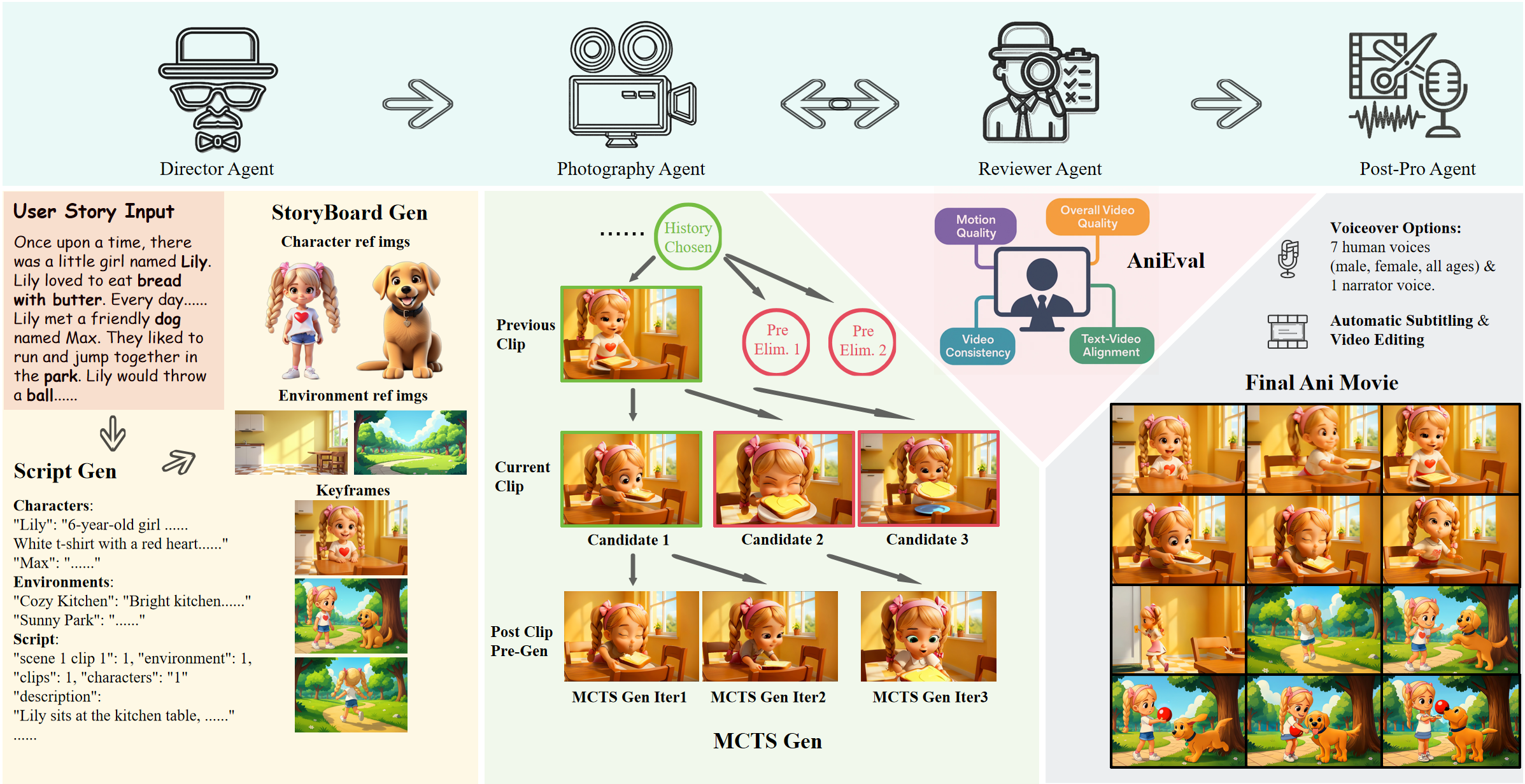 | **[SIGGRAPH Asia 2025] AniMaker: Multi-Agent Animated Storytelling with MCTS-Driven Clip Generation**
*Haoyuan Shi, Yunxin Li, Xinyu Chen, Longyue Wang, Baotian Hu, Min Zhang*
[[Paper](https://doi.org/10.1145/3757377.3764009)] [[GitHub](https://github.com/HITsz-TMG/Anim-Director/tree/main/AniMaker)] |
Built with 🦞 by the Lychee Agent team