# whistle
**Repository Path**: zboMa/whistle
## Basic Information
- **Project Name**: whistle
- **Description**: No description available
- **Primary Language**: Unknown
- **License**: MIT
- **Default Branch**: master
- **Homepage**: None
- **GVP Project**: No
## Statistics
- **Stars**: 0
- **Forks**: 1
- **Created**: 2022-03-07
- **Last Updated**: 2022-03-07
## Categories & Tags
**Categories**: Uncategorized
**Tags**: None
## README
English | [简体中文](./README-zh_CN.md)

> We recommend updating [whistle](https://wproxy.org/whistle/update.html) and [Node](https://nodejs.org/) to ensure that you receive important features, bugfixes and performance improvements.
> Some versions of Node have bugs that may cause whistle to not work properly, for detail see the issue: [#231](https://github.com/avwo/whistle/issues/231)
# whistle
[](https://npmjs.org/package/whistle)
[](http://nodejs.org/download/)
[](https://travis-ci.org/avwo/whistle)
[](https://codecov.io/gh/avwo/whistle)
[](https://npmjs.org/package/whistle)
[](https://www.npmjs.com/package/whistle)
[](https://www.npmjs.com/package/whistle)
[中文 README](README-zh_CN.md)
**whistle** is a cross-platform web debugging tool based on Node.js.
It features the following:
1. offer HTTP proxying
2. capture, replay or compose requests of HTTP, HTTPS, WebSocket and TCP.
3. manipulate http request and response by configing hosts, or [patterns](https://avwo.github.io/whistle/pattern.html) like domain, path, regular expression, wildcard characters, wildcard path, etc.
4. offer build-in mobile debugging mode
If the aboves can't satisfy your requirements, you can also use [plugins](https://avwo.github.io/whistle/plugins.html) to extend its capabilities.
The specific functions are as follows:
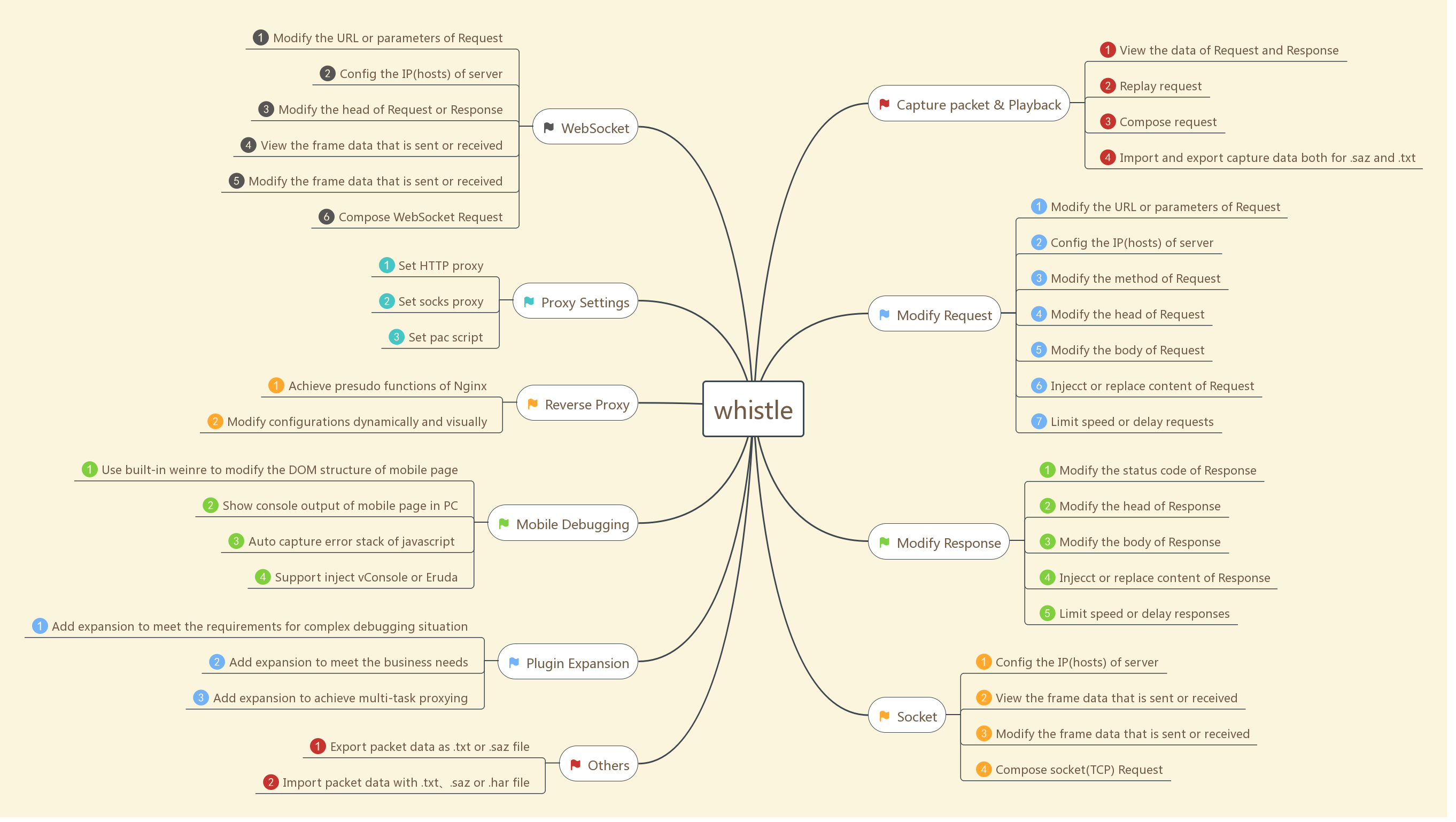
Manipulations to http request and response in whistle can be achieved as a **Rule** looks like:
pattern operatorURI
Description:
1. **pattern** is an expression to match the target request url. You can write patterns in different forms including domain, path, regular expression, wildcard, and so on.
# matching domain
www.example.com
# domain with port
www.example.com:6666
# domain with protocol, supporting http, https, ws, wss, tunnel
http://www.example.com
# matching path, supporting protocol, port
www.example.com/test
https:/www.exapmle.com/test
https:/www.exapmle.com:6666/test
# matching regular expression
/^https?://www\.example\.com\/test/(.*)/ referer://http://www.test.com/$1
# matching wildcard
^www.example.com/test/*** referer://http://www.test.com/$1
For more details, please visit [Pattern Matching](https://avwo.github.io/whistle/pattern.html)
2. **operatorURI** is the corresponding operation, made up of opProtocol and opValue:
**opProtocol** represents the kind of operation, e.g.
# host:setting requested server IP
pattern host://opValue
# file:using the local file to replace
pattern file://opValue
**opValue** represents the parameters of the specific operation, e.g.
# host:setting requested server IP
pattern host://127.0.0.1:6666 # or pattern 127.0.0.1:6666
# file:using the local file to replace
pattern file:///User/test/dirOrFile # or pattern /User/test/dirOrFile
pattern file://E:\test\dirOrFile # or pattern E:\test\dirOrFile
For more details, please visit [operation value](https://avwo.github.io/whistle/data.html)
3. The position of **pattern** and **operatorURI** can be swapped in most situations while the combination mode is also supported. For more details, please visit [configuration mode](https://avwo.github.io/whistle/mode.html)
# Install & Setup
#### install Node
The latest `LTS` version of Node.js is recommended.
If none or low version of Node.js is installed, you need install the latest version of Node.js according to the following instructions:
1. **For Windows**: please visit [https://nodejs.org/](https://nodejs.org/) to download the latest `LTS` version of Node.js and then, install it using the default options.
2. **For Mac**: the same as Windows.
3. **For Linux**: using source code to install is recommended, because in this way, you don't need to configure the `path`. If you fail to install with source code, you can also use the binary version of Node.js directly.
- **with source package**: visit [Official website of Node](https://nodejs.org/en/download/) to download the latest version of *Source Code**(or using `wget` in shell), unzip(`tar -xzvf node-xxx.tar.gz`), switch to the root directory(`cd node-xxx`), execute `./configure`, `./make` and `./make install` in order。
- **using binary version**:visit [Official website of Node](https://nodejs.org/en/download/) to download the latest **Linux Binaries**(or using command `wget` to download), unzip(`tar -xzvf node-xxx.tar.gz`), add the absolute path of bin directory to system `PATH` after extracting。
You can execute `node -v` in shell to check if the expected version of Node.js is installed successfully:
$ node -v
v8.9.4
#### install whistle
After the Node.js is installed successfully, you can execute the following npm command to install whistle(**In Mac or Linux, prefix `sudo` is needed if you are not root user, i.e. `sudo npm install -g whistle`**)
npm install -g whistle
In China, you can install whistle using npm mirror of taobao to speed up installing progress and avoid failure:
npm install cnpm -g --registry=https://registry.npm.taobao.org
cnpm install -g whistle
or specify mirror install directly:
npm install whistle -g --registry=https://registry.npm.taobao.org
After installation, execute `whistle help` or `w2 help` to view help information:
$ w2 help
Usage: whistle [options]
Commands:
run Start a front service
start Start a background service
stop Stop current background service
restart Restart current background service
help Display help information
Options:
-h, --help output usage information
-D, --baseDir [baseDir] the base dir of config data
-z, --certDir [directory] custom certificate path
-l, --localUIHost [hostname] local ui host (local.whistlejs.com by default)
-n, --username [username] the username of whistle
-w, --password [password] the password of whistle
-N, --guestName [username] the guest name
-W, --guestPassword [password] the guest password
-s, --sockets [number] max sockets (60 by default)
-S, --storage [newStorageDir] the new local storage directory
-C, --copy [storageDir] copy storageDir to newStorageDir
-c, --dnsCache [time] the cache time of DNS (30000ms by default)
-H, --host [host] whistle listening host(:: or 0.0.0.0 by default)
-p, --port [port] whistle listening port (8899 by default)
-P, --uiport [uiport] whistle ui port (8900 by default)
-m, --middlewares [script path or module name] express middlewares path (as: xx,yy/zz.js)
-M, --mode [mode] the whistle mode (as: pureProxy|debug|multiEnv)
-t, --timeout [ms] request timeout (66000 ms by default)
-e, --extra [extraData] extra data for plugin
-f, --secureFilter [secureFilter] the script path of secure filter
-R, --reqCacheSize [reqCacheSize] the cache size of request data (512 by default)
-F, --frameCacheSize [frameCacheSize] the cache size of socket frames (512 by default)
-V, --version output the version number
#### Setup whistle
Start:
w2 start
*Note: If you don't want others to visit the configuration page of whistle, just add username and password when start, i.e. `-n yourusername -w yourpassword`。*
Restart:
w2 restart
Stop:
w2 stop
Debugging mode:
w2 run
For more details, please visit [install and start](https://avwo.github.io/whistle/install.html)
# Proxing Settings
##### configuring server & port
1. proxying server:127.0.0.1(if whistle is deployed in remote server or virtual machine, change this address to corresponding IP address)
2. default port:8899(if port 8899 is used already, you can specify new port using `-p` when start. More details can be visited by executing `whistle help` or `w2 help` (only supported in `v0.7.0` and higher version)
> Make sure **using the same proxying server for all protocol** in system proxying setting is checked.
##### Browser & System configuration
1. proxy setting in OS:
* [Windows](http://jingyan.baidu.com/article/0aa22375866c8988cc0d648c.html)
* [Mac](http://jingyan.baidu.com/article/a378c960849144b3282830dc.html)
2. proxy setting in browser(**recommended**)
* for Chrome:intall chrome plugin [whistle-for-chrome](https://github.com/avwo/whistle-for-chrome) or [Proxy SwitchySharp](https://chrome.google.com/webstore/detail/proxy-switchysharp/dpplabbmogkhghncfbfdeeokoefdjegm)
* for Firefox: Open `Options` page in Firefox, then switch to `General` -> `Network Proxy`, then set `Manual proxy configuration` to whistle.

3. in mobiles, configure the proxy of current Wi-Fi in `Setting`
PS: The mobile may failed to use network after configuration because the firewall of the PC has forbidden remote visit to the whistle's port. you can try to close the firewall or configure white list :[ http://jingyan.baidu.com/article/870c6fc317cae7b03ee4be48.html]( http://jingyan.baidu.com/article/870c6fc317cae7b03ee4be48.html)
For more details, please vsit [install and start](https://avwo.github.io/whistle/install.html)
# Visit whistle's operation page
After the above steps are completed, open the whistle page in browser[http://local.whistlejs.com](http://local.whistlejs.com/):

There are five main tabs in the navigation bar:
1. Network
- check and compose the http request
- show the console print and javascript errors thrown in pages
2. Rules:configure rules for manipulating
3. Plugins
- show the list of installed plugins
- enable or disable installed plugins
4. Weinre:configure Weinre list
5. HTTPS:
- configure whether or not to intercept the HTTPS and download the root certificate for whistle
# Certificate Installment
Please install root certificate and enable HTTPS interception before using whislte.
For more details, please vsit [Certificate Installment](https://avwo.github.io/whistle/webui/https.html)
# Quick start
Open [Rules](http://local.whistlejs.com/) tab in whistle, and create a group named `test` by context menu or `Create` button in menu bar. Then follow the next steps to write rules and save.
1. cofigure hosts
Specify the ip of [www.ifeng.com](http://www.ifeng.com/):
www.ifeng.com 127.0.0.1
# or
127.0.0.1 www.ifeng.com
Specify the ip and port of [www.ifeng.com](http://www.ifeng.com/) to forward http request to local port 8080. In this way, we can visit the local website just as online when the developing port is not 80:
# www.ifeng.com 127.0.0.1
www.ifeng.com 127.0.0.1:8080
# or
127.0.0.1:8080 www.ifeng.com
We can also replace the real IP (or domain) and port with any domain without port:
www.ifeng.com host://www.qq.com:8080
# or
host://www.qq.com:8080 www.ifeng.com
For more details, please visit [Pattern Matching](https://avwo.github.io/whistle/pattern.html)
2. local files replacing
Replace the response with content in local file system, which is frequently used during web developing.
# Mac or Linux
www.ifeng.com file:///User/username/test
# or www.ifeng.com file:///User/username/test/index.html
# Both '\' and '/' can be used as path separator for Widows
www.ifeng.com file://E:\xx\test
# or www.ifeng.com file://E:\xx\test\index.html
[http://www.ifeng.com/](http://www.ifeng.com/) will try to load `/User/username/test` first. If the former dosen't exist, the file `/User/username/test/index.html` will be loaded. For neither exists, it returns 404.
To replace jsonp request, you can refer to [tpl](rules/rule/tpl.html)
For more details, please vsit [Pattern Matching](https://avwo.github.io/whistle/pattern.html)
3. Request Forward
To forward all the requests from domain `www.ifeng.com` to domain `www.aliexpress.com`
www.ifeng.com www.aliexpress.com
For more details, [Pattern Matching](https://avwo.github.io/whistle/pattern.html)
4. Inject html、js、css
whistle will decide whether injecting corresponding text and how to inject, like whether wrapping the text with HTML label, automatically according to response type.
# Mac、Linux
www.ifeng.com html:///User/xxx/test/test.html
www.ifeng.com js:///User/xxx/test/test.js
www.ifeng.com css:///User/xxx/test/test.css
# Both '\' and '/' can be used as path separator for Widows
www.ifeng.com html://E:\xx\test\test.html
www.ifeng.com js://E:\xx\test\test.js
www.ifeng.com css://E:\xx\test\test.css
For all the requests for domain `www.ifeng.com`, whistle will inject the processed text to response body according to response type. If the type is HTML, the js content will be wrapped within `script`, and the css content be wrapped within `style` to be injected to response body。
For more details, [Pattern Matching](https://avwo.github.io/whistle/pattern.html)
5. Debug for remote page
With the protocol [weinre](https://avwo.github.io/whistle/rules/weinre.html) and protocol [log](https://avwo.github.io/whistle/rules/log.html) provided by whistle, you can modify the DOM structure, capture the javascript errors and view the console print easily. Moreover, you can inject specified script to debug the remote page.
Before using whistle to debug remote page, you need to set the proxy for OS or browser to whistle. Please refers [Install and start](https://avwo.github.io/whistle/install.html) to know how to set the proxy.
For weinre:
www.ifeng.com weinre://test
Add the following rule in group named `test` and save, open the [www.ifeng.com](http://www.ifeng.com/) with a new tab in browser. Then you can see a list when you hover over the button `weinre`, click the item `test` to open a weinre debug page. For example, you can see the DOM structure when swich to `Elements` tab after selected a target.
For log:
www.ifeng.com log://{test.js}
Add the following rule in group named `test` and save. Then you can see a list when you hover over the button `Values`, whistle will create a group named `test.js` in Values when you click it. Input the text `console.log(1, 2, 3, {a: 123})` in the group editor, open the Network -> Log -> Console, open the [www.ifeng.com](http://www.ifeng.com/), you can see the output '1, 2, 3, {a: 123}' in Console panel.
For more details, [Pattern Matching](https://avwo.github.io/whistle/pattern.html) and [Rules](https://avwo.github.io/whistle/rules/)
# Documentation
1. [Install and start](https://avwo.github.io/whistle/install.html)
2. [CLI operation](https://avwo.github.io/whistle/cli.html)
2. [How to update](https://avwo.github.io/whistle/update.html)
3. [Quickly start](https://avwo.github.io/whistle/quickstart.html)
4. [Configuration mode](https://avwo.github.io/whistle/mode.html)
5. [Pattern Matching](https://avwo.github.io/whistle/pattern.html)
6. [Operation value](https://avwo.github.io/whistle/data.html)
7. [Frequent functions](https://avwo.github.io/whistle/frequet.html)
8. [How to develop plugins](https://avwo.github.io/whistle/plugins.html)
9. [Attentions](https://avwo.github.io/whistle/attention.html)
11. [Common questions](https://avwo.github.io/whistle/questions.html)
12. [Web UI](https://avwo.github.io/whistle/webui/)
13. [Rules](https://avwo.github.io/whistle/rules/)
14. [Feedback](https://avwo.github.io/whistle/feedback.html)
# License
[MIT](https://github.com/avwo/whistle/blob/master/LICENSE)