# mlx-server-OAI-compat
**Repository Path**: zhch158_admin/mlx-server-OAI-compat
## Basic Information
- **Project Name**: mlx-server-OAI-compat
- **Description**: mlx server
- **Primary Language**: Python
- **License**: Not specified
- **Default Branch**: main
- **Homepage**: None
- **GVP Project**: No
## Statistics
- **Stars**: 0
- **Forks**: 0
- **Created**: 2025-04-24
- **Last Updated**: 2025-04-24
## Categories & Tags
**Categories**: Uncategorized
**Tags**: None
## README
# mlx-server-OAI-compat
## Description
This repository hosts a high-performance API server that provides OpenAI-compatible endpoints for MLX models. Developed using Python and powered by the FastAPI framework, it provides an efficient, scalable, and user-friendly solution for running MLX-based vision and language models locally with an OpenAI-compatible interface.
> **Note:** This project currently supports **MacOS with M-series chips** only as it specifically leverages MLX, Apple's framework optimized for Apple Silicon.
## Demo
### 🚀 See It In Action
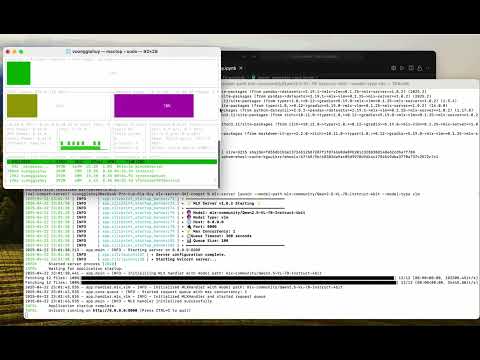
Check out our [video demonstration](https://youtu.be/BMXOWK1Okk4) to see the server in action! The demo showcases:
- Setting up and launching the server
- Using the OpenAI Python SDK for seamless integration
## OpenAI Compatibility
This server implements the OpenAI API interface, allowing you to use it as a drop-in replacement for OpenAI's services in your applications. It supports:
- Chat completions (both streaming and non-streaming)
- Vision-language model interactions
- Text embeddings generation (with text-only models)
- Standard OpenAI request/response formats
- Common OpenAI parameters (temperature, top_p, etc.)
## Supported Model Types
The server supports two types of MLX models:
1. **Text-only models** (`--model-type lm`) - Uses the `mlx-lm` library for pure language models
2. **Vision-language models** (`--model-type vlm`) - Uses the `mlx-vlm` library for multimodal models that can process both text and images
## Installation
Follow these steps to set up the MLX-powered server:
### Prerequisites
- MacOS with Apple Silicon (M-series) chip
- Python 3.11 or later (native ARM version)
- pip package manager
### Setup Steps
1. Create a virtual environment for the project:
```bash
python3 -m venv oai-compat-server
```
2. Activate the virtual environment:
```bash
source oai-compat-server/bin/activate
```
3. Install the package:
```bash
# Option 1: Install directly from GitHub
pip install git+https://github.com/cubist38/mlx-server-OAI-compat.git
# Option 2: Clone and install in development mode
git clone https://github.com/cubist38/mlx-server-OAI-compat.git
cd mlx-server-OAI-compat
pip install -e .
```
### Troubleshooting
**Issue:** My OS and Python versions meet the requirements, but `pip` cannot find a matching distribution.
**Cause:** You might be using a non-native Python version. Run the following command to check:
```bash
python -c "import platform; print(platform.processor())"
```
If the output is `i386` (on an M-series machine), you are using a non-native Python. Switch to a native Python version. A good approach is to use [Conda](https://stackoverflow.com/questions/65415996/how-to-specify-the-architecture-or-platform-for-a-new-conda-environment-apple).
## Usage
### Starting the Server
To start the MLX server, activate the virtual environment and run the main application file:
```bash
source oai-compat-server/bin/activate
python -m app.main \
--model-path \
--model-type \
--max-concurrency 1 \
--queue-timeout 300 \
--queue-size 100
```
#### Server Parameters
- `--model-path`: Path to the MLX model directory (local path or Hugging Face model repository)
- `--model-type`: Type of model to run (`lm` for text-only models, `vlm` for vision-language models). Default: `lm`
- `--max-concurrency`: Maximum number of concurrent requests (default: 1)
- `--queue-timeout`: Request timeout in seconds (default: 300)
- `--queue-size`: Maximum queue size for pending requests (default: 100)
- `--port`: Port to run the server on (default: 8000)
- `--host`: Host to run the server on (default: 0.0.0.0)
#### Example Configurations
Text-only model:
```bash
python -m app.main \
--model-path mlx-community/gemma-3-4b-it-4bit \
--model-type lm \
--max-concurrency 1 \
--queue-timeout 300 \
--queue-size 100
```
> **Note:** Text embeddings via the `/v1/embeddings` endpoint are only available with text-only models (`--model-type lm`).
Vision-language model:
```bash
python -m app.main \
--model-path mlx-community/llava-phi-3-vision-4bit \
--model-type vlm \
--max-concurrency 1 \
--queue-timeout 300 \
--queue-size 100
```
### Using the API
The server provides OpenAI-compatible endpoints that you can use with standard OpenAI client libraries. Here are some examples:
#### Text Completion
```python
import openai
client = openai.OpenAI(
base_url="http://localhost:8000/v1",
api_key="not-needed" # API key is not required for local server
)
response = client.chat.completions.create(
model="local-model", # Model name doesn't matter for local server
messages=[
{"role": "user", "content": "What is the capital of France?"}
],
temperature=0.7
)
print(response.choices[0].message.content)
```
#### Vision-Language Model
```python
import openai
import base64
client = openai.OpenAI(
base_url="http://localhost:8000/v1",
api_key="not-needed"
)
# Load and encode image
with open("image.jpg", "rb") as image_file:
base64_image = base64.b64encode(image_file.read()).decode('utf-8')
response = client.chat.completions.create(
model="local-vlm", # Model name doesn't matter for local server
messages=[
{
"role": "user",
"content": [
{"type": "text", "text": "What's in this image?"},
{
"type": "image_url",
"image_url": {
"url": f"data:image/jpeg;base64,{base64_image}"
}
}
]
}
]
)
print(response.choices[0].message.content)
```
#### Embeddings
```python
import openai
client = openai.OpenAI(
base_url="http://localhost:8000/v1",
api_key="not-needed"
)
# Generate embeddings for a single text
embedding_response = client.embeddings.create(
model="local-model", # Model name doesn't matter for local server
input=["The quick brown fox jumps over the lazy dog"]
)
print(f"Embedding dimension: {len(embedding_response.data[0].embedding)}")
# Generate embeddings for multiple texts
batch_response = client.embeddings.create(
model="local-model",
input=[
"Machine learning algorithms improve with more data",
"Natural language processing helps computers understand human language",
"Computer vision allows machines to interpret visual information"
]
)
print(f"Number of embeddings: {len(batch_response.data)}")
```
### CLI Usage
You can also use the provided CLI command to launch the server:
```bash
mlx-server launch --model-path --model-type --port 8000
```
All parameters available in the Python version are also available in the CLI:
```bash
mlx-server launch \
--model-path mlx-community/gemma-3-4b-it-4bit \
--model-type vlm \
--port 8000 \
--max-concurrency 1 \
--queue-timeout 300 \
--queue-size 100
```
#### CLI Commands
```bash
# Get help
mlx-server --help
mlx-server launch --help
# Check version
mlx-server --version
```
## Request Queue System
The server implements a robust request queue system to manage and optimize MLX model inference requests. This system ensures efficient resource utilization and fair request processing.
### Key Features
- **Concurrency Control**: Limits the number of simultaneous model inferences to prevent resource exhaustion
- **Request Queuing**: Implements a fair, first-come-first-served queue for pending requests
- **Timeout Management**: Automatically handles requests that exceed the configured timeout
- **Real-time Monitoring**: Provides endpoints to monitor queue status and performance metrics
### Architecture
The queue system consists of two main components:
1. **RequestQueue**: An asynchronous queue implementation that:
- Manages pending requests with configurable queue size
- Controls concurrent execution using semaphores
- Handles timeouts and errors gracefully
- Provides real-time queue statistics
2. **Model Handlers**: Specialized handlers for different model types:
- `MLXLMHandler`: Manages text-only model requests
- `MLXVLMHandler`: Manages vision-language model requests
### Queue Monitoring
Monitor queue statistics using the `/v1/queue/stats` endpoint:
```bash
curl http://localhost:8000/v1/queue/stats
```
Example response:
```json
{
"status": "ok",
"queue_stats": {
"running": true,
"queue_size": 3,
"max_queue_size": 100,
"active_requests": 5,
"max_concurrency": 2
}
}
```
### Error Handling
The queue system handles various error conditions:
1. **Queue Full (429)**: When the queue reaches its maximum size
```json
{
"detail": "Too many requests. Service is at capacity."
}
```
2. **Request Timeout**: When a request exceeds the configured timeout
```json
{
"detail": "Request processing timed out after 300 seconds"
}
```
3. **Model Errors**: When the model encounters an error during inference
```json
{
"detail": "Failed to generate response: "
}
```
## Performance Monitoring
The server includes comprehensive performance monitoring to help track and optimize model performance.
### Key Metrics
- **Tokens Per Second (TPS)**: Real-time tracking of token generation speed
- **Time To First Token (TTFT)**: Measures latency from request to first token generation
- **Throughput**: Tracks overall request processing capacity (requests per second)
- **Total Requests**: Cumulative count of all processed requests
- **Error Count**: Tracks the number of failed requests
### Metrics System Architecture
The performance metrics system uses a `RequestMetrics` class that:
1. **Rolling Averages**: Maintains running averages for key performance indicators
2. **Request-type Tracking**: Logs metrics by request type (chat completions, embeddings, etc.)
3. **Automatic Logging**: Records key metrics for each request completion
4. **Token Estimation**: Provides approximate token count estimation for text inputs
### Performance Metrics
Access detailed performance metrics through the `/v1/queue/stats` endpoint:
```bash
curl http://localhost:8000/v1/queue/stats
```
Example response with performance data:
```json
{
"status": "ok",
"queue_stats": {
"running": true,
"queue_size": 3,
"max_queue_size": 100,
"active_requests": 5,
"max_concurrency": 2
},
"metrics": {
"total_requests": 100,
"performance": {
"tps": 99.0,
"ttft": 150.0,
"throughput": 2.5
},
"error_count": 2
}
}
```
### Performance Optimization
Based on metrics collected, you can optimize server performance:
1. **Concurrency Tuning**: Adjust `--max-concurrency` based on throughput metrics
2. **Queue Size Management**: Configure `--queue-size` to handle expected request volumes
3. **Model Selection**: Compare TPS across different quantization levels (4-bit vs 8-bit)
4. **Resource Allocation**: Monitor TTFT to ensure acceptable response latency
## API Usage
### Text-Only Model Example
```bash
curl localhost:8000/v1/chat/completions \
-H "Content-Type: application/json" \
-d '{
"model": "gemma-3-4b-it-4bit",
"messages": [
{
"role": "system",
"content": "You are a helpful assistant."
},
{
"role": "user",
"content": "What is the capital of France?"
}
],
"stream": false,
"max_tokens": 256,
"temperature": 0.7
}'
```
### Vision Model Example
You can make vision requests to analyze images using the `/v1/chat/completions` endpoint when running with a VLM model:
```bash
curl localhost:8000/v1/chat/completions \
-H "Content-Type: application/json" \
-d '{
"model": "llava-phi-3-vision-4bit",
"messages": [
{
"role": "user",
"content": [
{
"type": "text",
"text": "What is in this image?"
},
{
"type": "image_url",
"image_url": {
"url": "https://upload.wikimedia.org/wikipedia/commons/thumb/d/dd/Gfp-wisconsin-madison-the-nature-boardwalk.jpg/2560px-Gfp-wisconsin-madison-the-nature-boardwalk.jpg"
}
}
]
}
],
"stream": false,
"max_tokens": 256
}'
```
### Embeddings Example
```bash
curl localhost:8000/v1/embeddings \
-H "Content-Type: application/json" \
-d '{
"model": "mlx-community/DeepSeek-R1-Distill-Qwen-1.5B-MLX-Q8",
"input": ["The quick brown fox jumps over the lazy dog"]
}'
```
Response format:
```json
{
"object": "list",
"data": [
{
"object": "embedding",
"embedding": [0.0123, ..., 0.9876],
"index": 0
}
],
"model": "mlx-community/DeepSeek-R1-Distill-Qwen-1.5B-MLX-Q8"
}
```
You can also generate embeddings for multiple texts in a single request:
```bash
curl localhost:8000/v1/embeddings \
-H "Content-Type: application/json" \
-d '{
"model": "mlx-community/DeepSeek-R1-Distill-Qwen-1.5B-MLX-Q8",
"input": [
"The quick brown fox jumps over the lazy dog",
"Machine learning models require training data",
"Neural networks are inspired by biological neurons"
]
}'
```
> **Note:** The server currently supports text embeddings only with `--model-type lm` (text-only models). Embeddings are not yet supported with vision-language models. See the included `examples/embeddings_examples.ipynb` notebook for detailed examples of using embeddings for semantic search, similarity comparison, and other applications.
> **Warning:** Make sure you're running the server with `--model-type vlm` when making vision requests. If you send a vision request to a server running with `--model-type lm` (text-only model), you'll receive a 400 error with a message that vision requests are not supported with text-only models.
### Request Format
- `model`: Optional model identifier (the server will use the loaded model regardless)
- `messages`: Array of message objects containing:
- `role`: The role of the message sender ("user", "assistant", or "system")
- `content`:
- For text models: A string containing the message
- For vision models: An array of content objects:
- `type`: Either "text" or "image_url"
- `text`: The text prompt (for type "text")
- `image_url`: Object containing the image URL (for type "image_url")
- `stream`: Optional boolean to enable streaming responses
- Additional parameters: `temperature`, `max_tokens`, `top_p`, etc.
For embeddings:
- `model`: Optional model identifier
- `input`: String or array of strings to generate embeddings for
### Response Format
The server will return responses in OpenAI-compatible format:
```json
{
"id": "chatcmpl-1234567890",
"object": "chat.completion",
"created": 1234567890,
"choices": [
{
"index": 0,
"message": {
"role": "assistant",
"content": "The capital of France is Paris."
},
"finish_reason": "stop"
}
]
}
```
### Streaming Responses
For streaming responses, add `"stream": true` to your request. The response will be in Server-Sent Events (SSE) format:
```bash
curl localhost:8000/v1/chat/completions \
-H "Content-Type: application/json" \
-d '{
"stream": true,
"messages": [
{
"role": "user",
"content": "Tell me about Paris"
}
]
}'
```
### Multi-turn Conversations
The API supports multi-turn conversations for both text-only and vision models:
#### Text-Only Model Example:
```json
{
"messages": [
{
"role": "system",
"content": "You are a helpful assistant."
},
{
"role": "user",
"content": "What is the capital of France?"
},
{
"role": "assistant",
"content": "The capital of France is Paris."
},
{
"role": "user",
"content": "Tell me some interesting facts about it."
}
]
}
```
#### Vision Model Example:
```json
{
"messages": [
{
"role": "system",
"content": "You are a helpful assistant that describes images."
},
{
"role": "user",
"content": [
{
"type": "text",
"text": "What is in this image?"
},
{
"type": "image_url",
"image_url": {
"url": "https://example.com/image.jpg"
}
}
]
},
{
"role": "assistant",
"content": "The image shows a wooden boardwalk..."
},
{
"role": "user",
"content": "Are there any people in the image?"
}
]
}
```
## API Response Schemas
The server implements comprehensive Pydantic schemas for request and response handling, ensuring type safety and validation:
### Request Schemas
- `ChatCompletionRequest`: Handles chat completion requests with support for:
- Text and vision messages
- Streaming options
- Model parameters (temperature, top_p, etc.)
- Tool calls and function calling
- `EmbeddingRequest`: Manages embedding generation requests
### Response Schemas
- `ChatCompletionResponse`: Standard chat completion responses
- `ChatCompletionChunk`: Streaming response chunks
- `EmbeddingResponse`: Embedding generation responses
- `ErrorResponse`: Standardized error responses
Example response structure:
```python
{
"id": "chatcmpl-1234567890",
"object": "chat.completion",
"created": 1234567890,
"model": "local-model",
"choices": [{
"index": 0,
"message": {
"role": "assistant",
"content": "The response content"
},
"finish_reason": "stop"
}]
}
```
### Streaming Responses
The server supports streaming responses with proper chunk formatting:
```python
{
"id": "chatcmpl-1234567890",
"object": "chat.completion.chunk",
"created": 1234567890,
"model": "local-model",
"choices": [{
"index": 0,
"delta": {"content": "chunk of text"},
"finish_reason": null
}]
}
```
## Example Notebooks
The repository includes example notebooks to help you get started with different aspects of the API:
- **vision_examples.ipynb**: A comprehensive guide to using the vision capabilities of the API, including:
- Processing image inputs in various formats
- Vision analysis and object detection
- Multi-turn conversations with images
- Using vision models for detailed image description and analysis
- **embeddings_examples.ipynb**: A comprehensive guide to using the embeddings API, including:
- Generating embeddings for single and batch inputs
- Computing semantic similarity between texts
- Building a simple vector-based search system
- Comparing semantic relationships between concepts
## Contributing
We welcome contributions to improve this project! Here's how you can contribute:
1. Fork the repository to your GitHub account.
2. Create a new branch for your feature or bug fix:
```bash
git checkout -b feature-name
```
3. Commit your changes with clear and concise messages:
```bash
git commit -m "Add feature-name"
```
4. Push your branch to your forked repository:
```bash
git push origin feature-name
```
5. Open a pull request to the main repository for review.
## License
This project is licensed under the [MIT License](LICENSE). You are free to use, modify, and distribute it under the terms of the license.
## Support
If you encounter any issues or have questions, please:
- Open an issue in the repository.
- Contact the maintainers via the provided contact information.
Stay tuned for updates and enhancements!
## Acknowledgments
We extend our heartfelt gratitude to the following individuals and organizations whose contributions have been instrumental in making this project possible:
### Core Technologies
- [MLX team](https://github.com/ml-explore/mlx) for developing the groundbreaking MLX framework, which provides the foundation for efficient machine learning on Apple Silicon
- [mlx-lm](https://github.com/ml-explore/mlx-lm) for efficient large language models support
- [mlx-vlm](https://github.com/Blaizzy/mlx-vlm/tree/main) for pioneering multimodal model support within the MLX ecosystem
- [mlx-community](https://huggingface.co/mlx-community) for curating and maintaining a diverse collection of high-quality MLX models
### Open Source Community
We deeply appreciate the broader open-source community for their invaluable contributions. Your dedication to:
- Innovation in machine learning and AI
- Collaborative development practices
- Knowledge sharing and documentation
- Continuous improvement of tools and frameworks
Your collective efforts continue to drive progress and make projects like this possible. We are proud to be part of this vibrant ecosystem.
### Special Thanks
A special acknowledgment to all contributors, users, and supporters who have helped shape this project through their feedback, bug reports, and suggestions. Your engagement helps make this project better for everyone.