# testkm
**Repository Path**: zhenshiruwo/testkm
## Basic Information
- **Project Name**: testkm
- **Description**: No description available
- **Primary Language**: C#
- **License**: MIT
- **Default Branch**: master
- **Homepage**: None
- **GVP Project**: No
## Statistics
- **Stars**: 0
- **Forks**: 0
- **Created**: 2016-12-06
- **Last Updated**: 2020-12-20
## Categories & Tags
**Categories**: Uncategorized
**Tags**: None
## README
# X.PagedList
[](https://app.wercker.com/project/bykey/d179668548bcb9e93cdb1a3563cc9e1a)
## What is this?
This is fork of Troy's project PagedList(https://github.com/troygoode/PagedList).
The main different is that X.PagedList is portable assembly. It means, that you can use it not only in Web projects, but in Winforms, Window Phone, Silverlight and etc. projects.
PagedList is a library that enables you to easily take an IEnumerable/IQueryable, chop it up into "pages", and grab a specific "page" by an index. PagedList.Mvc allows you to take that "page" and display a pager control that has links like "Previous", "Next", etc.
## How do I use it?
1. Install ["X.PagedList.Mvc"](http://nuget.org/List/Packages/X.PagedList.Mvc) via [NuGet](http://nuget.org) - that will automatically install ["X.PagedList"](https://nuget.org/packages/X.PagedList/) as well.
2. In your controller code, call **ToPagedList** off of your IEnumerable/IQueryable passing in the page size and which page you want to view.
3. Pass the result of **ToPagedList** to your view where you can enumerate over it - its still an IEnumerable, but only contains a subset of the original data.
4. Call **Html.PagedListPager**, passing in the instance of the PagedList and a function that will generate URLs for each page to see a paging control.
## Example
**/Controllers/ProductController.cs**
```csharp
public class ProductController : Controller
{
public object Index(int? page)
{
var products = MyProductDataSource.FindAllProducts(); //returns IQueryable representing an unknown number of products. a thousand maybe?
var pageNumber = page ?? 1; // if no page was specified in the querystring, default to the first page (1)
var onePageOfProducts = products.ToPagedList(pageNumber, 25); // will only contain 25 products max because of the pageSize
ViewBag.OnePageOfProducts = onePageOfProducts;
return View();
}
}
```
**/Views/Products/Index.cshtml**
```html
@{
ViewBag.Title = "Product Listing"
}
@using X.PagedList.Mvc; //import this so we get our HTML Helper
@using X.PagedList; //import this so we can cast our list to IPagedList (only necessary because ViewBag is dynamic)
List of Products
@foreach(var product in ViewBag.OnePageOfProducts){
@product.Name
}
@Html.PagedListPager( (IPagedList)ViewBag.OnePageOfProducts, page => Url.Action("Index", new { page }) )
```
## Example 2: Manual Paging
**/Controllers/ProductController.cs**
In some cases you do not have access something capable of creating an IQueryable, such as when using .Net's built-in [MembershipProvider's GetAllUsers](http://msdn.microsoft.com/en-us/library/system.web.security.membershipprovider.getallusers.aspx) method. This method offers paging, but not via IQueryable. Luckily PagedList still has your back (note the use of **StaticPagedList**):
```csharp
public class UserController : Controller
{
public object Index(int? page)
{
var pageIndex = (page ?? 1) - 1; //MembershipProvider expects a 0 for the first page
var pageSize = 10;
int totalUserCount; // will be set by call to GetAllUsers due to _out_ paramter :-|
var users = Membership.GetAllUsers(pageIndex, pageSize, out totalUserCount);
var usersAsIPagedList = new StaticPagedList(users, pageIndex + 1, pageSize, totalUserCount);
ViewBag.OnePageOfUsers = usersAsIPagedList;
return View();
}
}
```
## Customizing Each Page's URL
To add "foo=bar" to the querystring of each link, you can pass the values into the `RouteDictionary` parameter of [`Url.Action`](http://msdn.microsoft.com/en-us/library/system.web.mvc.urlhelper.action.aspx):
```csharp
@Html.PagedListPager( myList, page => Url.Action("Index", new { page = page, foo = "bar" }) )
```
Please note that `Url.Action` is a method provided by the Asp.Net MVC framework - not the PagedList library.
## Split and Partition Extension Methods
You can split an enumerable up into n equal-sized objects using the .Split extension method:
```csharp
var deckOfCards = new DeckOfCards(); //there are 52 cards in the deck
var splitDeck = deckOfCards.Split(2).ToArray();
Assert.Equal(26, splitDeck[0].Count());
Assert.Equal(26, splitDeck[1].Count());
```
You can split an enumerable up into n pages, each with a maximum of m items using the .Partition extension method:
```csharp
var deckOfCards = new DeckOfCards(); //52 cards
var hands = deckOfCards.Partition(5).ToArray();
Assert.Equal(11, hands.Count());
Assert.Equal(5, hands.First().Count());
Assert.Equal(2, hands.Last().Count()); //10 hands have 5 cards, last hand only has 2 cards
```
## Pager Configurations
### Styling the Pager Yourself
The HTML output by Html.PagedListPager is configured to be styled automatically by the [Twitter Bootstrap](http://getbootstrap.com/) stylesheet, if present. Here is what it looks like without using Twitter Bootstrap:
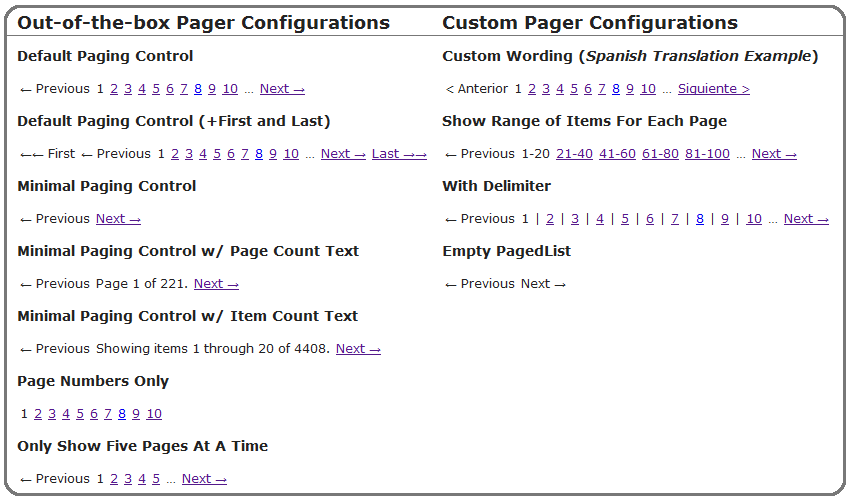
If your project does not reference the [Twitter Bootstrap](http://getbootstrap.com/) project, the NuGet package contains a stand-alone `PagedList.css`. You can reference this style sheet manually or, if using MVC4, reference within `BundleConfig.cs` and take advantage of bundling and minification automatically.
Simply append `"~/Content/PagedList.css"` to where Site.css is already bundled, yielding:
```csharp
bundles.Add(new StyleBundle("~/Content/css").Include("~/Content/site.css", "~/Content/PagedList.css"));
```
### Out-of-the-box Pager Configurations
```html
Default Paging Control
@Html.PagedListPager((IPagedList)ViewBag.OnePageOfProducts, page => Url.Action("Index", new { page = page }))
@Html.PagedListPager((IPagedList)ViewBag.OnePageOfProducts, page => Url.Action("Index", new { page = page }), PagedListRenderOptions.OnlyShowFivePagesAtATime)
```
### Custom Pager Configurations
You can instantiate [**PagedListRenderOptions**](https://github.com/kpi-ua/X.PagedList/blob/master/X.PagedList.Mvc/PagedListRenderOptions.cs) yourself to create custom configurations. All elements/links have discrete CSS classes applied to make styling easier as well.
```html
@Html.PagedListPager((IPagedList)ViewBag.OnePageOfProducts, page => Url.Action("Index", new { page = page }), new PagedListRenderOptions { DelimiterBetweenPageNumbers = "|" })
```
## License
Licensed under the [MIT License](http://www.opensource.org/licenses/mit-license.php).
## About .NET Core support
Unfortunately I cannot support ASP.NET Core (formerly ASP.NET MVC 6) version at this moment. So I deleted all code that related to .NET Core from master branch and cleaned up project. ASP.NET Core compatible version saved in net-core branch. I think I will back to this code when .NET Core will be released. Sorry for inconvenience.