# oinone-kunlun
**Repository Path**: zilla/oinone-kunlun
## Basic Information
- **Project Name**: oinone-kunlun
- **Description**: Oinone 是企业级产品化引擎,以低代码和无代码驱动的标准化研发与敏捷交付一体化的研发框架。解决研发效率与成本问题,解决产品标准化与规模化交付问题。借鉴Odoo的工程化理念,并在无代码能力上显著增强,即面向专业研发,又能面向公民研发。 [低代码、无代码一体化] [面向软件公司] [被集成原则] [国产化适配][信创工程]
- **Primary Language**: TypeScript
- **License**: AGPL-3.0
- **Default Branch**: feat/6.2.0
- **Homepage**: https://oinone.top
- **GVP Project**: No
## Statistics
- **Stars**: 0
- **Forks**: 40
- **Created**: 2025-06-30
- **Last Updated**: 2025-06-30
## Categories & Tags
**Categories**: Uncategorized
**Tags**: None
## README
### 1. Repository
Welcome to the Oinone Kunlun Repository, Oinone Kunlun is the front-end repository! Join and help us improve the Enterprise-grade Productization Engine.
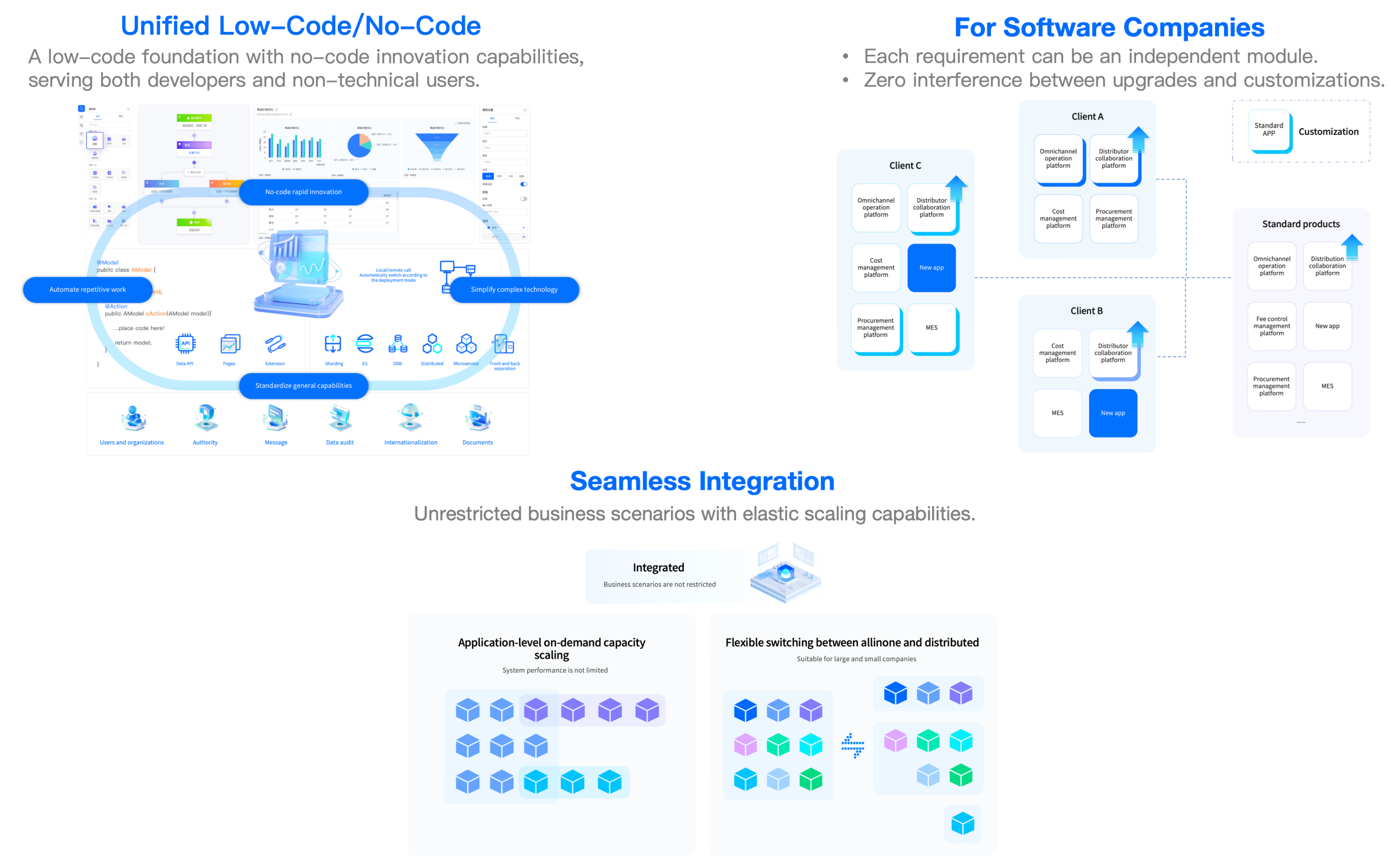
Oinone is an enterprise-class productization engine that combines standardized R&D and agile delivery. Drawing from Odoo's engineering philosophy while significantly enhancing no-code capabilities, for both professional developers and citizen developers.
The "O" symbolizes open source while phonetically resonating with "All in one," symbolizing: One-stop solutions, agile responsiveness, continuous innovation.
### 2. Learn More
- To learn more about Oinone,please visit【[🍀 Website](https://www.oinone.top) | [🍀 Gitee-中文](https://gitee.com/oinone) | [🍀 Github-EN](https://github.com/Oinone)】.
- 【[⚡ 后端框架-中文](https://gitee.com/oinone/oinone-pamirs) | [⚡ 前端框架-中文](https://gitee.com/oinone/oinone-kunlun) | [⚡ Back-end Framework](https://github.com/oinone/oinone-pamirs) | [⚡ Front-end Framework](https://github.com/oinone/oinone-kunlun)】
### 3. Demo
| Demo | Related Videos |
|----------------------------------------------------------------------------------------|-----------------------------------------------------------------------------------------------------------------------------------------------------------------------------------------------------------------------------------------------------------------------------------------------------------------------------------------------------------------------------------------------------------------------------------------------------------------------------------------------------------------------------------------------------------------------------------------------------------------------------------------------------------------------------------------------------------------------------------------------------------------------------------------------------------|
| [⚡ Direct to the Demo](https://demo.oinone.top)
☕ Account:admin
☕ Password:admin | [🎬 1. [Oinone] #Productization Demonstration# Work with Back-end And No-code](https://www.bilibili.com/video/BV1eDMizYEts/?vd_source=ee004011d0afa992f50d15c8738450b3)
[🎬 2. [Oinone] #Productization Demonstration# Work with Front-end Framework](https://www.bilibili.com/video/BV1DoMizbECt/?vd_source=ee004011d0afa992f50d15c8738450b3)
[🎬 3. [Oinone] #Customization# Work with Back-end Framework](https://www.bilibili.com/video/BV1RDMizYELg/?vd_source=ee004011d0afa992f50d15c8738450b3)
[🎬 4. [Oinone] #Customization# Front-end Interaction](https://www.bilibili.com/video/BV1eDMizYED1/?vd_source=ee004011d0afa992f50d15c8738450b3)
[🎬 5. [Oinone] #Customization# No-code mode](https://www.bilibili.com/video/BV1eDMizYEdF/?vd_source=ee004011d0afa992f50d15c8738450b3) |
### 4. Exclusive Benefits 🎁
| QR Code | Steps |
|-----|--------------------------------------------------------------------------------------------------------------------------------------------------------------------------------------------------------------------------------------------------------------------------------------------------------------|
|
| 1. ⭐ Star this project
2. Scan the QR code on the left to add the assistant
3. Send a screenshot (proof of starring) to the assistant
4. The assistant will invite the Star user to the exclusive communication group
5. Limited-time application for the enterprise edition trial authorization |
### 5. Quickstart
- [Installation or Upgrade](https://guide.oinone.top/en/InstallOrUpgrade/)
- [Development Environments](https://guide.oinone.top/en/InstallOrUpgrade/Dev-ENV/)
- [Community Edition - Source Code Installation](https://guide.oinone.top/en/InstallOrUpgrade/CommunityEdition/source-code-installation.html)
- [Enterprise Edition - Docker-full Installation](https://guide.oinone.top/en/InstallOrUpgrade/EnterpriseEdition/docker-full-installation.html)
- [Enterprise Edition - Docker-mini Installation](https://guide.oinone.top/en/InstallOrUpgrade/EnterpriseEdition/docker-mini-installation.html)
- [Enterprise Edition - Package Installation](https://guide.oinone.top/en/InstallOrUpgrade/EnterpriseEdition/docker-full-installation.html)
- [Tutorials](https://guide.oinone.top/en/DevManual/Tutorials/)
- [Discover the Front-end Framework](https://guide.oinone.top/en/DevManual/Tutorials/DiscoverTheFront-endFramework/)
- [Chapter 1 - Widget](https://guide.oinone.top/en/DevManual/Tutorials/DiscoverTheFront-endFramework/chapter1-widget.html)
- [Chapter 2 - Build a dashboard](https://guide.oinone.top/en/DevManual/Tutorials/DiscoverTheFront-endFramework/chapter2-build-a-dashboard.html)
- [Master the Front-end Framework](https://guide.oinone.top/en/DevManual/Tutorials/MasterTheFront-endFramework/)
- [Chapter 1 - Front-End Overview](https://guide.oinone.top/en/DevManual/Tutorials/MasterTheFront-endFramework/chapter1-front-end-overview.html)
- [Chapter 2 - Create a gantt view](https://guide.oinone.top/en/DevManual/Tutorials/MasterTheFront-endFramework/chapter2-create-a-gantt-view.html)
- [Chapter 3 - Customize a gallery view](https://guide.oinone.top/en/DevManual/Tutorials/MasterTheFront-endFramework/chapter3-customize-a-gallery-view.html)
- [Debug Tools](https://guide.oinone.top/en/DevManual/Tutorials/debug-tools.html)
### 6. Project Overview
| Packge | Content |
|----------------------|----------------------------------|
| 📦 kunlun-framework | 🌟 Framework - Core Package |
| 📦 kunlun-engine | 🌟 Framework - Extension Package |
| 📦 kunlun-expression | 🌟 Expression Package |
| 📦 kunlun-vue | 🌟 Widgets Package - PC |
| 📦 kunlun-mobile-vue | 🌟 Widgets Package - Mobile |
### 7. Documentation
- [📗 Installation Or Upgrade](https://guide.oinone.top/en/InstallOrUpgrade)
- [📗 User Manual](https://guide.oinone.top/en/UserManual)
- [📗 DEV Manual](https://guide.oinone.top/en/DevManual)
- [📗 White Paper](https://www.oinone.top/whitePaper)
- [📗 R&D Paradigm](https://guide.oinone.top/en/DevManual/R_DParadigm)
- [📗 Common Solutions](https://guide.oinone.top/en/DevManual/CommonSolutions)
- [📗 FAQ](https://guide.oinone.top/en/DevManual/FAQ)
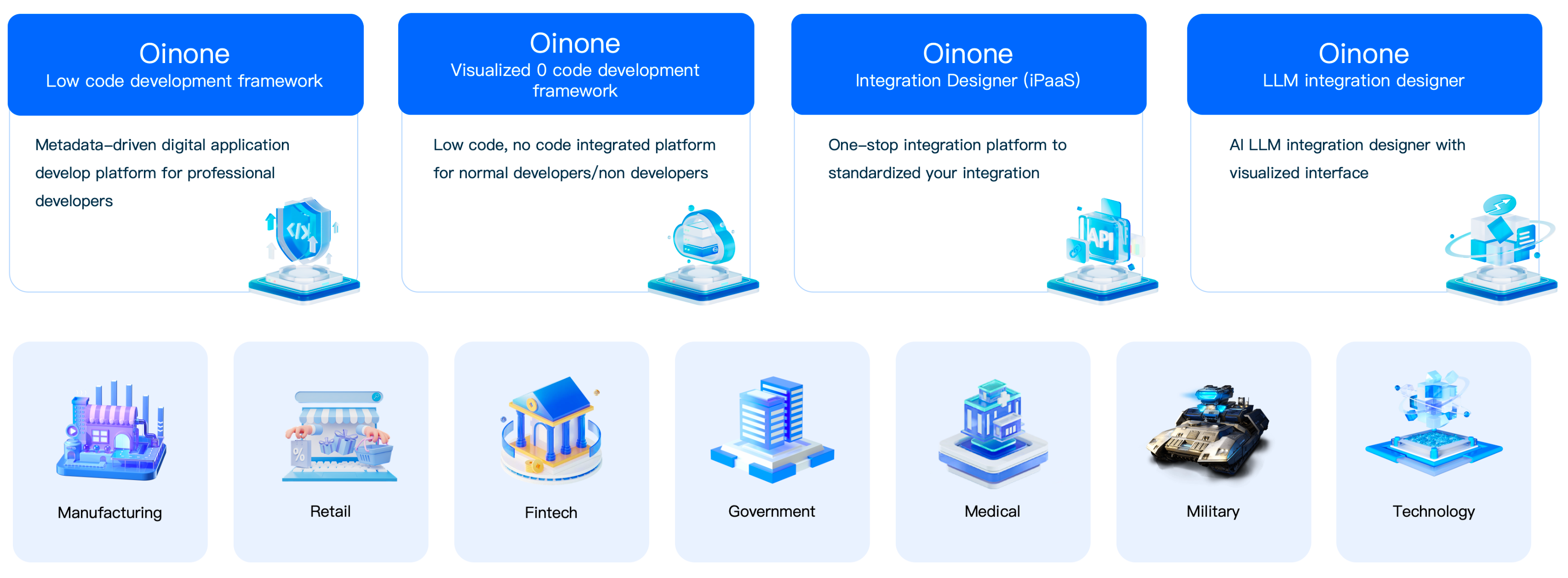
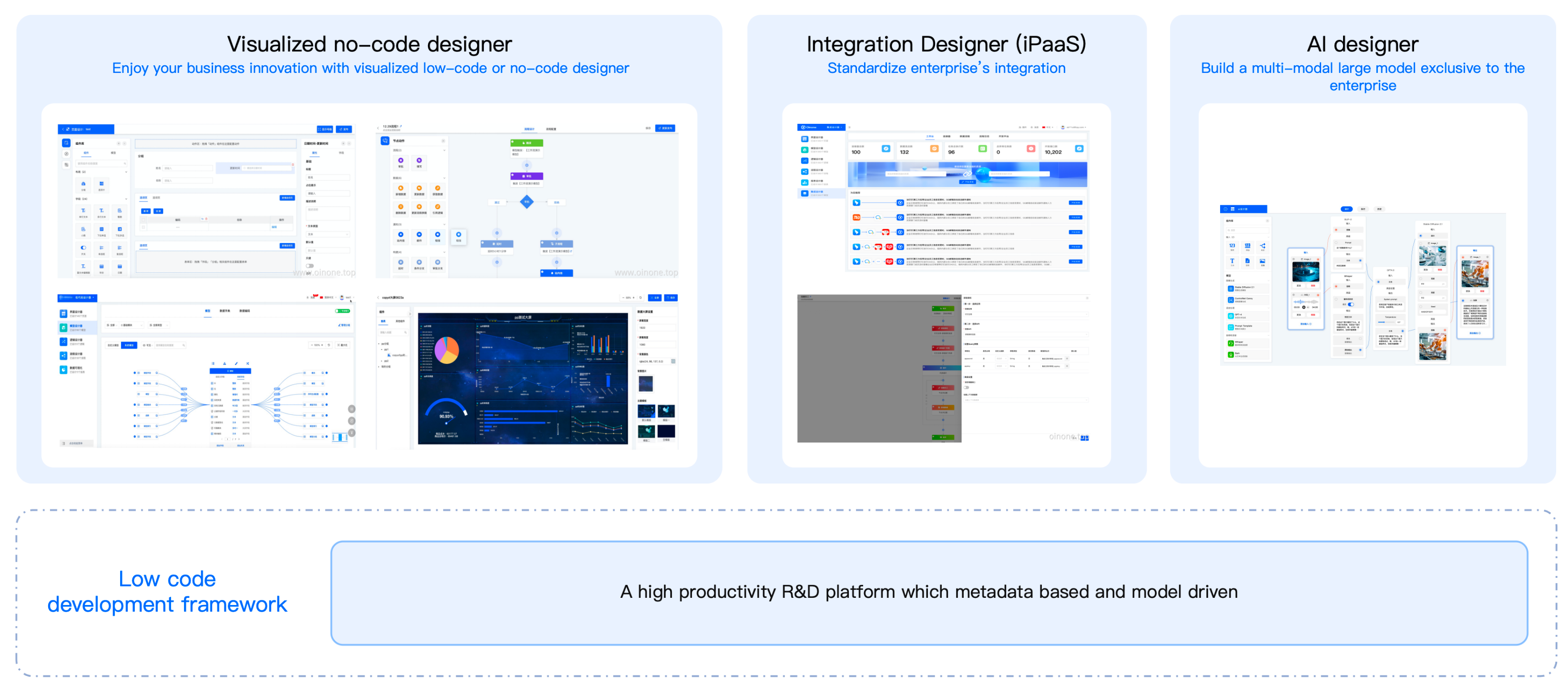
### 8. Product Ecosystem
Comprehensive coverage of product development and implementation needs.
### 9. Key Features
### 10. License
- Oinone Kunlun repository is licensed under AGPL-3.0.
- [Third Party Open Source Software and License Notice](https://guide.oinone.top/en/Third-Party-Open-Source-Software-And-License-Notice.html).
### 11. Community Participation
- Join the community: Go to [⚡Oinone Community](https://doc.oinone.top)❤️
- [How to contribute](https://guide.oinone.top/en/Contribute)
### 12. Contact Us
- Website:https://www.oinone.top
- Email:oinone@shushi.pro