# directiveCase
**Repository Path**: zjrzpp/directiveCase
## Basic Information
- **Project Name**: directiveCase
- **Description**: 有关ng1中自定义指令directive中配置详解demo
- **Primary Language**: JavaScript
- **License**: Not specified
- **Default Branch**: master
- **Homepage**: None
- **GVP Project**: No
## Statistics
- **Stars**: 0
- **Forks**: 0
- **Created**: 2017-12-15
- **Last Updated**: 2020-12-19
## Categories & Tags
**Categories**: Uncategorized
**Tags**: None
## README
## 前言
工作中使用angular1.x已经有很长一段时间了,但是有些angular上重要的难点,自己觉得是时候详细总结一下,一是对自己的总结,二是看自己那些还不熟悉。`angular1.x`中一大难点部分就是自定义指令,接下来我尽可能详细的对angular中的`directive`做总结。
---
## 如何定义一个自定义指令
```js
angular.module('app', [])
// 参数1: 指令名字(驼峰命名法) {String}
// 参数2: 指令的回调函数 {Function}, 这个函数一般返回的是一个对象, 也可以返回一个函数
.directive('myDirective', function(){
return {
// 这里书写参数配置项
}
})
```
## directive中第二个参数中返回对象的配置项
大致有如下参数项:
- restrict
- priority
- terminal
- template
- templateUrl
- replace
- scope
- transclude
... 其他参数在<二>
### restrict
* 作用:在DOM视图中的应用形式
* 取值: `EACM`,不是必填项
* js
```js
angular.module('app', [])
.directive('myDirective', function(){
return {
restrict: 'EACM'
}
})
```
* html
```html
<--directive:my-directive expression-->
```
* demo
### priority
* 作用:优先级
* 取值: Number,例如1000
* js
```js
angular.module('app', [])
.directive('myDirective', function(){
return {
restrict: 'EACM',
priority: 1000
}
})
```
* demo
### terminal
* 作用:告诉angularJS是否停止运行`当前元素`上比本指令优先级更低的指令,但与当前指令优先级同级的指令或者更高的指令还是会被执行的
* 取值:Boolean值
* js
```js
angular.module('app', [])
.directive('myDirective1', function(){
return {
restrict: 'A',
priority: 1,
link: function(scope) {
console.log('myDirective11111')
}
}
})
.directive('myDirective2', function(){
return {
restrict: 'A',
priority:2,
terminal: true,
link: function(scope, el) {
console.log('myDirective222222')
}
}
})
.directive('myDirective3', function(){
return {
restrict: 'A',
priority:5,
link: function(scope, el) {
console.log('myDirective33333')
}
}
})
```
* html
```html
angularJS!!!
```
* result
* 1.当`terminal = true`时,控制台会打印
```js
myDirective222222
myDirective33333
```
也就是说优先级比它低的没有执行,阻止了
* 2.当`terminal = false`时,控制台会打印
```js
myDirective11111
myDirective222222
myDirective33333
```
也就是说执行顺序是由低到高`myDirective1 -> myDirective2 -> myDirective3`
* demo
### template
* 作用:展示在页面上的模板字符串
* 取值:String或者 Funtion
* 注意: template返回的模板中,DOM结构中必须存在一个根节点
* js
```js
angular.module('app', [])
.directive('myDirective1', function(){
return {
restrict: 'EA',
template: 'hello
'
}
})
```
* demo
### templateUrl
* 作用:通过url地址把模板展示在页面上
* 取值:String(文件路径)或者Funtion
* js
* 下面模板地址是在本地写的模板,一般项目中的模板都是存在后台,异步获取,这就意味着会编译或者链接,所以会用到angular中的缓存模板`$templateCache`
```js
```
* demo
### replace
* 作用:false: 模板的内容将会被插入到视图中应用指令元素的内部; true: 则表示替代,即插入到视图中时,应用指令的html元素将被删除,取而代之的是html模板。
* 取值:Boolean
* js
* replace: true
```js
```
result: 
* replace: false
```js
```
result: 
* demo
### scope
* 作用:
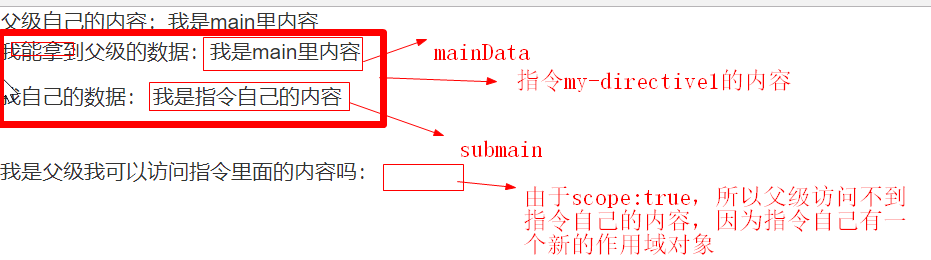
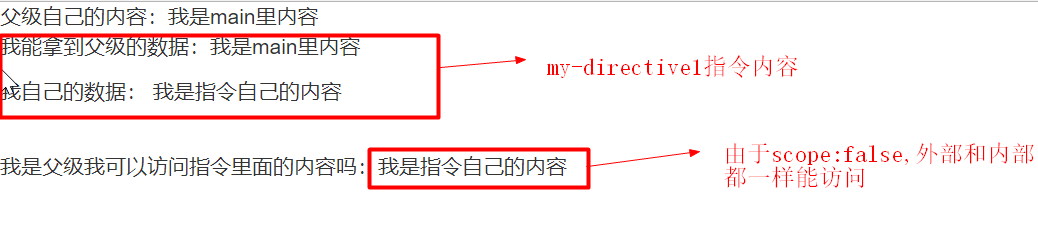
* Boolean:默认是false,即该指令并不会创建新的作用域,改指令内部或外部的作用域是一样的; true: 会继承父作用域并创建一个新的作用域对象
* true
* js
```js
```
* html
```html
父级自己的内容:{{mainData}}
我是父级我可以访问指令里面的内容吗:{{submain}}
```
* result
* demo
* false
* js
```js
```
* html
```html
父级自己的内容:{{mainData}}
我是父级我可以访问指令里面的内容吗:{{submain}}
```
* result
* Object:隔离作用域,也就是隔离模板与外界作用域,但是也是可以访问外面的值,取值如下:
* @ 本地作用域属性
* = 双向绑定
* & 父级作用域绑定
* 第一种使用方式
```js
```
```html
```
result: 
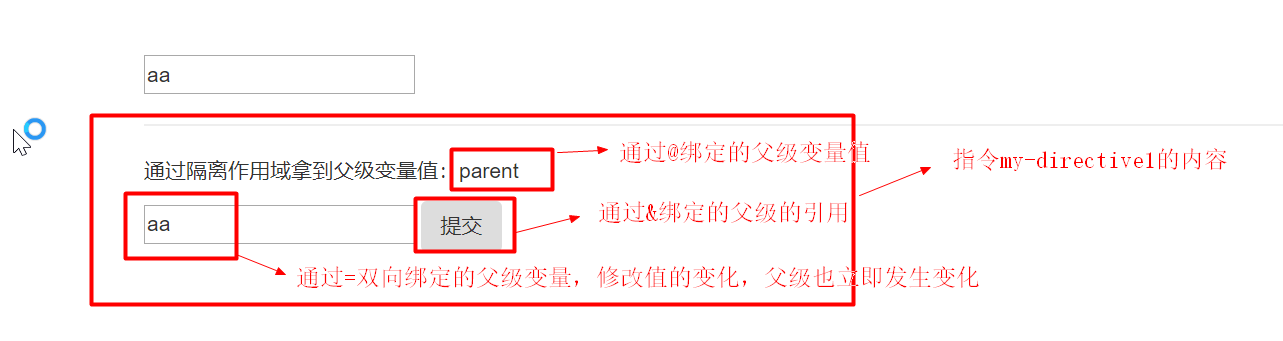
注意:定义传参时采用的是驼峰命名法
* 第二种采用别名方式
```js
```
```html
```
* demo
### transclude
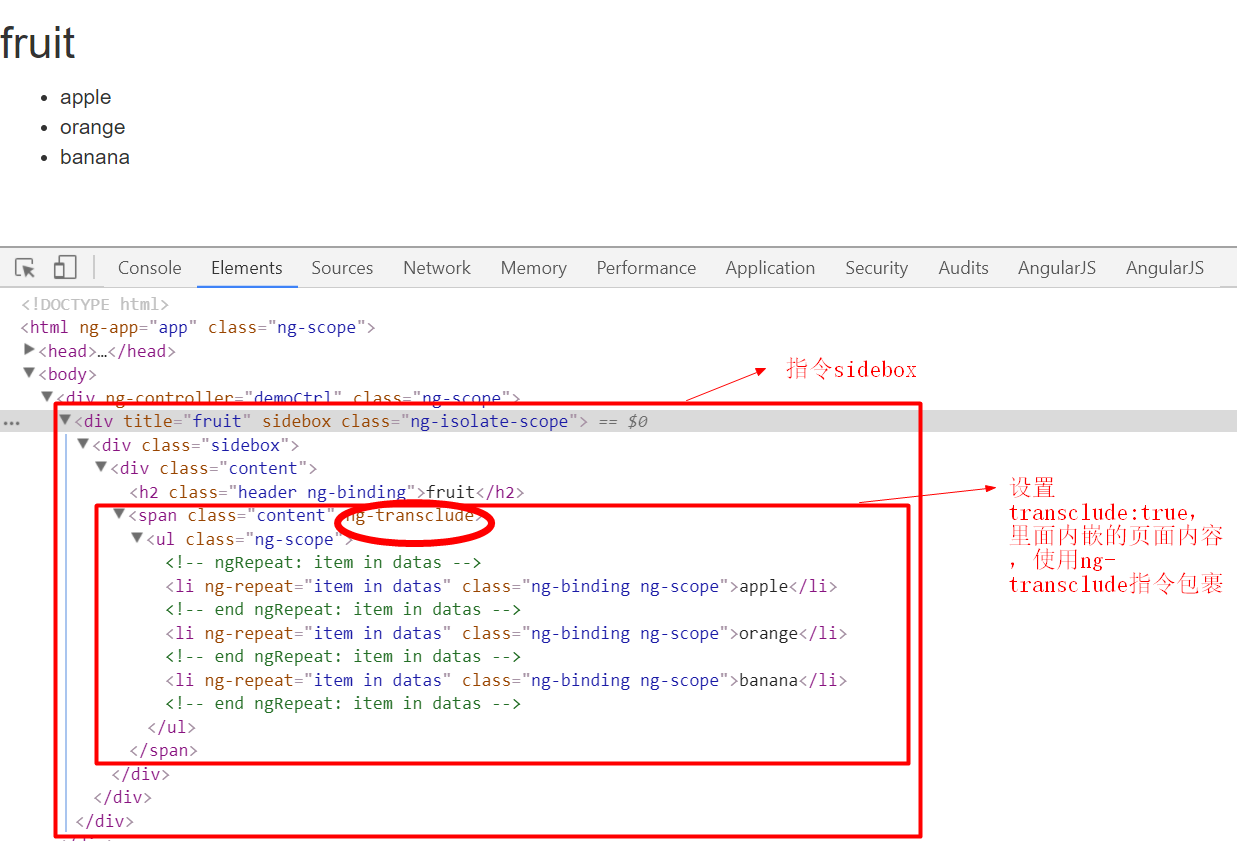
* 作用:你要不要把你指令内部的元素(不是指令的模板)嵌入到你的模板中去,
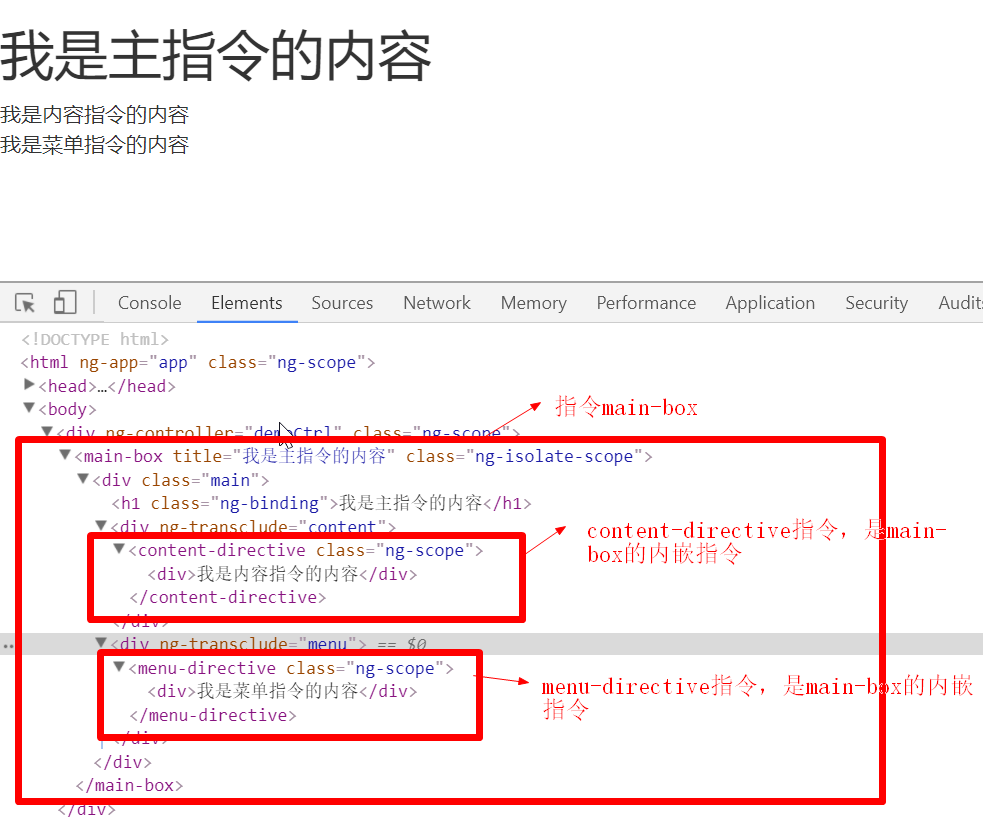
* 取值:Boolean值,默认是false; true或者Object: 它会将整个DOM嵌入到指令内部定义的模板中,包括DOM中的其他指令,经常和`ng-transclude`配合使用。
* transclude: true
* js
```js
```
* html
```html
```
* 图解
* demo
* transclude: Object
* js
```js
```
* html
```html
```
* 图解
* demo