# pyresparser
**Repository Path**: zly1708100237_admin/pyresparser
## Basic Information
- **Project Name**: pyresparser
- **Description**: No description available
- **Primary Language**: Unknown
- **License**: GPL-3.0
- **Default Branch**: master
- **Homepage**: None
- **GVP Project**: No
## Statistics
- **Stars**: 0
- **Forks**: 0
- **Created**: 2025-07-04
- **Last Updated**: 2025-07-04
## Categories & Tags
**Categories**: Uncategorized
**Tags**: None
## README
# pyresparser
```
A simple resume parser used for extracting information from resumes
```
Built with ❤︎ and :coffee: by [Omkar Pathak](https://github.com/OmkarPathak)
---
[](https://github.com/OmkarPathak/pyresparser/stargazers)
[](https://pypi.org/project/pyresparser/)
[](https://pepy.tech/project/pyresparser)
[](https://github.com/OmkarPathak/pyresparser/blob/master/LICENSE)  [](https://saythanks.io/to/omkarpathak27@gmail.com)
[](https://travis-ci.com/OmkarPathak/pyresparser)
[](https://codecov.io/gh/OmkarPathak/pyresparser)
# Features
- Extract name
- Extract email
- Extract mobile numbers
- Extract skills
- Extract total experience
- Extract college name
- Extract degree
- Extract designation
- Extract company names
# Installation
- You can install this package using
```bash
pip install pyresparser
```
- For NLP operations we use spacy and nltk. Install them using below commands:
```bash
# spaCy
python -m spacy download en_core_web_sm
# nltk
python -m nltk.downloader words
python -m nltk.downloader stopwords
```
# Documentation
Official documentation is available at: https://www.omkarpathak.in/pyresparser/
# Supported File Formats
- PDF and DOCx files are supported on all Operating Systems
- If you want to extract DOC files you can install [textract](https://textract.readthedocs.io/en/stable/installation.html) for your OS (Linux, MacOS)
- Note: You just have to install textract (and nothing else) and doc files will get parsed easily
# Usage
- Import it in your Python project
```python
from pyresparser import ResumeParser
data = ResumeParser('/path/to/resume/file').get_extracted_data()
```
# CLI
For running the resume extractor you can also use the `cli` provided
```bash
usage: pyresparser [-h] [-f FILE] [-d DIRECTORY] [-r REMOTEFILE]
[-re CUSTOM_REGEX] [-sf SKILLSFILE] [-e EXPORT_FORMAT]
optional arguments:
-h, --help show this help message and exit
-f FILE, --file FILE resume file to be extracted
-d DIRECTORY, --directory DIRECTORY
directory containing all the resumes to be extracted
-r REMOTEFILE, --remotefile REMOTEFILE
remote path for resume file to be extracted
-re CUSTOM_REGEX, --custom-regex CUSTOM_REGEX
custom regex for parsing mobile numbers
-sf SKILLSFILE, --skillsfile SKILLSFILE
custom skills CSV file against which skills are
searched for
-e EXPORT_FORMAT, --export-format EXPORT_FORMAT
the information export format (json)
```
# Notes:
- If you are running the app on windows, then you can only extract .docs and .pdf files
# Result
The module would return a list of dictionary objects with result as follows:
```
[
{
'college_name': ['Marathwada Mitra Mandal’s College of Engineering'],
'company_names': None,
'degree': ['B.E. IN COMPUTER ENGINEERING'],
'designation': ['Manager',
'TECHNICAL CONTENT WRITER',
'DATA ENGINEER'],
'email': 'omkarpathak27@gmail.com',
'mobile_number': '8087996634',
'name': 'Omkar Pathak',
'no_of_pages': 3,
'skills': ['Operating systems',
'Linux',
'Github',
'Testing',
'Content',
'Automation',
'Python',
'Css',
'Website',
'Django',
'Opencv',
'Programming',
'C',
...],
'total_experience': 1.83
}
]
```
# References that helped me get here
- Some of the core concepts behind the algorithm have been taken from [https://github.com/divapriya/Language_Processing](https://github.com/divapriya/Language_Processing) which has been summed up in this blog [https://medium.com/@divalicious.priya/information-extraction-from-cv-acec216c3f48](https://medium.com/@divalicious.priya/information-extraction-from-cv-acec216c3f48). Thanks to Priya for sharing this concept
- [https://www.kaggle.com/nirant/hitchhiker-s-guide-to-nlp-in-spacy](https://www.kaggle.com/nirant/hitchhiker-s-guide-to-nlp-in-spacy)
- [https://www.analyticsvidhya.com/blog/2017/04/natural-language-processing-made-easy-using-spacy-%E2%80%8Bin-python/](https://www.analyticsvidhya.com/blog/2017/04/natural-language-processing-made-easy-using-spacy-%E2%80%8Bin-python/)
- **Special thanks** to dataturks for their [annotated dataset](https://dataturks.com/blog/named-entity-recognition-in-resumes.php)
# Donation
If you have found my softwares to be of any use to you, do consider helping me pay my internet bills. This would encourage me to create many such softwares :smile:
| PayPal |  |
|:-------------------------------------------:|:-------------------------------------------------------------:|
| ₹ (INR) |
|
|:-------------------------------------------:|:-------------------------------------------------------------:|
| ₹ (INR) |  |
# Stargazer over time
[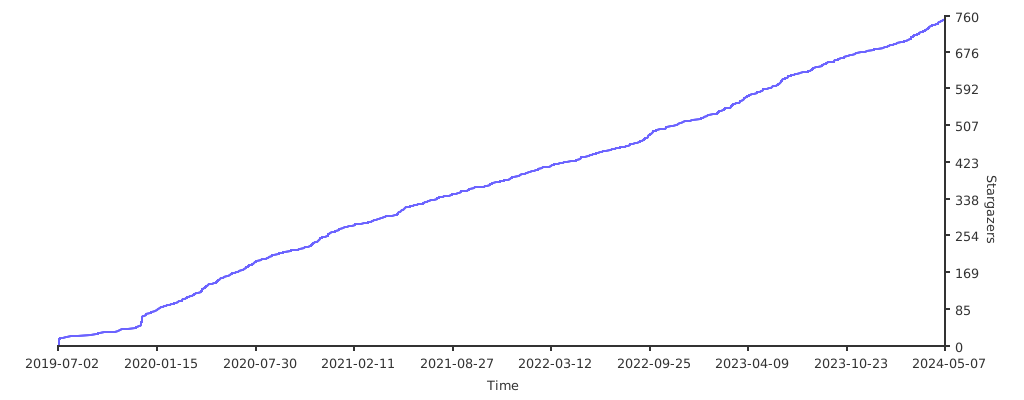](https://starchart.cc/OmkarPathak/pyresparser)
|
# Stargazer over time
[](https://starchart.cc/OmkarPathak/pyresparser)