# CarouselRecyclerview
**Repository Path**: zy841336855/CarouselRecyclerview
## Basic Information
- **Project Name**: CarouselRecyclerview
- **Description**: Carousel Recyclerview let's you create carousel layout with the power of recyclerview by creating custom layout manager.
- **Primary Language**: Unknown
- **License**: Apache-2.0
- **Default Branch**: main
- **Homepage**: None
- **GVP Project**: No
## Statistics
- **Stars**: 0
- **Forks**: 1
- **Created**: 2021-12-10
- **Last Updated**: 2022-06-06
## Categories & Tags
**Categories**: Uncategorized
**Tags**: None
## README
Carousel Recyclerview
Create carousel effect in recyclerview with the CarouselRecyclerview in a simple way.






## Including in your project
[](https://search.maven.org/artifact/com.github.sparrow007/carouselrecyclerview/1.2.1/aar/)
[](https://jitpack.io/#sparrow07/CarouselRecyclerview)
### Gradle
Add below codes to your **root** `build.gradle` file (not your module build.gradle file).
```Gradle
allprojects {
repositories {
mavenCentral()
}
}
```
And add a dependency code to your **module**'s `build.gradle` file.
```gradle
dependencies {
implementation 'com.github.sparrow007:carouselrecyclerview:1.2.1'
}
```
## Usage
### Basic Example for Kotlin
Here is a basic example of implementing carousel recyclerview in koltin files (activity or fragment) with attribute.
```kotlin
val carouselRecyclerview = findViewById(R.id.recycler)
carouselRecyclerview.adapter = adapter
```
### Basic Example for XML
Here is a basic example of implementing carousel recyclerview in layout xml.
```xml
```
Property infinite and 3D on Item enabled |Property infinite and alpha on Item enabled |
| :---------------: | :---------------: |
|  |
|  |
## API Methods
Method | Description | Default
---|--- |---
fun set3DItem(is3DItem: Boolean) | Make the view tilt according to their position, middle position does not tilt. | false
fun setInfinite(isInfinite: Boolean) | Create the loop of the given view means there is no start or end, but provided position in the interface will be correct. | false
fun setFlat(isFlat: Boolean) | Make the flat layout in the layout manager of the reyclerview | false
fun setAlpha(isAlpha: Boolean) | Set the alpha for each item depends on the position in the layout manager | false
fun setIntervalRatio(ratio: Float) | Set the interval ratio which is gap between items (views) in layout manager | 0.5f (value of gap, it should in range (0.4f - 1f))
fun getCarouselLayoutManager(): CarouselLayoutManager | Get the carousel layout manager instance |
fun getSelectedPosition(): Int | Get selected position from the layout manager | center view Positoin
## API Methods Usage
```Kotlin
val carouselRecyclerview = findViewById(R.id.recycler)
carouselRecyclerview.adapter = adapter
carouselRecyclerview.set3DItem(true)
carouselRecyclerview.setInfinite(true)
carouselRecyclerview.setAlpha(true)
carouselRecyclerview.setFlat(true)
val carouselLayoutManager = carouselRecyclerview.getCarouselLayoutManager()
val currentlyCenterPosition = carouselRecyclerview.getSelectedPosition()
```
## Item Position Listener
You can listen to the position whenever the scroll happens you will get notified about the position, following are codes for listener
```Kotlin
carouselRecyclerview.setItemSelectListener(object : OnSelected {
override fun onItemSelected(position: Int) {
//Cente item
}
})
```
## Reflection ImageView
|
## API Methods
Method | Description | Default
---|--- |---
fun set3DItem(is3DItem: Boolean) | Make the view tilt according to their position, middle position does not tilt. | false
fun setInfinite(isInfinite: Boolean) | Create the loop of the given view means there is no start or end, but provided position in the interface will be correct. | false
fun setFlat(isFlat: Boolean) | Make the flat layout in the layout manager of the reyclerview | false
fun setAlpha(isAlpha: Boolean) | Set the alpha for each item depends on the position in the layout manager | false
fun setIntervalRatio(ratio: Float) | Set the interval ratio which is gap between items (views) in layout manager | 0.5f (value of gap, it should in range (0.4f - 1f))
fun getCarouselLayoutManager(): CarouselLayoutManager | Get the carousel layout manager instance |
fun getSelectedPosition(): Int | Get selected position from the layout manager | center view Positoin
## API Methods Usage
```Kotlin
val carouselRecyclerview = findViewById(R.id.recycler)
carouselRecyclerview.adapter = adapter
carouselRecyclerview.set3DItem(true)
carouselRecyclerview.setInfinite(true)
carouselRecyclerview.setAlpha(true)
carouselRecyclerview.setFlat(true)
val carouselLayoutManager = carouselRecyclerview.getCarouselLayoutManager()
val currentlyCenterPosition = carouselRecyclerview.getSelectedPosition()
```
## Item Position Listener
You can listen to the position whenever the scroll happens you will get notified about the position, following are codes for listener
```Kotlin
carouselRecyclerview.setItemSelectListener(object : OnSelected {
override fun onItemSelected(position: Int) {
//Cente item
}
})
```
## Reflection ImageView
 You see in the demo that there is a mirror image (reflection imageview), for this i already created custom imageview for this.
Use ReflectionImageView in xml layout and provide src
```xml
```
You see in the demo that there is a mirror image (reflection imageview), for this i already created custom imageview for this.
Use ReflectionImageView in xml layout and provide src
```xml
```
## Reflection Layout
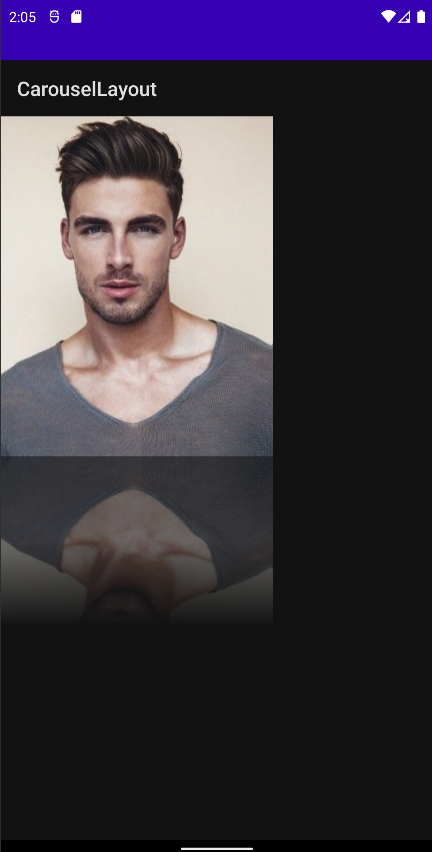 Now you can show reflection in more efficient way and 3x faster than ReflectionImageView see the codes below
```XML
```
Now you can show reflection in more efficient way and 3x faster than ReflectionImageView see the codes below
```XML
```
### Notes about Reflection imageview
I would recommend you to use image loading library like Glide for loading image in reflection image for better performance
### What's New Version 1.2.1 🎉🎉
Bugs Fix (ScrollToPosition)
### Version 1.2.0
Adding reflection container
### Version 1.1.0
Adding Support for orientation changes
## Contribute 🤝
If you like the project and somehow wants to contribute, you are welcome to contribute by either submitting issues, refactor, pull request Thankyou.
## Find this repository useful? ❤️
Support it by joining __[stargazers](https://github.com/sparrow007/CarouselRecyclerview/stargazers)__ for this repository. :star:
And __[follow](https://github.com/sparrow007)__ me for next creation 🤩
## License
```xml
Copyright 2021 Sparrow007 (Ankit kumar)
Licensed under the Apache License, Version 2.0 (the "License");
you may not use this file except in compliance with the License.
You may obtain a copy of the License at
http://www.apache.org/licenses/LICENSE-2.0
Unless required by applicable law or agreed to in writing, software
distributed under the License is distributed on an "AS IS" BASIS,
WITHOUT WARRANTIES OR CONDITIONS OF ANY KIND, either express or implied.
See the License for the specific language governing permissions and
limitations under the License.
```