# audino
**Repository Path**: zy_08/audino
## Basic Information
- **Project Name**: audino
- **Description**: Open source audio annotation tool for humans™
- **Primary Language**: Unknown
- **License**: MIT
- **Default Branch**: master
- **Homepage**: None
- **GVP Project**: No
## Statistics
- **Stars**: 0
- **Forks**: 0
- **Created**: 2021-06-01
- **Last Updated**: 2021-06-01
## Categories & Tags
**Categories**: Uncategorized
**Tags**: None
## README

# audino
[](https://github.com/midas-research/audino/blob/master/LICENSE) [](./docs/getting-started.md#development)
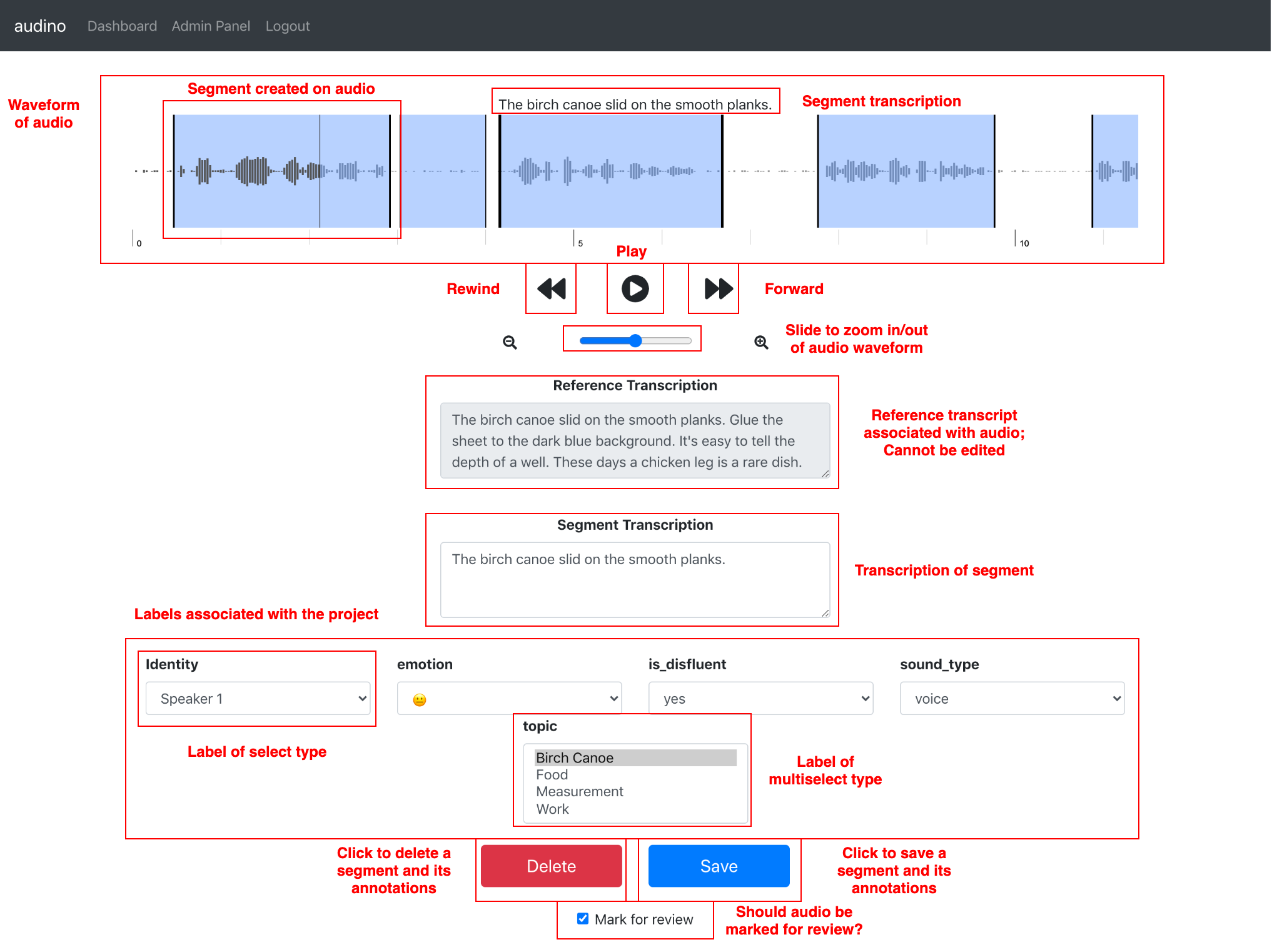
audino is an open source audio annotation tool. It provides features such as transcription and labeling which enables annotation for Voice Activity Detection (VAD), Diarization, Speaker Identification, Automated Speech Recognition, Emotion Recognition tasks and more.
## Features
Current features of the tool include:
1. Multi-language support
2. Collaborative annotation
3. JWT based authentication
4. User-level project, role and data assignment
5. Project-level API Key based datapoint creation
6. Emoji support
7. Flexibility in label creation
## Usage
*Note: Please see [getting started](docs/getting-started.md) guide for configurations and concrete usage.*
Please install the following dependencies to run `audino` on your system:
1. [git](https://git-scm.com/) *[tested on v2.23.0]*
2. [docker](https://www.docker.com/) *[tested on v19.03.8, build afacb8b]*
3. [docker-compose](https://docs.docker.com/compose/) *[tested on v1.25.5, build 8a1c60f6]*
### Clone the repository
```sh
$ git clone https://github.com/midas-research/audino.git
$ cd audino
```
**Note for Windows users**: Please configure git to handle line endings correctly as services might throw an error and not come up. You can do this by cloning the project this way:
```sh
$ git clone https://github.com/midas-research/audino.git --config core.autocrlf=input
```
### For Production
You can either run the project on [default configuration](./docker-compose.prod.yml) or modify them to your need.
**Note**: Before proceeding further, you might need to give docker `sudo` access or run the commands listed below as `sudo`.
**To build the services, run:**
```sh
$ docker-compose -f docker-compose.prod.yml build
```
**To bring up the services, run:**
```sh
$ docker-compose -f docker-compose.prod.yml up
```
Then, in browser, go to [http://0.0.0.0/](http://0.0.0.0/) to view the application.
**To bring down the services, run:**
```sh
$ docker-compose -f docker-compose.prod.yml down
```
### For Development
Similar to `production` setup, you need to use development [configuration](./docker-compose.dev.yml) for working on the project, fixing bugs and making contributions.
**Note**: Before proceeding further, you might need to give docker `sudo` access or run the commands listed below as `sudo`.
**To build the services, run:**
```sh
$ docker-compose -f docker-compose.dev.yml build
```
**To bring up the services, run:**
```sh
$ docker-compose -f docker-compose.dev.yml up
```
Then, in browser, go to [http://localhost:3000/](http://localhost:3000/) to view the application.
**To bring down the services, run:**
```sh
$ docker-compose -f docker-compose.dev.yml down
```
## Tutorials
We provide a set of [tutorials](./docs/tutorial.md) to guide users to achieve certain tasks. If you feel something is missing and should be included, please open an [issue](https://github.com/midas-research/audino/issues).
## Citation
Currently, the [paper](https://arxiv.org/abs/2006.05236) is under review. For now, please cite it as:
```
@misc{grover2020audino,
title={audino: A Modern Annotation Tool for Audio and Speech},
author={Manraj Singh Grover and Pakhi Bamdev and Yaman Kumar and Mika Hama and Rajiv Ratn Shah},
year={2020},
eprint={2006.05236},
archivePrefix={arXiv},
primaryClass={cs.SD}
}
```
## License
[MIT](https://github.com/midas-research/audino/blob/master/LICENSE) © MIDAS, IIIT Delhi