# MicroPython_ESP32_psRAM_LoBo
**Repository Path**: zyr_ms/MicroPython_ESP32_psRAM_LoBo
## Basic Information
- **Project Name**: MicroPython_ESP32_psRAM_LoBo
- **Description**: MicroPython for ESP32 with psRAM support
- **Primary Language**: Unknown
- **License**: Apache-2.0
- **Default Branch**: master
- **Homepage**: None
- **GVP Project**: No
## Statistics
- **Stars**: 3
- **Forks**: 1
- **Created**: 2019-10-04
- **Last Updated**: 2024-05-31
## Categories & Tags
**Categories**: Uncategorized
**Tags**: None
## README
# MicroPython for TTGO T-Watch
This is a branch from Lobo fork, I added it to Twatch's hardware driver and the `lvgl` graphics library, thanks to Lobo's clean project (than the official).
## Add the following drivers
- PCF8563 Real-time clock/calendar driver
- BMA423 Low-g acceleration sensor driver
- LVGL popular embedded graphics library
- FT5x/6x touch screen driver
- AXP202 advanced multi-channel power management chip driver
### The following examples have all been tested in T-Watch.
#### BMA423 interrupt example
```
from machine import I2C
from machine import Pin
import bma423 as bma
def handle_interrupt(pin):
state = bma.read_irq()
if state == bma.IRQ_STEP_COUNTER:
s = bma.stepcount()
print('IRQ_STEP_COUNTER %u' % s)
elif state == bma.IRQ_DOUBLE_WAKEUP:
print('IRQ_DOUBLE_WAKEUP')
i2c = I2C(scl=22, sda=21,speed=400000)
bma.init(i2c,irq=True)
irq = Pin(39, mode=Pin.IN,handler=handle_interrupt,trigger=Pin.IRQ_RISING)
```
#### BMA423 accel example
```
from machine import I2C
from machine import Pin
import bma423 as bma
import time
i2c = I2C(scl=22, sda=21,speed=400000)
bma.init(i2c)
while True:
bma.accel()
time.sleep_ms(200)
```
#### FT5x/6x touchscreen example
```
import machine
import touchscreen as ts
import time
i2c = machine.I2C(scl=32, sda=23, speed=400000)
ts.init(i2c)
while True:
ts.read()
time.sleep(0.2);
```
#### PCF8563 RTC example
```
import utime
import time
import pcf8563
from machine import I2C
from machine import Pin
def handle_interrupt(pin):
if r.check_for_alarm_interrupt():
print('is alarm clock interrupt')
else:
print('is not for alarm interrupt')
r.clear_alarm()
irq = Pin(37, mode=Pin.IN,handler=handle_interrupt,trigger=Pin.IRQ_FALLING)
i2c = I2C(scl=22, sda=21)
r = pcf8563.PCF8563(i2c)
print('rtc time')
r.datetime()
time.sleep(1)
print('Clear alarm config register')
r.clear_alarm()
print('Setting current clock datetime')
r.write_all(50,30,15,3,17,9,49)
print('Set the alarm to match for minutes')
r.set_daily_alarm(minutes=31)
print('Enable rtc chip interrupt')
r.enable_alarm_interrupt()
while True:
r.datetime()
time.sleep(1)
```
#### AXP202 Power example
```
from machine import I2C
from machine import Pin
import axp202
import time
i2c = I2C(scl=22, sda=21)
print(i2c)
pmu = axp202.PMU(i2c)
pmu.enablePower(axp202.AXP202_LDO2)
pmu.setLDO2Voltage(3300)
bl = Pin(12, Pin.OUT)
bl.value(1)
'''
enable axp202 adc
'''
pmu.enableADC(axp202.AXP202_ADC1,axp202.AXP202_BATT_VOL_ADC1)
pmu.enableADC(axp202.AXP202_ADC1, axp202.AXP202_BATT_CUR_ADC1)
pmu.enableADC(axp202.AXP202_ADC1, axp202.AXP202_VBUS_VOL_ADC1)
pmu.enableADC(axp202.AXP202_ADC1, axp202.AXP202_VBUS_CUR_ADC1)
while True:
if pmu.isVBUSPlug():
vbus = pmu.getVbusVoltage()
cbus = pmu.getVbusCurrent()
print("vbus is connect VBUS is {} mV Current is {} mA".format( vbus , cbus))
if pmu.isBatteryConnect():
vbatt = pmu.getBattVoltage()
percent = pmu.getBattPercentage()
print("battery percent is {}% battery is {} mV".format(percent , vbatt))
time.sleep(1)
```
#### lvgl example
```
import lvgl as lv
import lvgl_helper as lv_h
import lvesp32
import display
import time
import machine
import touchscreen as ts
import axp202
import random
i2c0 = machine.I2C(scl=22, sda=21)
pmu = axp202.PMU(i2c0)
pmu.enablePower(axp202.AXP202_LDO2)
pmu.setLDO2Voltage(3300)
tft = display.TFT()
i2c = machine.I2C(id=1, scl=32, sda=23, speed=400000)
ts.init(i2c)
tft.init(tft.ST7789,width=240, invrot=3,rot=1,bgr=False, height=240, miso=2, mosi=19, clk=18, cs=5, dc=27,speed=40000000,color_bits=tft.COLOR_BITS16,backl_pin=12,backl_on=1)
lv.init()
disp_buf1 = lv.disp_buf_t()
buf1_1 = bytes(240*10)
lv.disp_buf_init(disp_buf1,buf1_1, None, len(buf1_1)//4)
disp_drv = lv.disp_drv_t()
lv.disp_drv_init(disp_drv)
disp_drv.buffer = disp_buf1
disp_drv.flush_cb = lv_h.flush
disp_drv.hor_res = 240
disp_drv.ver_res = 240
lv.disp_drv_register(disp_drv)
indev_drv = lv.indev_drv_t()
lv.indev_drv_init(indev_drv)
indev_drv.type = lv.INDEV_TYPE.POINTER
indev_drv.read_cb = lv_h.read
lv.indev_drv_register(indev_drv)
scr = lv.obj()
btn = lv.btn(scr)
btn.align(lv.scr_act(), lv.ALIGN.CENTER, 0, 0)
label = lv.label(btn)
label.set_text("Button")
lv.scr_load(scr)
```
Examples can be found in the `modules_examples` directory.
The following is Lobo original Readme, I am not going to delete it.
# MicroPython for ESP32
# with support for 4MB of psRAM
> This repository can be used to build MicroPython for ESP32 boards/modules with **psRAM** as well as for ESP32 boards/modules **without psRAM.**
> *Building on* **Linux**, **MacOS** *and* **Windows** (including **Linux Subsystem on Windows 10**) *is supported*.
> MicroPython works great on ESP32, but the most serious issue is still (as on most other MicroPython boards) limited amount of free memory.
> This repository contains all the tools and sources necessary to **build working MicroPython firmware** which can fully use the advantages of **4MB** (or more) of **psRAM**.
> It is **huge difference** between MicroPython running with **less than 100KB** of free memory and running with **4MB** of free memory.
ESP32 can use external **SPIRAM** (psRAM) to expand available RAM up to 16MB.
Currently, there are several modules & development boards which incorporates **4MB** of psRAM:
* [**M5Stack**](http://www.m5stack.com) _Development Kit_ [version with psRAM](https://www.aliexpress.com/store/product/M5Stack-NEWEST-4M-PSRAM-ESP32-Development-Board-with-MPU9250-9DOF-Sensor-Color-LCD-for-Arduino-Micropython/3226069_32847906756.html?spm=2114.12010608.0.0.1ba0ee41gOPji)
* **TTGO T8 V1.1** _board_, available at [eBay](https://www.ebay.com/itm/TTGO-T8-V1-1-ESP32-4MB-PSRAM-TF-CARD-3D-ANTENNA-WiFi-bluetooth/152891206854?hash=item239906acc6:g:7QkAAOSwMfhadD85)
* **ESP-WROVER-KIT** _boards_ from Espressif, available from [ElectroDragon](http://www.electrodragon.com/product/esp32-wrover-kit/), [AnalogLamb](https://www.analoglamb.com/product/esp-wrover-kit-esp32-wrover-module/), ...
* **WiPy 3.0** _board_ from [Pycom](https://pycom.io/product/wipy-3/).
* **TTGO TAudio** _board_ ([eBay](https://www.ebay.com/itm/TTGO-TAudio-V1-0-ESP32-WROVER-SD-Card-Slot-Bluetooth-WI-FI-Module-MPU9250/152835010520?hash=item2395ad2fd8:g:Jt8AAOSwR2RaOdEp))
* **Lolin32 Pro** _board_ from [Wemos](https://wiki.wemos.cc/products:lolin32:lolin32_pro) - **`no longer available`** ([Schematic](https://wiki.wemos.cc/_media/products:lolin32:sch_lolin32_pro_v1.0.0.pdf)).
* **ESP-WROVER** _module_ from Espressif, available from [ElectroDragon](http://www.electrodragon.com/product/esp32-wrover-v4-module-based-esp32/) and many other vendors.
* **ALB32-WROVER** _module_ (4 MB SPIRAM & 4/8/16 MB Flash) from [AnalogLamb](https://www.analoglamb.com/product/alb32-wrover-esp32-module-with-64mb-flash-and-32mb-psram/).
* **S01**, **L01** and **G01** _OEM modules_ from [Pycom](https://pycom.io/webshop#oem-products).
---
[Wiki pages](https://github.com/loboris/MicroPython_ESP32_psRAM_LoBo/wiki) with detailed documentation specific to this **MicroPython** port are available.
Some examples can be found in [modules_examples](https://github.com/loboris/MicroPython_ESP32_psRAM_LoBo/tree/master/MicroPython_BUILD/components/micropython/esp32/modules_examples) directory.
---
This repository contains all the tools and sources necessary to **build working MicroPython firmware** which can fully use the advantages of **4MB** (or more) of **psRAM**
It is **huge difference** between MicroPython running with **less than 100KB** of free memory and running with **4MB** of free memory.
---
## **The MicroPython firmware is built as esp-idf component**
This means the regular esp-idf **menuconfig** system can be used for configuration. Besides the ESP32 configuration itself, many MicroPython options can also be configured via **menuconfig**.
This way many features not available in standard ESP32 MicroPython are enabled, like unicore/dualcore, all Flash speed/mode options etc. No manual *sdkconfig.h* editing and tweaking is necessary.
---
### Features
* MicroPython core based on latest build from [main Micropython repository](https://github.com/micropython/micropython)
* added changes needed to build for ESP32 with psRAM
* Default configuration has **2MB** of MicroPython heap, **20KB** of MicroPython stack, **~200KB** of free DRAM heap for C modules and functions
* MicroPython can be built in **unicore** (FreeRTOS & MicroPython task running only on the first ESP32 core, or **dualcore** configuration (MicroPython task running on ESP32 **App** core)
* ESP32 Flash can be configured in any mode, **QIO**, **QOUT**, **DIO**, **DOUT**
* **BUILD.sh** script is provided to make **building** MicroPython firmware as **easy** as possible
* Internal Fat filesystem is built with esp-idf **wear leveling** driver, so there is less danger of damaging the flash with frequent writes.
* **SPIFFS** filesystem is supported and can be used instead of FatFS in SPI Flash. Configurable via **menuconfig**
* Flexible automatic and/or manual filesystem configuration
* **sdcard** support is included which uses esp-idf **sdmmc** driver and can work in **SD mode** (*1-bit* and *4-bit*) or in **SPI mode** (sd card can be connected to any pins). For imformation on how to connect sdcard see the documentation.
* Files **timestamp** is correctly set to system time both on internal fat filesysten and on sdcard
* **Native ESP32 VFS** support for spi Flash & sdcard filesystems.
* **RTC Class** is added to machine module, including methods for synchronization of system time to **ntp** server, **deepsleep**, **wakeup** from deepsleep **on external pin** level, ...
* **Time zone** can be configured via **menuconfig** and is used when syncronizing time from NTP server
* Built-in **ymodem module** for fast transfer of text/binary files to/from host
* Some additional frozen modules are added, like **pye** editor, **urequests**, **functools**, **logging**, ...
* **Btree** module included, can be Enabled/Disabled via **menuconfig**
* **_threads** module greatly improved, inter-thread **notifications** and **messaging** included
* **Neopixel** module using ESP32 **RMT** peripheral with many new features
* **DHT** module implemented using ESP32 RMT peripheral
* **1-wire** module implemented using ESP32 RMT peripheral
* **i2c** module uses ESP32 hardware i2c driver
* **spi** module uses ESP32 hardware spi driver
* **adc** module improved, new functions added
* **pwm** module, ESP32 hardware based
* **timer** module improved, new timer types and features
* **curl** module added, many client protocols including FTP and eMAIL
* **ssh** module added with sftp/scp support and _exec_ function to execute program on server
* **display** module added with full support for spi TFT displays
* **mqtt** module added, implemented in C, runs in separate task
* **mDNS** module added, implemented in C, runs in separate task
* **telnet** module added, connect to **REPL via WiFi** using telnet protocol
* **ftp** server module added, runs as separate ESP32 task
* **GSM/PPPoS** support, connect to the Internet via GSM module
* **OTA Update** supported, various partitions layouts
* **Eclipse** project files included. To include it into Eclipse goto File->Import->Existing Projects into Workspace->Select root directory->[select *MicroPython_BUILD* directory]->Finish. **Rebuild index**.
---
### How to Build
---
Detailed instructions on **MicroPython** building process are available in the [Wiki](https://github.com/loboris/MicroPython_ESP32_psRAM_LoBo/wiki/build).
---
#### Using file systems
Detailed information about using MicroPython file systems are available in the [Wiki](https://github.com/loboris/MicroPython_ESP32_psRAM_LoBo/wiki/filesystems).
---
### Some examples
Using new machine methods and RTC:
```python
import machine
rtc = machine.RTC()
rtc.init((2017, 6, 12, 14, 35, 20))
rtc.now()
rtc.ntp_sync(server="" [,update_period=])
# can be empty string, then the default server is used ("pool.ntp.org")
rtc.synced()
# returns True if time synchronized to NTP server
rtc.wake_on_ext0(Pin, level)
rtc.wake_on_ext1(Pin, level)
# wake up from deepsleep on pin level
machine.deepsleep(10000)
ESP32: DEEP SLEEP
# ...
# ...
Reset reason: Deepsleep wake-up
Wakeup source: RTC wake-up
uPY stack: 19456 bytes
uPY heap: 3073664/5664/3068000 bytes (in SPIRAM using malloc)
MicroPython ESP32_LoBo_v3.1.0 - 2017-01-03 on ESP32 board with ESP32
Type "help()" for more information.
machine.wake_reason()
# returns tuple with reset & wakeup reasons
machine.wake_description()
# returns tuple with strings describing reset & wakeup reasons
```
Using sdcard module:
```python
import uos
uos.mountsd()
uos.listdir('/sd')
```
Working directory can be changed to root of the sd card automatically on mount:
```python
>>> import uos
>>> uos.mountsd(True)
---------------------
Mode: SD (4bit)
Name: NCard
Type: SDHC/SDXC
Speed: default speed (25 MHz)
Size: 15079 MB
CSD: ver=1, sector_size=512, capacity=30881792 read_bl_len=9
SCR: sd_spec=2, bus_width=5
>>> uos.listdir()
['overlays', 'bcm2708-rpi-0-w.dtb', ......
>>>
```
---
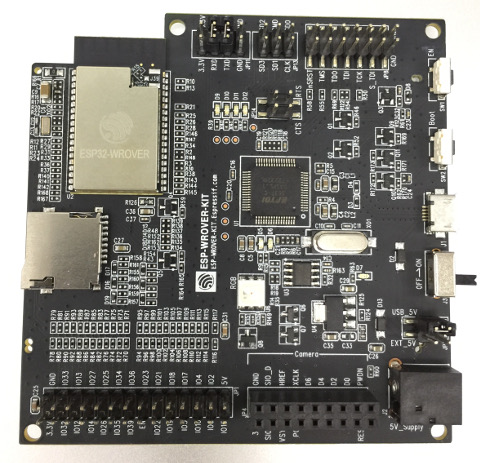
Tested on **ESP-WROVER-KIT v3**
---
### Example terminal session
```
I (0) cpu_start: App cpu up.
I (1569) spiram: SPI SRAM memory test OK
I (1570) heap_init: Initializing. RAM available for dynamic allocation:
D (1570) heap_init: New heap initialised at 0x3ffae6e0
I (1575) heap_init: At 3FFAE6E0 len 00001920 (6 KiB): DRAM
D (1581) heap_init: New heap initialised at 0x3ffc1a00
I (1586) heap_init: At 3FFC1A00 len 0001E600 (121 KiB): DRAM
I (1593) heap_init: At 3FFE0440 len 00003BC0 (14 KiB): D/IRAM
I (1599) heap_init: At 3FFE4350 len 0001BCB0 (111 KiB): D/IRAM
D (1606) heap_init: New heap initialised at 0x4009d70c
I (1611) heap_init: At 4009D70C len 000028F4 (10 KiB): IRAM
I (1617) cpu_start: Pro cpu start user code
I (1622) spiram: Adding pool of 4096K of external SPI memory to heap allocator
I (1630) spiram: Reserving pool of 32K of internal memory for DMA/internal allocations
D (1646) clk: RTC_SLOW_CLK calibration value: 3305242
D (89) intr_alloc: Connected src 46 to int 2 (cpu 0)
D (90) intr_alloc: Connected src 57 to int 3 (cpu 0)
D (90) intr_alloc: Connected src 24 to int 9 (cpu 0)
I (95) cpu_start: Starting scheduler on PRO CPU.
D (0) intr_alloc: Connected src 25 to int 2 (cpu 1)
I (4) cpu_start: Starting scheduler on APP CPU.
D (119) heap_init: New heap initialised at 0x3ffe0440
D (125) heap_init: New heap initialised at 0x3ffe4350
D (130) intr_alloc: Connected src 16 to int 12 (cpu 0)
D (145) nvs: nvs_flash_init_custom partition=nvs start=9 count=4
D (178) intr_alloc: Connected src 34 to int 3 (cpu 1)
D (187) intr_alloc: Connected src 22 to int 4 (cpu 1)
Internal FS (SPIFFS): Mounted on partition 'internalfs' [size: 1048576; Flash address: 0x2D0000]
----------------
Filesystem size: 956416 B
Used: 512 B
Free: 955904 B
----------------
FreeRTOS running on BOTH CORES, MicroPython task running on both cores.
Running from partition at 10000, type 10 [MicroPython_1].
Reset reason: Power on reset
uPY stack: 19456 bytes
uPY heap: 3073664/5664/3068000 bytes (in SPIRAM using malloc)
MicroPython ESP32_LoBo_v3.1.0 - 2017-01-03 on ESP32 board with ESP32
Type "help()" for more information.
>>>
>>> import micropython, machine
>>>
>>> micropython.mem_info()
stack: 752 out of 19456
GC: total: 3073664, used: 5904, free: 3067760
No. of 1-blocks: 19, 2-blocks: 7, max blk sz: 325, max free sz: 191725
>>>
>>> machine.heap_info()
Heap outside of MicroPython heap:
---------------------------------
Free: 239920
Allocated: 52328
Minimum free: 233100
Total blocks: 85
Largest free block: 113804
Allocated blocks: 79
Free blocks: 6
SPIRAM info:
------------
Free: 1048532
Allocated: 3145728
Minimum free: 1048532
Total blocks: 2
Largest free block: 1048532
Allocated blocks: 1
Free blocks: 1
>>>
```