# alfred
**Repository Path**: zzb32/alfred
## Basic Information
- **Project Name**: alfred
- **Description**: alfred-py: A deep learning utility library for visualization and sensor fusion purpose
- **Primary Language**: Unknown
- **License**: Apache-2.0
- **Default Branch**: master
- **Homepage**: None
- **GVP Project**: No
## Statistics
- **Stars**: 0
- **Forks**: 0
- **Created**: 2020-11-27
- **Last Updated**: 2024-07-10
## Categories & Tags
**Categories**: Uncategorized
**Tags**: None
## README
# Alfred
*Alfred* is command line tool for deep-learning usage. if you want split an video into image frames or combine frames into a single video, then **alfred** is what you want.
## Install
To install **alfred**, it is very simple:
```shell
sudo pip3 install alfred-py
```
**alfred is both a lib and a tool, you can import it's APIs, or you can directly call it inside your terminal**.
A glance of alfred, after you installed above package, you will have `alfred`:
- **`data`** module:
```shell
# show VOC annotations
alfred data vocview -i JPEGImages/ -l Annotations/
# show coco anntations
alfred data cocoview -j annotations/instance_2017.json -i images/
# show yolo annotations
alfred data yoloview -i images -l labels
# show detection label with txt format
alfred data txtview -i images/ -l txts/
# show more of data
alfred data -h
# eval tools
alfred data evalvoc -h
```
- **`cab`** module:
```shell
# count files number of a type
alfred cab count -d ./images -t jpg
# split a txt file into train and test
alfred cab split -f all.txt -r 0.9,0.1 -n train,val
```
- **`vision`** module;
```shell
# extract video to images
alfred vision extract -v video.mp4
# combine images to video
alfred vision 2video -d images/
```
- **`-h`** to see more:
```shell
usage: alfred [-h] [--version] {vision,text,scrap,cab,data} ...
positional arguments:
{vision,text,scrap,cab,data}
vision vision related commands.
text text related commands.
scrap scrap related commands.
cab cabinet related commands.
data data related commands.
optional arguments:
-h, --help show this help message and exit
--version, -v show version info.
```
**inside every child module, you can call it's `-h` as well: `alfred text -h`.**
> if you are on windows, you can install pycocotools via: `pip install "git+https://github.com/philferriere/cocoapi.git#egg=pycocotools&subdirectory=PythonAPI"`, we have made pycocotools as an dependencies since we need pycoco API.
## Updates
- 2050-: *to be continue*;
- **2020.09.27**:
Now, yolo and VOC can convert to each other, so that using Alfred you can:
- convert yolo2voc;
- convert voc2yolo;
- convert voc2coco;
- convert coco2voc;
By this, you can convert any labeling format of each other.
- 2020-09-08: After a long time past, **alfred** got some updates:
We providing `coco2yolo` ability inside it. Users can run this command convert your data to yolo format:
```
alfred data coco2yolo -i images/ -j annotations/val_split_2020.json
```
Only should provided is your image root path and your json file. And then all result will generated into `yolo` folder under images or in images parent dir.
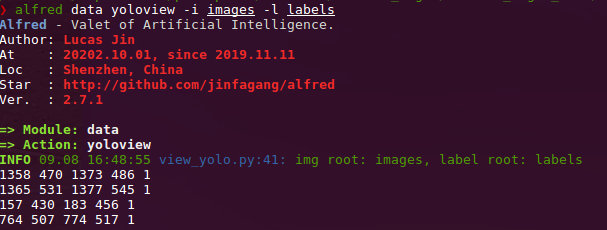
After that (you got your yolo folder), then you can visualize the conversion result to see if it correct or not:
```
alfred data yolovview -i images/ -l labels/
```
- 2020-07-27: After a long time past, **alfred** finally get some updates:
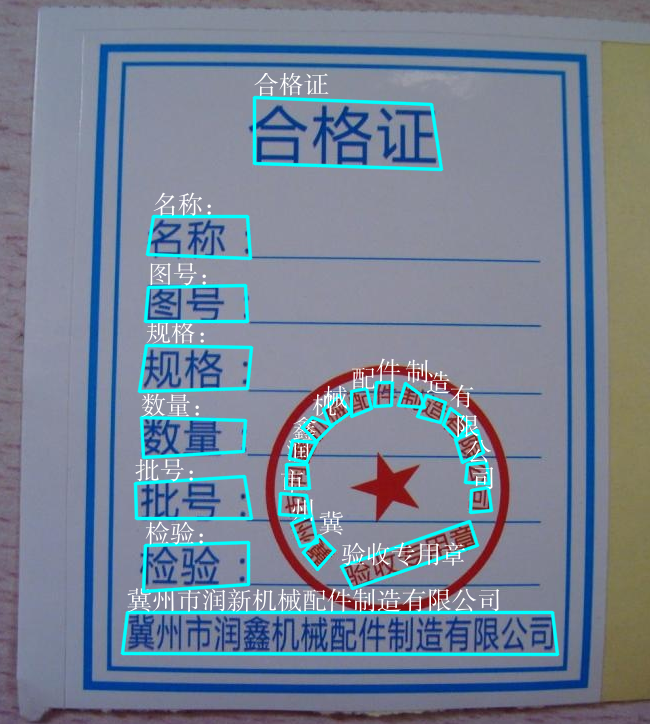
Now, you can using alfred draw Chinese charactors on image without xxxx undefined encodes.
```python
from alfred.utils.cv_wrapper import put_cn_txt_on_img
img = put_cn_txt_on_img(img, spt[-1], [points[0][0], points[0][1]-25], 1.0, (255, 255, 255))
```
Also, you now can **merge** 2 VOC datasets! This is helpful when you have 2 dataset and you want merge them into a single one.
```
alfred data mergevoc -h
```
You can see more promotes.
- 2020-03-08:Several new files added in **alfred**:
```
alfred.utils.file_io: Provide file io utils for common purpose
alfred.dl.torch.env: Provide seed or env setup in pytorch (same API as detectron2)
alfred.dl.torch.distribute: utils used for distribute training when using pytorch
```
- 2020-03-04: We have added some **evaluation tool** to calculate mAP for object detection model performance evaluation, it's useful and can visualize result:
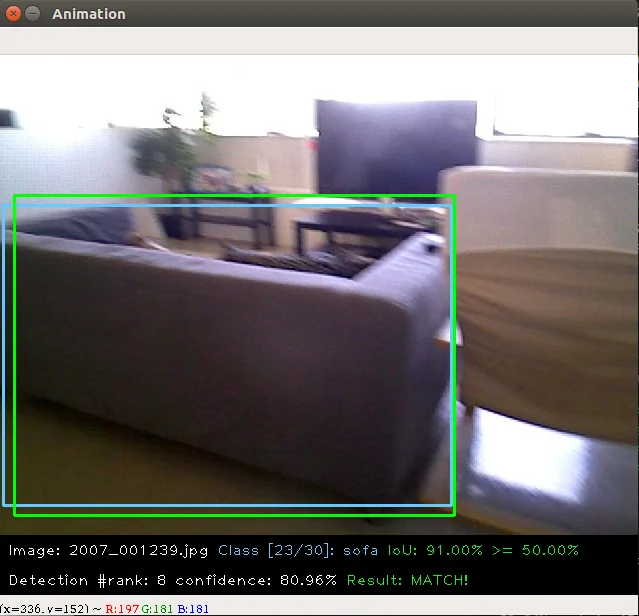

this usage is also quite simple:
```
alfred data evalvoc -g ground-truth -d detection-results -im images
```
where `-g` is your ground truth dir (contains xmls or txts), `-d` is your detection result files dir, `-im` is your images fodler. You only need save all your detected results into txts, one image one txt, and format like this:
```shell
bottle 0.14981 80 1 295 500
bus 0.12601 36 13 404 316
horse 0.12526 430 117 500 307
pottedplant 0.14585 212 78 292 118
tvmonitor 0.070565 388 89 500 196
```
- 2020-02-27: We just update a `license` module inside alfred, say you want apply license to your project or update license, simple:
```shell script
alfred cab license -o 'MANA' -n 'YoloV3' -u 'manaai.cn'
```
you can found more detail usage with `alfred cab license -h`
- 2020-02-11: open3d has changed their API. we have updated new open3d inside alfred, you can simply using latest open3d and run `python3 examples/draw_3d_pointcloud.py` you will see this:

- 2020-02-10: **alfred** now support windows (experimental);
- 2020-02-01: **武汉加油**! *alfred* fix windows pip install problem related to encoding 'gbk';
- 2020-01-14: Added cabinet module, also add some utils under data module;
- 2019-07-18: 1000 classes imagenet labelmap added. Call it from:
```python
from alfred.vis.image.get_dataset_label_map import imagenet_labelmap
# also, coco, voc, cityscapes labelmap were all added in
from alfred.vis.image.get_dataset_label_map import coco_labelmap
from alfred.vis.image.get_dataset_label_map import voc_labelmap
from alfred.vis.image.get_dataset_label_map import cityscapes_labelmap
```
- 2019-07-13: We add a VOC check module in command line usage, you can now visualize your VOC format detection data like this:
```
alfred data voc_view -i ./images -l labels/
```
- 2019-05-17: We adding **open3d** as a lib to visual 3d point cloud in python. Now you can do some simple preparation and visual 3d box right on lidar points and show like opencv!!

You can achieve this by only using **alfred-py** and **open3d**!
example code can be seen under `examples/draw_3d_pointcloud.py`. **code updated with latest open3d API**!.
- 2019-05-10: A minor updates but **really useful** which we called **mute_tf**, do you want to disable tensorflow ignoring log? simply do this!!
```python
from alfred.dl.tf.common import mute_tf
mute_tf()
import tensorflow as tf
```
Then, the logging message were gone....
- 2019-05-07: Adding some protos, now you can parsing tensorflow coco labelmap by using alfred:
```python
from alfred.protos.labelmap_pb2 import LabelMap
from google.protobuf import text_format
with open('coco.prototxt', 'r') as f:
lm = LabelMap()
lm = text_format.Merge(str(f.read()), lm)
names_list = [i.display_name for i in lm.item]
print(names_list)
```
- 2019-04-25: Adding KITTI fusion, now you can get projection from 3D label to image like this:
we will also add more fusion utils such as for *nuScene* dataset.
We providing kitti fusion kitti for convert `camera link 3d points` to image pixel, and convert `lidar link 3d points` to image pixel. Roughly going through of APIs like this:
```python
# convert lidar prediction to image pixel
from alfred.fusion.kitti_fusion import LidarCamCalibData, \
load_pc_from_file, lidar_pts_to_cam0_frame, lidar_pt_to_cam0_frame
from alfred.fusion.common import draw_3d_box, compute_3d_box_lidar_coords
# consit of prediction of lidar
# which is x,y,z,h,w,l,rotation_y
res = [[4.481686, 5.147319, -1.0229858, 1.5728549, 3.646751, 1.5121397, 1.5486346],
[-2.5172017, 5.0262384, -1.0679419, 1.6241353, 4.0445814, 1.4938312, 1.620804],
[1.1783253, -2.9209857, -0.9852259, 1.5852798, 3.7360613, 1.4671413, 1.5811548]]
for p in res:
xyz = np.array([p[: 3]])
c2d = lidar_pt_to_cam0_frame(xyz, frame_calib)
if c2d is not None:
cv2.circle(img, (int(c2d[0]), int(c2d[1])), 3, (0, 255, 255), -1)
hwl = np.array([p[3: 6]])
r_y = [p[6]]
pts3d = compute_3d_box_lidar_coords(xyz, hwl, angles=r_y, origin=(0.5, 0.5, 0.5), axis=2)
pts2d = []
for pt in pts3d[0]:
coords = lidar_pt_to_cam0_frame(pt, frame_calib)
if coords is not None:
pts2d.append(coords[:2])
pts2d = np.array(pts2d)
draw_3d_box(pts2d, img)
```
And you can see something like this:
**note**:
`compute_3d_box_lidar_coords` for lidar prediction, `compute_3d_box_cam_coords` for KITTI label, **cause KITTI label is based on camera coordinates!**.

**since many users ask me how to reproduces this result, you can checkout demo file under `examples/draw_3d_box.py`**;
- 2019-01-25: We just adding network visualization tool for **pytorch** now!! How does it look? Simply print out *every layer network with output shape*, I believe this is really helpful for people to visualize their models!
```
➜ mask_yolo3 git:(master) ✗ python3 tests.py
----------------------------------------------------------------
Layer (type) Output Shape Param #
================================================================
Conv2d-1 [-1, 64, 224, 224] 1,792
ReLU-2 [-1, 64, 224, 224] 0
.........
Linear-35 [-1, 4096] 16,781,312
ReLU-36 [-1, 4096] 0
Dropout-37 [-1, 4096] 0
Linear-38 [-1, 1000] 4,097,000
================================================================
Total params: 138,357,544
Trainable params: 138,357,544
Non-trainable params: 0
----------------------------------------------------------------
Input size (MB): 0.19
Forward/backward pass size (MB): 218.59
Params size (MB): 527.79
Estimated Total Size (MB): 746.57
----------------------------------------------------------------
```
Ok, that is all. what you simply need to do is:
```python
from alfred.dl.torch.model_summary import summary
from alfred.dl.torch.common import device
from torchvision.models import vgg16
vgg = vgg16(pretrained=True)
vgg.to(device)
summary(vgg, input_size=[224, 224])
```
Support you input (224, 224) image, you will got this output, or you can change any other size to see how output changes. (currently not support for 1 channel image)
- 2018-12-7: Now, we adding a extensible class for quickly write an image detection or segmentation demo.
If you want write a demo which **do inference on an image or an video or right from webcam**, now you can do this in standared alfred way:
```python
class ENetDemo(ImageInferEngine):
def __init__(self, f, model_path):
super(ENetDemo, self).__init__(f=f)
self.target_size = (512, 1024)
self.model_path = model_path
self.num_classes = 20
self.image_transform = transforms.Compose(
[transforms.Resize(self.target_size),
transforms.ToTensor()])
self._init_model()
def _init_model(self):
self.model = ENet(self.num_classes).to(device)
checkpoint = torch.load(self.model_path)
self.model.load_state_dict(checkpoint['state_dict'])
print('Model loaded!')
def solve_a_image(self, img):
images = Variable(self.image_transform(Image.fromarray(img)).to(device).unsqueeze(0))
predictions = self.model(images)
_, predictions = torch.max(predictions.data, 1)
prediction = predictions.cpu().numpy()[0] - 1
return prediction
def vis_result(self, img, net_out):
mask_color = np.asarray(label_to_color_image(net_out, 'cityscapes'), dtype=np.uint8)
frame = cv2.resize(img, (self.target_size[1], self.target_size[0]))
# mask_color = cv2.resize(mask_color, (frame.shape[1], frame.shape[0]))
res = cv2.addWeighted(frame, 0.5, mask_color, 0.7, 1)
return res
if __name__ == '__main__':
v_f = ''
enet_seg = ENetDemo(f=v_f, model_path='save/ENet_cityscapes_mine.pth')
enet_seg.run()
```
After that, you can directly inference from video. This usage can be found at git repo:
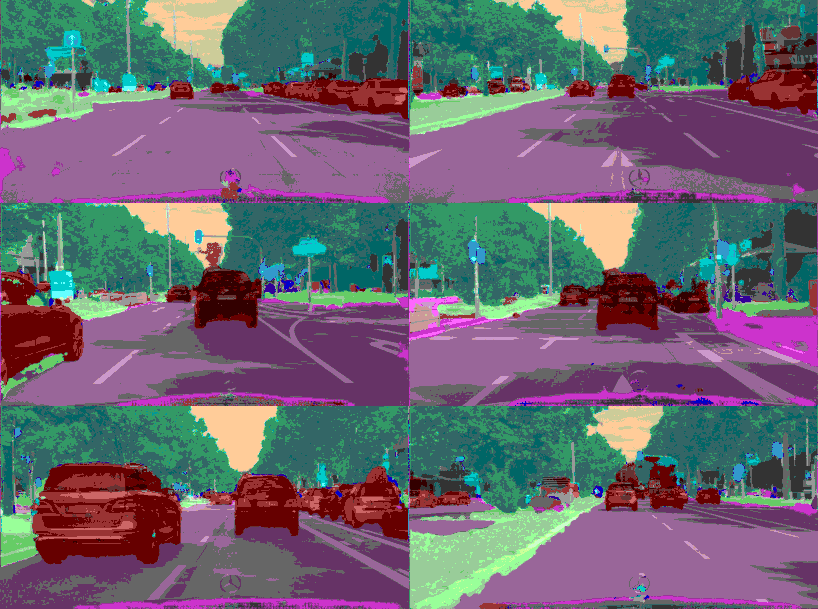
The repo using **alfred**: http://github.com/jinfagang/pt_enet
- 2018-11-6: I am so glad to announce that alfred 2.0 released!😄⛽️👏👏 Let's have a quick look what have been updated:
```
# 2 new modules, fusion and vis
from alred.fusion import fusion_utils
```
For the module `fusion` contains many useful sensor fusion helper functions you may use, such as project lidar point cloud onto image.
- 2018-08-01: Fix the video combined function not work well with sequence. Add a order algorithm to ensure video sequence right.
also add some draw bbox functions into package.
can be called like this:
- 2018-03-16: Slightly update **alfred**, now we can using this tool to combine a video sequence back original video!
Simply do:
```shell
# alfred binary exectuable program
alfred vision 2video -d ./video_images
```
## Capable
**alfred** is both a library and a command line tool. It can do those things:
```angular2html
# extract images from video
alfred vision extract -v video.mp4
# combine image sequences into a video
alfred vision 2video -d /path/to/images
# get faces from images
alfred vision getface -d /path/contains/images/
```
Just try it out!!
## Copyright
**Alfred** build by *Lucas Jin* with ❤️, welcome star and send PR. If you got any question, you can ask me via wechat: `jintianiloveu`, this code released under MIT license.