# file-server
**Repository Path**: zzbingo/file-server
## Basic Information
- **Project Name**: file-server
- **Description**: No description available
- **Primary Language**: Unknown
- **License**: Not specified
- **Default Branch**: master
- **Homepage**: None
- **GVP Project**: No
## Statistics
- **Stars**: 0
- **Forks**: 0
- **Created**: 2025-07-01
- **Last Updated**: 2025-07-01
## Categories & Tags
**Categories**: Uncategorized
**Tags**: None
## README
# File-Server
[](https://www.npmjs.com/package/@edfus/file-server)
[](https://packagephobia.com/result?p=@edfus/file-server)
[](https://david-dm.org/edfus/file-server)
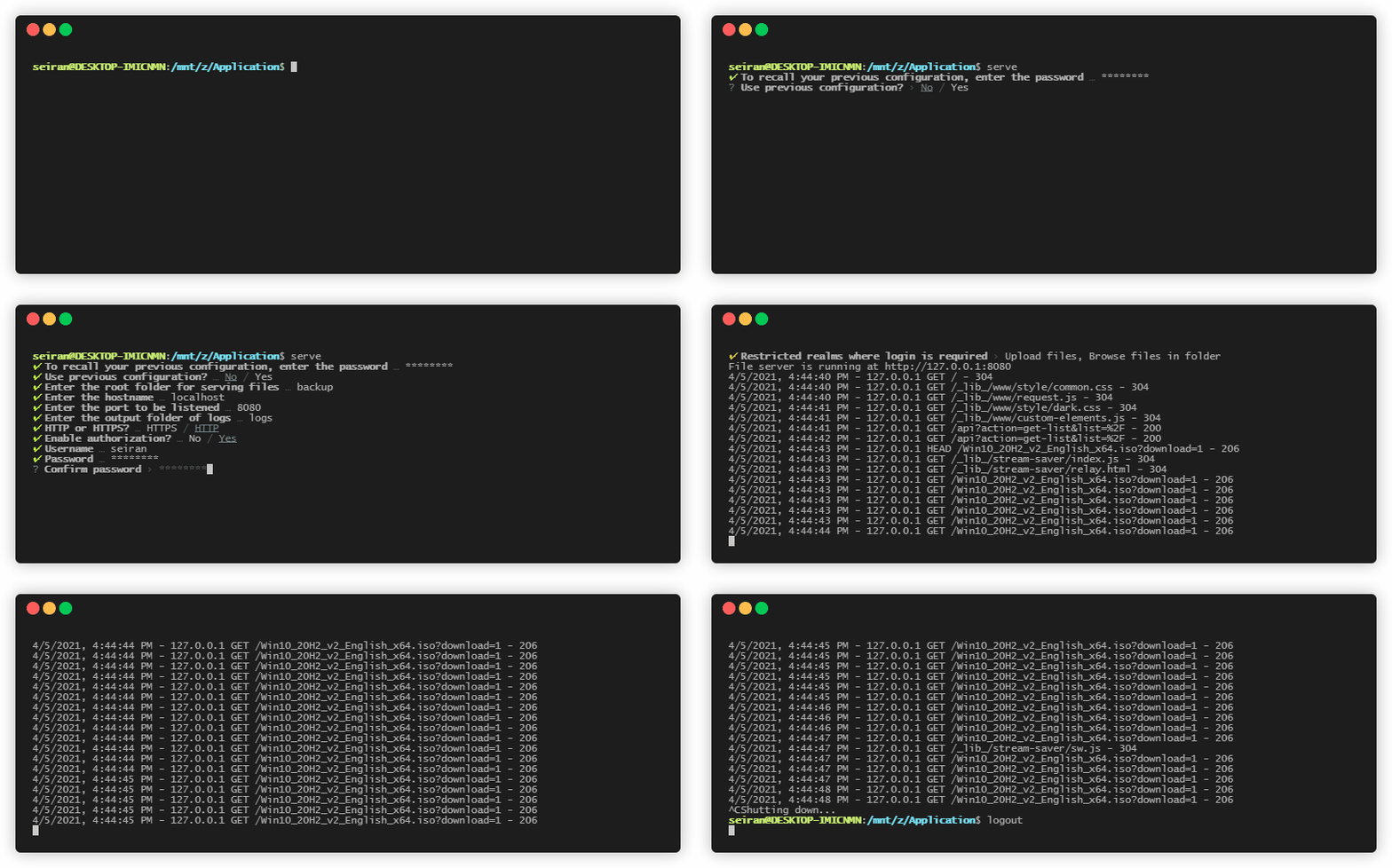 ---
This package is developed as an easy and quick mean to share files across my LAN with some more abilities like authorization / client upload / client range request.
## Features
- User-friendly interactive prompts powered by [prompts](https://github.com/terkelg/prompts#-prompts)
- Multithreaded download based on [StreamSaver.js](https://github.com/jimmywarting/StreamSaver.js)
- Composing router logic & cascading middlewares in [Koa](https://koajs.com/) style
- HTTPS & HTTP over the same port
## CMD Usage
The one-line way:
```bash
npx @edfus/file-server
```
Alternatively, you can install this package either globally or locally
```bash
npm install @edfus/file-server -g
```
```bash
npm install @edfus/file-server
cd node_modules/@edfus/file-server
```
```bash
git clone --depth 1 https://github.com/edfus/file-server
cd file-server
npm install
```
And then run:
```bash
# global
serve
# local
npm run serve
```
A default HTML main page will be used unless file `index.html` exists in the folder to be served.
Available command-line options:
- `--config [config_path]`: The path to your preferred config location for retriving/creating/updating settings.
- `--password [passwd]`: The optional password for encrypting and decrypting config file. Passwords set by the authorization prompt take priority over this.
- `--no-prompt`: Skip the prompts, use possible or default settings.
- `--no-validate`: Do not check whether a path is valid.
- `--no-fallback`: Exits immediately when any misconfiguration has been found.
- ``: The first unpaired, non-option command line argument will be treated as the ``, if exists. Specifying `` will skip the prompts, serve what you want directly using possible or default settings.
When a encrypted config is encountered, a `To recall your previous configuration, enter the password` prompt will always jump out regardless of the `"will-skip-prompts"` options being set or not. Specify `--password passwd` explicitly in this case.
Examples:
```bash
serve .
npx @edfus/file-server /var/www/localhost/ --config /var/www/docker_volume/config
serve --config /var/www/docker_volume/config --password K3qUrFS+h@G --no-prompt
npm run serve -- --no-prompt
```
Alias:
- `-c`: `--config [config_path]`
- `-p`: `--password [passwd]`
- `-h`: `--help`
- `-n`: `--no-prompt`
- `-l`, `--loose`: `--no-validate`
- `-e`, `--set-e`: `--no-fallback`
## Env Settings
See files in folder [./env/](https://github.com/edfus/file-server/tree/master/env) for behaviors that you can customize.
## API
Some quick start snippets:
```js
import { App, Serve } from "@edfus/file-server";
const app = new App();
const services = new Serve().mount("./");
for (const service of services)
app.use(service);
// simply sugar for http.createServer(app.callback()).listen();
app.listen(0, "localhost", function () {
console.info(`File server is running at http://localhost:${this.address().port}`);
});
```
```js
import { App, Serve } from "@edfus/file-server";
const app = new App();
app.prepend(
async (ctx, next) => {
await next();
console.info(
new Date().toLocaleString(),
ctx.ip,
ctx.req.method,
ctx.url,
ctx.res.statusCode
);
}
);
app.use(new Serve().mount("./doc").serveFile).listen(
8080, "localhost", function () {
console.info(`File server is running at http://localhost:${this.address().port}`);
}
);
```
---
This package has two named exports:
### `App`
Class `App` is a minimal implementation of [Koa](https://koajs.com/).
Following properties are available in ctx for middlewares:
```ts
/**
* the prototype from which ctx is created.
* You may add additional properties to ctx by editing app.context
*/
interface BasicContext {
app: App;
/* parameter `properties` not supported */
throw(status?: number, message?: string): void;
/* parameter `properties` not supported */
assert(shouldBeTruthy: any, status?: number, message?: string): void;
}
interface Context extends BasicContext {
req: IncomingMessage;
res: ServerResponse;
state: {
pathname: string;
uriObject: URL;
};
url: string;
secure: boolean;
ip: string;
}
```
See for more details.
### `Serve`
Class `Serve` is the core of this package, loosely coupled.
```ts
class Serve {
constructor();
implementedMethods: ["GET", "PUT", "HEAD"];
/**
* sugar for
* this.implementedMethods.includes(ctx.req.method)
*
* if (ctx.state.pathname === "/api") {
* switch (ctx.state.uriObject.searchParams.get("action")) {
* case "list":
* case "get-list": return this.getList(ctx);
* case "upload": return this.uploadFile(ctx);
* }
* }
*
* this.serveFile
*/
[Symbol.iterator](): IterableIterator;
_getList(ctx: Context): Promise;
_uploadFile(ctx: Context): Promise;
_serveFile(ctx: Context): Promise;
/**
* sugar for _getList with correct `this` reference
*/
getList(ctx: Context): Promise;
/**
* sugar for _uploadFile with correct `this` reference
*/
uploadFile(ctx: Context): Promise;
/**
* _serveFile with correct `this` reference.
* Will silence errors with status 404
*/
serveFile(ctx: Context): Promise;
/**
* sugar for
* this.pathnameRouter.dir.push(pathname => join(directory, normalize(pathname)));
*
* this.pathnameRouter.file.push(pathname => join(directory, normalize(pathname)));
*/
mount(directory: string): this;
pathnameRouter: Router;
fileResHeadersRouter: Router;
routeThrough(input: T, ...routers: SubRouter): T;
etag(stats: Stats): string;
listCache: Map;
mimeCache: Map;
}
```
Serve#pathnameRouter is where you can customize the routing logic. By default, following actions are used.
```js
pathnameRouter = {
map: [
pathname => pathMap.has(pathname) ? pathMap.get(pathname) : pathname,
],
filter: [
// hide all files starting with . in their names
pathname => basename(pathname).startsWith(".") ? false : pathname
],
fs: [
pathname => pathname.replace(/<|>|:|"|\||\?|\*/g, "-")
],
file: [
pathname => pathname.endsWith("/") ? pathname.concat("index.html") : pathname
],
dir: [
pathname => pathname.endsWith("/") ? pathname : pathname.concat("/")
]
};
```
## Notes
[./lib/stream-saver](https://github.com/edfus/file-server/tree/master/lib/stream-saver) is a modified version of [StreamSaver.js](https://github.com/jimmywarting/StreamSaver.js), only browsers compatible with [Transferable Streams](https://github.com/whatwg/streams/blob/main/transferable-streams-explainer.md) are supported and a valid SSL certificate is required for service worker registration when serving via https (http is ok, though).
Strict [CSP](https://developer.mozilla.org/en-US/docs/Web/HTTP/CSP) rules are applied for `$indexHTML`. Delete lines in `Serve#fileResHeadersRouter.CSP` in `./bin/cmd.mjs` if needed.
`App#callback` trust `proxy set headers` by default (e.g. X-Forwarded-Host, X-Forwarded-For)
HTTP/2 is not supported.
`console.error` will be bound to App's intance if no error listener has been attached before invoking `App#callback` and a warning message will be displayed. This is the intended behavior inherited from [Koa](https://github.com/koajs/koa/blob/eb51cf5fb35b39592a050b25fd261a574f547cfa/lib/application.js#L146).
---
This package is developed as an easy and quick mean to share files across my LAN with some more abilities like authorization / client upload / client range request.
## Features
- User-friendly interactive prompts powered by [prompts](https://github.com/terkelg/prompts#-prompts)
- Multithreaded download based on [StreamSaver.js](https://github.com/jimmywarting/StreamSaver.js)
- Composing router logic & cascading middlewares in [Koa](https://koajs.com/) style
- HTTPS & HTTP over the same port
## CMD Usage
The one-line way:
```bash
npx @edfus/file-server
```
Alternatively, you can install this package either globally or locally
```bash
npm install @edfus/file-server -g
```
```bash
npm install @edfus/file-server
cd node_modules/@edfus/file-server
```
```bash
git clone --depth 1 https://github.com/edfus/file-server
cd file-server
npm install
```
And then run:
```bash
# global
serve
# local
npm run serve
```
A default HTML main page will be used unless file `index.html` exists in the folder to be served.
Available command-line options:
- `--config [config_path]`: The path to your preferred config location for retriving/creating/updating settings.
- `--password [passwd]`: The optional password for encrypting and decrypting config file. Passwords set by the authorization prompt take priority over this.
- `--no-prompt`: Skip the prompts, use possible or default settings.
- `--no-validate`: Do not check whether a path is valid.
- `--no-fallback`: Exits immediately when any misconfiguration has been found.
- ``: The first unpaired, non-option command line argument will be treated as the ``, if exists. Specifying `` will skip the prompts, serve what you want directly using possible or default settings.
When a encrypted config is encountered, a `To recall your previous configuration, enter the password` prompt will always jump out regardless of the `"will-skip-prompts"` options being set or not. Specify `--password passwd` explicitly in this case.
Examples:
```bash
serve .
npx @edfus/file-server /var/www/localhost/ --config /var/www/docker_volume/config
serve --config /var/www/docker_volume/config --password K3qUrFS+h@G --no-prompt
npm run serve -- --no-prompt
```
Alias:
- `-c`: `--config [config_path]`
- `-p`: `--password [passwd]`
- `-h`: `--help`
- `-n`: `--no-prompt`
- `-l`, `--loose`: `--no-validate`
- `-e`, `--set-e`: `--no-fallback`
## Env Settings
See files in folder [./env/](https://github.com/edfus/file-server/tree/master/env) for behaviors that you can customize.
## API
Some quick start snippets:
```js
import { App, Serve } from "@edfus/file-server";
const app = new App();
const services = new Serve().mount("./");
for (const service of services)
app.use(service);
// simply sugar for http.createServer(app.callback()).listen();
app.listen(0, "localhost", function () {
console.info(`File server is running at http://localhost:${this.address().port}`);
});
```
```js
import { App, Serve } from "@edfus/file-server";
const app = new App();
app.prepend(
async (ctx, next) => {
await next();
console.info(
new Date().toLocaleString(),
ctx.ip,
ctx.req.method,
ctx.url,
ctx.res.statusCode
);
}
);
app.use(new Serve().mount("./doc").serveFile).listen(
8080, "localhost", function () {
console.info(`File server is running at http://localhost:${this.address().port}`);
}
);
```
---
This package has two named exports:
### `App`
Class `App` is a minimal implementation of [Koa](https://koajs.com/).
Following properties are available in ctx for middlewares:
```ts
/**
* the prototype from which ctx is created.
* You may add additional properties to ctx by editing app.context
*/
interface BasicContext {
app: App;
/* parameter `properties` not supported */
throw(status?: number, message?: string): void;
/* parameter `properties` not supported */
assert(shouldBeTruthy: any, status?: number, message?: string): void;
}
interface Context extends BasicContext {
req: IncomingMessage;
res: ServerResponse;
state: {
pathname: string;
uriObject: URL;
};
url: string;
secure: boolean;
ip: string;
}
```
See for more details.
### `Serve`
Class `Serve` is the core of this package, loosely coupled.
```ts
class Serve {
constructor();
implementedMethods: ["GET", "PUT", "HEAD"];
/**
* sugar for
* this.implementedMethods.includes(ctx.req.method)
*
* if (ctx.state.pathname === "/api") {
* switch (ctx.state.uriObject.searchParams.get("action")) {
* case "list":
* case "get-list": return this.getList(ctx);
* case "upload": return this.uploadFile(ctx);
* }
* }
*
* this.serveFile
*/
[Symbol.iterator](): IterableIterator;
_getList(ctx: Context): Promise;
_uploadFile(ctx: Context): Promise;
_serveFile(ctx: Context): Promise;
/**
* sugar for _getList with correct `this` reference
*/
getList(ctx: Context): Promise;
/**
* sugar for _uploadFile with correct `this` reference
*/
uploadFile(ctx: Context): Promise;
/**
* _serveFile with correct `this` reference.
* Will silence errors with status 404
*/
serveFile(ctx: Context): Promise;
/**
* sugar for
* this.pathnameRouter.dir.push(pathname => join(directory, normalize(pathname)));
*
* this.pathnameRouter.file.push(pathname => join(directory, normalize(pathname)));
*/
mount(directory: string): this;
pathnameRouter: Router;
fileResHeadersRouter: Router;
routeThrough(input: T, ...routers: SubRouter): T;
etag(stats: Stats): string;
listCache: Map;
mimeCache: Map;
}
```
Serve#pathnameRouter is where you can customize the routing logic. By default, following actions are used.
```js
pathnameRouter = {
map: [
pathname => pathMap.has(pathname) ? pathMap.get(pathname) : pathname,
],
filter: [
// hide all files starting with . in their names
pathname => basename(pathname).startsWith(".") ? false : pathname
],
fs: [
pathname => pathname.replace(/<|>|:|"|\||\?|\*/g, "-")
],
file: [
pathname => pathname.endsWith("/") ? pathname.concat("index.html") : pathname
],
dir: [
pathname => pathname.endsWith("/") ? pathname : pathname.concat("/")
]
};
```
## Notes
[./lib/stream-saver](https://github.com/edfus/file-server/tree/master/lib/stream-saver) is a modified version of [StreamSaver.js](https://github.com/jimmywarting/StreamSaver.js), only browsers compatible with [Transferable Streams](https://github.com/whatwg/streams/blob/main/transferable-streams-explainer.md) are supported and a valid SSL certificate is required for service worker registration when serving via https (http is ok, though).
Strict [CSP](https://developer.mozilla.org/en-US/docs/Web/HTTP/CSP) rules are applied for `$indexHTML`. Delete lines in `Serve#fileResHeadersRouter.CSP` in `./bin/cmd.mjs` if needed.
`App#callback` trust `proxy set headers` by default (e.g. X-Forwarded-Host, X-Forwarded-For)
HTTP/2 is not supported.
`console.error` will be bound to App's intance if no error listener has been attached before invoking `App#callback` and a warning message will be displayed. This is the intended behavior inherited from [Koa](https://github.com/koajs/koa/blob/eb51cf5fb35b39592a050b25fd261a574f547cfa/lib/application.js#L146).