English | 简体中文
[win-badge]: https://github.com/Practice3DVision/SLMaster/workflows/Windows/badge.svg "Windows" [win-link]: https://github.com/Practice3DVision/SLMaster/actions/workflows/windows.yml "Windows" [release-badge]: https://img.shields.io/github/release/Practice3DVision/SLMaster.svg "Release status" [release-link]: https://github.com/Practice3DVision/SLMaster/releases "Release status" [download-badge]: https://img.shields.io/github/downloads/Practice3DVision/SLMaster/total.svg "Download status" [download-link]: https://github.com/Practice3DVision/SLMaster/releases/latest "Download status" [download-latest]: https://img.shields.io/github/downloads/Practice3DVision/SLMaster/latest/total.svg "latest status" [SLMaster](https://github.com/Practice3DVision/SLMaster)是一个较为完整的结构光3D相机软件。您可以使用它对任意被测物体完成静态扫描或者实时动态扫描。 该软件相关博客可见公众号专栏:[从0到1搭建一套属于你自己的高精度实时结构光3D相机](https://mp.weixin.qq.com/s/E8K3892eNVJfgpMUHtf9Lw),欢迎关注公众号。 请动动小手点击右上角的**Star**⭐,您的**Star**⭐和关注是博主源源不断的动力。 有任何问题和**bug**反馈请提**Issue**。谢绝不给**Star**⭐,反复咨询解决方案的情况。 **想先体验该软件?** 请在`Release`页面下载`exe`安装文件,但请注意`exe`安装方式不支持`GPU`加速。 更多使用与开发文档请查阅[Wiki Document](https://github.com/Practice3DVision/SLMaster/wiki)。 付费咨询/项目合作请加QQ:`1369215984`。 ## 依赖 🍁 **SLMaster**依赖的库包含如下几点: - [FluentUI](https://github.com/Practice3DVision/SLMaster/tree/master/FluentUI)`V1.5.6`(项目内包含) - [QuickQanava](https://github.com/cneben/QuickQanava/tree/2.4.1)`V2.4.1`(项目内包含) - [MVViewer](https://www.irayple.com/cn/serviceSupport/downloadCenter/18?p=17)`V2.3.5` - [opencv_contribute](https://github.com/opencv/opencv_contrib.git)`V4.8.0` - [OpenCV](https://github.com/opencv/opencv.git)`V4.8.0` - [VTK](https://github.com/Kitware/VTK/tree/v9.2.0)`V9.2.0` - [PCL](https://github.com/PointCloudLibrary/pcl/tree/pcl-1.12.1)`V1.12.1` - [Qt5](https://doc.qt.io/qt-5/index.html)`V5.15.14` > 如果电脑没有`NVIDIA GPU`,软件仍然能够使用CPU加速有效运行,此时可无需`opencv_contribute`依赖。 ## 编译 🚀 当您获取到本库代码之后,首先检查上述依赖,若不满足依赖条件,可通过点击上述依赖库跳转至对应的库,随后下载其代码并进行编译。以上面库皆没有编译安装的环境为例,编译顺序如下: 1. 下载[MVViewer](https://www.irayple.com/cn/serviceSupport/downloadCenter/18?p=17)并进行安装。 2. 下载[OpenCV](https://github.com/opencv/opencv.git)和[opencv_contribute](https://github.com/opencv/opencv_contrib.git)并进行编译(若`WITH_CUDA`未勾选请勾选上) 3. 下载[Qt5.15](https://doc.qt.io/qt-5/index.html)并选择`MSVC`编译套件安装 4. 下载[VTK](https://github.com/Kitware/VTK/tree/v9.2.0)并令`VTK_GROUP_ENABLE_Qt=YES`进行编译 5. 下载[PCL-1.12.1-AllInOne](https://github.com/PointCloudLibrary/pcl/releases)进行安装,安装完成后删除`PCL`安装文件夹下的除`3rdParty`外的其它任何文件,并将`3rdParty`文件夹中的`VTK`文件夹删除 6. 下载[PCL](https://github.com/PointCloudLibrary/pcl/tree/pcl-1.12.1)并选择好第三方库路径进行编译 7. 打开命令行窗口,键入`git clone --recursive https://github.com/Practice3DVision/SLMaster.git`克隆`SLMaster` 8. 打开您喜欢的编译器,使用`Ninja`生成器,将编译目录设置为`${work_space}/build`,编译运行`SLMasterGui`即可 > 注意! > 每当编译好一个库都应当在系统环境变量中加入。例如,编译完成OpenCV后,设置好系统环境变量OpenCV_DIR路径。 您可以打开`SLMaster`中的`BUILD_TEST`和`BUILD_PERF`选项,这将编译**google_test**和**google_benchmark**中的测试用例,这些测试用例同样是一份非常不错的示例代码。 ## 使用 🌈 离线使用情况下,可通过进入`扫描模式->离线扫描模式->选择左相机文件夹->选择右相机文件夹->开始扫描->单次扫描`测试离线重建效果,软件提供一组离线数据集位于`安装目录/data/`下。 如您需要更改算法参数以测试自己的离线数据集,请通过更改`安装目录/gui/qml/res/config`下的相机配置文件,该文件记录了**3D**相机所有的状态,包括硬件组成、算法参数等。 如您需要接入硬件并执行在线功能,请修改`安装目录/gui/qml/res/config`下的相机配置文件,确保硬件组成参数与您所用的硬件设备一致。 ## 部分功能 💡 |功能|示例|功能|示例| |:-|-|:-|-| |单双三目重建||实时重建|| |硬件在线调试||条纹生成|| |相机标定||误差分布显示|| |投影仪标定||点云后处理|| ## License 📕 SLMaster当前使用[AGPL-3.0](./LICENSE)许可证. ## Star History ⭐ [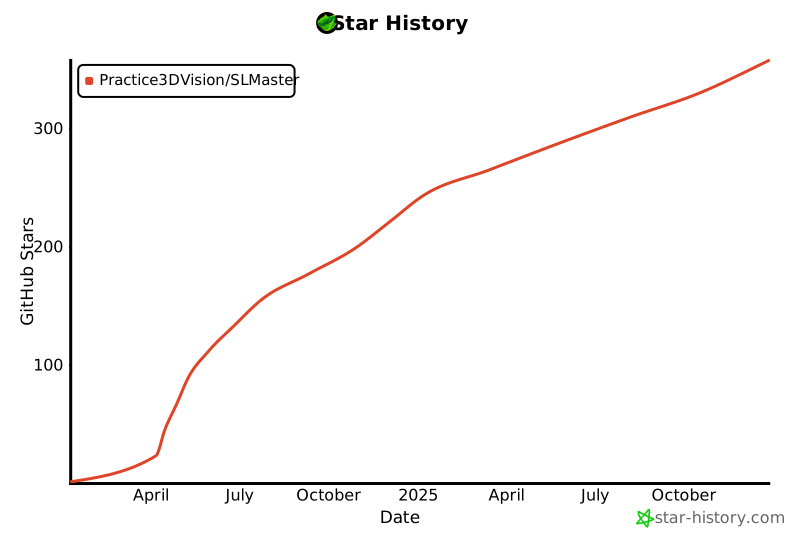](https://star-history.com/#Practice3DVision/SLMaster&Date) ## Visitor count ⚡ 